Shop
  • Deals
  • Deal checker
  • Black Friday
  • Buying guides
  • Brands
  • Stores
Travel
  • Flight deals
  • Hotel deals
Company
  • Research
  • Press
  • deal.ai apps
Black Friday 2026
  • Walmart
  • Best Buy
  • Target
  • TVs
  • Laptops
  • Headphones
  • Apple
  • Gaming
  • Vacuums
  • Kitchen
  • Toys
  • Smartwatches
  • Tablets
  • Furniture
  • Mattresses
© Deal.ai Inc.
TermsPrivacy
Deal.ai › Compare

ASUS Chromebook CX15 vs Lenovo Chromebook m 14"

Buy the Lenovo Chromebook m 14" if you want a touchscreen, a sharper 16:10 display and longer battery life; it costs $199 at Walmart as of November 8, 2026. Buy the ASUS Chromebook CX15 if you want the biggest screen and the lowest price; it costs $160 at Walmart as of November 8, 2026. The $39 gap buys the Lenovo a touch panel, 8 cores and a 50Wh battery. Both are 4GB RAM machines, so neither is a heavy multitasker.

Today the ASUS Chromebook CX15 costs $2.00 less at its best price.

Ask our shopping agent

It checks today's price at every store, compares the alternatives and answers in about a minute.
Enter to send, Shift+Enter for a new line

ASUS
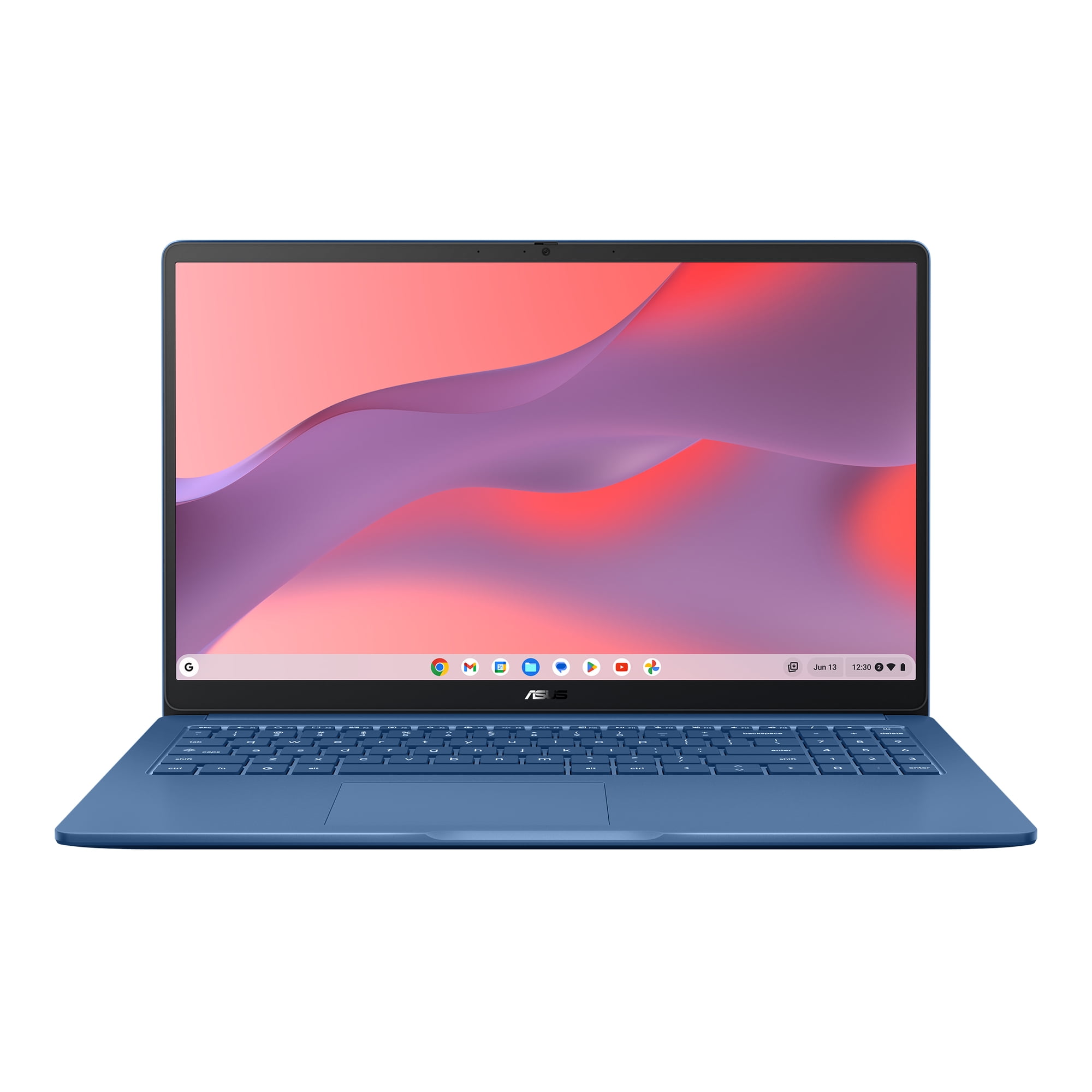
ASUS Chromebook CX15 Laptop

ASUS Chromebook CX15

ASUS Chromebook CX15 Laptop

4.3(1,816 ratings)
$197.00at WalmartVerified
See all prices and details
Visit Walmart

Choose the ASUS Chromebook CX15 if you want a 15.6-inch screen with a numeric keypad for the least money and mostly work in a browser.

Pros
  • Lowest price of the two at $160.
  • Large 15.6-inch Full HD screen.
  • Numeric keypad helps with spreadsheets and data entry.
  • MIL-STD 810H durability rating and a lay-flat hinge.
  • Wi-Fi 6 and Bluetooth 5.4.
Cons
  • Only 2 CPU cores; slow for many open tabs.
  • No touchscreen.
  • 4GB RAM cannot be upgraded.
  • Heavier and bulkier than a 14-inch laptop.
Lenovo
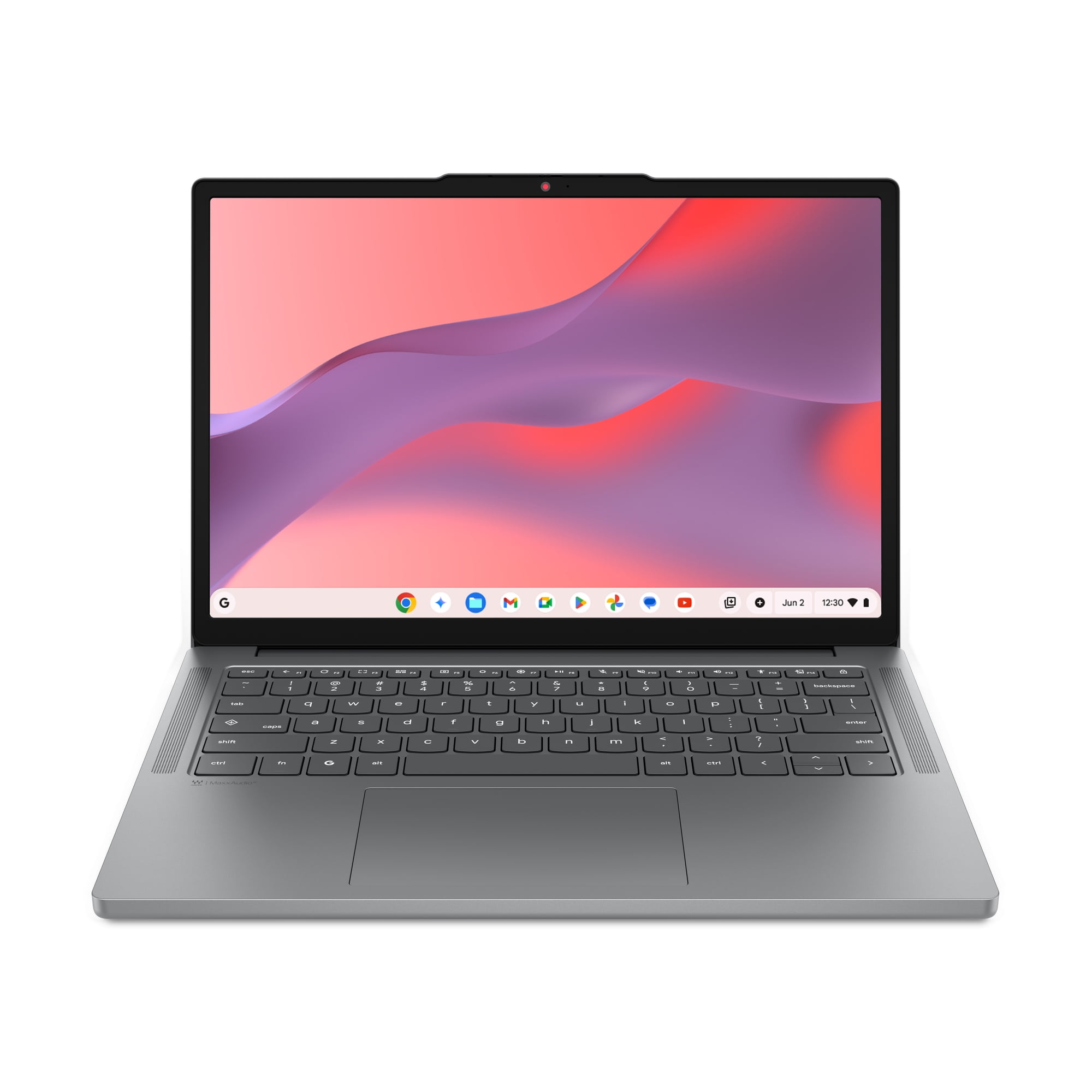
Lenovo Chromebook m 14" Laptop

Lenovo Chromebook m 14"

Lenovo Chromebook m 14" Laptop

4.1(26 ratings)
$199.00at WalmartVerified
See all prices and details
Visit Walmart

Choose the Lenovo Chromebook m 14" if you want a touchscreen, a taller 1920x1200 display and longer battery life for about $39 more.

Pros
  • Touchscreen with a sharper 1920x1200 16:10 panel.
  • 8-core Kompanio 540 handles more tabs than the N50.
  • Up to 15 hours of battery from a 50Wh pack.
  • Backlit keyboard and a webcam privacy shutter.
  • Wi-Fi 6E and dual USB-C, dual USB-A plus HDMI.
Cons
  • Costs $39 more than the ASUS.
  • Only 26 ratings, so less proven in the field.
  • No numeric keypad.
  • 4GB RAM and no MIL-STD durability rating.

What separates them

ASUS Chromebook CX15Lenovo Chromebook m 14"
Price$160 at Walmart as of November 8, 2026$199 at Walmart as of November 8, 2026
Screen15.6-inch 1920x1080 IPS, no touch14-inch 1920x1200 IPS, 10-point touch, 16:10
ProcessorIntel N50, 2 cores, up to 3.4 GHzMediaTek Kompanio 540, 8 cores
BatteryUp to 13 hours50Wh, up to 15 hours
Memory and storage4GB LPDDR5, 128GB SSD4GB LPDDR5X, 128GB UFS
WirelessWi-Fi 6, Bluetooth 5.4Wi-Fi 6E, Bluetooth 5.3
KeyboardFull-size with numeric keypadBacklit keyboard, no numeric keypad
DurabilityMIL-STD 810H tested, 180-degree hingeNot rated to a MIL standard

Price history

$452.21$160.00
Nov 1Nov 8
  • ASUS Chromebook CX15: lowest $160.00 on Nov 7 at Walmart; $160.00 on Nov 8.
  • Lenovo Chromebook m 14": lowest $199.00 on Nov 1 at Walmart; $199.00 on Nov 8.

Prices at every store

ASUS Chromebook CX15

  • WalmartNew

    In stock

    $197.00Verified
    Visit Walmart
  • TalkShopLiveNew

    In stock

    $197.00Observed at 9:19 AM
    Visit TalkShopLive
  • eBayNew

    In stockSold by ultimate_us_electronics

    $199.95Free shippingObserved at 9:19 AM
    Visit eBay
  • Wireless PlaceNew

    In stock

    $259.50Free shippingObserved at 9:19 AM
    Visit Wireless Place

Also available at

  • WalmartCheck price at Walmart

Store links may earn us a commission.

All 5 stores and price history →

Lenovo Chromebook m 14"

  • WalmartNew

    In stock

    $199.00Verified
    Visit Walmart
  • Wireless PlaceNew

    Availability unknown

    $239.50Observed at 12:36 AM
    Visit Wireless Place
  • Best BuyNew

    Availability unknown

    $329.00Observed Nov 5, 2026, 2:34 PM
    Visit Best Buy
  • CompSourceNew

    Availability unknown

    $441.97Observed Nov 5, 2026, 2:34 PM
    Visit CompSource

Also available at

  • WalmartCheck price at Walmart
  • SHI InternationalCheck price at SHI International
  • SilariusCheck price at Silarius
All 7 stores and price history →

Specs compared

SpecASUS Chromebook CX15Lenovo Chromebook m 14"
colorBlueGray
ProcessorIntel Processor N50MediaTek Kompanio 540
Storage128GB128GB UFS
Display resolutionFull HD 1920x10801920×1200
SeriesASUS ChromebookLenovo Chromebook
SSD Size128 GB128 GB
Hard Drive TypeSSDSSD
Screen Size (")15.614 inches
RAM4 GB4GB LPDDR5X
actual_colorForging Blue—
Display size15.6-inch—
Battery lifeup to 13 hours—
Show all 32 specsShow fewer specs
SpecASUS Chromebook CX15Lenovo Chromebook m 14"
Wi-FiWi-Fi 6—
USB-C portsdual USB-C ports—
USB-A portsUSB-A—
HDMIHDMI—
Audio jack3.5mm audio jack—
Hinge180-degree lay-flat hinge—
Durability standardMIL‑STD 810H—
Screen TypeLCD—
processor_type—Kompanio 540
Touchscreen—10-point multi-touch

What reviewers say

ASUS Chromebook CX15

  • 4.3 / 51,816 ratings

Rated 4.3 out of 5 from 1,816 ratings, buyers treat the CX15 as a solid budget Chromebook for basic tasks. The large screen and low price come up often; the modest processor and memory are the usual caveats.

What people mention
  • PerformanceMixedFine for browsing and documents, but the N50 and 4GB RAM bog down with many tabs or heavy web apps.
  • DisplayPraisedThe 15.6-inch Full HD IPS panel is sharp with wide viewing angles, unusual at this price.
  • BatteryPraisedOwners report it lasting a full day of light use, close to the claimed 13 hours.
  • BuildMixedThe plastic body is light and passes MIL-STD 810H, but feels basic.

Lenovo Chromebook m 14"

  • 4.1 / 526 ratings

With 4.1 out of 5 from 26 ratings, buyers mostly see this as good value for light use. The screen and price come up favorably; performance with 4GB of RAM is the common concern.

What people mention
  • ValuePraisedBuyers say you get a lot of screen and storage for the money.
  • DisplayPraisedThe 1920x1200 16:10 touchscreen is called sharp and roomy for the size.
  • PerformanceCriticisedThe Kompanio 540 with 4GB of RAM feels slow once several tabs or apps are open.
  • PortabilityPraised

Questions and answers

Which is better for schoolwork?
The Lenovo. Its 8-core chip and touchscreen handle Google Classroom, PDFs and note apps more smoothly than the ASUS N50. The ASUS numeric keypad helps if you do a lot of spreadsheet entry.
Which has the better screen?
The Lenovo. It is 1920x1200 on a 16:10 panel and supports 10-point touch. The ASUS is larger at 15.6 inches but 1920x1080 and not touch.
Which lasts longer on a charge?
The Lenovo, rated up to 15 hours from a 50Wh battery versus up to 13 hours for the ASUS. Real-world time drops with video streaming and many tabs on both.
Is the Lenovo worth $39 more?
Yes for most shoppers. The extra money buys a touchscreen, two more display pixels per row, 8 cores and a bigger battery. Skip it if you only want the cheapest big-screen browser machine.
Can I upgrade the RAM or storage?
No on RAM for both; 4GB is soldered. Storage is 128GB on each, and ChromeOS leans on cloud storage, so plan on Google Drive or an SD card for large files.
Which is better for watching video?
The ASUS for size, the Lenovo for sharpness and sound. The ASUS gives you a 15.6-inch panel; the Lenovo gives a taller 16:10 touch display with MaxxAudio tuning.

More comparisons

  • ASUS Chromebook CX15 Laptop vs Lenovo IdeaPad Slim 3 (2024, Ryzen 5 7530U)
  • ASUS Chromebook CX15 Laptop vs HP OmniBook 3 16
  • ASUS Chromebook CX15 Laptop vs HP 14-inch HD Windows 11 Laptop
  • HP 14-inch HD Windows 11 Laptop vs Lenovo Chromebook m 14" Laptop

Buying guides that pick them

  • Best laptops under $500
  • Best laptops for students
  • Best Chromebooks
  • Best laptops under $200
  • Best everyday laptops
Graphics—ARM Mali-G57 MC2
Operating system—Chrome OS
Wireless—Wi-Fi 6E + BT5.3
Battery—50Wh
Camera—HD 720P webcam with privacy shutter
Drive Type—Solid State Drive
Language—English / North America
Drive Capacity—64 GB drive
Installed Memory—4 GB RAM
Connections—USB-C, USB-A
At 1.36kg it is easy to carry between classes or rooms.
Best laptops under $1000 for everyday use
  • Best everyday laptops for home and school
  • Best laptops for everyday use