StoreDeal.ai store
Shop
  • Deals
  • Deal checker
  • Black Friday
  • Buying guides
  • Brands
  • Stores
Travel
  • Flight deals
  • Hotel deals
Company
  • Research
  • Press
  • Use in AI assistants
  • Contact
  • deal.ai apps
Black Friday 2026
  • Walmart
  • Best Buy
  • Target
  • TVs
  • Laptops
  • Headphones
  • Apple
  • Gaming
  • Vacuums
  • Kitchen
  • Toys
  • Smartwatches
  • Tablets
  • Furniture
  • Mattresses
© Deal.ai Inc.·2222 Ponce de Leon Blvd, Miami, FL 33134·support@deal.ai
TermsPrivacy
Deal.ai › Compare

ASUS ROG Strix XG27ACS Gaming Monitor vs ASUS ROG Strix XG27WCS

Both are 27-inch 1440p ROG Strix gaming monitors, but they are different panels. The XG27ACS is a flat Fast IPS screen at 180Hz with a full height, tilt and pivot stand and a USB-C hub, and owners rate it well for sharp motion and clean text. The XG27WCS is a curved VA panel listed at up to 255Hz and 500 cd/m², which suits fast shooters and dark-room play but brings VA trade-offs in black smearing and off-angle color. Pick the flat IPS for mixed work and gaming; pick the curved high-refresh VA for competitive play and immersion.

  • Choose the ROG Strix XG27ACS if you want a flat, color-accurate IPS panel for gaming plus desk work, with a height and pivot adjustable stand and USB-C video and hub.
  • Choose the ROG Strix XG27WCS if you want a curved screen with the highest refresh rate here and deeper blacks for fast-paced games and dark rooms.

Prices

  • ASUS ROG Strix XG27ACS Gaming Monitor: $251.21 at Amazon (checked today)
  • ASUS ROG Strix XG27WCS: $284.98 at Amazon (checked today)
  • Difference: the ASUS ROG Strix XG27ACS Gaming Monitor is $33.77 cheaper than the ASUS ROG Strix XG27WCS today
ASUS
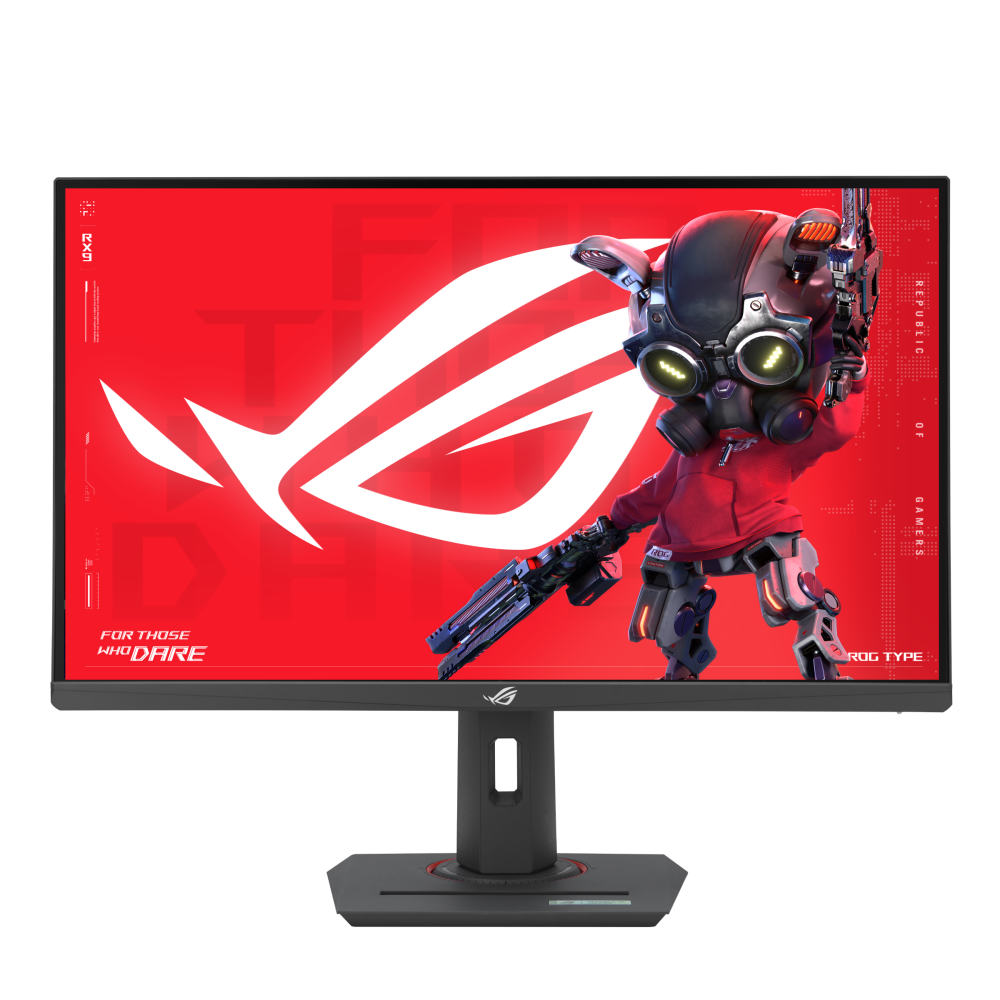
ASUS ROG Strix XG27ACS 27" WQHD 180Hz USB-C Fast IPS LCD HDR Gaming Monitor

ASUS ROG Strix XG27ACS Gaming Monitor

ASUS ROG Strix XG27ACS 27" WQHD 180Hz USB-C Fast IPS LCD HDR Gaming Monitor

4.4(29 ratings)
$251.21at AmazonChecked 2 h ago
See all prices and details
Visit Amazon

Store links may earn us a commission. As an Amazon Associate, Deal.ai earns from qualifying purchases.

Pros
  • Flat Fast IPS gives consistent color across the screen
  • 180Hz with ELMB Sync and variable refresh cuts ghosting and tearing
  • Height, tilt and pivot stand plus VESA mount
  • USB-C carries video and acts as a USB hub
  • Matte coating handles glare well
Cons
  • IPS contrast around 1000:1, so blacks look gray in dark rooms
  • 180Hz is below the other model's ceiling
  • Single HDMI port plus USB-C limits console and PC hookups
  • 8-bit color, no wider gamut claimed
ASUS
ASUS ROG Strix 27" Curved 1440p QHD VA LED Gaming Monitor (XG27WCS)

ASUS ROG Strix XG27WCS

ASUS ROG Strix 27" Curved 1440p QHD VA LED Gaming Monitor (XG27WCS)

4.8(11 ratings)
$284.98at AmazonChecked 2 h ago
See all prices and details
Visit Amazon

Store links may earn us a commission. As an Amazon Associate, Deal.ai earns from qualifying purchases.

Pros
  • Up to 255Hz refresh for very fast shooters
  • 500 cd/m² brightness holds up in brighter rooms
  • Curved screen adds immersion for racing and sims
  • Deeper blacks than IPS in dark scenes
  • Same 1440p resolution and 1ms response class
Cons
  • VA-style panels smear in dark transitions
  • Curved shape can distort straight lines for design work
  • Color shifts off-center compared with IPS
  • Stand ergonomics and port layout are less detailed

What separates them

ASUS ROG Strix XG27ACS Gaming MonitorASUS ROG Strix XG27WCS
Panel typeFast IPS, flatListed as IPS but a curved 1440p VA-class design in practice
CurvatureFlatCurved
Refresh rate180HzUp to 255Hz
BrightnessNot specified, typical IPS level500 cd/m²
Stand ergonomicsHeight, tilt and 90° pivot adjustable, VESA mountCurved stand, ergonomics not detailed
USB-CUSB-C with DisplayPort video and USB hubUSB-C connector listed
Contrast1000:1 typical IPSVA-class blacks, deeper in dark scenes
Motion clarity1ms GTG with ELMB Sync and variable refresh1ms response, higher refresh ceiling

Price history

$300.49$218.43
Nov 10Nov 26
  • ASUS ROG Strix XG27ACS Gaming Monitor: lowest $251.21 on Nov 26 at Amazon.
  • ASUS ROG Strix XG27WCS: lowest $218.43 on Nov 26 at Links.

Prices at every store

ASUS ROG Strix XG27ACS Gaming Monitor

  • NeweggNew

    In stock

    $283.99Free shippingChecked 2 h ago
    Visit Newegg
  • WalmartNew

    In stockSold by DemProductSalesReturns: Sold by a Walmart Marketplace seller; returns go to the seller under the seller's returns policy.

    $303.99Checked 2 h ago
    Visit Walmart
  • WalmartNew

    In stock

    $303.99Checked 2 h ago
    Visit Walmart
  • AmazonNew

    Availability unknown

    As an Amazon Associate, Deal.ai earns from qualifying purchases.

    $251.21Free shippingChecked 2 h ago
    Visit Amazon

Store links may earn us a commission. Some prices via Klarna.

All 3 stores and price history →

ASUS ROG Strix XG27WCS

  • LinksNew

    In stockShips from Croatia · duties may apply · made for another market

    $218.43Checked 2 h ago
    Visit Links
  • AsusNew

    In stock

    $300.49Free shippingChecked 2 h ago
    Visit Asus
  • AmazonNew

    Availability unknown

    As an Amazon Associate, Deal.ai earns from qualifying purchases.

    $284.98Free shippingChecked 2 h ago
    Visit Amazon
  • eBayNew

    Availability unknownSold by digi-techx (99.4% positive, 17,100 ratings)Ships from Switzerland · duties may applyReturns: Set by the eBay seller; the eBay Money Back Guarantee covers an item that doesn't arrive or isn't as described.

    $286.97+ $150.04 shippingChecked Nov 17
    Visit eBay

Store links may earn us a commission. Some prices via Klarna.

All 4 stores and price history →

Specs compared

SpecASUS ROG Strix XG27ACS Gaming MonitorASUS ROG Strix XG27WCS
Panel TypeIPS/PLSIPS
Resolution2560x14402560 x 1440
Response Time1 ms1 millisecond
Brightness400 lm500 cd/m²
colorBlack—
Weight With Stand (lb)14.6—
3.5 mm In (AUX)No—
HDMI Ports1—
No. of USB (total) (pcs)1—
Depth Without Stand (")2.4—
TiltableYes—
VGA PortsNo—
Show all 40 specsShow fewer specs
SpecASUS ROG Strix XG27ACS Gaming MonitorASUS ROG Strix XG27WCS
Curved ScreenNo—
Height With Stand (")20.2—
Weight With Stand (kg)6.61—
VESA-MountYes—
Headphone OutYes—
VGANo—
Width (")25.3—
Adjustable HeightYes—
Contrast (:1)1000—
TCO CertificationNo

What reviewers say

ASUS ROG Strix XG27ACS Gaming Monitor

  • 4.4 / 529 ratings

Owners rate it well overall, praising the smooth 180Hz panel, sharp 1440p image and useful USB-C hub. Complaints center on modest HDR performance and IPS black levels rather than motion or build.

What people mention
  • Refresh ratePraisedOwners say 180Hz feels smooth and responsive in fast games.
  • Picture sharpnessPraisedReviewers call the 1440p image crisp at 27 inches.
  • USB-C hubPraisedBuyers like running video and peripherals over one cable.
  • HDRCriticisedUsers find HDR underwhelming with limited brightness and impact.

ASUS ROG Strix XG27WCS

  • 4.8 / 511 ratings

Owners rate the XG27WCS highly, praising smooth high-refresh gameplay and the convenience of USB-C. Complaints center on the curve and viewing angles rather than performance.

What people mention
  • Motion smoothnessPraisedOwners say fast-paced games look fluid with little blur or ghosting.
  • CurveMixedSome like the immersion; others find it distorts straight lines in desktop work.
  • Viewing anglesCriticisedColors and contrast fade when you sit off to the side of the screen.
  • USB-CPraised

Questions and answers

Which is better for competitive shooters?
The XG27WCS, because its refresh ceiling is higher at up to 255Hz. The XG27ACS at 180Hz with ELMB Sync is still fast and has cleaner IPS motion with less dark smearing.
Which is better for work and text?
The XG27ACS. A flat IPS panel keeps text and straight lines consistent, and the height and pivot stand lets you rotate it to portrait.
Is the curved screen worth stepping up to?
Only if you want immersion and the higher refresh rate. If you split time between games and office work, the flat IPS is the safer all-rounder.
Which has better blacks?
The XG27WCS, since its VA-class panel produces deeper blacks. The XG27ACS IPS sits around 1000:1 contrast, so dark scenes look lighter.
Do both work with a laptop over USB-C?
The XG27ACS explicitly supports USB-C DisplayPort video and doubles as a USB hub. The XG27WCS lists USB-C but its hub and power delivery are not detailed.
Which is brighter?
The XG27WCS is rated at 500 cd/m², which is bright for a gaming monitor. ASUS does not publish a comparable brightness figure for the XG27ACS.

Ask our shopping agent

It checks today's price at every store, compares the alternatives and answers in about a minute.

Enter to send, Shift+Enter for a new line

More comparisons

  • ASUS ROG Strix XG27ACS 27" WQHD 180Hz USB-C Fast IPS LCD HDR Gaming Monitor vs AOC Q27G3XMN 27-Inch 1440p 180Hz Mini LED Gaming Monitor
  • AOC Q27G3XMN 27-Inch 1440p 180Hz Mini LED Gaming Monitor vs ASUS ROG Strix 27" Curved 1440p QHD VA LED Gaming Monitor (XG27WCS)
  • ASUS ROG Strix XG27ACS 27" WQHD 180Hz USB-C Fast IPS LCD HDR Gaming Monitor vs INNOCN 27" 280Hz 1440p QD-OLED Gaming Monitor GA27S1Q
  • ASUS ROG Strix 27" Curved 1440p QHD VA LED Gaming Monitor (XG27WCS) vs INNOCN 27" 280Hz 1440p QD-OLED Gaming Monitor GA27S1Q
  • Acer Nitro 27" WQHD QD-OLED Gaming Monitor, VG277U Xbiip vs ASUS ROG Strix 27" Curved 1440p QHD VA LED Gaming Monitor (XG27WCS)
  • AOC Q27G3XMN vs ASUS ROG Strix 27" Curved 1440p QHD VA LED Gaming Monitor (XG27WCS)

Buying guides that pick them

  • Best 1440p monitors
—
EthernetNo—
Surface TreatmentMatte—
HDMIYes—
EPEAT RatingNo—
DVI PortsNo—
Pivot‎ 90°‎Yes—
Camera (built-in)No—
Color Depth8 Bit—
Height Without Stand (")14.5—
Energy Consumption HDR (1000h) (kW/h)45.0—
Memory Card ReaderNo—
DisplayPortYes—
HDRYes—
TouchscreenNo—
Pixel Size (mm)0.233—
Energy Consumption (1000h) (kW/h)26.0—
USB TypeUSB-C—
USBYes—
Buyers like running video and charging to a laptop over one cable.