StoreDeal.ai store
Shop
  • Deals
  • Deal checker
  • Black Friday
  • Buying guides
  • Brands
  • Stores
Travel
  • Flight deals
  • Hotel deals
Company
  • Research
  • Press
  • Use in AI assistants
  • Contact
  • deal.ai apps
Black Friday 2026
  • Walmart
  • Best Buy
  • Target
  • TVs
  • Laptops
  • Headphones
  • Apple
  • Gaming
  • Vacuums
  • Kitchen
  • Toys
  • Smartwatches
  • Tablets
  • Furniture
  • Mattresses
© Deal.ai Inc.·2222 Ponce de Leon Blvd, Miami, FL 33134·support@deal.ai
TermsPrivacy
Deal.ai › Compare

Creality Falcon A1 10W Laser Engraver vs Carverall X1Pro 20W Laser Engraver

The Carverall X1Pro is the stronger machine for most shoppers. It has double the laser power, a 300x300 mm work area, air assist and a wider software choice, and its 4.7 rating from 85 owners is a deeper track record than the Falcon A1's 4.0 from 12. The Falcon A1 wins on convenience: no assembly, a camera for alignment, auto material detection and a compact enclosed-friendly body that suits a first laser indoors. Pick the Creality if you want to unbox and burn the same day; pick the Carverall if you want headroom to cut thicker stock and grow.

  • Choose the Creality Falcon A1 if you are a total beginner who wants a camera-guided, no-assembly machine that fits on a desk and mostly engraves small wood, leather and acrylic pieces.
  • Choose the Carverall X1Pro if you want 20W of cutting power, a 300x300 mm bed, air assist and LightBurn support for thicker stock and larger designs.

Prices

  • Creality Falcon A1 10W Laser Engraver: $424.99 at Newegg (checked today)
  • Carverall X1Pro 20W Laser Engraver: $358.79 at Carverall (checked today)
  • Difference: the Carverall X1Pro 20W Laser Engraver is $66.20 cheaper than the Creality Falcon A1 10W Laser Engraver today
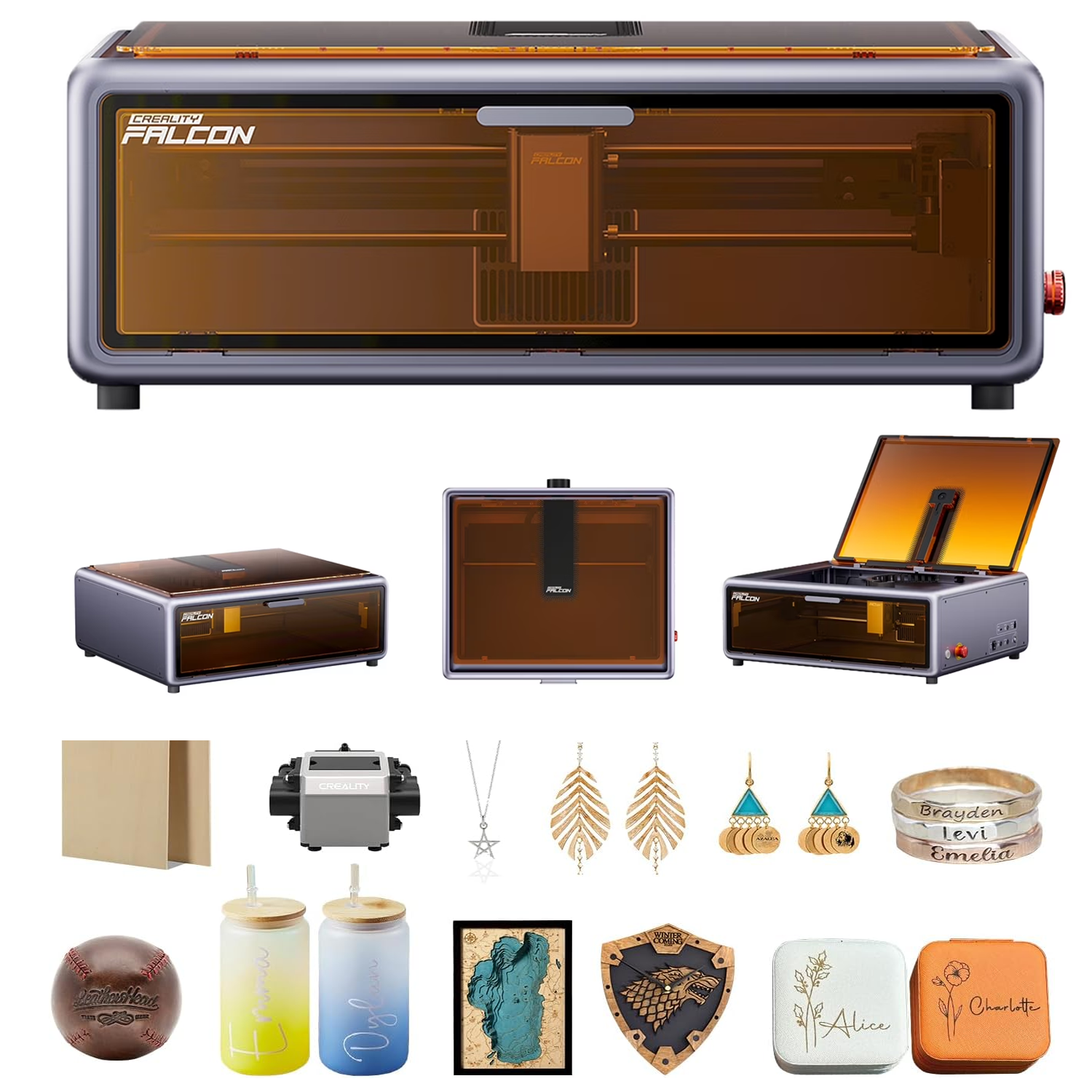
Creality
Creality Falcon A1 10W Laser Engraver&Cutter

Creality Falcon A1 10W Laser Engraver

Creality Falcon A1 10W Laser Engraver&Cutter

4(12 ratings)
$424.99at NeweggChecked 2 h ago
See all prices and details
Visit Newegg

Store links may earn us a commission. Price via Klarna.

Pros
  • Camera makes aligning workpieces quick
  • Auto material recognition sets power and speed for you
  • No assembly; unbox and start
  • Compact and quiet enough for a home desk
Cons
  • 10W limits cutting to thin stock
  • Small bed rules out wide signs and panels
  • Fewer software options than LightBurn users expect
  • Small rating base of 12 owners
Carverall
Carverall X1Pro 20W Diode Laser Engraver

Carverall X1Pro 20W Laser Engraver

Carverall X1Pro 20W Diode Laser Engraver

4.7(85 ratings)
$358.79at CarverallChecked 1 h ago
See all prices and details
Visit Carverall
Pros
  • 20W cuts thick pine and acrylic in one pass
  • 300x300 mm bed handles signs and small batches
  • Works with LightBurn, CutLabX and LaserGRBL over USB or WiFi
  • Air assist and risers included; strong 4.7 rating from 85 owners
Cons
  • Class 4 open frame; enclosure is an extra
  • Needs assembly and manual focus setup
  • Larger footprint and more noise than the Creality
  • Acrylic engraving needs slower speeds for best results

What separates them

Creality Falcon A1 10W Laser EngraverCarverall X1Pro 20W Laser Engraver
Laser power10W diode20W quad-diode, roughly 20-22W optical
Work areaCompact bed, not suited to pieces wider than about 30 cm300 x 300 mm
SetupNo assembly, camera alignment and auto material recognition out of the boxNeeds assembly and focus setup; air pump and risers included
SoftwareCreality's own app and softwareLightBurn, CutLabX and LaserGRBL, wired USB or WiFi
Cutting capabilityThin wood, leather, acrylic and paperUp to 25 mm pine, 35 mm acrylic and 0.05 mm stainless steel per Carverall
Safety classDesigned for indoor home use; compact bodyClass 4 open frame, Class 1 only with the optional enclosure
Owner feedback4.0 from 12 ratings, praised as the beginner pick4.7 from 85 ratings, praised for clean cuts and stability in long sessions
FootprintSmall enough for a home office or crowded workshopDesktop unit but larger and heavier, needs room for the bed and air pump

Price history

  • Creality Falcon A1 10W Laser Engraver: lowest $424.99 on Nov 17 at Newegg.
  • Carverall X1Pro 20W Laser Engraver: lowest $358.79 on Nov 17 at Carverall.

Prices at every store

Creality Falcon A1 10W Laser Engraver

  • NeweggNew

    In stock

    $424.99Free shippingChecked 2 h ago
    Visit Newegg
  • WalmartNew

    In stockSold by CREALITY STOREReturns: Sold by a Walmart Marketplace seller; returns go to the seller under the seller's returns policy.

    $477.90Free shippingChecked 2 h ago
    Visit Walmart
  • CongeriemNew

    In stock

    $549.00Free shippingChecked 2 h ago
    Visit Congeriem
  • CrealityFalconNew

    Availability unknown

    $466.00Checked 2 h ago
    Visit CrealityFalcon

Store links may earn us a commission. Some prices via Klarna.

All 7 stores and price history →

Carverall X1Pro 20W Laser Engraver

  • CarverallNew

    In stockReturn policy

    $358.79Checked 1 h ago
    Visit Carverall

Also available at

  • CarverallCheck price at Carverall
Prices and history →

Specs compared

SpecCreality Falcon A1 10W Laser EngraverCarverall X1Pro 20W Laser Engraver
colorOrange—
Work Area—300mm X 300mm
Product Type—Class 4 laser engraver (Class 1 with enclosure)
Focus Modes—3/5/7 mm focus modes
Connectivity—Serial (cable) and wifi for CutlabX (desktop an…
Supported Software—LightBurn, CutlabX, LaserGRBL
Operating Voltage—AC100- 240V
Working Temperature—5 - 30°C
Working Humidity—30 - 65% rh (no condensation)

What reviewers say

Creality Falcon A1 10W Laser Engraver

  • 4 / 512 ratings

With 12 ratings averaging 4 out of 5, owners mostly praise the out-of-box setup and the camera-assisted workflow. Complaints center on the small working area and the limits of 10W cutting power.

What people mention
  • SetupPraisedOwners say it works shortly after unboxing because no assembly is needed.
  • Camera alignmentMixedThe camera speeds up placing designs, but users say it needs recalibration to stay accurate.
  • Cutting powerCriticisedThe 10W head handles thin stock but not thick wood or clear acrylic.
  • Work areaCriticisedBuyers note the bed is small and pieces wider than about 30 cm will not fit.

Carverall X1Pro 20W Laser Engraver

  • 4.7 / 585 ratings

Owners rate the X1Pro highly, calling it easy to learn and stable over long runs. They praise sharp engraving on wood and leather and clean one-pass cuts. Acrylic results depend on slower speeds, and some wish for more included accessories.

What people mention
  • Ease of usePraisedOwners say the software is easy to learn and the machine suits beginners.
  • Engraving qualityPraisedWood and leather come out sharp and clean with fine detail.
  • CuttingPraisedComplex cuts finish in one pass with clean edges.
  • Build stabilityPraised

Questions and answers

Which is better for a complete beginner?
The Creality Falcon A1. It arrives assembled, the camera lines up your design and auto material detection picks settings, so there is little to learn before your first burn. The Carverall is still beginner-friendly but needs assembly and focus setup.
Can the Falcon A1 cut thicker wood?
Not much. At 10W it handles thin plywood, leather and acrylic. For 10 mm-plus hardwood or 25 mm pine you need the Carverall's 20W head and multiple passes.
Which lasts longer?
Both use air-cooled diode modules that degrade with use, and neither brand publishes a diode hour rating. The Carverall's larger owner base reports stable long sessions; the Creality's smaller sample makes long-term durability harder to judge.
Is the Carverall worth stepping up to?
Yes if you plan to cut rather than just engrave, or want to work on pieces near 30 cm. If you only engrave small gifts indoors, the Creality's convenience and compact size matter more than power.
Do I need an enclosure for the Carverall?
It ships as a Class 4 open-frame laser. The optional shield cover makes it Class 1, which matters if pets, kids or visitors share the room. The Creality is built for indoor desk use but still needs eye protection and ventilation.
Which works better with LightBurn?
The Carverall. It is listed as supported by LightBurn, CutLabX and LaserGRBL over USB or WiFi. The Creality runs on Creality's own software, which is simpler but less flexible.

Ask our shopping agent

It checks today's price at every store, compares the alternatives and answers in about a minute.

Enter to send, Shift+Enter for a new line

More comparisons

  • xTool M2 10W Laser Engraver vs Carverall X1Pro 20W Diode Laser Engraver
  • Creality Falcon2 Pro 40W Enclosed Laser Engraver & Cutter vs Carverall X1Pro 20W Diode Laser Engraver
  • Creality Falcon A1 10W Laser Engraver&Cutter vs Creality Falcon2 Pro 40W Enclosed Laser Engraver & Cutter
  • xTool M2 10W Laser Engraver vs Creality Falcon A1 10W Laser Engraver&Cutter
  • WeCreat Vision 20W Diode Laser Cutter Engraver vs Carverall X1Pro 20W Diode Laser Engraver
  • Longer RAY5 10W Laser Engraver vs Carverall X1Pro 20W Diode Laser Engraver

Buying guides that pick them

  • Best desktop diode laser engravers for hobby and small business use
Runs smoothly through long sessions without trouble.