StoreDeal.ai store
Shop
  • Deals
  • Deal checker
  • Black Friday
  • Buying guides
  • Brands
  • Stores
Travel
  • Flight deals
  • Hotel deals
Company
  • Research
  • Press
  • Use in AI assistants
  • Contact
  • deal.ai apps
Black Friday 2026
  • Walmart
  • Best Buy
  • Target
  • TVs
  • Laptops
  • Headphones
  • Apple
  • Gaming
  • Vacuums
  • Kitchen
  • Toys
  • Smartwatches
  • Tablets
  • Furniture
  • Mattresses
© Deal.ai Inc.·2222 Ponce de Leon Blvd, Miami, FL 33134·support@deal.ai
TermsPrivacy
Deal.ai › Compare

Glorious GMMK 3 Barebones Keyboard vs Keychron Q1 Pro Keyboard

Buy the Keychron Q1 Pro if you want one keyboard that works wirelessly across a desktop, laptop and tablet, and you value a solid aluminum case out of the box. Buy the GMMK 3 barebones if you already own switches and keycaps and want to build and rebuild a board with adjustable actuation and deep modularity. The Q1 Pro is the sturdier, more finished product and owners consistently praise its build; the GMMK 3 is the more configurable platform but arrives as a shell you must complete.

  • Choose the GMMK 3 if you want a barebones 75% board to fill with your own switches and keycaps and you plan to tinker with actuation and layout.
  • Choose the Q1 Pro if you want a complete, wireless, aluminum 75% keyboard that works with Mac, Windows and Linux without extra parts.

Prices

  • Glorious GMMK 3 Barebones Keyboard: $80.00 at eBay (last seen Nov 28)
  • Keychron Q1 Pro Keyboard: $129.49 at Keychron (last seen Nov 25)
  • Difference: the Glorious GMMK 3 Barebones Keyboard is $49.49 cheaper than the Keychron Q1 Pro Keyboard at the latest prices (Nov 25 and Nov 28)
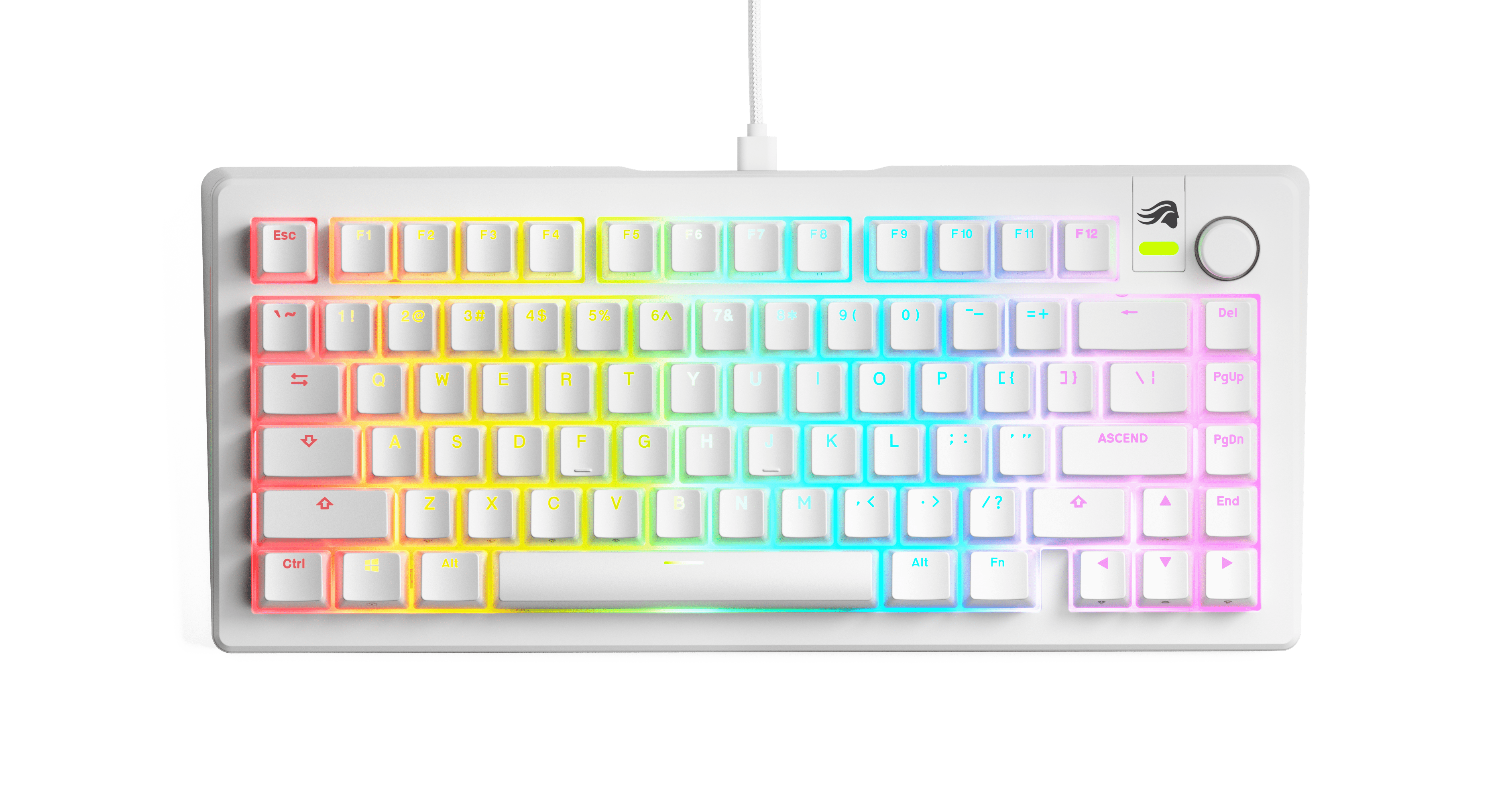
Glorious
Glorious GMMK 3 Barebones Mechanical Keyboard

Glorious GMMK 3 Barebones Keyboard

Glorious GMMK 3 Barebones Mechanical Keyboard

5(1 rating)
$80.00at eBayChecked 20 h ago
See all prices and details
Visit eBay

Store links may earn us a commission.

Pros
  • Adjustable actuation and hot-swap sockets
  • Nine points of modularity for custom builds
  • Lighter and simpler than an aluminum board
  • Good starting point if you already own switches and caps
Cons
  • Barebones: no switches or keycaps included
  • Wired only, no Bluetooth
  • Plastic case feels less premium than aluminum
  • No wrist rest or knob
Keychron
Keychron Q1 Pro Wireless Custom Mechanical Keyboard

Keychron Q1 Pro Keyboard

Keychron Q1 Pro Wireless Custom Mechanical Keyboard

$129.49at KeychronChecked Nov 25
See all prices and details
Visit Keychron
Pros
  • Solid CNC aluminum body that owners praise
  • Wireless to three devices plus wired USB-C
  • Double gasket mount with foam for a softer typing feel
  • QMK/VIA remapping and a programmable knob
  • Long battery life with backlight off
Cons
  • Heavier and sits high; a palm rest helps
  • QMK has a learning curve
  • No adjustable actuation or rapid trigger
  • Stock sound benefits from added foam and lubed switches

What separates them

Glorious GMMK 3 Barebones KeyboardKeychron Q1 Pro Keyboard
What's in the boxBarebones: case, PCB and plate only, no switches or keycapsFully assembled version ships with switches and keycaps; barebone version also sold
ConnectivityWired USB onlyBluetooth 5.1 to up to 3 devices plus USB-C wired
Case materialPlastic frame with modular partsCNC machined 6063 aluminum
Mount and feelTray-style with adjustable tiltDouble gasket mount with PC plate and sound-absorbing foam
Switch tuningHot-swap with adjustable actuation pointHot-swap 3-pin and 5-pin, fixed actuation
SoftwareGlorious software for remapping and lightingQMK firmware and Keychron Launcher web app, steeper learning curve
Portability and desk fitLighter, no battery, cable onlyHeavier aluminum body, sits high, palm rest recommended
Layout and knob75% QWERTY, no rotary knob listed75% QWERTY with programmable aluminum rotary knob

Price history

$209.99$45.00
Nov 6Nov 29
  • Glorious GMMK 3 Barebones Keyboard: lowest $45.00 on Nov 28 at Whatnot; $94.99 on Nov 29.
  • Keychron Q1 Pro Keyboard: lowest $129.49 on Nov 19 at Keychron.com; $146.99 on Nov 29.

Prices at every store

Glorious GMMK 3 Barebones Keyboard

  • eBayNew

    In stock

    $80.00Checked 20 h ago
    Visit eBay
  • Best BuyNew

    In stock

    $89.99Checked 20 h ago
    Visit Best Buy
  • Micro CenterNew

    In stock

    $89.99Checked 20 h ago
    Visit Micro Center
  • DoorDashNew

    In stockSold by Best Buy US

    $89.99Checked 20 h ago
    Visit DoorDash

Store links may earn us a commission.

All 11 stores and price history →

Keychron Q1 Pro Keyboard

  • KeychronNew

    Availability unknownReturn policy

    $129.49Checked Nov 25
    Visit Keychron
  • AmazonNew

    Availability unknown

    As an Amazon Associate, Deal.ai earns from qualifying purchases.

    $146.99Free shippingChecked 2 h ago
    Visit Amazon
  • KBD LabNew

    Availability unknown

    $149.99Checked Nov 25
    Visit KBD Lab
  • DivinikeyNew

    Availability unknown

    $159.20Checked 2 h ago
    Visit Divinikey

Also available at

  • Keychron.comCheck price at Keychron.com

Store links may earn us a commission.

All 8 stores and price history →

Specs compared

SpecGlorious GMMK 3 Barebones KeyboardKeychron Q1 Pro Keyboard
ConnectivityWiredBroadcom Bluetooth 5.1
Language / LayoutQWERTYEnglish
UsePCTablet
colorWhiteBrown
WirelessNoYes
Mouse IncludedNoNo
TypeGaming KeyboardsStandard Keyboards
BacklightRGB (multicolored)RGB (multicolored)
Form FactorGaming75%
CompatibilityLinux, macOS, WindowsWindows, Mac, Linux
MechanicalYes—
actual_colorWhite—
Show all 40 specsShow fewer specs
SpecGlorious GMMK 3 Barebones KeyboardKeychron Q1 Pro Keyboard
size75%—
Model NameGMMK 3—
SeriesGMMK 3—
Keyboard SubtypeGaming keyboard—
Keyboard TypeGaming—
TechnologyMechanical—
Type Highlights75%—
Accessory TypeStandalone—
Switch Audible ClickClicky (switch option)—
Switch Tactile Feedback

What reviewers say

Glorious GMMK 3 Barebones Keyboard

Owners of the GMMK 3 line tend to praise the hot-swap build and the amount of customization for the price. Common complaints center on the barebones format, since buyers must budget for switches and keycaps, and on software that takes time to learn.

What people mention
  • ModularityPraisedOwners like being able to swap plates, frames and badges to change feel and looks.
  • Hot-swapPraisedSwitch changes need no soldering and take minutes with a puller.
  • ValueMixedThe kit is fair value, but the total cost climbs once switches and keycaps are added.
  • SoftwareCriticisedLighting and key remapping through Glorious software take time to figure out.

Keychron Q1 Pro Keyboard

Owners of the Q1 line consistently praise the build quality and the soft gasket typing feel, and several call it the best stock keyboard they have used. Common complaints center on the height, the stock sound, and the weight.

What people mention
  • BuildPraisedOwners describe the aluminum case as dense and flex-free, with a premium feel.
  • Typing feelPraisedThe double-gasket mount and PC plate are called soft and cushioned rather than stiff.
  • SoundMixedReviewers say the stock sound is muted and pleasant without modding, but some find it not perfect out of the box and add foam and lubed switches.
  • WeightCriticisedThe aluminum body makes it heavy and tall, so it stays on the desk and often needs a wrist rest.
Reviews
  • The Best Wireless Keyboards for 2026

Questions and answers

Which is better for typing all day?
The Q1 Pro. Its gasket mount, foam and aluminum case give a softer, more settled feel, and the wireless option keeps your desk clean. The GMMK 3 depends heavily on the switches and caps you install.
Which is better for gaming?
The GMMK 3, mainly for its adjustable actuation point and hot-swap tuning. The Q1 Pro is fine for gaming but has fixed actuation and no rapid trigger.
Do I need to buy extra parts for the GMMK 3?
Yes. The barebones version has no switches or keycaps, so budget for both. The Q1 Pro fully assembled version is ready to use out of the box.
Which lasts longer?
The Q1 Pro's aluminum case and screw-in stabilizers should hold up better over years of use. The GMMK 3 is easier to repair and reconfigure because parts swap without soldering.
Is the Q1 Pro worth stepping up to over the GMMK 3?
If you want wireless, an aluminum body and a finished keyboard, yes. If you want to build and retune the board yourself, the GMMK 3 is the better fit.
Does the Q1 Pro work with a Mac?
Yes. It ships with Mac and Windows keycaps and supports Windows, Mac and Linux, and you can remap keys in QMK or the Keychron Launcher.

Ask our shopping agent

It checks today's price at every store, compares the alternatives and answers in about a minute.

Enter to send, Shift+Enter for a new line

More comparisons

  • Keychron Q1 Pro Wireless Custom Mechanical Keyboard vs Keychron K3 Max 75% Custom Wireless RGB Mechanical Keyboard with Programmable QMK/VIA Hot-Swappable Red Switch
  • Keychron Q1 Pro Wireless Custom Mechanical Keyboard vs Keychron Q1 Max
  • Keychron Q4 QMK Custom Mechanical Keyboard vs Glorious GMMK 3 Barebones Mechanical Keyboard
  • Keychron Q4 QMK Custom Mechanical Keyboard vs Keychron Q1 Pro Wireless Custom Mechanical Keyboard
  • Glorious GMMK 3 Barebones Mechanical Keyboard vs Keychron C1 Pro 8K QMK 80% TKL Wired Mechanical Keyboard with Customization
  • Keychron Q1 Pro Wireless Custom Mechanical Keyboard vs Keychron C1 Pro 8K QMK 80% TKL Wired Mechanical Keyboard with Customization

Buying guides that pick them

  • Best custom mechanical keyboards
  • Best wireless mechanical keyboards for Mac
No (Linear)
—
Hot Swappable SwitchesYes—
Switch Actuation PointAdjustable actuation—
Ergonomic DesignMedium Incline—
Ergonomic FeaturesAdjustable tilt function—
Adjustable AngleYes—
Wrist RestNo—
Connectivity TypeWired—
Connectivity InterfaceBluetooth, 2.4 GHz Wireless, USB, USB-C, Wired—
Wired ConnectivityYes—
Cable Length2 m—
Multi Device Support1—
PortsUSB-C—
Wireless devices—up to 3 devices
Wired connection—USB Type-C
Polling rate wired—1000 Hz
Body material—6063 aluminum
Keycap profile—KSA
Keycap material—PBT