Shop
  • Deals
  • Deal checker
  • Black Friday
  • Buying guides
  • Brands
  • Stores
Travel
  • Flight deals
  • Hotel deals
Company
  • Research
  • Press
  • deal.ai apps
Black Friday 2026
  • Walmart
  • Best Buy
  • Target
  • TVs
  • Laptops
  • Headphones
  • Apple
  • Gaming
  • Vacuums
  • Kitchen
  • Toys
  • Smartwatches
  • Tablets
  • Furniture
  • Mattresses
© Deal.ai Inc.
TermsPrivacy
Deal.ai › Compare

HP 22-dg0003w All-in-One Desktop vs HP OmniDesk AI Desktop PC

Buy the OmniDesk if you want a machine that stays fast for years: 10 cores, 16 GB DDR5, a 512 GB SSD and Windows 11 Pro. Buy the 22-dg0003w if you want one box with a screen, keyboard and mouse included and only do light web, email and schoolwork. The all-in-one is the weaker machine on every spec that matters, and its 128 GB drive and S Mode Windows fill up and frustrate quickly. Owners rate the all-in-one around 4.2 out of 5; the OmniDesk is the better long-term buy for anyone who does real work.

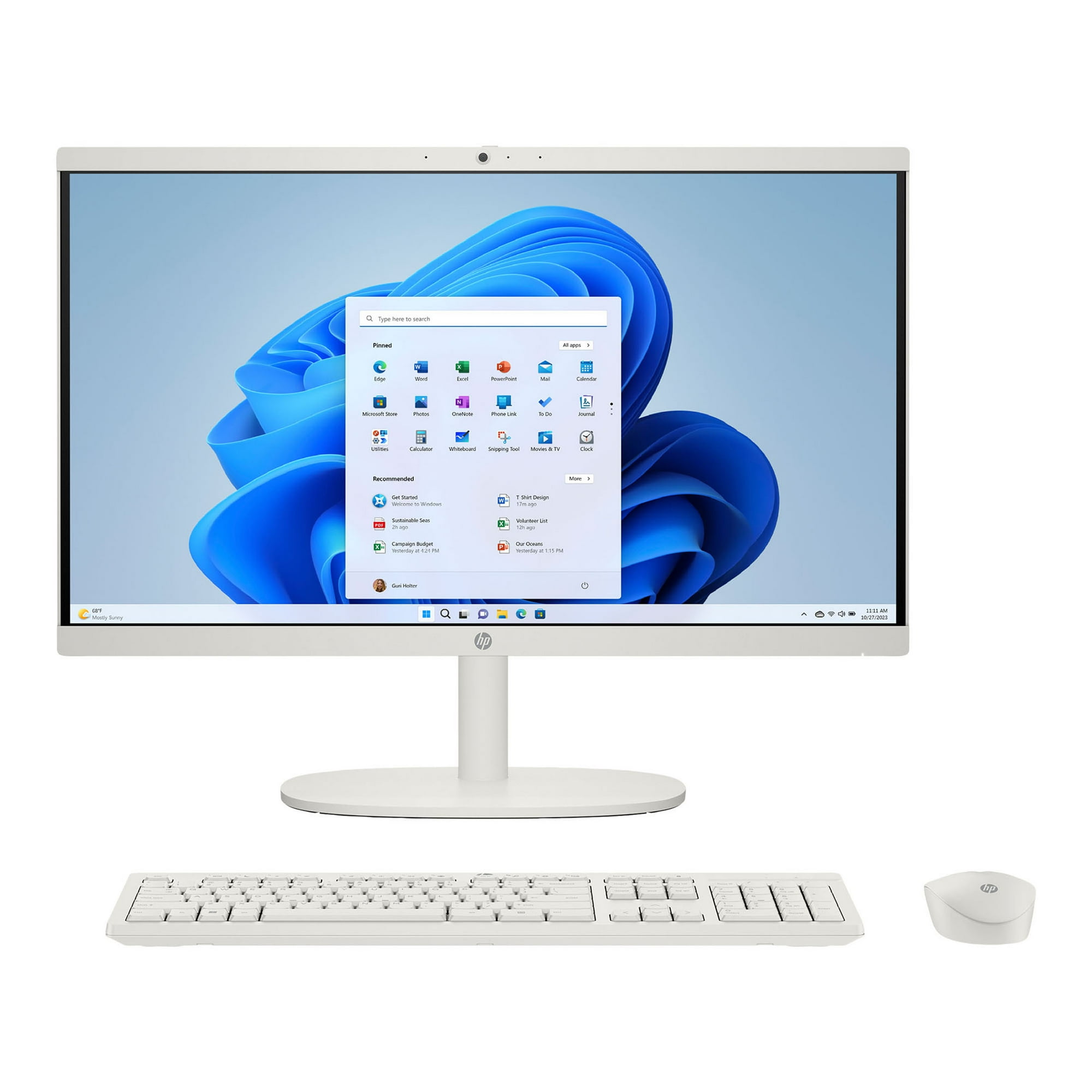
  • Choose the HP 22-dg0003w if you want a single tidy unit with the display, wireless keyboard and mouse in the box, and your workload is browsing, video and documents.
  • Choose the HP OmniDesk if you need real processing headroom, room to store files, and Windows 11 Pro without S Mode restrictions.

Prices

  • HP 22-dg0003w All-in-One Desktop: $449.99 at Walmart (checked today)
  • HP OmniDesk AI Desktop PC: $549.99 at eBay (checked today)
  • Difference: the HP 22-dg0003w All-in-One Desktop is $100.00 cheaper than the HP OmniDesk AI Desktop PC today
HP
HP 22-dg0003w All-in-One Desktop Computer

HP 22-dg0003w All-in-One Desktop

HP 22-dg0003w All-in-One Desktop Computer

4.2(1,126 ratings)
$449.99at WalmartChecked 59 min ago
See all prices and details
Visit Walmart

Store links may earn us a commission. Price via Klarna.

Pros
  • Display, keyboard and mouse come in one purchase
  • Small footprint at 16.56 lb and no tower to place
  • Anti-glare FHD screen suits bright rooms
  • Low power draw for a always-on family PC
Cons
  • Pentium Silver J5040 struggles with many browser tabs or heavy apps
  • 128 GB SSD leaves little room after Windows
  • S Mode blocks installing apps from outside the Microsoft Store until you switch it off
  • 8 GB DDR4 RAM is not user-friendly to expand on most all-in-ones
  • No touchscreen and no dedicated graphics
HP
HP OmniDesk AI Desktop PC

HP OmniDesk AI Desktop PC

$549.99at eBayChecked 1 h ago
See all prices and details
Visit eBay

Store links may earn us a commission.

Pros
  • 10-core Core Ultra 5 handles multitasking, photo work and light content creation
  • 16 GB DDR5 and a 512 GB SSD give room to work
  • Windows 11 Pro with no S Mode limits
  • Front USB-C at 10 Gbps and DisplayPort output up to 8K
  • Wi-Fi 6 and Bluetooth 5.4, plus 5.1 surround audio ports
Cons
  • No monitor, keyboard or mouse included, so add those to your setup
  • Integrated Intel graphics limit gaming and heavy 3D work
  • Listings disagree on RAM (8 GB vs 16 GB) and mention an RTX 5060 option, so check the exact configuration
  • Tower takes desk or floor space

What separates them

HP 22-dg0003w All-in-One DesktopHP OmniDesk AI Desktop PC
Form factorAll-in-one with a built-in 21.45-inch FHD displayCompact tower; you supply the monitor
ProcessorIntel Pentium Silver J5040, 4 cores, burst up to 3.2 GHzIntel Core Ultra 5 225, 10 cores
Memory8 GB DDR416 GB DDR5 (listing also shows an 8 GB figure; confirm before buying)
Storage128 GB SSD512 GB SSD
Operating systemWindows 11 Home in S Mode, which limits you to Store apps until you switch outWindows 11 Pro, no S Mode
PortsUSB-A, USB-C, HDMI-out, one LAN portUp to 10 USB ports including 2 front USB-C at 10 Gbps, DisplayPort up to 8K, 3 audio ports
WirelessWi-Fi 6 (1x1), Bluetooth 5.3Wi-Fi 6, Bluetooth 5.4
Included peripheralsWireless keyboard and mouse includedNone included

Price history

$798.88$449.99
Nov 2Nov 10
  • HP 22-dg0003w All-in-One Desktop: lowest $449.99 on Nov 9 at Walmart; $449.99 on Nov 10.
  • HP OmniDesk AI Desktop PC: lowest $549.99 on Nov 10 at eBay.

Prices at every store

HP 22-dg0003w All-in-One Desktop

  • WalmartNew

    In stock

    $449.99Free shippingChecked 59 min ago
    Visit Walmart
  • Best BuyNew

    In stock

    $472.01Free shippingChecked 59 min ago
    Visit Best Buy
  • eBayPre-owned

    Availability unknownReturns: Set by the eBay seller; the eBay Money Back Guarantee covers an item that doesn't arrive or isn't as described.

    $194.99Free shippingChecked Nov 9
    Visit eBay

Also available at

  • WalmartCheck price at Walmart

Store links may earn us a commission. Some prices via Klarna.

All 3 stores and price history →

HP OmniDesk AI Desktop PC

  • eBayNew

    Availability unknownSold by primetimebuys

    $549.99Checked 1 h ago
    Visit eBay
  • WalmartNew

    Availability unknownSold by Premier Deals

    $551.99Checked 1 h ago
    Visit Walmart
  • Newegg.comNew

    Availability unknownSold by PREMIERBUYS

    $574.99Checked 1 h ago
    Visit Newegg.com
  • Best BuyNew

    Availability unknown

    $619.99Free shippingChecked 1 h ago
    Visit Best Buy

Store links may earn us a commission.

All 10 stores and price history →

Specs compared

SpecHP 22-dg0003w All-in-One DesktopHP OmniDesk AI Desktop PC
colorGrayBlack, Gold, Brown
TypeAll-in-OneCompact
Wi-FiWi-Fi 6 (1x1)Yes
BluetoothBluetooth 5.3Yes
Operating SystemWindowsWindows
Supported OSWindows—
OS VersionWindows 11 Home in S Mode—
Internal Storage TypeSSD—
Number Of CPU Cores4—
CPU Clock Speed3.7 GHz—
RAM TypeDDR5—
Included Drives128ssd—
Show all 40 specsShow fewer specs
SpecHP 22-dg0003w All-in-One DesktopHP OmniDesk AI Desktop PC
Typical UsersEntire family, Busy household—
Form FactorAll-in-One—
Desktop Monitor BundleYes—
Dimensions6.69 x 19.43 x 15.07 in—
Weight16.56 lb—
Materialmetal/plastic—
Ports And Interfacesmultiple USB ports—
Display Size21.45 in—
Display ResolutionFHD—
Touch Screen

What reviewers say

HP 22-dg0003w All-in-One Desktop

  • 4.2 / 51,126 ratings

Ratings are solid rather than glowing. Owners tend to like the compact footprint, the clear screen and the included wireless keyboard and mouse, while complaints center on the small storage and the modest processor.

What people mention
  • PerformanceMixedFine for browsing and documents, but owners notice slowdowns with many tabs or heavier apps.
  • StorageCriticisedThe 128GB SSD is called out as filling up quickly once programs and files are added.
  • SetupPraisedBuyers describe getting it running quickly with the bundled wireless keyboard and mouse.
  • DisplayPraisedThe 21.45-inch FHD anti-glare panel is seen as clear and comfortable for daily use.

Questions and answers

Which is better for a student?
The OmniDesk. Its 10-core CPU, 16 GB of RAM and 512 GB SSD handle papers, research tabs and online classes without slowdown. The all-in-one works for basic schoolwork but its 128 GB drive and S Mode get in the way.
Which lasts longer?
The OmniDesk. More cores, more RAM and a larger SSD keep it usable for years, and Windows 11 Pro avoids the S Mode ceiling. The all-in-one's Pentium Silver and small SSD will feel dated sooner.
Is the all-in-one worth stepping up from?
Yes, if you do anything beyond browsing and video. The OmniDesk is a full desktop-class machine; the all-in-one is a compact family PC. You give up the built-in screen but gain far more performance.
Do I need a monitor for the OmniDesk?
Yes. It is a tower only, with no display, keyboard or mouse. Budget for those, or reuse what you have via HDMI or DisplayPort.
Can I install regular Windows apps on the all-in-one?
Not while S Mode is on. You can switch out of S Mode once for free through the Microsoft Store, after which standard Windows apps install normally.
Which is better for photo or video editing?
The OmniDesk. Its 10-core Core Ultra 5 and 16 GB DDR5 beat the Pentium Silver and 8 GB DDR4 by a wide margin. Check the exact configuration, since listings mention both integrated graphics and an RTX 5060 option.

Ask our shopping agent

It checks today's price at every store, compares the alternatives and answers in about a minute.

Enter to send, Shift+Enter for a new line

More comparisons

  • HP 22-dg0003w All-in-One Desktop Computer vs HP OmniDesk Slim Desktop
  • HP OmniDesk Slim Desktop vs HP OmniDesk AI Desktop PC

Buying guides that pick them

  • Best HP desktop computers for home and office
  • Best all-in-one desktop computers for home use
No
—
Display HighlightsFHD display—
Energy EfficiencyLower power consumption (UFS storage)—
KeyboardYes, Wireless Keyboard—
ConnectionsHDMI, USB-A—
No. of RJ45 (LAN)1—
Processor Brand—Intel CPU
Number Of Cores—10-core
Graphics Processor—Intel GPU
Hard Drive Type—Solid State Drive
Processor Speed—2.7 GHz
Processor—Intel® Core™ Ultra 5 - 225
Memory—16 GB RAM
Storage—512 GB SSD
Graphics—Intel® Graphics
Wireless—Wi-Fi 6 and Bluetooth® 5.4 wireless card
USB Type-C speed—10Gbps signaling data rate
DisplayPort—up to 8K performance
Memory type—DDR5