StoreDeal.ai store
Shop
  • Deals
  • Deal checker
  • Black Friday
  • Buying guides
  • Brands
  • Stores
Travel
  • Flight deals
  • Hotel deals
Company
  • Research
  • Press
  • Use in AI assistants
  • Contact
  • deal.ai apps
Black Friday 2026
  • Walmart
  • Best Buy
  • Target
  • TVs
  • Laptops
  • Headphones
  • Apple
  • Gaming
  • Vacuums
  • Kitchen
  • Toys
  • Smartwatches
  • Tablets
  • Furniture
  • Mattresses
© Deal.ai Inc.·2222 Ponce de Leon Blvd, Miami, FL 33134·support@deal.ai
TermsPrivacy
Deal.ai › Compare

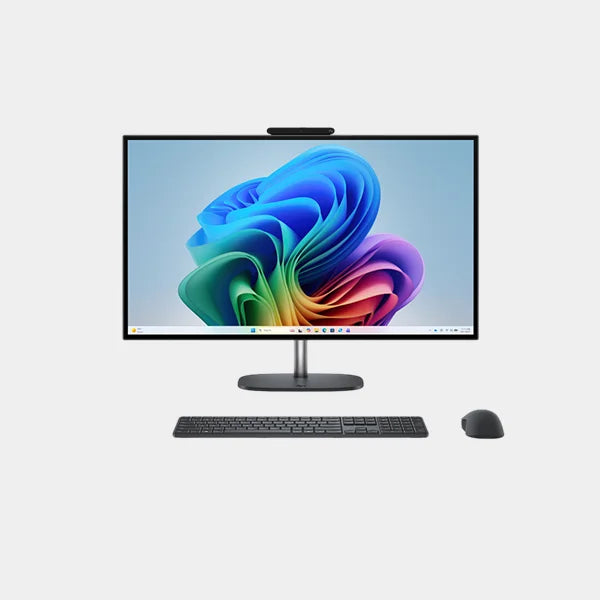
HP OmniStudio X 31.5 vs HP OmniStudio X

Buy the 31.5-inch OmniStudio X if you want a big 4K screen and strong CPU work performance. The 27-inch model is the better pick if you need dedicated graphics for gaming or GPU-accelerated work. The 31.5-inch has a higher-rated panel and faster storage, but its Intel Arc graphics trail the RTX 5050 badly in games. Owners of the 27-inch report stand failures and weak speakers, so check the stand and plan for a soundbar.

  • Choose the HP OmniStudio X 31.5 if you want a large 4K display for spreadsheets, photo editing and everyday multitasking, and you rarely game.
  • Choose the HP OmniStudio X 27 if you need dedicated RTX 5050 graphics for gaming or GPU work, and a smaller screen suits your desk.

Prices

  • HP OmniStudio X 31.5: $1,299.99 at Best Buy (last seen Nov 22)
  • HP OmniStudio X: $1,149.99 at eBay (last seen Nov 12)
  • Difference: the HP OmniStudio X is $150.00 cheaper than the HP OmniStudio X 31.5 at the latest prices (Nov 12 and Nov 22)
HP
HP OmniStudio X 31.5

HP OmniStudio X 31.5

4.1(138 ratings)
$1,299.99at Best BuyChecked 13 h ago
See all prices and details
Visit Best Buy
Pros
  • Large 4K IPS panel suits side-by-side windows and photo work
  • Core Ultra 7 with 8 cores scores well in GeekBench and Premiere Pro
  • 1 TB SSD with fast read and write speeds
  • Recycled materials, EPEAT Gold and ENERGY STAR certified
  • 5MP camera with Windows Studio Effects for calls
Cons
  • Intel Arc graphics are weak for gaming, especially at 4K
  • Spec sheet conflicts on RAM: 32 GB and 16 GB both listed
  • 31.5-inch screen needs a deep desk, roughly 36 to 48 inches
  • Rated 4.1 out of 5, so not universally praised
HP
HP OmniStudio X

HP OmniStudio X

4.5(2 ratings)
$1,149.99at eBayChecked Nov 12
See all prices and details
Visit eBay

Store links may earn us a commission.

Pros
  • Dedicated RTX 5050 with 8 GB is far better for games and GPU tasks
  • Smaller 27-inch footprint fits tighter desks
  • Sleek Eclipse Gray finish that owners like
  • NPU rated up to 47 to 50 TOPS for AI features
  • Quiet, fast boot and program loading per owners
Cons
  • Owners report the monitor falling off the stand
  • Speakers are poor; a soundbar is often needed
  • Base model has only 512 GB of storage
  • Low 2.7 out of 5 rating on Google Shopping from 339 ratings
  • Keyboard symbols are hard to read for some owners

What separates them

HP OmniStudio X 31.5HP OmniStudio X
Screen size and resolution31.5-inch 4K UHD (3840 x 2160) IPS27-inch LCD, non-touch
ProcessorIntel Core Ultra 7 Series 1, 8 cores, up to 4.8 GHzIntel Core Ultra 5 Series 1 (some listings show Ultra 7 356H)
GraphicsIntel Arc integratedNVIDIA GeForce RTX 5050 with 8 GB dedicated
Gaming at 4KAbout 16 fps in Borderlands 3 and 26 fps in Dirt 5 at 2160pDedicated RTX 5050 handles modern titles at 1080p and 1440p
Storage1 TB SSD512 GB SSD on the base model; some listings show 2 TB
Memory32 GB listed, though the spec sheet also says 16 GB16 GB DDR5
Build and standSilver chassis, EPEAT Gold with Climate+, ENERGY STAREclipse Gray finish; owners report the monitor detaching from the stand
AudioBuilt-in speakers, no complaints notedOwners say bass booms and dialogue is muddy; a soundbar is often needed

Price history

$2,629.99$1,149.99
Oct 30Nov 23
  • HP OmniStudio X 31.5: lowest $1,299.99 on Nov 16; $1,299.99 on Nov 23.
  • HP OmniStudio X: lowest $1,149.99 on Nov 12 at Best Buy; $2,629.99 on Nov 23.

Prices at every store

HP OmniStudio X 31.5

  • Best BuyNew

    In stock

    $1,299.99Free shippingChecked 13 h ago
    Visit Best Buy
  • HPNew

    In stock

    $1,299.99Free shippingChecked 13 h ago
    Visit HP
  • TargetNew

    In stock

    $1,299.99Free shippingChecked 13 h ago
    Visit Target
  • eBayNew

    In stockSold by officialhpstore

    $1,299.99Checked 13 h ago
    Visit eBay

Also available at

  • eBayCheck price at eBay
  • WalmartCheck price at Walmart

Store links may earn us a commission.

All 13 stores and price history →

HP OmniStudio X

  • TargetNew

    In stock

    $1,149.99Free shippingChecked Nov 12
    Visit Target
  • WalmartNew

    In stockSold by HP

    $1,149.99Free shippingChecked Nov 12
    Visit Walmart
  • eBayNew

    In stockSold by officialhpstore

    $1,149.99Free shippingChecked Nov 12
    Visit eBay
  • Newegg.comNew

    In stockSold by Official HP Store

    $1,149.99Free shippingChecked Nov 12
    Visit Newegg.com

Also available at

  • Abt ElectronicsCheck price at Abt Electronics
  • WalmartCheck price at Walmart
  • DoorDashCheck price at DoorDash

Store links may earn us a commission.

All 10 stores and price history →

Specs compared

SpecHP OmniStudio X 31.5HP OmniStudio X
Operating SystemWindowsWindows 11 Home
Processor BrandIntel CPUIntel
Number Of Cores8-core16-core
Graphics ProcessorIntel GPUNVIDIA GPU
Monitor Resolution3840 x 21602560 x 1440
With 4K GraphicsYesYes
ColorSilverSilver
Energy StarYesYes
Hard Drive TypeSolid State DriveSolid State Drive
Processor Speed4.8 GHz4.7 GHz
Installed Memory32 GB RAM32 GB RAM
Drive Capacity1 TB Storage1 TB Storage
Show all 40 specsShow fewer specs
SpecHP OmniStudio X 31.5HP OmniStudio X
Monitor Size31.5″ screen27″ screen
EPEAT-RegisteredYesYes
Screen Size31 inches27 inches
Processor ModelIntel Core Ultra 7 Series 1Intel Core Ultra 5 Series 1
Storage TypeSSDSSD
Total Storage Capacity1024 gigabytes512 gigabytes
System Memory (RAM)16 gigabytes16 gigabytes
GraphicsIntel ArcIntel Arc
BrandHPHP
Model Number

What reviewers say

HP OmniStudio X 31.5

  • 4.1 / 5138 ratings

Reviewers highlight this machine as a capable creative workstation for photo and video editing, though it falls short for high-end gaming. It earns high marks for design and display quality, but the integrated graphics are a bottleneck for 4K rendering and 3D tasks.

What people mention
  • DisplayPraisedThe 31.5-inch 4K screen is highly rated for its size and sharpness in creative workflows.
  • Gaming PerformanceMixedWhile it handles 1080p gaming at 60 fps, it struggles significantly at native 4K resolution.
  • Creative AppsPraisedUsers find it very capable for Adobe CC tasks like Photoshop and Premiere Pro.
  • DesignPraisedReviewers rate the design highly, calling out the sleek silver finish.

HP OmniStudio X

  • 2.7 / 5Google Shopping · 339 ratings

Reception is split. Several owners praise its speed, features and display quality, while others report the monitor coming off the stand and rate it poorly overall.

What people mention
  • Display sizePraisedOwners like the large screen for fitting several windows and for watching video.
  • Desk footprintCriticisedReviewers say it needs a deep desk and plenty of room, which rules out small spaces.
  • SetupPraisedBuyers find the all-in-one setup simple, with one unit and few cables.
Reviews
  • Finally, a big screen all-in-one PC that business users and creatives will both appreciate - ZDNET
  • HP OmniStudio X 31.5 review: a great all-in-one PC for everyday computing - Welcome to Tech Radar club

Questions and answers

Which is better for gaming?
The 27-inch model. Its RTX 5050 with 8 GB is a dedicated GPU, while the 31.5-inch relies on Intel Arc integrated graphics that manage only about 16 fps in Borderlands 3 at 4K.
Which has the better screen?
The 31.5-inch. It has a 4K UHD IPS panel at 3840 x 2160, while the 27-inch is a standard LCD at a lower resolution.
Is the 31.5-inch worth stepping up to?
Yes if you want a bigger 4K screen, more storage and stronger CPU performance for editing and multitasking. Skip it if gaming matters, since the 27-inch has the far better GPU.
Which lasts longer?
Both carry a 1-year warranty. The 27-inch has a reported stand failure that can end its life early, so the 31.5-inch is the safer bet on build.
Can the 27-inch handle video editing?
Yes for moderate projects. The RTX 5050 helps with GPU-accelerated effects, but the 31.5-inch Core Ultra 7 and 1 TB SSD are stronger for heavy timelines.
Do either have a touchscreen?
No. Both are non-touch all-in-ones built for mouse and keyboard use.

Ask our shopping agent

It checks today's price at every store, compares the alternatives and answers in about a minute.

Enter to send, Shift+Enter for a new line

More comparisons

  • HP OmniStudio X 31.5 vs HP OmniStudio 23.8-inch
  • HP OmniStudio X 31.5 vs HP OmniStudio X All-in-One Desktop Next Gen AI 27-cx0077t
  • HP OmniStudio X 31.5 vs Dell Inspiron 27" All-in-One Desktop PC
  • HP OmniStudio X vs Lenovo Yoga AIO 9i (32-inch)
  • HP OmniStudio X vs HP OmniStudio X All-in-One Desktop Next Gen AI 27-cx0077t
  • HP OmniStudio X vs Dell Inspiron 7730 All in One Desktop

Buying guides that pick them

  • Best all-in-one desktop computers with a dedicated graphics card
HP OmniStudio X 31.5 inch All-
HP OmniStudio X 27 inch All-in
Year of Release20252025
Display TypeLCDLCD
Screen Resolution3840 x 2160 (4K)1920 x 1080 (Full HD)
Touch Screenfalsefalse
Processor Model Number256V226V
Solid State Drive Capacity1024 gigabytes512 gigabytes
Type of Memory (RAM)LPDDR5XLPDDR5X
Number Of Memory Slots11
Graphics TypeIntegratedIntegrated
GPU BrandIntelIntel
Display Connector(s)1 x DisplayPort 1.41 x DisplayPort 1.4
Number of HDMI Outputs (Total)22
Number of DisplayPort Outputs (Total)00
Display—31.5 inches
Ideal desk depth—36–48 inches (large workspaces)
Optimal viewing distance—3–4 feet
Form Factor—AIO
Type—All-in-One
  • UpgradabilityCriticisedOwners note that memory and storage are harder to change than on a tower PC.