StoreDeal.ai store
Shop
  • Deals
  • Deal checker
  • Black Friday
  • Buying guides
  • Brands
  • Stores
Travel
  • Flight deals
  • Hotel deals
Company
  • Research
  • Press
  • Use in AI assistants
  • Contact
  • deal.ai apps
Black Friday 2026
  • Walmart
  • Best Buy
  • Target
  • TVs
  • Laptops
  • Headphones
  • Apple
  • Gaming
  • Vacuums
  • Kitchen
  • Toys
  • Smartwatches
  • Tablets
  • Furniture
  • Mattresses
© Deal.ai Inc.·2222 Ponce de Leon Blvd, Miami, FL 33134·support@deal.ai
TermsPrivacy
Deal.ai › Compare

Logitech MK250 Bluetooth Combo vs JLab Flow Keyboard & Mouse Bundle

Buy the Logitech MK250 if you want a proven, low-maintenance combo for everyday typing and a compact keyboard that keeps the numpad. Buy the JLab Flow if you want a full-size keyboard with a dedicated AI button, a media knob and app-based customization. The Logitech has the stronger track record: 4.8 from 2,000 ratings against 4.2 from 50, and a spill-resistant build with recycled plastic. The JLab adds software features and a USB-C option, but its smaller review base makes long-term reliability less certain.

  • Choose the Logitech MK250 if you want a compact Bluetooth combo with a numpad, spill resistance and a long, well-reviewed track record.
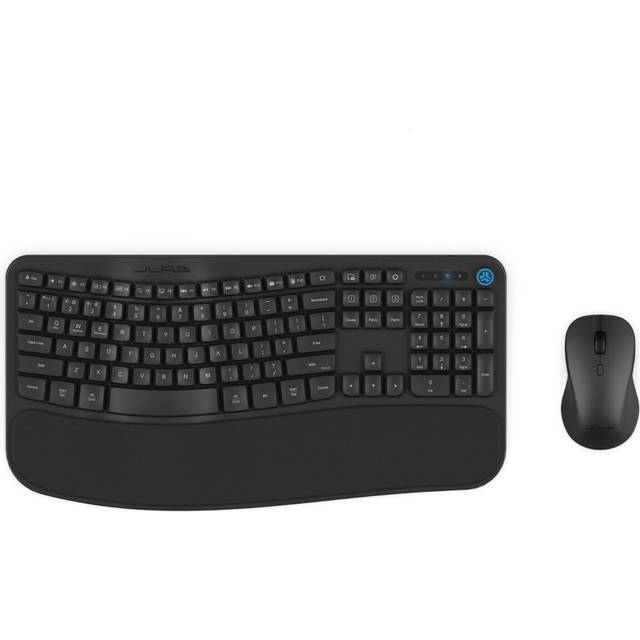
  • Choose the JLab Flow if you want a full-size keyboard with a dedicated AI button, a media knob and customizable profiles through the JLab Work app.

Prices

  • Logitech MK250 Bluetooth Combo: $18.99 at Amazon (checked today)
  • JLab Flow Keyboard & Mouse Bundle: $39.99 at Best Buy (checked today)
  • Difference: the Logitech MK250 Bluetooth Combo is $21.00 cheaper than the JLab Flow Keyboard & Mouse Bundle today
Logitech
Logitech MK250 Bluetooth Wireless Mouse and Keyboard Combo

Logitech MK250 Bluetooth Combo

Logitech MK250 Bluetooth Wireless Mouse and Keyboard Combo

4.8(2,000 ratings)
$18.99at AmazonChecked 8 h ago
See all prices and details
Visit Amazon

Store links may earn us a commission. As an Amazon Associate, Deal.ai earns from qualifying purchases.

Pros
  • Compact keyboard that still has a numpad
  • Spill-resistant, made with recycled plastic
  • Strong rating from a large number of owners
  • Pairs over Bluetooth in seconds with no dongle
  • 12-month battery life
Cons
  • No USB receiver option
  • No backlight or programmable keys
  • Compact key spacing takes adjustment
  • Mouse is small for large hands
JLab
JLab Flow Keyboard & Mouse Bundle

JLab Flow Keyboard & Mouse Bundle

4.2(50 ratings)
$39.99at Best BuyChecked 8 h ago
See all prices and details
Visit Best Buy
Pros
  • Dedicated AI button and Smart Media knob
  • Customizable profiles in the JLab Work app
  • Bluetooth and USB connectivity
  • Full-size ergonomic keyboard and mouse
  • Works with Mac, iPad, iOS and Android
Cons
  • Fewer reviews, so reliability is less proven
  • No spill resistance stated
  • No backlight
  • Software features depend on the JLab Work app

What separates them

Logitech MK250 Bluetooth ComboJLab Flow Keyboard & Mouse Bundle
ConnectionBluetooth only, no dongle neededBluetooth and USB
Keyboard sizeCompact space-saving body that still includes a numpadFull-size layout with 105 keys
Extra keys and controlsStandard 104-key QWERTY, adjustable tiltDedicated AI button plus Smart Media knob, customizable in the JLab Work app
Build and durabilitySpill-resistant keyboard, plastic parts at least 64% recycledErgonomic design, no spill rating stated
Battery12-month battery life, AA/AAA batteries12 months on AAA batteries
Wireless rangeAbout 33 ftAbout 33 ft
MouseSmall contoured ambidextrous optical mouseFull-size ambidextrous mouse with scroll wheel
Track record4.8 from 2,000 ratings4.2 from 50 ratings

Price history

$39.99$18.99
Nov 13Nov 24
  • Logitech MK250 Bluetooth Combo: lowest $18.99 on Nov 24 at Amazon.
  • JLab Flow Keyboard & Mouse Bundle: lowest $39.99 on Nov 24 at Best Buy.

Prices at every store

Logitech MK250 Bluetooth Combo

  • WalmartNew

    In stockSold by Capri Electronics

    $19.99Checked 8 h ago
    Visit Walmart
  • LogitechNew

    In stock

    $19.99Checked 8 h ago
    Visit Logitech
  • Best BuyNew

    In stock

    $19.99Checked 8 h ago
    Visit Best Buy
  • AmazonNew

    Availability unknown

    As an Amazon Associate, Deal.ai earns from qualifying purchases.

    $18.99Checked 8 h ago
    Visit Amazon

Also available at

  • WalmartCheck price at Walmart
  • eBayCheck price at eBay

Store links may earn us a commission.

All 22 stores and price history →

JLab Flow Keyboard & Mouse Bundle

  • Best BuyNew

    In stock

    $39.99Checked 8 h ago
    Visit Best Buy
  • WalmartNew

    In stockSold by JLab

    $49.99Checked 7 h ago
    Visit Walmart
  • TargetNew

    In stock

    $49.99Checked 8 h ago
    Visit Target
  • eBayNew

    Availability unknownSold by antsdeepdiscounts (100% positive, 4,000 ratings)Returns: Set by the eBay seller; the eBay Money Back Guarantee covers an item that doesn't arrive or isn't as described.

    $34.99+ $7.03 shippingChecked 8 h ago
    Visit eBay

Also available at

  • eBayCheck price at eBay
  • WalmartCheck price at Walmart

Store links may earn us a commission.

All 13 stores and price history →

Specs compared

SpecLogitech MK250 Bluetooth ComboJLab Flow Keyboard & Mouse Bundle
ColorGrayBlack
WirelessBluetoothYes, No
Number of keys104105
CompatibilityDesktop Set—
BrandLogitech—
Power typeBattery—
Keyboard techOptical—
FeaturesAdjustable Tilt—
Keyboard layoutQwerty—
Accessories1 x User Documentation, 1 x QSG Printed on Pack…—
Battery consumption typeIntegrated Rechargeable Battery—
Motion detectOptical—
Show all 40 specsShow fewer specs
SpecLogitech MK250 Bluetooth ComboJLab Flow Keyboard & Mouse Bundle
Model920-013510—
Pieces1—
Maximum transmission range32.81 ft—
Height5.39 in—
Assembled product weight0.84 lb—
Battery sizeAAA, AA—
Retail packagingSet—
Included Components—Keyboard, Mouse
Number Of Items—2
Accessory Type

What reviewers say

Logitech MK250 Bluetooth Combo

  • 4.8 / 52,000 ratings

With 4.8 out of 5 from about 2,000 ratings, owners mostly praise the quick Bluetooth pairing, the compact keyboard that still has a number pad, and the comfortable keys. Complaints center on the small mouse and the tighter key layout.

What people mention
  • PairingPraisedOwners say the keyboard and mouse connect over Bluetooth in seconds without a receiver.
  • LayoutMixedThe number pad is welcome, but some find the compact spacing cramped for fast typing.
  • Mouse sizeCriticisedSeveral owners say the mouse is small and less comfortable for long sessions or larger hands.
  • Key feelPraisedReviewers describe the deep-profile keys as comfortable and quiet for everyday typing.

JLab Flow Keyboard & Mouse Bundle

  • 4.2 / 550 ratings

Questions and answers

Which is better for typing all day?
The JLab Flow has a full-size layout and an ergonomic shape, which suits long sessions. The Logitech MK250 uses deep-profile keys in a compact body, which many typists prefer for feel. Try the layout you are used to.
Which lasts longer?
Both claim 12 months of battery life. The Logitech has a spill-resistant build and a much larger review base, so its durability is better documented. The JLab is newer with fewer owners reporting.
Is the JLab Flow worth stepping up to?
If you want a dedicated AI button, a media knob and app-based customization, yes. If you just need reliable everyday typing, the Logitech covers it with a stronger track record.
Do either need a dongle?
The Logitech MK250 is Bluetooth only and needs no dongle. The JLab Flow supports both Bluetooth and USB, so you can use a receiver if your device lacks Bluetooth.
Which works better with a Mac or iPad?
JLab lists Mac, iPadOS, iOS and Android support explicitly. Logitech's combo is a standard Bluetooth desktop set and pairs with most Bluetooth devices, but check the layout labels match your system.
Which mouse is more comfortable?
The JLab mouse is full-size and ambidextrous, which suits larger hands. The Logitech mouse is small and contoured for portability. Pick based on hand size and whether you travel.

Ask our shopping agent

It checks today's price at every store, compares the alternatives and answers in about a minute.

Enter to send, Shift+Enter for a new line

Buying guides that pick them

  • Best wireless keyboard and mouse combos
—
Keyboard and mouse set
Battery Life—12 months
Power Source—Battery powered, AAA type battery
Connectivity Technology—Wireless
Ports And Interfaces—USB-C
Wireless Range—33 ft
Language Layout—English
Layout—Full-size (mouse)
Ergonomic Design—Ergonomic design, Ambidextrous mouse
Compatible Devices—iPadOS, Android, Apple iOS, Mac, Various devices
Compatible Brand—Apple
Number Of Mouse Buttons—1 (including scroll wheel)
Programmable Keys—Dedicated AI Button (customizable via JLab Work…
Scroll Type—Scroll wheel (Smart Media knob)
Typical Users—Unisex, Adults
Numpad—No, Yes
Form Factor—Full Size
Mouse Included—Yes
Type—Standard Keyboards