StoreDeal.ai store
Shop
  • Deals
  • Deal checker
  • Black Friday
  • Buying guides
  • Brands
  • Stores
Travel
  • Flight deals
  • Hotel deals
Company
  • Research
  • Press
  • Use in AI assistants
  • Contact
  • deal.ai apps
Black Friday 2026
  • Walmart
  • Best Buy
  • Target
  • TVs
  • Laptops
  • Headphones
  • Apple
  • Gaming
  • Vacuums
  • Kitchen
  • Toys
  • Smartwatches
  • Tablets
  • Furniture
  • Mattresses
© Deal.ai Inc.·2222 Ponce de Leon Blvd, Miami, FL 33134·support@deal.ai
TermsPrivacy
Deal.ai › Compare

Logitech MX Master 3S vs Logitech MX Anywhere 3S

Buy the MX Master 3S if you want a full-size ergonomic mouse for a desk and long work sessions. Buy the MX Anywhere 3S if you travel, use a laptop, or want a light mouse that tracks on glass and any surface. The MX Master 3S is the larger, heavier mouse at 141 g with 7 buttons and 70 days of battery. The MX Anywhere 3S is 99 g with 6 buttons, quiet clicks, and 70 days of battery on a full charge. Reviewers rate both highly: owners call the MX Master 3S comfortable and responsive for daily work, while the MX Anywhere 3S holds a slightly higher rating from fewer ratings.

  • Choose the MX Master 3S if you work at a desk all day and want a palm-filling shape, a thumb rest, and a second wheel for horizontal scrolling and gestures.
  • Choose the MX Anywhere 3S if you carry a mouse between home, office, and coffee shops and need something light that works on glass and any surface.

Prices

  • Logitech MX Master 3S: $47.99 at Shiloh Outfitters (last seen Nov 12)
  • Logitech MX Anywhere 3S: $40.99 at qingguo-djonline (last seen Nov 19)
  • Difference: the Logitech MX Anywhere 3S is $7.00 cheaper than the Logitech MX Master 3S at the latest prices (Nov 12 and Nov 19)
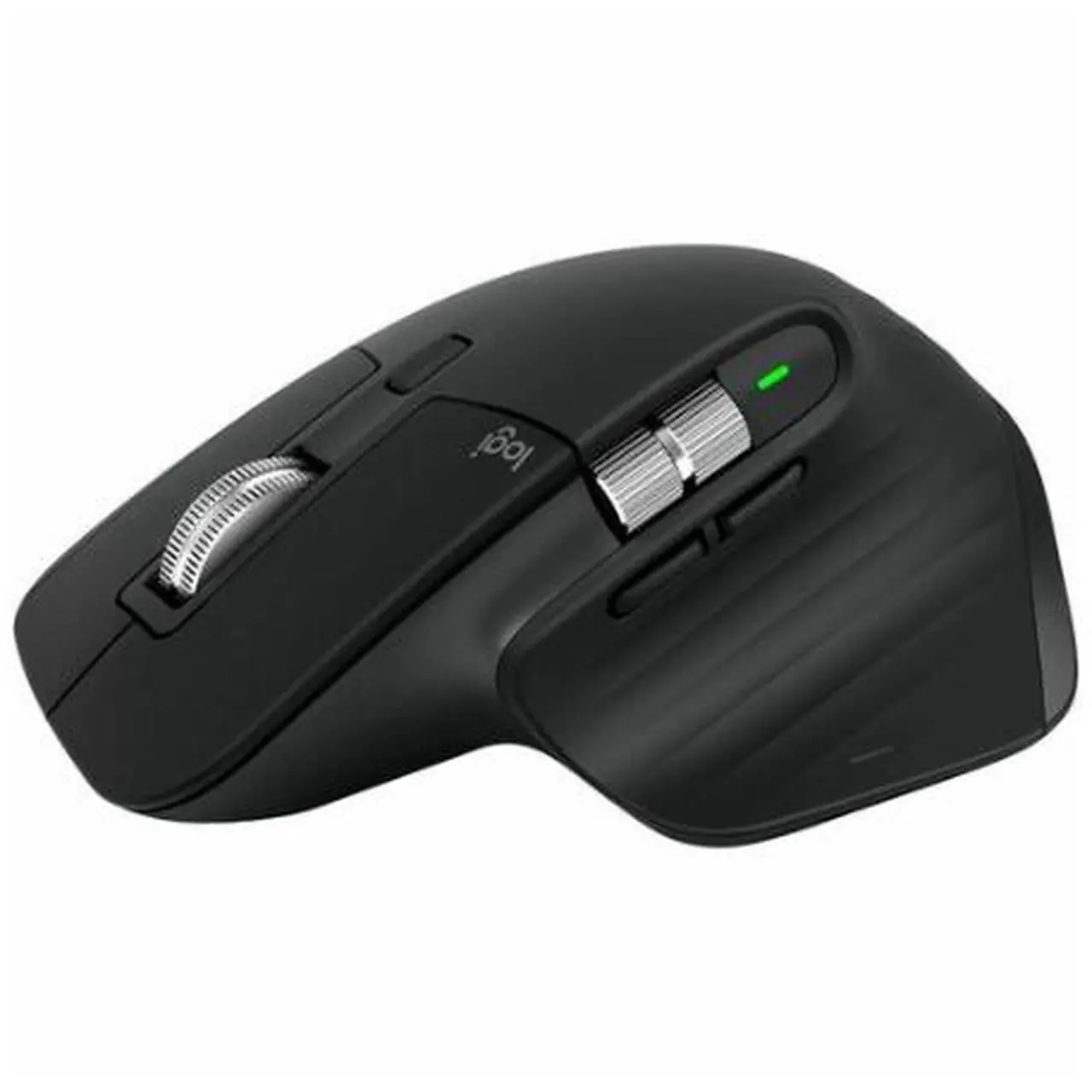
Logitech
Logitech MX Master 3S

Logitech MX Master 3S

4.7(11,000 ratings)
$47.99at Shiloh OutfittersChecked Nov 12
See all prices and details
Visit Shiloh Outfitters
Pros
  • Comfortable for long desk sessions with a full palm rest and thumb shelf
  • 70-day battery life cuts charging to a few times a year
  • Thumb wheel speeds up horizontal scrolling and gestures
  • Tracks well on glass and without a mouse pad
  • 7 programmable buttons cover common shortcuts
  • One-minute quick charge gives three hours of use
Cons
  • Heavy at 141 g for travel
  • Some owners report scroll wheel jumping and cursor drift
  • Clicks are quieter than the MX Master 2S, which some dislike
  • Rubber coating can wear or peel over time
  • Charging cable not included
Logitech
Logitech MX Anywhere 3S

Logitech MX Anywhere 3S

4.8(5,900 ratings)
$40.99at qingguo-djonlineChecked Nov 19
See all prices and details
Visit qingguo-djonline
Pros
  • Light at 99 g, easy to pack
  • Tracks on glass and any surface
  • Quiet Click buttons suit shared offices and calls
  • Flow lets you move between computers with one mouse
  • Compact shape fits small hands and laptop bags
  • 70 days per charge, with a one-minute quick charge for three hours of use
  • USB-C charging cable included in the box
Cons
  • No thumb wheel, so horizontal scrolling is slower
  • Smaller body gives less palm support for all-day desk use
  • Logi Bolt receiver may not be included depending on the listing

What separates them

Logitech MX Master 3SLogitech MX Anywhere 3S
Size and weight141 g, 3.3 in wide, full palm rest99 g, compact travel shape
Buttons7 buttons, including a thumb wheel6 buttons, 4 programmable, no thumb wheel
Battery life70 days per charge70 days per charge; 1 minute of quick charge gives 3 hours of use
ClicksStandard clicks; some reviewers find them too quietQuiet Click switches
Tracking surfaceGlass and other surfaces, Darkfield high precisionAny surface, including glass
Multi-devicePairs with up to 3 devices, Logi Bolt receiver includedMulti-device with Flow cross-computer control, receiver sold separately or bundled depending on listing
SoftwareLogi Options+ with per-app button customizationLogi Options+ with macOS-specific customizations
Rating4.7 out of 5 from 11,000 ratings4.8 out of 5 from 5,900 ratings
Operating system supportLists macOS and WindowsLists macOS, with macOS-specific customizations in Logi Options+
Battery indicatorBattery gauge in Logi Options+LED indicator light showing battery life

Price history

$89.99$47.99
Nov 2Nov 19
  • Logitech MX Master 3S: lowest $47.99 on Nov 12 at Shiloh Outfitters; $79.99 on Nov 19.
  • Logitech MX Anywhere 3S: lowest $57.49 on Nov 2 at Adorama; $66.48 on Nov 19.

Prices at every store

Logitech MX Master 3S

  • Shiloh OutfittersNew

    In stock

    $47.99Checked Nov 12
    Visit Shiloh Outfitters
  • eBayNew

    In stockSold by leetradeco (99.3% positive, 701 ratings)Returns: Set by the eBay seller; the eBay Money Back Guarantee covers an item that doesn't arrive or isn't as described.

    $69.99Free shippingChecked Nov 14
    Visit eBay
  • TheKUDA.comNew

    In stockReturn policy

    $71.99Checked Nov 14
    Visit TheKUDA.com
  • PoshmarkNew

    Availability unknown

    $75.00Checked Nov 9
    Visit Poshmark

Also available at

  • WalmartCheck price at Walmart
  • eBayCheck price at eBay

Store links may earn us a commission.

All 37 stores and price history →

Logitech MX Anywhere 3S

  • cgdj-hionlineNew

    In stockReturn policy

    $40.99Checked Nov 19
    Visit cgdj-hionline
  • Before It Sells OutNew

    In stockShips from France · duties may applyReturn policy

    $40.99Checked Nov 19
    Visit Before It Sells Out
  • NFGNew

    In stockShips from France · duties may applyReturn policy

    $46.00Checked Nov 19
    Visit NFG
  • qingguo-djonlineNew

    Availability unknownReturn policy

    $40.99Checked Nov 19
    Visit qingguo-djonline

Also available at

  • WalmartCheck price at Walmart
  • eBayCheck price at eBay
  • ShopSimonCheck price at ShopSimon
All 54 stores and price history →

Specs compared

SpecLogitech MX Master 3SLogitech MX Anywhere 3S
Connectivity TypeWirelessWireless
InterfaceUSB-CUSB-C (for charging)
CompatibilitymacOS, WindowsmacOS
Wireless TechnologyBluetoothBluetooth
Multi Device ConnectivityYesYes
Supported DevicesMac, PCLaptop, Mac
Range10 m10 m
USB ReceiverYes (Logi Bolt USB receiver)No, Logi Bolt USB Receiver, Yes
Number Of Buttons76
Programmable ButtonsYesYes
Scroll TypeScroll wheelScroll wheel
Gesture SupportYesYes
Show all 40 specsShow fewer specs
SpecLogitech MX Master 3SLogitech MX Anywhere 3S
Functionality HighlightsCustomizable buttonsFlow cross-computer control, macOS specific cus…
Tracking MethodOpticalOptical
Tracking PrecisionHigh precisionHigh precision
Tracking Surface TypeGlassAny surface, Glass
Power SourceBattery-poweredBattery-powered
Battery TypeRechargeableRechargeable
Charging TypeUSB-CUSB-C
Power IndicatorYes (Options+ battery gauge)Yes, LED indicator light displaying battery life
Weight141 g

What reviewers say

Logitech MX Master 3S

  • 4.7 / 511,000 ratings

With 4.7 out of 5 from about 11,000 ratings, owners mostly praise the comfort, smooth tracking and shortcut buttons for daily work. A minority report scroll wheel glitches, cursor drift and quieter clicks than the older model.

What people mention
  • ComfortPraisedOwners say the tall, contoured shape supports the hand well through long workdays.
  • TrackingPraisedReviewers find tracking smooth and accurate, including on glass and without a mouse pad.
  • Scroll wheelMixedMost like the fast, quiet MagSpeed wheel, but some report it jumping or scrolling on its own.
  • ButtonsPraisedThe programmable buttons and thumb wheel are called genuinely useful for shortcuts.

Logitech MX Anywhere 3S

  • 4.8 / 55,900 ratings

Rated 4.8 out of 5 from about 5,900 ratings. Owners mostly praise the glass tracking, the scroll wheel and the quiet clicks, and many use it as a travel mouse. Complaints center on the small size and the missing receiver.

What people mention
  • TrackingPraisedOwners say it works on glass and uneven surfaces where other mice slip.
  • Scroll wheelPraisedThe MagSpeed wheel is called fast and precise, with a free-spin mode for long pages.
  • SizeMixedGood for travel and small hands, but some larger-handed users find it cramped.
  • ButtonsPraised
Reviews
  • Best Wireless Mouse for 2025 - CNET
  • Best Wireless Mouse 2026: Our top choices
  • Best Wireless Mouse for 2026 - CNET
  • Logitech MX Master 3S vs. MX Master 4: Should You Upgrade?
  • The Best Wireless Mice We've Tested for 2025 - PCMag editors select and review products independently
  • Best Back-to-School Tech Gear and Gadgets in 2026 - CNET

Questions and answers

Which is better for all-day office work?
The MX Master 3S. Its larger body, thumb rest, and 70-day battery suit long desk sessions. The MX Anywhere 3S is built for portability, not palm support.
Which is better for travel?
The MX Anywhere 3S. At 99 g it is about 40% lighter than the 141 g MX Master 3S and fits easily in a laptop bag.
Do both work on glass?
Yes. Both list glass and any-surface tracking. The MX Master 3S uses Darkfield high-precision tracking; the MX Anywhere 3S lists any surface and glass.
Which has better battery life?
They are close. Both are rated at 70 days per charge, and both give three hours of use from a one-minute quick charge. The MX Master 3S shows charge in the Options+ gauge; the MX Anywhere 3S uses an LED indicator.
Which is quieter?
The MX Anywhere 3S, which uses Quiet Click switches. Some MX Master 3S owners say its clicks are already too quiet compared with the older MX Master 2S.
Is the MX Master 3S worth stepping up to?
For a desk setup, yes: you get a thumb wheel, an extra programmable button, and a larger palm rest. For a laptop bag, the lighter MX Anywhere 3S is the better buy.
Does the MX Master 3S work with a Mac?
Yes. It lists macOS and Windows support, and its buttons are customized in Logi Options+ on either system.
What do owners complain about on the MX Master 3S?
A few report the scroll wheel jumping, the cursor drifting on its own, and rubber that wears or peels. Most reviewers still call it comfortable and responsive for daily work.
How fast can the MX Master 3S scroll?
Its MagSpeed wheel can scroll up to 1,000 lines a second, and Logitech rates it 90% faster and 87% more precise than a standard wheel. The MX Anywhere 3S uses the same MagSpeed wheel, rated at up to 1,000 lines a second and precise to the pixel.
Do both come with a USB receiver?
The MX Master 3S includes a Logi Bolt USB receiver. The MX Anywhere 3S listing is inconsistent, so check the specific bundle before you buy.

Ask our shopping agent

It checks today's price at every store, compares the alternatives and answers in about a minute.

Enter to send, Shift+Enter for a new line

More comparisons

  • Microsoft Bluetooth Ergonomic Mouse vs Logitech MX Anywhere 3S
  • Logitech MX Master 4 vs Logitech MX Anywhere 3S
  • Dell MS3320W Mobile Wireless Mouse vs Logitech MX Anywhere 3S
  • Logitech MX Anywhere 3S vs Logitech Lift
  • Logitech MX Master 4 vs Logitech MX Master 3S
  • Dell MS3320W Mobile Wireless Mouse vs Logitech MX Master 3S
  • Logitech MX Master 3S vs MX Master 4 Special Edition
  • Logitech MX Anywhere 3S vs Razer DeathAdder V4 Pro

Buying guides that pick them

  • Best wireless mice
  • Best wireless mice for creative work
  • Best wireless mice for everyday use
99 g
colorBlackGray
WirelessYesYes
ConnectionBluetoothRadio (RF), Bluetooth
SensorOpticalOptical
BluetoothYesYes
TypeMouseMouse
Sensitivity8,000 DPI8,000 DPI
BrandLogitechLogitech
Mouse TypeStandardWireless Mice
DPI (dpi)80008000
sizeN/A1
Height (")2.04 in
Battery Life70 days—
Width3.3 in—
Depth124.9 mm—
ErgonomicYes—
Lighting TypeNone—
Maximum Sensitivity8000 dots per inch—
Number of Buttons (Total)7—
Quiet Click buttons are noted for being soft and near-silent.