StoreDeal.ai store
Shop
  • Deals
  • Deal checker
  • Black Friday
  • Buying guides
  • Brands
  • Stores
Travel
  • Flight deals
  • Hotel deals
Company
  • Research
  • Press
  • Use in AI assistants
  • Contact
  • deal.ai apps
Black Friday 2026
  • Walmart
  • Best Buy
  • Target
  • TVs
  • Laptops
  • Headphones
  • Apple
  • Gaming
  • Vacuums
  • Kitchen
  • Toys
  • Smartwatches
  • Tablets
  • Furniture
  • Mattresses
© Deal.ai Inc.·2222 Ponce de Leon Blvd, Miami, FL 33134·support@deal.ai
TermsPrivacy
Deal.ai › Compare

Logitech MX Master 3S vs Logitech MX Anywhere 3S

Buy the MX Master 3S if you work at a desk all day and want a full-size, palm-filling mouse with a thumb wheel and a second scroll wheel for spreadsheets and design apps. Buy the MX Anywhere 3S if you travel, use a laptop on small or uneven surfaces, or want a light mouse that tracks on glass and slips into a bag. Both share Logitech's quiet clicks, MagSpeed scrolling, Flow cross-computer control and USB-C charging, so the choice comes down to size and portability, not build quality. Owners rate the Anywhere slightly higher, but the Master carries more controls and a more sculpted shape.

  • Choose the MX Master 3S if you want a large ergonomic mouse with a thumb wheel, a horizontal scroll wheel and seven buttons for desktop work.
  • Choose the MX Anywhere 3S if you need a light, compact mouse that travels well and works on glass or uneven surfaces.

Prices

  • Logitech MX Master 3S: $79.99 at Logitech (checked today)
  • Logitech MX Anywhere 3S: $66.48 at Amazon (checked today)
  • Difference: the Logitech MX Anywhere 3S is $13.51 cheaper than the Logitech MX Master 3S today
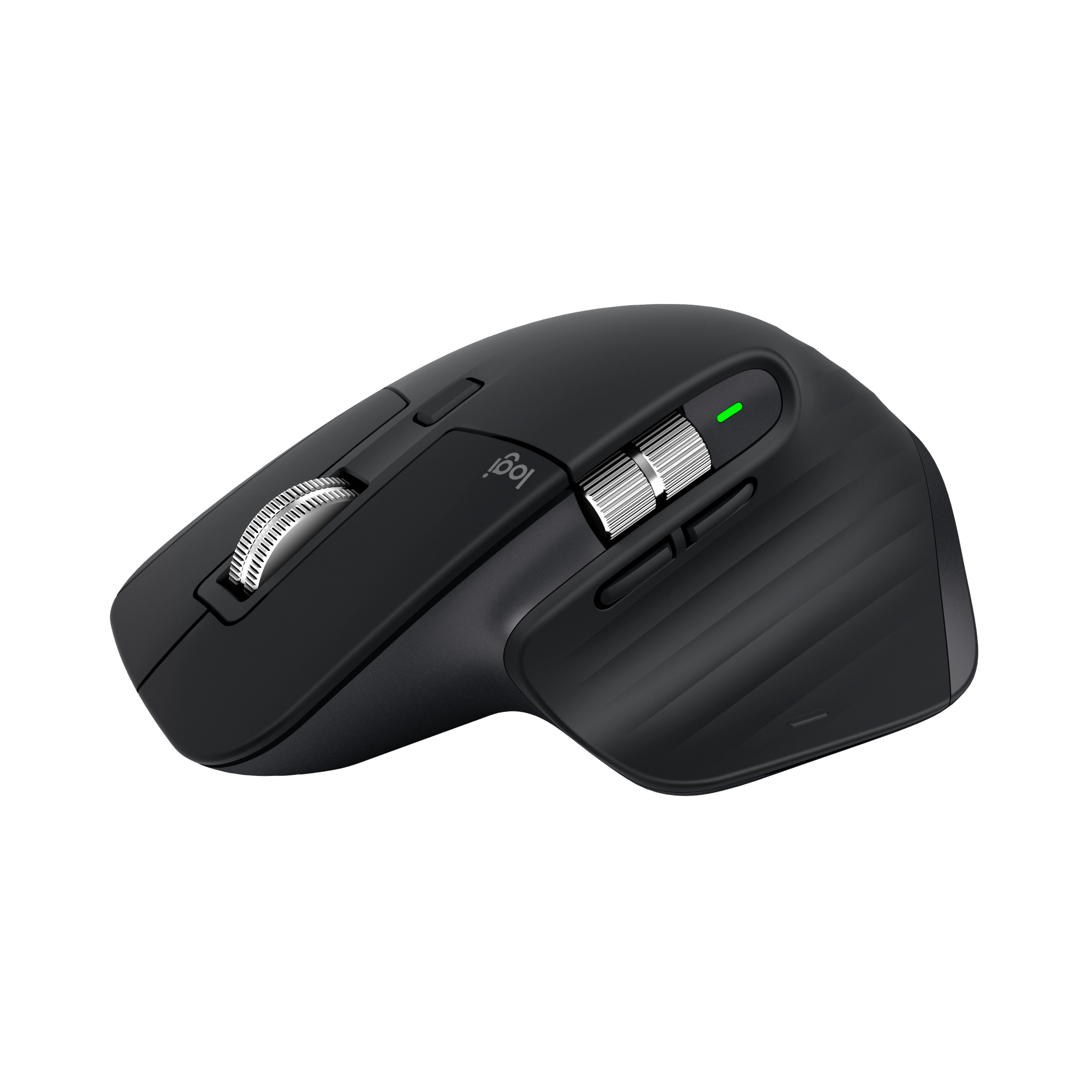
Logitech
Logitech MX Master 3S Wireless Mouse

Logitech MX Master 3S

Logitech MX Master 3S Wireless Mouse

4.4(413 ratings)
$79.99at LogitechChecked 1 h ago
See all prices and details
Visit Logitech
Pros
  • Large ergonomic shape reduces wrist strain over long sessions
  • Thumb wheel and horizontal scroll speed up spreadsheets and timelines
  • Seven programmable buttons with Logi Options+
  • Quiet Click buttons and near-silent MagSpeed wheel
  • Charges over USB-C with a one-minute quick charge for three hours of use
Cons
  • Heavy at 141 g and too large for most laptop bags
  • Right-handed shape only
  • Costs more than the Anywhere at most stores
Logitech
Logitech MX Anywhere 3S Wireless Mouse

Logitech MX Anywhere 3S

Logitech MX Anywhere 3S Wireless Mouse

4.6(507 ratings)
$66.48at AmazonChecked 1 h ago
See all prices and details
Visit Amazon

Store links may earn us a commission. As an Amazon Associate, Deal.ai earns from qualifying purchases.

Pros
  • Light at 99 g and small enough for any bag
  • Tracks reliably on glass and uneven surfaces
  • Quiet Click buttons and MagSpeed scrolling
  • Flow lets you move between computers and copy-paste across them
  • Higher owner rating than the Master
Cons
  • No thumb wheel or side scroll
  • Compact shape cramps larger hands over long days
  • Smaller battery capacity than the Master

What separates them

Logitech MX Master 3SLogitech MX Anywhere 3S
Size and gripFull-size sculpted body, 141 g, palm and finger supportCompact body, 99 g, claw or fingertip grip
PortabilityBulky for a laptop bagSmall and light, easy to carry
Buttons7 buttons including a thumb wheel and side scroll6 buttons, no thumb wheel
Sensor resolution8,000 DPI8,000 DPI optical
Surface trackingTracks on glass and most surfacesTracks on glass and any surface
Battery lifeUp to 70 days per chargeUp to 70 days per charge
ConnectivityBluetooth plus Logi Bolt receiver, up to 3 devicesBluetooth plus optional Logi Bolt receiver, up to 3 devices
Owner rating4.4 out of 5 from 413 ratings4.6 out of 5 from 507 ratings

Price history

$89.87$65.00
Nov 2Nov 19
  • Logitech MX Master 3S: lowest $65.00 on Nov 9 at eBay; $79.99 on Nov 19.
  • Logitech MX Anywhere 3S: lowest $66.48 on Nov 19 at Amazon.

Prices at every store

Logitech MX Master 3S

  • LogitechNew

    In stock

    $79.99Free shippingChecked 1 h ago
    Visit Logitech
  • TargetNew

    In stock

    $79.99Free shippingChecked Nov 10
    Visit Target
  • Newegg.comNew

    Availability unknown

    $79.99Checked 1 h ago
    Visit Newegg.com
  • AmazonNew

    Availability unknown

    As an Amazon Associate, Deal.ai earns from qualifying purchases.

    $79.99Free shippingChecked 1 h ago
    Visit Amazon

Store links may earn us a commission.

All 27 stores and price history →

Logitech MX Anywhere 3S

  • LogitechNew

    In stock

    $69.99Free shippingChecked 4 h ago
    Visit Logitech
  • Best BuyNew

    In stock

    $69.99Free shippingChecked 4 h ago
    Visit Best Buy
  • AmazonNew

    Availability unknown

    As an Amazon Associate, Deal.ai earns from qualifying purchases.

    $66.48Free shippingChecked 1 h ago
    Visit Amazon
  • LenovoNew

    Availability unknown

    $69.99Checked 4 h ago
    Visit Lenovo

Store links may earn us a commission.

All 24 stores and price history →

Specs compared

SpecLogitech MX Master 3SLogitech MX Anywhere 3S
Connectivity TypeWirelessWireless
InterfaceUSB-CUSB-C (for charging)
CompatibilitymacOS, WindowsmacOS
Wireless TechnologyBluetoothBluetooth
Multi Device ConnectivityYesYes
Supported DevicesMac, PCLaptop, Mac
Range10 m10 m
USB ReceiverYes (Logi Bolt USB receiver)No, Logi Bolt USB Receiver, Yes
Number Of Buttons76
Programmable ButtonsYesYes
Scroll TypeScroll wheelScroll wheel
Gesture SupportYesYes
Show all 40 specsShow fewer specs
SpecLogitech MX Master 3SLogitech MX Anywhere 3S
Functionality HighlightsCustomizable buttonsFlow cross-computer control, macOS specific cus…
Tracking MethodOpticalOptical
Tracking PrecisionHigh precisionHigh precision
Tracking Surface TypeGlassAny surface, Glass
Power SourceBattery-poweredBattery-powered
Battery TypeRechargeableRechargeable
Charging TypeUSB-CUSB-C
Power IndicatorYes (Options+ battery gauge)Yes, LED indicator light displaying battery life
Weight141 g

What reviewers say

Logitech MX Master 3S

  • 4.4 / 5413 ratings

Owners rate the MX Master 3S highly for comfort, the MagSpeed wheel and quiet clicks. Complaints center on its size and weight for smaller hands and on the software needed to get full use of the buttons.

What people mention
  • ComfortPraisedOwners say the contoured shape supports the hand well through long work days.
  • Scroll wheelPraisedThe MagSpeed wheel is called fast and precise, with a satisfying free-spin mode.
  • Click noisePraisedReviewers note the quiet clicks are much softer than earlier MX models.
  • WeightMixedSome find the 141 g body stable and solid, others call it heavy for quick movement.

Logitech MX Anywhere 3S

  • 4.6 / 5507 ratings

Owners of the MX Anywhere line tend to praise its portability and glass tracking, and the 3S keeps that formula with quieter clicks. Complaints usually center on the small size and the price.

What people mention
  • SizeMixedOwners like how it fits in a bag but say it is small for full-hand use.
  • TrackingPraisedReviewers report it tracks well on glass and other tricky surfaces.
  • Click noisePraisedThe Quiet Click buttons are described as noticeably softer than standard mice.
  • PriceCriticised

Questions and answers

Which is better for all-day office work?
The MX Master 3S. Its larger palm support, thumb wheel and extra buttons reduce hand movement during long sessions. The Anywhere 3S is fine for shorter bursts but its compact shape suits travel more than eight-hour desk days.
Which one is better for travel?
The MX Anywhere 3S. At 99 g and much smaller, it fits a laptop sleeve and works on cafe tables, glass and fabric. The Master is heavy and bulky to carry daily.
Do both work on glass?
Yes. Both use an 8,000 DPI optical sensor Logitech rates for glass and most surfaces. Neither needs a mousepad.
Is the MX Master 3S worth stepping up to over the Anywhere 3S?
If you work at a desk and use spreadsheets, CAD or video editing, yes. The thumb wheel, horizontal scroll and extra button are real time savers. If you mostly browse and travel, the Anywhere covers the same core features in a smaller body.
How long does the battery last on each?
Logitech rates both at up to 70 days per charge, and both charge over USB-C. The Master adds a one-minute quick charge that gives about three hours of use.
Can I use either with a Mac and a PC at the same time?
Yes. Both pair with up to three devices over Bluetooth or a Logi Bolt receiver, and Logitech Flow lets you move the cursor and copy-paste between computers.

Ask our shopping agent

It checks today's price at every store, compares the alternatives and answers in about a minute.

Enter to send, Shift+Enter for a new line

More comparisons

  • Logitech MX Master 3S Wireless Mouse vs Logitech MX Vertical Advanced wireless
  • Logitech MX Anywhere 3S Wireless Mouse vs Logitech MX Vertical Advanced wireless
  • Logitech MX Master 3S Wireless Mouse vs SteelSeries Aerox 5 Gaming Mouse

Buying guides that pick them

  • Best wireless mice for creative work
99 g
TypeMouseRechargeable Li-Po, Built-In Battery, Laser, Op…
Battery Life70 days—
Width3.3 in—
Depth124.9 mm—
ErgonomicYes—
ColorBlack, Silver, Graphite, Gray, Pale Grey, Mx Ma…—
BluetoothYes—
SensorLaser—
Sensitivity8,000 DPI—
Count Per Pack1—
sizeN/A—
ConnectivityWireless, Bluetooth—
Quantity1-Pack—
Sensor Type—Optical sensor
Polling Rate—88,133 Hz
Switches—Quiet Click buttons
Connection Type—Wireless
Capacity—500 Mah
Compatible Device—Laptop, Tablet, Desktop, Smartphone
Some buyers feel it costs too much for a compact mouse.