StoreDeal.ai store
Shop
  • Deals
  • Deal checker
  • Black Friday
  • Buying guides
  • Brands
  • Stores
Travel
  • Flight deals
  • Hotel deals
Company
  • Research
  • Press
  • Use in AI assistants
  • Contact
  • deal.ai apps
Black Friday 2026
  • Walmart
  • Best Buy
  • Target
  • TVs
  • Laptops
  • Headphones
  • Apple
  • Gaming
  • Vacuums
  • Kitchen
  • Toys
  • Smartwatches
  • Tablets
  • Furniture
  • Mattresses
© Deal.ai Inc.·2222 Ponce de Leon Blvd, Miami, FL 33134·support@deal.ai
TermsPrivacy
Deal.ai › Compare

Logitech MX Master 4 vs Apple Magic Mouse

Buy the MX Master 4 if you work long hours and want a sculpted right-hand mouse with a thumb rest, eight buttons, haptic feedback and a steel MagSpeed wheel that scrolls on glass. Buy the Magic Mouse if you want the lightest, flattest option that matches a Mac and gives you Multi-Touch gestures on the top surface. Reviewers praise the MX Master 4 for comfort, quiet clicks and battery life, though some find it heavy and awkward in small hands. Magic Mouse owners like the gestures and the finish but often complain about the low profile and the charging port on the bottom.

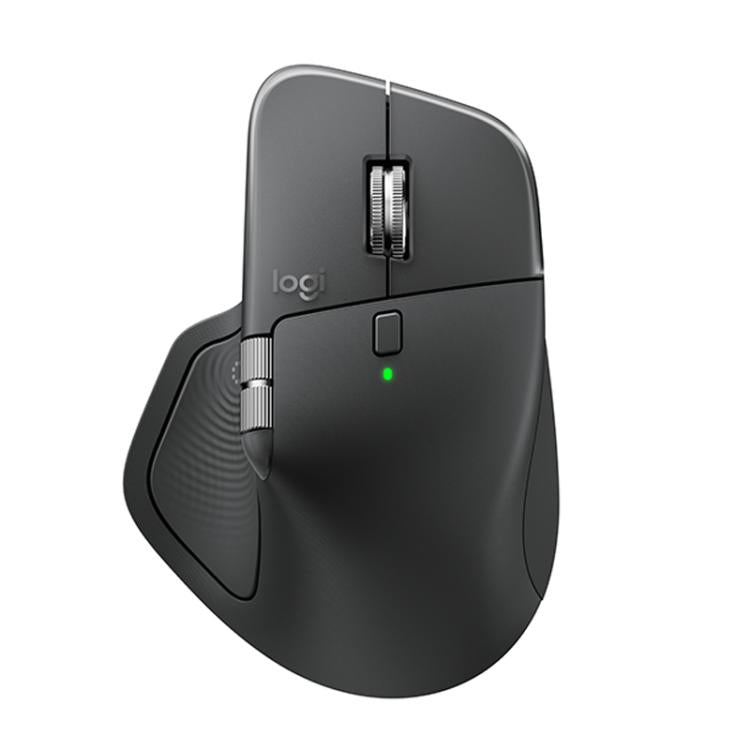
  • Choose the MX Master 4 if you want an ergonomic right-handed mouse with many programmable buttons, a thumb rest and fast scrolling for long work sessions.
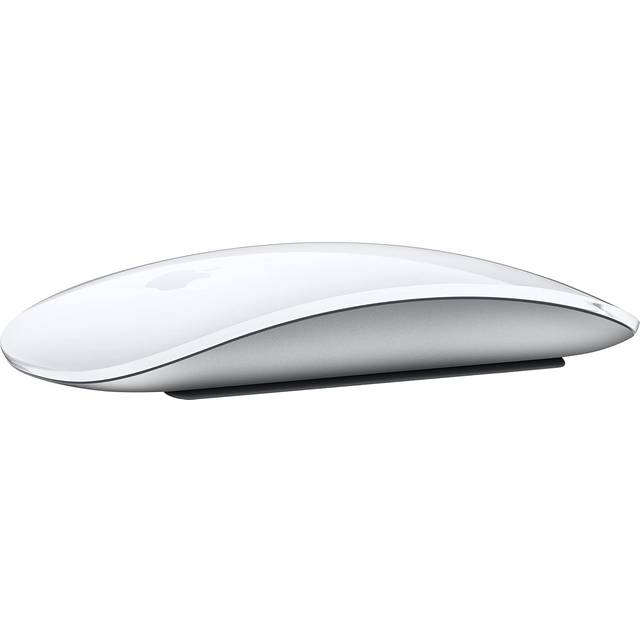
  • Choose the Magic Mouse if you want a slim, light, ambidextrous mouse that pairs instantly with a Mac and gives you swipe and scroll gestures on its surface.

Prices

  • Logitech MX Master 4: $41.00 at vipoutlet.com (last seen Nov 12)
  • Apple Magic Mouse: $46.00 at Walmart (last seen Nov 12)
  • Difference: the Logitech MX Master 4 is $5.00 cheaper than the Apple Magic Mouse at the latest prices (Nov 12)
Logitech
Logitech MX Master 4

Logitech MX Master 4

4.5(371 ratings)
$41.00at vipoutlet.comChecked Nov 12
See all prices and details
Visit vipoutlet.com
Pros
  • Comfortable for long sessions with a thumb rest and palm support
  • Fast, precise MagSpeed wheel that scrolls on glass
  • Eight programmable buttons and a thumb wheel speed up workflows
  • Quiet Click switches cut click noise
  • USB-C charging on the front lets you keep working
Cons
  • Heavy compared with most mice
  • Right-hand only
  • Can feel large for smaller hands
  • Costs more than a basic mouse
Apple
Apple Magic Mouse Multi-Touch Surface White

Apple Magic Mouse

Apple Magic Mouse Multi-Touch Surface White

4.7(136 ratings)
$46.00at WalmartChecked Nov 12
See all prices and details
Visit Walmart
Pros
  • Very light and slim
  • Multi-Touch surface handles swipes and scrolling
  • Pairs automatically with a Mac
  • Ambidextrous design
  • Smooth-gliding feet
Cons
  • Low profile gives little wrist support
  • Charging port on the bottom blocks use while charging
  • No physical side buttons or scroll wheel
  • Gesture features are limited outside macOS

What separates them

Logitech MX Master 4Apple Magic Mouse
Shape and gripSculpted right-hand design with a thumb rest and palm supportFlat, low-profile slab with no side grip
WeightAbout 5.3 ozAbout 3.5 oz
Buttons8 buttons plus a thumb wheel and gesture controlNo physical side buttons; gestures come from the touch surface
ScrollingMagSpeed electromagnetic wheel, up to 1,000 lines per second, works on glassTouch-surface scrolling with momentum, no physical wheel
HandednessRight hand onlyWorks in either hand
ChargingUSB-C port on the front, so you can use it while chargingUSB-C port on the underside, so it cannot be used while charging
Battery lifeWeeks to months per charge depending on useAbout a month or more per charge
Software and platform fitLogi Options+ works on macOS and Windows; Mac-tuned version availableDeepest gesture integration on macOS; limited use on Windows

Price history

$119.99$41.00
Nov 2Nov 24
  • Logitech MX Master 4: lowest $41.00 on Nov 12 at vipoutlet.com; $109.74 on Nov 24.
  • Apple Magic Mouse: lowest $46.00 on Nov 12 at Walmart; $59.99 on Nov 24.

Prices at every store

Logitech MX Master 4

  • vipoutlet.comNew

    In stock

    $41.00Checked Nov 12
    Visit vipoutlet.com
  • PayMore ArcadiaNew

    In stockReturn policy

    $94.99Checked Nov 14
    Visit PayMore Arcadia
  • PayMore MelbourneNew

    In stockReturn policy

    $99.99Checked Nov 14
    Visit PayMore Melbourne
  • eBayNew

    Availability unknownSold by shihasu7 (0% positive, 2 ratings)Returns: Set by the eBay seller; the eBay Money Back Guarantee covers an item that doesn't arrive or isn't as described.

    $89.99Free shippingChecked 8 h ago
    Visit eBay

Also available at

  • eBayCheck price at eBay
  • WalmartCheck price at Walmart
  • ShopSimonCheck price at ShopSimon

Store links may earn us a commission.

All 63 stores and price history →

Apple Magic Mouse

  • WalmartNew

    In stock

    $46.00Free shippingChecked Nov 12
    Visit Walmart
  • NFMNew

    In stock

    $58.99Checked Nov 12
    Visit NFM
  • StaplesNew

    In stock

    $79.00Free shippingChecked Nov 12
    Visit Staples
  • AmazonNew

    Availability unknown

    As an Amazon Associate, Deal.ai earns from qualifying purchases.

    $59.99Free shippingChecked 1 h ago
    Visit Amazon

Also available at

  • WalmartCheck price at Walmart

Store links may earn us a commission.

All 16 stores and price history →

Specs compared

SpecLogitech MX Master 4Apple Magic Mouse
ColorPale Grey, Space BlackWhite
BluetoothYesYes
TypeMouseMulti-touch
SensorLaserLaser
WirelessYesYes
Weight (oz)5.33.492
Manufacturer ColorPale GreyWhite
ConnectionUSB, Radio (RF), BluetoothBluetooth
Left or Right HandRight HandUniversal
Side ButtonsYesNo
Number Of Buttons8 Button—
Sensitivity8,000 DPI—
Show all 36 specsShow fewer specs
SpecLogitech MX Master 4Apple Magic Mouse
Scroll WheelElectromagnetic MagSpeed—
AcousticsQuiet Click switches (90% noise reduction)—
DPI8,000—
Scroll Speed1,000 lines per second—
Scroll Wheel MaterialMachined steel—
Optimised for AppleDesigned for seamless use with macOS and iPadOS.—
Coordinated DesignThe colour scheme matches the aesthetic of Appl…—
Bluetooth ConnectivitySimple and direct connection without an additio…—
Cross-PlatformDespite its Mac optimisation, it is also compat…

What reviewers say

Logitech MX Master 4

  • 3.5 / 5Google Shopping · 1,362 ratings

Rated 4.5 out of 5 from 371 ratings. Owners largely praise the comfort, the scroll wheel, battery life and customizable controls, and several call it a clear improvement over earlier models. Complaints center on size, weight and the software.

What people mention
  • ComfortPraisedOwners say the palm and thumb support makes long work sessions easier.
  • Scroll wheelPraisedThe MagSpeed wheel is called fast and precise, with a satisfying free-spin mode.
  • Multi-devicePraisedSwitching between paired computers is described as quick and reliable.
  • SizeMixedBig hands like the fit, but some find it bulky for small hands or travel.

Apple Magic Mouse

  • 4.7 / 5136 ratings

Owners rate it highly and praise the gesture surface, the automatic Mac pairing and the clean design. Many complain about the flat shape for long sessions and about having to flip the mouse over to charge it.

What people mention
  • GesturesPraisedOwners like swiping between pages and scrolling with the touch surface instead of a wheel.
  • ComfortCriticisedThe flat, low shape gives little palm support and some users feel strain in long sessions.
  • ChargingCriticisedThe port is on the underside, so the mouse must be flipped over and cannot be used while charging.
Reviews
  • 2026 Grad Gift Guide: The Best Laptops and Gear to Launch a Career - PCMag editors select and review products independently
  • Best Wireless Mouse 2026: Our top choices
  • Logitech MX Master 3S vs. MX Master 4: Should You Upgrade?
  • The Best Wireless Mice for 2026 - PCMag editors select and review products independently

Questions and answers

Which is better for all-day office work?
The MX Master 4. Its sculpted shape, thumb rest and palm support reduce strain over long sessions, and the extra buttons cut repeated keystrokes. The Magic Mouse is flatter and lighter but offers less support.
Which is better for a Mac?
The Magic Mouse integrates most deeply with macOS, with gestures and automatic pairing. The MX Master 4 also works well on Macs, and Logitech sells a Mac-tuned version, so pick it if comfort matters more than native gestures.
Can I use either mouse with Windows?
Yes. The MX Master 4 works on Windows and macOS through Logi Options+. The Magic Mouse connects over Bluetooth but its gesture features are limited outside macOS.
Which lasts longer on a charge?
The MX Master 4. It runs for weeks to months per charge depending on use. Apple rates the Magic Mouse at about a month or more.
Is the MX Master 4 worth stepping up to from the Magic Mouse?
If you get wrist or hand fatigue, want programmable buttons or need fast scrolling, yes. If you mainly browse and value a light, minimal mouse, the Magic Mouse is enough.
Does either work for left-handed users?
The Magic Mouse is ambidextrous. The MX Master 4 is right-hand only.

Ask our shopping agent

It checks today's price at every store, compares the alternatives and answers in about a minute.

Enter to send, Shift+Enter for a new line

More comparisons

  • Logitech MX Master 4 vs Logitech MX Master 3S
  • Logitech MX Master 4 vs Logitech MX Anywhere 3S
  • Logitech MX Master 3S vs Apple Magic Mouse Multi-Touch Surface White
  • Logitech Lift vs Apple Magic Mouse Multi-Touch Surface White
  • Logitech MX Master 4 vs MX Master 4 Special Edition
  • Dell MS3320W Mobile Wireless Mouse vs Apple Magic Mouse Multi-Touch Surface White
  • Logitech MX Master 4 vs Razer DeathAdder V4 Pro
  • Lenovo Go Wireless Vertical Mouse vs Apple Magic Mouse Multi-Touch Surface White

Buying guides that pick them

  • Best wireless mice
  • Best wireless mice for creative work
  • Best wireless mice for everyday use
—
DPI (dpi)8000—
USB TypeUSB-C—
No. of Buttons (pcs)8—
ErgonomicYes—
Colour NameGraphite—
Style Name4—
Quantity1-Pack—
Vertical—No
Width (")—2.248
Backlight—No
Height (")—0.85
DPI Button—No
PTFE Mouse Feet—Yes
Length (")—4.469
Suitable for Left-Handers—Yes
Pairing
Praised
It connects to a Mac quickly and automatically over Bluetooth.