StoreDeal.ai store
Shop
  • Deals
  • Deal checker
  • Black Friday
  • Buying guides
  • Brands
  • Stores
Travel
  • Flight deals
  • Hotel deals
Company
  • Research
  • Press
  • Use in AI assistants
  • Contact
  • deal.ai apps
Black Friday 2026
  • Walmart
  • Best Buy
  • Target
  • TVs
  • Laptops
  • Headphones
  • Apple
  • Gaming
  • Vacuums
  • Kitchen
  • Toys
  • Smartwatches
  • Tablets
  • Furniture
  • Mattresses
© Deal.ai Inc.·2222 Ponce de Leon Blvd, Miami, FL 33134·support@deal.ai
TermsPrivacy
Deal.ai › Compare

MSI Codex Z2 Gaming Desktop vs Dell XPS 8940 Tower Desktop

The MSI Codex Z2 is the stronger gaming machine by a wide margin. Its RTX 5070 with 12 GB of graphics memory and Ryzen 7 8700F run modern games at high settings, where the Dell's GTX 1660 SUPER and older Core i7-11700 are several generations behind. The Dell XPS 8940 counters with a cleaner, quieter white chassis, more USB and display ports, and 32 GB of DDR4 RAM out of the box. Buy the MSI for gaming and GPU-heavy work; buy the Dell for office multitasking, media, and a quieter desk.

  • Choose the MSI Codex Z2 if you want to play current games at high settings or do GPU-heavy work like video editing and 3D rendering.
  • Choose the Dell XPS 8940 if your workload is office multitasking, browsing, and media, and you value a quieter, better-connected tower.

Prices

  • MSI Codex Z2 Gaming Desktop: $899.00 at MSI (last seen Nov 16)
  • Dell XPS 8940 Tower Desktop: $714.00 at Tecdale (checked today)
  • Difference: the Dell XPS 8940 Tower Desktop is $185.00 cheaper than the MSI Codex Z2 Gaming Desktop at the latest prices (Nov 16 and Nov 17)
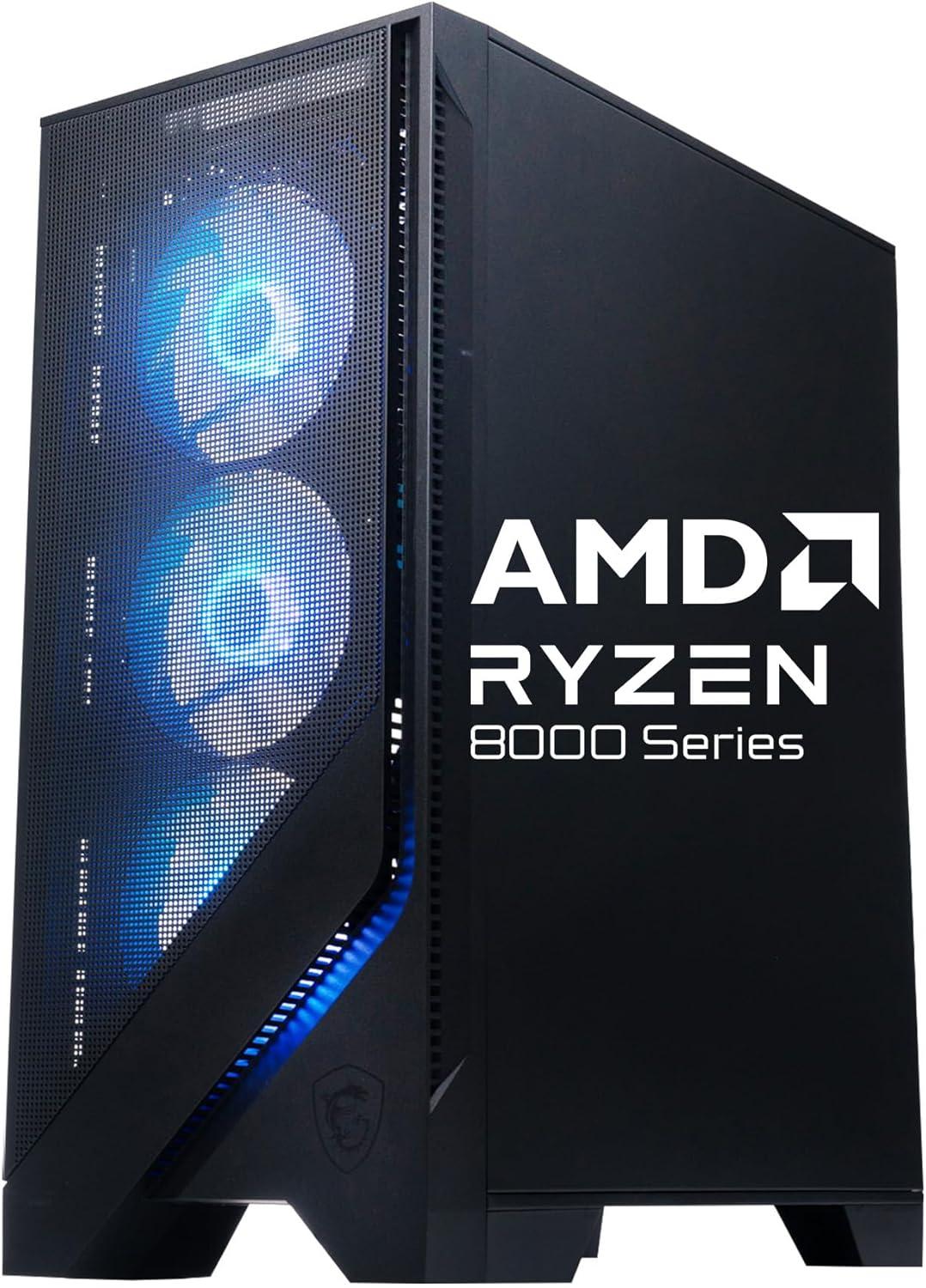
MSI
MSI Codex Z2 Gaming Desktop

MSI Codex Z2 Gaming Desktop

$899.00at MSIChecked 21 h ago
See all prices and details
Visit MSI

Store links may earn us a commission. Price via Klarna.

Pros
  • RTX 5070 with 12 GB handles modern games at high settings
  • 8-core Ryzen 7 8700F is fast for gaming and creative work
  • Wi-Fi 6E for newer routers
  • RGB lighting and four fans for airflow
  • Large SSD capacity for a games library
Cons
  • Listing conflicts on RAM (16 vs 32 GB) and storage (1 vs 2 TB)
  • Limited rear ports: USB-A and HDMI only
  • No USB-C or DisplayPort listed
  • RGB lighting is not for everyone
Dell
Dell XPS 8940 White Tower Desktop PC

Dell XPS 8940 Tower Desktop

Dell XPS 8940 White Tower Desktop PC

$714.00at TecdaleChecked 2 h ago
See all prices and details
Visit Tecdale
Pros
  • 32 GB DDR4 RAM for heavy multitasking
  • Quiet, airflow-focused white XPS chassis
  • Wide port selection including USB-C, DisplayPort and DVI
  • Room to add storage and cards later
  • Solid for office, media and light creative work
Cons
  • GTX 1660 SUPER is outdated for modern games
  • 11th-gen Core i7 is two generations behind
  • 512 GB SSD fills quickly with games
  • No current-gen ray tracing or DLSS support

What separates them

MSI Codex Z2 Gaming DesktopDell XPS 8940 Tower Desktop
Graphics cardGeForce RTX 5070 with 12 GB, current generationGeForce GTX 1660 SUPER with 6 GB, several generations old
ProcessorAMD Ryzen 7 8700F, 8 cores at 4.2 GHzIntel Core i7-11700, 8 cores, 11th gen
Memory32 GB DDR5 listed, though the listing also states 16 GB installed32 GB DDR4
Storage2 TB SSD listed, though the listing also states 1 TB512 GB NVMe SSD
PortsUSB-A and HDMIUSB-C, multiple USB 3.2 and USB 2.0, HDMI, DisplayPort, DVI, Ethernet
Cooling and noiseFour fans plus ARGB air cooler, RGB lightingAirflow-focused XPS chassis, generally quieter
Upgrade roomTower with active cooling, max 32 GB memoryExpandable XPS tower with room for storage and cards
WirelessWi-Fi 6EWi-Fi and Bluetooth

Price history

$1,699.99$899.00
Nov 3Nov 17
  • MSI Codex Z2 Gaming Desktop: lowest $899.00 on Nov 10 at MSI; $1,679.00 on Nov 17.

Prices at every store

MSI Codex Z2 Gaming Desktop

  • MSINew

    In stock

    $899.00Free shippingChecked 21 h ago
    Visit MSI
  • AntonlineNew

    In stock

    $976.37Free shippingChecked Nov 11
    Visit Antonline
  • Best BuyNew

    In stock

    $1,679.00Free shippingChecked 3 h ago
    Visit Best Buy
  • WalmartNew

    In stockSold by DemProductSalesReturns: Sold by a Walmart Marketplace seller; returns go to the seller under the seller's returns policy.

    $1,699.99Free shippingChecked 3 h ago
    Visit Walmart

Also available at

  • WalmartCheck price at Walmart

Store links may earn us a commission. Some prices via Klarna.

All 14 stores and price history →

Dell XPS 8940 Tower Desktop

  • TecdaleNew

    In stockReturn policy

    $714.00Checked 2 h ago
    Visit Tecdale
Prices and history →

Specs compared

SpecMSI Codex Z2 Gaming DesktopDell XPS 8940 Tower Desktop
GPUGeForce RTX 5070—
ConnectionsUSB-A, HDMI—
TouchscreenNo—
Optical DriveNo—
Windows VersionWindows 11 Home—
ProcessorAMD Ryzen 7—
Wi-FiYes—
Graphics Memory12 GB—
SSD Size2 TB—
ColorBlack—
Graphics Card AMDRadeon RX Vega 7—
Graphics Card NvidiaGeForce RTX 5070—
Show all 40 specsShow fewer specs
SpecMSI Codex Z2 Gaming DesktopDell XPS 8940 Tower Desktop
Hard DriveSSD—
Memory Support (max) (GB)32—
Memory TypeDDR5—
Processor Cores8—
TypeTower—
Release Year2024—
Cooling TypeActive Cooling—
Processor Model8700F—
Operating SystemWindows—
Wi-Fi StandardWi-Fi 6E (802.11ax)

What reviewers say

MSI Codex Z2 Gaming Desktop

Owner feedback on the Codex Z2 line is generally positive on gaming performance and setup, with the RTX 5070 and large SSD drawing the most praise. Complaints center on fan noise under load and limited upgrade headroom.

What people mention
  • PerformancePraisedOwners say the RTX 5070 and Ryzen 7 combo runs modern games smoothly at 1440p.
  • NoiseCriticisedSeveral owners find the fans audible during long gaming sessions.
  • StoragePraisedThe 2 TB SSD is called out as generous for a prebuilt.
  • UpgradabilityMixedBuyers note the 32 GB memory ceiling and tight case space limit future upgrades.

Questions and answers

Which is better for gaming?
The MSI Codex Z2. Its RTX 5070 and Ryzen 7 8700F are far newer and faster than the Dell's GTX 1660 SUPER and 11th-gen Core i7, so it runs modern titles at higher settings and frame rates.
Which lasts longer before needing an upgrade?
The MSI, because its GPU and CPU are current generation and will stay capable for more years. The Dell's GTX 1660 SUPER is already the limiting part for games.
Is the Dell worth stepping up to for office work?
If you mostly do office work, the Dell is a sensible pick. It has 32 GB of RAM, a quiet chassis and more ports, and you do not need a strong GPU for spreadsheets and browsing.
Does the MSI have enough ports?
It lists USB-A and HDMI only, so check your monitor and peripherals. The Dell offers USB-C, DisplayPort, DVI and more USB ports, which suits multi-monitor and legacy setups better.
Which is quieter?
The Dell XPS 8940 is generally quieter under light load. The MSI runs four fans plus an air cooler and is built for sustained gaming loads.
Can I upgrade either one later?
Both are towers with room to expand. The Dell has the clearer upgrade path for storage and add-in cards; the MSI caps memory support at 32 GB.

Ask our shopping agent

It checks today's price at every store, compares the alternatives and answers in about a minute.

Enter to send, Shift+Enter for a new line

More comparisons

  • MSI Codex Z2 Gaming Desktop vs CyberpowerPC Gamer Xtreme Gaming Tower Desktop
  • CyberpowerPC Gamer Xtreme Gaming Tower Desktop vs Dell XPS 8940 White Tower Desktop PC
  • MSI Codex Z2 Gaming Desktop vs Alienware Aurora Gaming Desktop
  • MSI Codex Z2 Gaming Desktop vs Lenovo Legion Tower 5i Desktop Computer with Microsoft 365 Personal Kit
  • MSI Codex Z2 Gaming Desktop vs Skytech Gaming O11 Vision Gaming PC
  • MSI Codex Z2 Gaming Desktop vs AQVIN AQ10 Gaming Desktop Computer Combo Tower
  • AQVIN AQ10 Gaming Desktop Computer Combo Tower vs Dell XPS 8940 White Tower Desktop PC

Buying guides that pick them

  • Best desktop computers with 32GB RAM
—
Sound CardYes—
RAM32 GB—
Graphics ProcessorNVIDIA GPU—
Hard Drive TypeSolid State Drive—
Processor Speed4.2 GHz—
Installed Memory16 GB RAM—
Drive Capacity1 TB Storage—
Supported OSWindows 11 Pro (for business), Windows 11 Home—
OS VersionWindows 11 Home—
GamingYes—
Typical UsersBusiness users, Gamers—
Internal Storage TypeM.2 NVMe Gen4—
Number Of CPU Cores8 (Processor cores)—
CPU Clock Speed5 GHz (Processor boost frequency)—
RAM TypeDDR5—
CPU CacheL2 & L3 (Processor cache type)—
Motherboard ChipsetAMD B650—
Form FactorTower—