StoreDeal.ai store
Shop
  • Deals
  • Deal checker
  • Black Friday
  • Buying guides
  • Brands
  • Stores
Travel
  • Flight deals
  • Hotel deals
Company
  • Research
  • Press
  • Use in AI assistants
  • Contact
  • deal.ai apps
Black Friday 2026
  • Walmart
  • Best Buy
  • Target
  • TVs
  • Laptops
  • Headphones
  • Apple
  • Gaming
  • Vacuums
  • Kitchen
  • Toys
  • Smartwatches
  • Tablets
  • Furniture
  • Mattresses
© Deal.ai Inc.·2222 Ponce de Leon Blvd, Miami, FL 33134·support@deal.ai
TermsPrivacy
Deal.ai › Compare

NZXT H9 Flow vs NZXT H5 Flow

Buy the H9 Flow if you want maximum cooling headroom, room for a big GPU and a clean dual-chamber build. Buy the H5 Flow if you want a compact, lighter case with a USB-C front port. The H9 Flow supports E-ATX and rear-connector boards and up to 10 fans; the H5 Flow is smaller, lighter and easier to fit on a desk. Both rate well with owners, 4.7 out of 5 for the H9 Flow and 4.6 out of 5 for the H5 Flow.

  • Choose the H9 Flow if you plan a large E-ATX or rear-connector build with up to 10 fans, a 360mm radiator and a long GPU.
  • Choose the H5 Flow if you want a smaller, lighter case with a USB-C front port and a 360mm front radiator.

Prices

  • NZXT H9 Flow: $89.99 at Micro Center (last seen Nov 16)
  • NZXT H5 Flow: $59.99 at Amazon (last seen Nov 16)
  • Difference: the NZXT H5 Flow is $30.00 cheaper than the NZXT H9 Flow at the latest prices (Nov 16)
NZXT
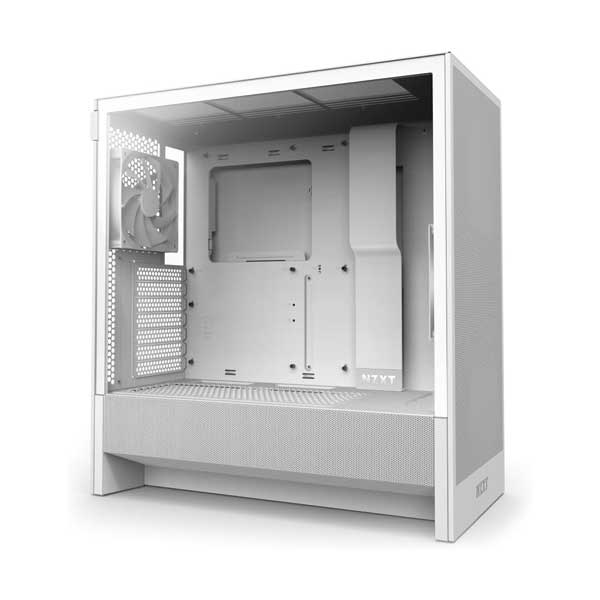
NZXT H9 Flow Dual-Chamber Mid-Tower ATX Case

NZXT H9 Flow

NZXT H9 Flow Dual-Chamber Mid-Tower ATX Case

4.7(384 ratings)
$89.99at Micro CenterChecked Nov 16
See all prices and details
Visit Micro Center
Pros
  • Dual-chamber layout keeps cables and drives out of the main airflow path.
  • Supports E-ATX and rear-connector motherboards for cleaner builds.
  • Up to 10 fans and strong radiator support.
  • Perforated steel panels and angled front-right fans push airflow.
  • Removable nylon dust filters on all intakes.
Cons
  • Large footprint at 315 mm wide and 481 mm deep.
  • Heavy at 12.6 kg.
  • No USB-C on the front panel.
  • No warranty term in the listed specs.
NZXT
NZXT H5 Flow ATX Mid-Tower Case

NZXT H5 Flow

NZXT H5 Flow ATX Mid-Tower Case

4.6(384 ratings)
$59.99at AmazonChecked Nov 16
See all prices and details
Visit Amazon

Store links may earn us a commission. As an Amazon Associate, Deal.ai earns from qualifying purchases.

Pros
  • Compact and light at 7.01 kg.
  • USB 3.2 Gen 2x2 Type-C front port.
  • Two 120mm fans included.
  • Fits a 360mm front and 240mm top radiator.
  • 2-year warranty.
Cons
  • No E-ATX support.
  • GPU limited to 365 mm without front fans or radiator.
  • Fewer fan mounts than the H9 Flow.
  • Only 23 mm of cable management clearance.
  • No liquid cooling support listed in its specs, though the front and top fit radiators.

What separates them

NZXT H9 FlowNZXT H5 Flow
Size (H x W x D)506 x 315 x 481 mm464 x 227 x 446 mm
Weight12.6 kg (27.78 lb)7.01 kg (15.46 lb)
Motherboard supportE-ATX, ATX, microATX, mini-ITX, rear-connector ATX/mATXATX, microATX, mini-ITX
Fan capacityUp to 10 fansTwo pre-installed 120mm fans; fewer mounts
Front I/O2x USB 3.2 Type-AUSB 3.2 Gen 2x2 Type-C plus USB-A
Radiator supportDual-chamber layout with broad liquid cooling support360mm front, 240mm top
GPU clearanceAmple for large GPUsUp to 365 mm without front fans or radiator
Side panelWraparound tinted tempered glassTempered glass side panel
Cable managementChannels, Velcro straps, tie points, dedicated SSD wall panelUp to 23 mm of cable clearance
WarrantyNot stated in the listed specs2 years

Price history

$119.99$59.99
Oct 31Nov 16
  • NZXT H9 Flow: lowest $89.99 on Nov 16 at Micro Center.
  • NZXT H5 Flow: lowest $59.99 on Nov 16 at Amazon.

Prices at every store

NZXT H9 Flow

  • Micro CenterNew

    In stock

    $89.99Checked Nov 16
    Visit Micro Center
  • Best BuyNew

    In stock

    $99.99Checked Nov 16
    Visit Best Buy
  • WalmartNew

    In stockSold by Newegg Inc.Returns: Sold by a Walmart Marketplace seller; returns go to the seller under the seller's returns policy.

    $105.98Free shippingChecked Nov 16
    Visit Walmart
  • Altex ElectronicsNew

    In stock

    $109.99Checked Nov 16
    Visit Altex Electronics

Also available at

  • WalmartCheck price at Walmart
  • eBayCheck price at eBay

Store links may earn us a commission.

All 13 stores and price history →

NZXT H5 Flow

  • DoorDashNew

    In stockSold by Best Buy US

    $69.99+ $5.99 shippingChecked Nov 10
    Visit DoorDash
  • AmazonNew

    Availability unknown

    As an Amazon Associate, Deal.ai earns from qualifying purchases.

    $59.99Free shippingChecked Nov 16
    Visit Amazon
  • Altex ElectronicsNew

    Availability unknown

    $69.99Checked Nov 10
    Visit Altex Electronics
  • Newegg BusinessNew

    Availability unknown

    $69.99Checked Nov 10
    Visit Newegg Business

Also available at

  • WalmartCheck price at Walmart
  • TeciSoftCheck price at TeciSoft
  • Altex Computers & ElectronicsCheck price at Altex Computers & Electronics

Store links may earn us a commission.

All 16 stores and price history →

Specs compared

SpecNZXT H9 FlowNZXT H5 Flow
MaterialSGCC steelGlass
Depth481 mm (18.9 in)446 mm (17.56 in)
Height506 mm (19.9 in)18.3
Width315 mm (12.4 in)227 mm (8.94 in)
Weight12.6 kg (27.78 lb)7.01 kg (15.46 lb)
Liquid Cooling SupportYesNo
Motherboard SupportE-ATX, ATX, microATX, miniITX, Hidden Connector…ATX, Mini-ATX
Fan Mounts 92 mm00
Chassis TypeMidi Tower (ATX)Midi Tower (ATX)
Window Side PanelYesYes
Fan ControllersNoNo
USB-AYesYes
Show all 40 specsShow fewer specs
SpecNZXT H9 FlowNZXT H5 Flow
Fan Mounts Total106
2.5" bays (pcs)62
USB-CYesYes
Microphone (3.5mm) PortYesYes
Release Year20232022
Headphone (3.5mm) PortYesYes
Graphics Card Length (max) (mm)435.0365.0
Fan Mounts 200 mm00
CPU Cooler Height (max) (mm)165.0165.0
Soundproof

What reviewers say

NZXT H9 Flow

  • 4.7 / 5384 ratings

Rated 4.7 out of 5 from 384 ratings, the H9 Flow is well liked for its looks, airflow and easy cable management. Complaints center on its size and the front I/O port selection.

What people mention
  • AirflowPraisedOwners say the perforated panels and angled intakes keep temperatures down with large GPU and radiator setups.
  • Cable managementPraisedThe dual-chamber layout, channels and Velcro straps make clean builds easy, especially with rear-connector boards.
  • SizeMixedThe roomy interior is welcome, but the case is deep, tall and heavy on a desk.
  • Front I/OCriticisedBuyers note the panel has only two USB-A ports and no USB-C.

NZXT H5 Flow

  • 4.6 / 5384 ratings

Rated 4.6 out of 5 from 384 ratings, the H5 Flow is well received for its airflow and clean look. Owners mainly note the tight cable space and clearance limits when adding front cooling.

What people mention
  • AirflowPraisedOwners say the perforated front and mesh panels keep temperatures down with the included fans.
  • Build qualityPraisedBuyers describe it as solid and easy to build in for a compact case.
  • Cable managementCriticisedThe 23mm of space behind the tray is called tight for thick cables.
  • ClearanceMixed

Questions and answers

Which is better for a high-end gaming build?
The H9 Flow. It fits E-ATX boards, long GPUs and up to 10 fans, so it handles hot components with more headroom. The H5 Flow works for most ATX builds but caps GPU length at 365 mm without front fans or a radiator.
Which has better airflow?
The H9 Flow moves more air with its dual-chamber layout, perforated panels and up to 10 fan mounts. The H5 Flow uses a perforated front and mesh top and side panels with two included 120mm fans, which is enough for mid-range builds.
Do I need a USB-C front port?
Only the H5 Flow has one, a USB 3.2 Gen 2x2 Type-C. The H9 Flow gives you two USB 3.2 Type-A ports. If you plug in modern devices often, the H5 Flow is the easier choice.
Which is easier to build in?
The H9 Flow. Its dual chamber, cable channels, Velcro straps and dedicated SSD wall panel give more room to route cables. The H5 Flow is tighter, with 23 mm of cable clearance.
Which is easier to move or fit on a desk?
The H5 Flow. It is 7.01 kg and 227 mm wide, versus 12.6 kg and 315 mm wide for the H9 Flow. Check desk depth too: 446 mm versus 481 mm.
Is the H9 Flow worth stepping up to?
Yes if you want E-ATX support, rear-connector motherboards, more radiator space or a bigger showcase build. No if a compact ATX case with a USB-C port covers your parts.
Which case has the longer warranty?
The H5 Flow lists a 2-year warranty. The H9 Flow's listed specs give no warranty term, so check with the seller before you buy.
Which case holds more drives?
The H9 Flow. It lists a 3.5-inch bay plus four 2.5-inch mounts, a dedicated SSD wall panel and up to six 2.5-inch drives. The H5 Flow lists one 3.5-inch bay and two 2.5-inch bays.
Does the H5 Flow include fans?
Yes. Two 120mm fans come in the box. The H9 Flow's listing does not state included fans, so plan your fan setup around its 10 mounts.

Ask our shopping agent

It checks today's price at every store, compares the alternatives and answers in about a minute.

Enter to send, Shift+Enter for a new line

More comparisons

  • NZXT H9 Flow Dual-Chamber Mid-Tower ATX Case vs NZXT CM-H72FW-R1 H7 Flow RGB Mid-Tower ATX Airflow Case with RGB Fans
  • NZXT H5 Flow ATX Mid-Tower Case vs NZXT CM-H72FW-R1 H7 Flow RGB Mid-Tower ATX Airflow Case with RGB Fans
  • NZXT H5 Flow ATX Mid-Tower Case vs Lian Li Lancool 207
No
No
Mesh frontNoNo
ColorBlackBlack, White
3.5" bays (pcs)20
LED LightingNoYes
PSU IntegratedNoNo
Fan Mounts 120 mm104
Dust FilterYesYes
5.25" bays (pcs)00
3.5" / 2.5" bays (pcs)01
FanYesYes
No. of USB-A (pcs)21
Fan Mounts 140 mm42
Fans Included42
PSU FormatATXATX
Expansion Slots (pcs)77
PSU Max Length (max) (mm)200.0180.0
No. of USB-C (pcs)11
sizeMid-TowerH5 Flow RGB 2024
GPU and cooler limits are fine for most builds but restrict large radiators and tall air coolers.