Shop
  • Deals
  • Deal checker
  • Black Friday
  • Buying guides
  • Brands
  • Stores
Travel
  • Flight deals
  • Hotel deals
Company
  • Research
  • Press
  • deal.ai apps
Black Friday 2026
  • Walmart
  • Best Buy
  • Target
  • TVs
  • Laptops
  • Headphones
  • Apple
  • Gaming
  • Vacuums
  • Kitchen
  • Toys
  • Smartwatches
  • Tablets
  • Furniture
  • Mattresses
© Deal.ai Inc.
TermsPrivacy
Deal.ai › Compare

Snapmaker U1 vs Bambu Lab P1S Combo with AMS

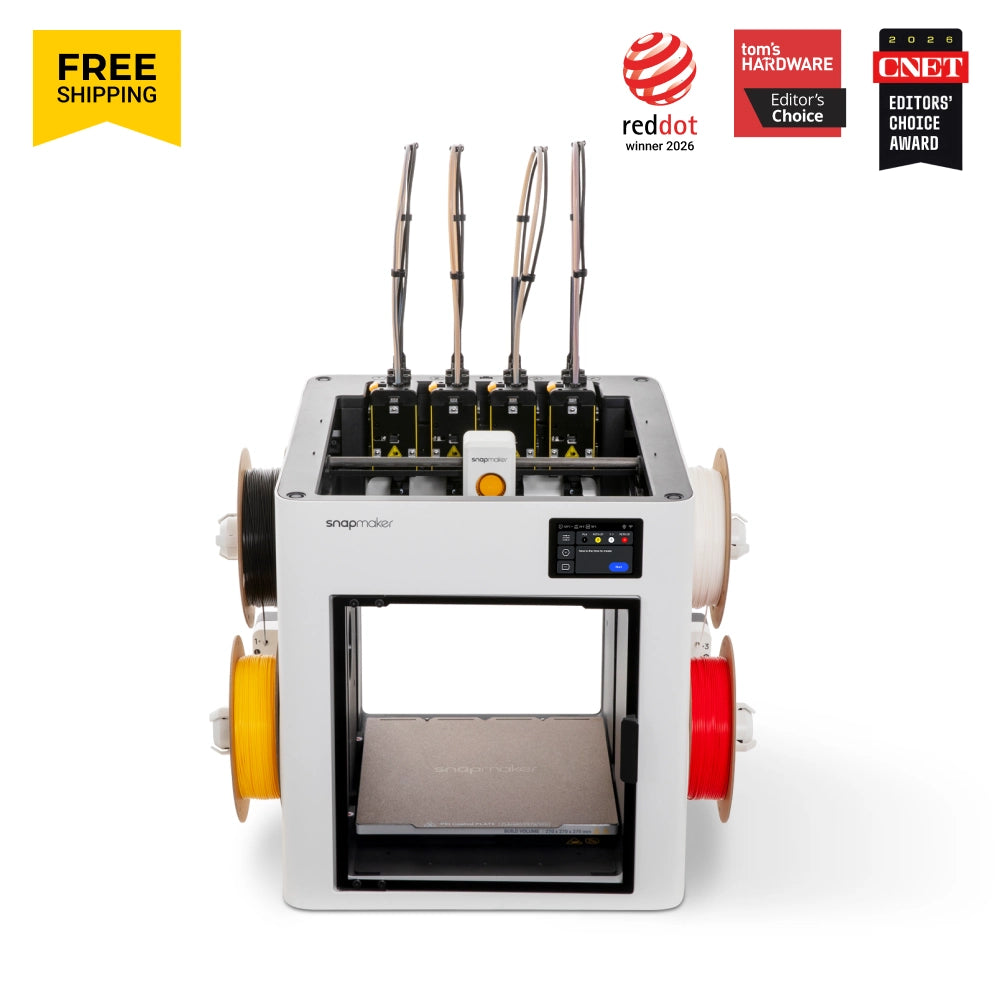
Buy the Snapmaker U1 if you print in multiple colors or materials and want to stop wasting filament on purges. Buy the Bambu Lab P1S Combo if you want a simpler, cheaper enclosed printer with a large, well-established ecosystem. The latest prices are far apart: the U1 was $699.00 on November 3, 2026, while the P1S Combo was $479.99 at Best Buy as of November 8, 2026.

Ask our shopping agent

It checks today's price at every store, compares the alternatives and answers in about a minute.

Enter to send, Shift+Enter for a new line

Snapmaker
Snapmaker U1

Snapmaker U1

4.9(252 ratings)
See all prices and details

Choose the Snapmaker U1 if you print multi-color or multi-material parts and want 5-second tool changes with up to 80% less purge waste.

Pros
  • Four toolheads handle up to four colors or materials in one print.
  • Tool changes take about 5 seconds and cut purge waste by up to 80%.
  • Open Klipper firmware with Fluidd access and OrcaSlicer support.
  • Built-in camera with AI failure detection.
  • Larger build volume than the P1S.
Cons
  • Open frame, so ABS and ASA printing is harder.
  • No native ABS or ASA support listed.
  • Costs about $220 more than the P1S Combo.
  • Advanced setup aimed at experienced users.
  • Large footprint at 584 x 499 x 730 mm.
Bambu lab
Bambu lab P1S Combo with AMS

Bambu Lab P1S Combo with AMS

Bambu lab P1S Combo with AMS

See all prices and details

Choose the Bambu Lab P1S Combo if you want an enclosed, single-nozzle printer with AMS color switching for about $220 less.

Pros
  • Enclosed chamber suits ABS and ASA.
  • AMS gives multi-color printing from one nozzle.
  • Prints up to 500 mm/s.
  • Lower price at $479.99 at Best Buy.
  • Mature Bambu Studio software and community profiles.
Cons
  • Single nozzle means purging and wasted filament on color changes.
  • Smaller 256 mm build cube.
  • Closed firmware limits tinkering.
  • No USB drive support; microSD only.
  • Slower color changes than a tool changer.

What separates them

Snapmaker U1Bambu Lab P1S Combo with AMS
ExtrudersFour independent toolheadsOne extruder with AMS filament switching
Color changeAbout 5 seconds, minimal purgeFilament retract and purge through one nozzle
Build volume270 x 270 x 270 mm256 x 256 x 256 mm
EnclosureOpen frameFully enclosed
MaterialsPLA, PETG, TPUPLA, PETG, ABS, ASA, PET, PVA
Max speed300 mm/s print, 500 mm/s travel500 mm/s
Firmware and slicerOpen Klipper, Fluidd, OrcaSlicerClosed Bambu firmware, Bambu Studio
Price$699.00 on November 3, 2026$479.99 at Best Buy as of November 8, 2026

Price history

$1,132.00$479.99
Oct 30Nov 7
  • Snapmaker U1: lowest $699.00 on Nov 3 at Snapmaker; $749.00 on Nov 7.
  • Bambu Lab P1S Combo with AMS: lowest $479.99 on Nov 7 at Best Buy.

Prices at every store

Snapmaker U1

  • AmazonNew

    Availability unknown

    As an Amazon Associate, Deal.ai earns from qualifying purchases.

    $749.00Checked Nov 6
    Visit Amazon
  • Micro CenterNew

    Availability unknown

    $749.99Checked Nov 1
    Visit Micro Center
  • CAZ 3DNew

    Availability unknown

    $780.00Checked Nov 2
    Visit CAZ 3D
  • Stay Ready To 3D PrintNew

    Availability unknown

    $849.00Checked Nov 1
    Visit Stay Ready To 3D Print

Also available at

  • consum3d.comCheck price at consum3d.com
  • HartSmart ProductsCheck price at HartSmart Products
  • Maker ShedCheck price at Maker Shed
Prices and history →

Bambu Lab P1S Combo with AMS

  • Best BuyNew

    In stock

    $479.99Free shippingChecked Nov 7
    Visit Best Buy
  • NeweggNew

    In stock

    $749.99Free shippingChecked Nov 7
    Visit Newegg

Store links may earn us a commission. Some prices via Klarna.

Prices and history →

Specs compared

SpecSnapmaker U1Bambu Lab P1S Combo with AMS
Filament Diameter1.75 mm1.75 mm
Depth499 mm15.3
Height730 mm26.9
Width584 mm15.3
Printing Material TypeTPU, PETG, PLA—
Build Volume270 mm × 270 mm × 270 mm—
Printing TechnologyFused Deposition Modeling—
Layer Resolution.25 layer height,.2 mm layers (for TPU print)—
Filament TypeTPU, PETG, PLA—
Filament ColorMulti-color—
Filament Multipack QuantityFour spools—
ConnectivityUSB Flash Drive, Wi-Fi (IEEE802.11b/g/n Standar…—
Show all 40 specsShow fewer specs
SpecSnapmaker U1Bambu Lab P1S Combo with AMS
Type3D printer—
MaterialStainless Steel (Nozzle), Carbon fiber (X-axis …—
Design HighlightsTool changer—
Weight18.2 kg—
Printing Speed500 mm/s (travel speeds)—
Software CompatibilityOrcaSlicer—
Number Of ExtrudersFour tool heads—
Display Screen TypeTouchscreen—
Built-In CameraYes—
Storage Type

What reviewers say

Snapmaker U1

  • 4.9 / 5252 ratings

Rated 4.9 out of 5 from 252 ratings, the U1 is received as an affordable four-color toolchanger that avoids the filament waste of purge-based systems. Owners report fast, clean multicolor prints with little setup and reliable toolhead pickup and parking, including on high-hour machines.

What people mention
  • Filament wastePraisedOwners say multicolor prints waste far less filament than purge-based color systems.
  • Tool changesPraisedReviewers report toolheads are picked up and parked reliably and quickly.
  • SetupPraisedBuyers describe little to no setup time before the first print.
  • Print speedPraisedOwners praise fast printing and good results for the price.

Bambu Lab P1S Combo with AMS

Owners consistently rate the P1S Combo highly for its out-of-box reliability and the AMS's multi-color convenience. Most complaints center on noise, the AMS's footprint and occasional filament jams in the AMS path.

What people mention
  • ReliabilityPraisedOwners say prints come out right with minimal tuning after the initial calibration.
  • AMSPraisedMulti-color and multi-material jobs are the main draw, and the AMS handles spool swaps automatically.
  • NoiseCriticisedThe enclosed printer is loud enough that owners move it out of living spaces.
  • EnclosurePraisedThe sealed chamber lets ABS and ASA print without warping or drafts.

Questions and answers

Which is better for multi-color printing?
The U1. Its four toolheads swap in about 5 seconds and barely purge, so colors and materials change fast with little waste. The P1S Combo's AMS feeds one nozzle, which needs purging between colors.
Which handles ABS and ASA?
The P1S Combo. It is fully enclosed and lists ABS and ASA support. The U1 is an open-frame printer listed for PLA, PETG and TPU.
Is the U1 worth the extra money?
If you print multi-color or multi-material parts often, yes. The $699.00 U1 price on November 3, 2026 buys faster color changes and less wasted filament. For single-color printing, the $479.99 P1S Combo is the better value.
Which is easier for a beginner?
The P1S Combo. Bambu Studio and the enclosed design make it more plug-and-play. The U1 is aimed at advanced users and runs open Klipper firmware.
Which has the larger build volume?
The U1, at 270 x 270 x 270 mm versus 256 x 256 x 256 mm on the P1S. The difference is small but real on large parts.
Which prints faster?
The P1S lists a higher 500 mm/s top speed. The U1 prints at up to 300 mm/s with 500 mm/s travel, but its 5-second tool changes make multi-color jobs much faster overall.

More comparisons

  • K2 Pro/ Combo 3D Printer vs Bambu lab P1S Combo with AMS

Buying guides that pick them

  • Best beginner-friendly 3D printers
USB Flash Drive, eMMC
—
Skill LevelAdvanced users—
Dimensions584mm x 499mm x 730mm—
Colors per printup to 4 different colors—
Tool change time5 seconds—
Max print speed300 mm/s—
Travel speed500 mm/s—
Acceleration20,000 mm/s²—
Nozzle diameter0.4 mm—
Max nozzle temperature300°C—
Max bed temperature100°C—
Build surfaceFlexible steel sheet with PEI—
Extruder—Single
Print Technology—FDM
Wi-Fi—Yes
USB—No
Print Speed (max) (mm/s)—500.0
Type of Memory Card—microSD
Nozzle Temperature (max) (°F)—572.0