StoreDeal.ai store
Shop
  • Deals
  • Deal checker
  • Black Friday
  • Buying guides
  • Brands
  • Stores
Travel
  • Flight deals
  • Hotel deals
Company
  • Research
  • Press
  • Use in AI assistants
  • Contact
  • deal.ai apps
Black Friday 2026
  • Walmart
  • Best Buy
  • Target
  • TVs
  • Laptops
  • Headphones
  • Apple
  • Gaming
  • Vacuums
  • Kitchen
  • Toys
  • Smartwatches
  • Tablets
  • Furniture
  • Mattresses
© Deal.ai Inc.·2222 Ponce de Leon Blvd, Miami, FL 33134·support@deal.ai
TermsPrivacy
Deal.ai › Compare

Valve Steam Deck Docking Station vs WAVLINK UHP3426 Steam Deck Dock

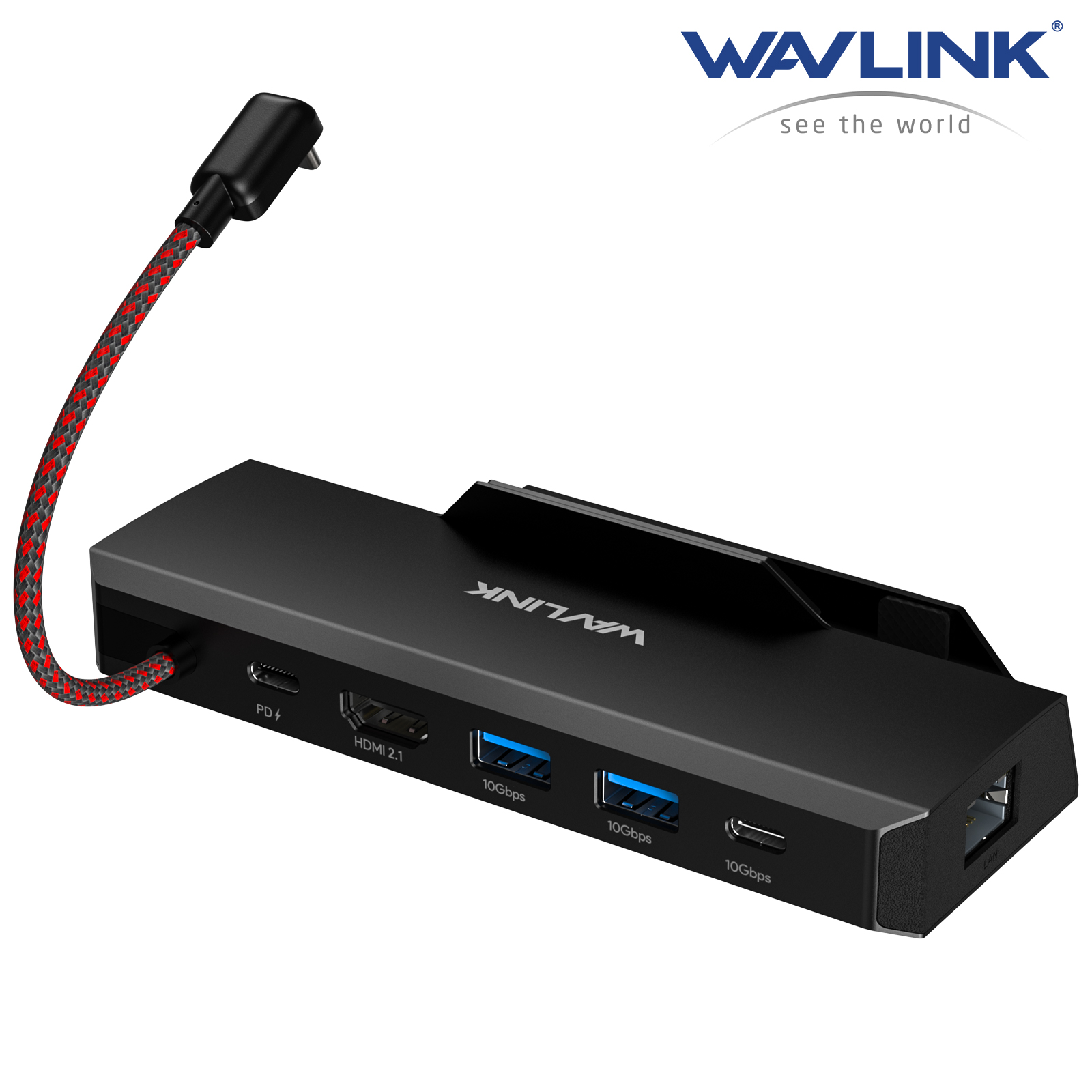
Buy the Valve Steam Deck Docking Station for a Steam Deck you want to run on a TV or monitor with Ethernet, FreeSync and a bundled power supply. It is the safer match: the captive 90° cable, three USB-A ports, DisplayPort 1.4 and HDMI 2.0 are documented, and owners report it just works with the Deck. The WAVLINK UHP3426 is a lighter 6-in-1 alternative, but its listing gives no port list, no resolution figures and no charger, so you are buying on faith.

  • Choose the Valve Steam Deck Docking Station if you want a dock built for the Deck with Ethernet, FreeSync, dual display output and a power supply in the box.
  • Choose the WAVLINK UHP3426 if you want a lighter, more compact 6-in-1 hub and you can confirm its ports and video limits before buying.

Prices

  • Valve Steam Deck Docking Station: $39.99 at Newegg (checked today)
  • WAVLINK UHP3426 Steam Deck Dock: $29.99 at Walmart (checked today)
  • Difference: the WAVLINK UHP3426 Steam Deck Dock is $10.00 cheaper than the Valve Steam Deck Docking Station today
Valve
Steam Deck Docking Station

Valve Steam Deck Docking Station

Steam Deck Docking Station

$39.99at NeweggChecked 3 h ago
See all prices and details
Visit Newegg

Store links may earn us a commission. Price via Klarna.

Pros
  • Official Valve dock, built for the Steam Deck
  • Three USB-A ports plus Gigabit Ethernet
  • DisplayPort and HDMI, up to 4K 60Hz or 1440p 120Hz
  • FreeSync and MST multi-monitor support
  • Power supply included, so no extra charger needed
Cons
  • Only one USB-C port, used for power
  • No SD card reader or audio jack
  • Costs more than generic hubs
WAVLINK
WAVLINK Steam Deck/ROG Dock

WAVLINK UHP3426 Steam Deck Dock

WAVLINK Steam Deck/ROG Dock

$29.99at WalmartChecked 3 h ago
See all prices and details
Visit Walmart
Pros
  • Lighter and smaller than the Valve dock
  • 6-in-1 design covers the basics
  • Marketed for both Steam Deck and ROG Ally
Cons
  • Port list and video limits are not documented
  • No power supply in the box
  • No stated Ethernet, FreeSync or MST support

What separates them

Valve Steam Deck Docking StationWAVLINK UHP3426 Steam Deck Dock
Port list3x USB-A 3.1 Gen1, Gigabit Ethernet, DisplayPort 1.4, HDMI 2.06-in-1, but the listing does not name the ports
Max output4K 60Hz or 1440p 120Hz, with FreeSync VRRNot stated
Multi-monitorMST support for more than one screenNot stated
Power supplyIncluded PSU with 1.5m cable and USB-C PD passthroughNot included per the listing
Cable6-inch captive USB-C cable with low-profile 90° connectorNot stated
WeightAbout 120 gAbout 146 g (0.32 lb)
Device fitMade by Valve for the Steam DeckMarketed for Steam Deck and ROG Ally

Price history

  • Valve Steam Deck Docking Station: lowest $39.99 on Nov 28 at Newegg.
  • WAVLINK UHP3426 Steam Deck Dock: lowest $23.99 on Nov 28 at Amazon.

Prices at every store

Valve Steam Deck Docking Station

  • NeweggNew

    In stock

    $39.99Free shippingChecked 3 h ago
    Visit Newegg

Store links may earn us a commission. Price via Klarna.

Prices and history →

WAVLINK UHP3426 Steam Deck Dock

  • WalmartNew

    In stockSold by WavlinkDirectReturns: Sold by a Walmart Marketplace seller; returns go to the seller under the seller's returns policy.

    $29.99Free shippingChecked 3 h ago
    Visit Walmart

Also available at

  • AmazonCheck price at Amazon
  • WalmartCheck price at Walmart

Store links may earn us a commission.

Prices and history →

Specs compared

SpecValve Steam Deck Docking StationWAVLINK UHP3426 Steam Deck Dock
Size117mm x 29mm x 50.5mm146g
WeightApprox. 120 grams0.32 lb
USB-A ports3 x USB-A 3.1 Gen1 Ports—
NetworkingGigabit Ethernet—
DisplayPortDisplayPort 1.4—
HDMIHDMI 2.0—
Display outputSupports up to 4k 60hz, or 1440p 120hz—
Multi-monitorMST (Multi-Stream Transport) enabling multi-mon…—
Variable refreshFreeSync (VRR) support—
Power inputUSB-C power delivery passthrough input—
Deck cable6" USB-C captive cable with low profile 90° con…—
Included chargerIncluded PSU with 1.5m long cable—
Show all 18 specsShow fewer specs
SpecValve Steam Deck Docking StationWAVLINK UHP3426 Steam Deck Dock
Brand—WAVLINK
Color—Black
Model—UHP3426
Accessories—6-in-1 Steam Deck/ROG Dock, Quick Start Guide, …
Piece count—1
Retail packaging—Set

What reviewers say

Valve Steam Deck Docking Station

Owners generally rate the official dock as a solid, no-surprise way to put a Steam Deck on a big screen. They like the stable Ethernet, the extra USB ports and the fact that it just works with Valve's software. Complaints center on the limited port mix and the short cable.

What people mention
  • SetupPraisedOwners say it connects and outputs to a display with little fuss.
  • NetworkingPraisedThe Gigabit Ethernet port is called out as stable for downloads and online play.
  • Port selectionMixedThree USB-A ports are useful, but some want USB-C data or a card reader.
  • Cable lengthCriticisedThe short captive cable is said to limit where the dock can sit.

Questions and answers

Which is better for playing on a TV?
The Valve dock. It states 4K 60Hz over HDMI 2.0 and 1440p 120Hz, plus FreeSync, and includes its own power supply. The WAVLINK listing gives no resolution or refresh figures.
Does the WAVLINK dock include a charger?
No. Its listed contents are the dock, a quick start guide and a safety sheet. The Valve dock ships with a PSU and a 1.5m cable.
Which has more ports?
The Valve dock documents three USB-A 3.1 Gen1 ports, Gigabit Ethernet, DisplayPort 1.4 and HDMI 2.0. WAVLINK calls its unit 6-in-1 but does not name the ports.
Can either run two monitors?
The Valve dock supports MST for multi-monitor setups. WAVLINK does not state multi-monitor support, so assume one screen unless confirmed.
Is the WAVLINK dock worth stepping up to?
It is not a step up on features; it is a lighter, simpler hub. Step up to the Valve dock if you need Ethernet, FreeSync or a second display.
Which is more portable?
The WAVLINK is slightly lighter at about 146 g versus about 120 g for the Valve dock, but the Valve dock's short captive 90° cable packs easily too.

Ask our shopping agent

It checks today's price at every store, compares the alternatives and answers in about a minute.

Enter to send, Shift+Enter for a new line

More comparisons

  • Anker 575 USB-C Docking Station (13-in-1) vs WAVLINK Steam Deck/ROG Dock
  • Acer 9-in-1 USB-C Docking Station for Dual Monitors vs Steam Deck Docking Station
  • Acer 9-in-1 USB-C Docking Station for Dual Monitors vs WAVLINK Steam Deck/ROG Dock

Buying guides that pick them

  • Best USB-C docks for handheld gaming PCs