StoreDeal.ai store
Shop
  • Deals
  • Deal checker
  • Black Friday
  • Buying guides
  • Brands
  • Stores
Travel
  • Flight deals
  • Hotel deals
Company
  • Research
  • Press
  • Use in AI assistants
  • Contact
  • deal.ai apps
Black Friday 2026
  • Walmart
  • Best Buy
  • Target
  • TVs
  • Laptops
  • Headphones
  • Apple
  • Gaming
  • Vacuums
  • Kitchen
  • Toys
  • Smartwatches
  • Tablets
  • Furniture
  • Mattresses
© Deal.ai Inc.·2222 Ponce de Leon Blvd, Miami, FL 33134·support@deal.ai
TermsPrivacy
Deal.ai › Compare

Vector 2.0 Robot Companion vs Loona Deskmate

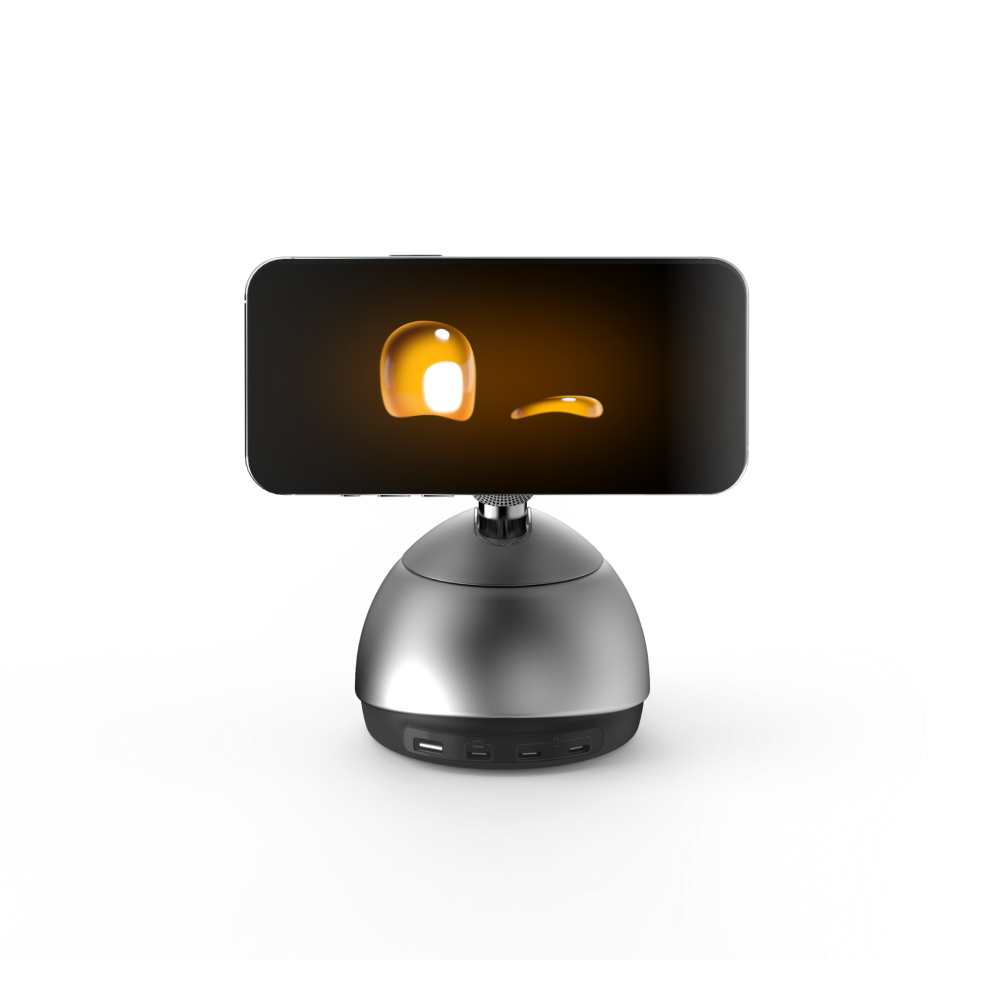
Buy the Vector 2.0 if you want a self-contained, moving robot companion the whole family can use without a phone. Buy the Loona Deskmate if you work at a desk with an iPhone 12 or newer and want a moving AI screen plus a 165W charging hub. The Vector 2.0 is the more capable companion on its own: it drives, maps rooms, recognizes faces, and adds a 2MP camera plus a user-replaceable battery with up to 30% longer runtime. The Loona Deskmate is the better desk tool, with 3-DoF motion, 360-degree auto-tracking, and a 165W GaN hub, but it is inert without a docked iPhone.

  • Choose the Vector 2.0 if you want a palm-sized robot that drives around on its own, recognizes faces, and works without a phone.
  • Choose the Loona Deskmate if you have an iPhone 12 or newer and want a desk companion that doubles as a 165W GaN charger for your laptop and accessories.

Prices

  • Vector 2.0 Robot Companion: $249.99 at ANKI (last seen Nov 20)
  • Loona Deskmate: $239.00 at Best Buy (last seen Nov 13)
  • Difference: the Loona Deskmate is $10.99 cheaper than the Vector 2.0 Robot Companion at the latest prices (Nov 13 and Nov 20)
Vector
Vector 2.0 AI ChatGPT connected Robot Companion

Vector 2.0 Robot Companion

Vector 2.0 AI ChatGPT connected Robot Companion

$249.99at ANKIChecked Nov 20
See all prices and details
Visit ANKI
Pros
  • Works without a phone or app subscription to a handset
  • Drives around, maps rooms, and recognizes faces on its own
  • Alexa built-in plus ChatGPT-connected chat
  • Palm-sized and light at 5.6 ounces
  • 2MP camera adds facial recognition, with pet recognition and smile detection planned
  • Battery is replaceable at home and runs up to 30% longer
Cons
  • Needs Wi-Fi and the Alexa setup to do much
  • Small treaded base limits it to flat floors
  • No charging hub for other devices
  • Camera on a moving home robot raises privacy questions
  • Voice commands need a paid subscription after the first 28 days
Loona
Loona Deskmate

Loona Deskmate

$239.00at Best BuyChecked Nov 13
See all prices and details
Visit Best Buy
Pros
  • 165W GaN hub charges a laptop at up to 140W on one USB-C port
  • 3-DoF motion with 360-degree auto-tracking looks lively on a desk
  • Turns your iPhone into a glanceable second screen for meetings and focus
  • 15W Qi2 magnetic charging with active cooling
  • Small footprint at 2 ounces and 4.45 inches
Cons
  • Useless without a docked iPhone 12 or newer
  • Fixed to the desk; it cannot follow you around
  • 1-year limited warranty only

What separates them

Vector 2.0 Robot CompanionLoona Deskmate
What it isStandalone robot with treads, camera, and sensorsMotorized desk stand that uses your docked iPhone as its screen and camera
Phone requiredNo; works on its own over Wi-FiYes; iPhone 12 or newer on iOS 16+ with the Loona app
MovementDrives on treaded wheels around a room3-DoF head, neck, and torso motion, 360 degrees, on a fixed base
Charging hubCharging station for the robot only165W GaN hub: 3 USB-C (140W single port) plus 1 USB-A, and 15W Qi2 wireless charging
Voice assistantAlexa built-in plus ChatGPT-connected conversationAI assistant through the Loona app on your iPhone
Best settingFloor and family rooms; kids and whole familyA desk; focus tracking, meeting reminders, calendar cards
Weight and size5.6 ounces, palm-sized2 ounces, 4.45 inches tall, holds a phone
Camera and battery2MP camera for facial recognition, with planned pet recognition and smile detection; battery compartment redesigned for at-home replacement, up to 30% longer ruUses the iPhone camera; no battery of its own, runs from the charger
Voice command subscriptionRequires a paid subscription for voice commands, with the first 28 days freeNo subscription; the Loona app is free
WarrantyNo warranty figure published; check the store page1-year limited parts and labor

Price history

$299.00$239.00
Nov 6Nov 13
  • Vector 2.0 Robot Companion: lowest $249.99 on Nov 6 at Amazon; $249.99 on Nov 10.
  • Loona Deskmate: lowest $239.00 on Nov 10 at Best Buy; $239.00 on Nov 13.

Prices at every store

Vector 2.0 Robot Companion

  • ANKINew

    In stockReturn policy

    $249.99Checked Nov 20
    Visit ANKI
  • AmazonNew

    Availability unknown

    As an Amazon Associate, Deal.ai earns from qualifying purchases.

    $249.99Free shippingChecked Nov 10
    Visit Amazon
  • eBayNew

    Availability unknownSold by lifestylebyfocus

    $299.00Free shippingChecked Nov 8
    Visit eBay
  • RobotShop.comNew

    Availability unknown

    $265.98+ $52.00 shippingChecked Nov 8
    Visit RobotShop.com

Store links may earn us a commission.

Prices and history →

Loona Deskmate

  • Best BuyNew

    In stock

    $239.00Free shippingChecked Nov 13
    Visit Best Buy
  • AmazonNew

    Availability unknown

    As an Amazon Associate, Deal.ai earns from qualifying purchases.

    $299.00Free shippingChecked Nov 13
    Visit Amazon
  • WalmartNew

    Out of stockSold by Smart Lifestyle Brands

    $299.00Free shippingChecked Nov 13
    Visit Walmart
  • tm:rwNew

    In stock

    $349.00+ $15.00 shippingChecked Nov 9
    Visit tm:rw

Store links may earn us a commission.

All 3 stores and price history →

Specs compared

SpecVector 2.0 Robot CompanionLoona Deskmate
Product TypeRobotStand
ColorBlackMist Silver
Recommended AgeWhole family, Kids—
Educational FocusCoding/Programming—
Batteries RequiredYes—
Included ComponentsInteractive cube, Charging station—
Sensory StimulationTouch, Sight, Sound—
SizeSmall, Palm-sized—
ThemeRobots—
Genre ThemeSci-Fi—
DimensionsPalm-sized—
Connectivity TypeWi-Fi—
Show all 40 specsShow fewer specs
SpecVector 2.0 Robot CompanionLoona Deskmate
Typical UsersWhole family, Kids—
Weight5.6 ounces—
Included AccessoriesInteractive cube, Charging station—
GenreScience Fiction—
Lighting TypeLED (display)—
Drive TypeTreaded wheels, Tracked base—
Quantity1—
Release Date2022—
Audio FeaturesAlexa built-in, Voice commands—
Total degrees of freedom

What reviewers say

Vector 2.0 Robot Companion

Owners of the original Vector praised its expressive personality and autonomous behavior, and early impressions of the 2.0 focus on the improved camera and battery access. The subscription for voice commands is the most common complaint.

What people mention
  • PersonalityPraisedOwners say its LED eyes and reactions make it feel like a pet rather than a gadget.
  • SubscriptionCriticisedVoice commands stop working unless you pay after the 28-day free period.
  • BatteryMixedThe new compartment makes replacement easy and runtime is longer, but it still needs frequent charging.
  • CameraPraisedThe 2MP sensor is reported to recognize faces more reliably than the original.

Questions and answers

Which is better for kids?
The Vector 2.0. It is a standalone robot that drives around, reacts to faces, and needs no phone, so a child can use it directly. The Loona Deskmate needs an iPhone 12 or newer docked in it, which you probably do not want a child handling.
Which is better for a home office desk?
The Loona Deskmate. It shows meeting reminders and calendar cards on your iPhone screen, tracks your focus, and charges a laptop at up to 140W through one USB-C port. The Vector is more of a floor companion.
Do I need an iPhone for the Loona Deskmate?
Yes. It requires an iPhone 12 or newer on iOS 16+ with the free Loona app, and the phone supplies the screen and camera. The Vector needs no phone.
Which one can answer questions out loud?
The Vector 2.0, through Alexa built-in and its ChatGPT connection. The Loona Deskmate's assistant runs through the Loona app on your iPhone.
Which lasts longer?
Neither has a published lifespan. The Loona Deskmate carries a 1-year limited parts and labor warranty; the Vector listing gives no warranty figure, so check the store page before buying.
Is the Loona Deskmate worth stepping up to?
Only if you will use the charging hub and desk features. The extra buys 165W charging and a moving desk screen, not a free-roaming robot.
Does the Vector 2.0 need a subscription?
Yes for voice commands. ANKI's product page says voice commands require a paid subscription, with the first 28 days free. The Loona Deskmate's app is free.
Can the Loona Deskmate charge a MacBook?
Yes, through its USB-C ports, at up to 140W on a single port. That covers most MacBook models, and the 165W total lets you charge other devices at the same time.

Ask our shopping agent

It checks today's price at every store, compares the alternatives and answers in about a minute.

Enter to send, Shift+Enter for a new line

More comparisons

  • Vector 2.0 AI ChatGPT connected Robot Companion vs Eilik
  • Vector 2.0 AI ChatGPT connected Robot Companion vs Moflin
  • Vector 2.0 AI ChatGPT connected Robot Companion vs EMO — AI Desktop Pet
  • Eilik vs Loona Deskmate
—
3 DOF
Actuator type—3 outer-rotor brushless DC servomotors
Charger—180 W GaN charger
Charging power—165 W GaN power delivery
Max power—140 W single port; 180 W multi-port
Wireless charging—15 W Qi2 magnetic wireless charging
Communication—Bluetooth 5.3 (BLE & BT dual-mode)
External ports—3 × USB-C + 1 × USB-A
Smartphone requirement—iPhone 12 or newer running iOS 16+
Response time—~0.5s
USB-C ports—3x USB Type-C ports
USB-A ports—1x USB Type-A port
Brand—Loona
Model Number—KY06LNDM01 Mist Silver
Powered—true
Charging Port(s)—1 x USB-A, 1 x USB-C
Number of Units Per Package—1
Power Source—USB-C
Product Height—4.45 inches