StoreDeal.ai store
Shop
  • Deals
  • Deal checker
  • Black Friday
  • Buying guides
  • Brands
  • Stores
Travel
  • Flight deals
  • Hotel deals
Company
  • Research
  • Press
  • Use in AI assistants
  • Contact
  • deal.ai apps
Black Friday 2026
  • Walmart
  • Best Buy
  • Target
  • TVs
  • Laptops
  • Headphones
  • Apple
  • Gaming
  • Vacuums
  • Kitchen
  • Toys
  • Smartwatches
  • Tablets
  • Furniture
  • Mattresses
© Deal.ai Inc.·2222 Ponce de Leon Blvd, Miami, FL 33134·support@deal.ai
TermsPrivacy
Deal.ai › Compare

xTool F1 Ultra Laser Engraver vs AtomStack Swift Laser Engraver

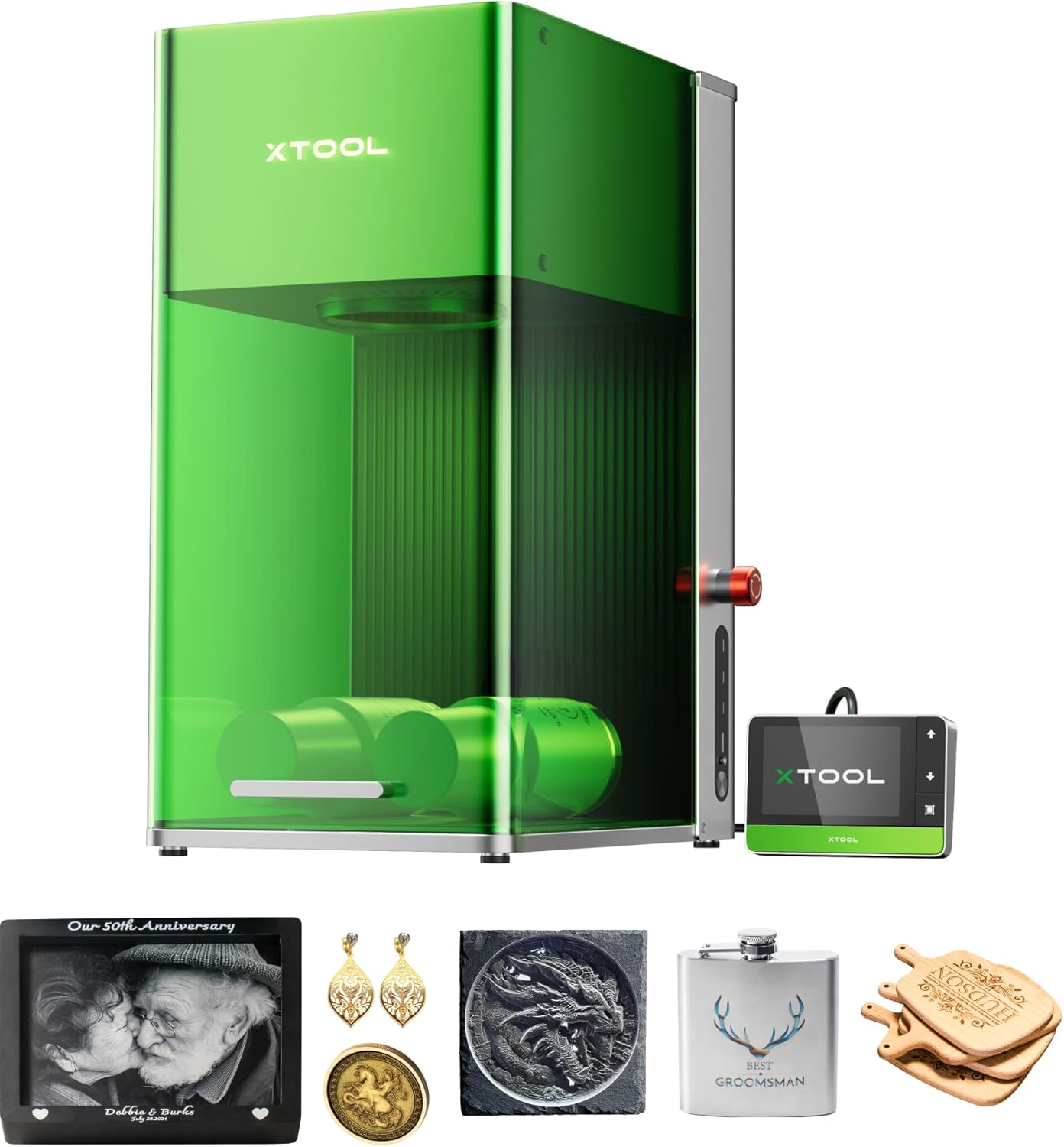
Buy the xTool F1 Ultra if you need to engrave metal, jewelry, or run small-batch production; its 20W fiber laser and 16MP camera do work no diode machine can match. Buy the AtomStack Swift if you are starting out on wood, leather, and acrylic and want to spend far less. The F1 Ultra is a much bigger investment than the Swift, so weigh what each offers against your work before deciding. The F1 Ultra is a dual-source 20W fiber plus 20W diode machine in an enclosed steel frame; the Swift is a 2.8 kg open-frame kit rated 4.6 out of 5 from 208 ratings, and owners call it surprisingly capable for a budget laser while noting settings take trial and error.

  • Choose the xTool F1 Ultra if you need fiber-laser metal marking, deep jewelry engraving, or camera-guided batch production.
  • Choose the AtomStack Swift if you are a beginner engraving wood, leather, and acrylic on a tight budget.

Prices

  • xTool F1 Ultra Laser Engraver: $2,184.05 at Amazon (checked today)
  • AtomStack Swift Laser Engraver: $75.99 at AtomStack (last seen Nov 20)
  • Difference: the AtomStack Swift Laser Engraver is $2,108.06 cheaper than the xTool F1 Ultra Laser Engraver at the latest prices (Nov 20 and Nov 23)
xTool
xTool F1 Ultra 20W Fiber & Diode Laser Engraver

xTool F1 Ultra Laser Engraver

xTool F1 Ultra 20W Fiber & Diode Laser Engraver

1(1 rating)
$2,184.05at AmazonChecked 5 h ago
See all prices and details
Visit Amazon

Store links may earn us a commission. As an Amazon Associate, Deal.ai earns from qualifying purchases.

Pros
  • Fiber laser handles steel, aluminum, and jewelry that diode lasers cannot
  • 16MP camera makes placement and repeat jobs fast
  • 10,000 mm/s top speed suits small-batch production
  • Enclosed 145 mm-deep work area with Wi-Fi, USB, and IP control
  • 7G onboard storage and 16MP camera keep jobs on the machine
Cons
  • Smaller 220 × 220 mm bed than the Swift
  • Heavy and bulky; needs bench space and power headroom
  • A much bigger investment than a diode-only machine
AtomStack
AtomStack Swift Laser Engraver

AtomStack Swift Laser Engraver

4.6(208 ratings)
$75.99at AtomStackChecked Nov 20
See all prices and details
Visit AtomStack
Pros
  • 300 × 300 mm bed is larger than the F1 Ultra's
  • Assembles in about 5 minutes and weighs 2.8 kg
  • Works with LightBurn and takes air assist, rotary, and extension kit
  • Low entry cost for a first laser
  • Rated 4.6 out of 5 from 208 ratings, with owners calling it surprisingly capable for a budget laser
Cons
  • Diode laser will not mark bare metal or do deep jewelry engraving
  • No camera; alignment is manual
  • 7W mode is slow for cutting; settings need trial and error

What separates them

xTool F1 Ultra Laser EngraverAtomStack Swift Laser Engraver
Laser source20W fiber plus 20W diode7W or 12W diode only
Metals and jewelryFiber laser marks and deep-engraves metalBarely marks metal; no fiber source
Working area220 × 220 mm300 × 300 mm
Spot size0.03 × 0.03 mm fiber, 0.08 × 0.1 mm diode0.08 × 0.04 mm
Max speed10,000 mm/sNot published
Camera and automation16MP camera, Auto Streamline with conveyor supportNo camera; manual positioning
SetupEnclosed unit, heavier and largerModular, assembles in about 5 minutes, 2.8 kg
SoftwarexTool software, LightBurn supportLightBurn and AtomStack Studio
Work depth145 mm max material thickness with 220 × 220 × 145 mm work areaOpen-frame flat-bed design; no enclosed depth
ExpandabilityConveyor support for long production runsExtension kit, air assist, rotary roller, and an upcoming infrared laser module

Price history

$2,420.00$75.99
Nov 2Nov 23
  • xTool F1 Ultra Laser Engraver: lowest $2,184.05 on Nov 22 at Amazon; $2,184.05 on Nov 23.
  • AtomStack Swift Laser Engraver: lowest $75.99 on Nov 2 at AtomStack; $75.99 on Nov 20.

Prices at every store

xTool F1 Ultra Laser Engraver

  • WalmartNew

    In stock

    $2,299.00Checked 5 h ago
    Visit Walmart
  • MakerFloNew

    In stock

    $3,999.00Free shippingChecked 5 h ago
    Visit MakerFlo
  • AmazonNew

    Availability unknown

    As an Amazon Associate, Deal.ai earns from qualifying purchases.

    $2,184.05Free shippingChecked 5 h ago
    Visit Amazon
  • Micro CenterNew

    Availability unknown

    $2,849.99Checked Nov 2
    Visit Micro Center

Also available at

  • WalmartCheck price at Walmart

Store links may earn us a commission.

All 3 stores and price history →

AtomStack Swift Laser Engraver

  • AliExpressNew

    In stockShips from abroad · duties may apply

    $126.89Free shippingChecked Nov 20
    Visit AliExpress
  • WoodArtSupplyNew

    In stock

    $129.99Free shippingChecked Nov 20
    Visit WoodArtSupply
  • AtomStackNew

    Availability unknown

    $75.99Free shippingChecked Nov 20
    Visit AtomStack
  • AmazonNew

    Availability unknown

    As an Amazon Associate, Deal.ai earns from qualifying purchases.

    $134.99Free shippingChecked Nov 20
    Visit Amazon

Also available at

  • eBayCheck price at eBay

Store links may earn us a commission.

All 7 stores and price history →

Specs compared

SpecxTool F1 Ultra Laser EngraverAtomStack Swift Laser Engraver
Working area220 mm × 220 mm × 145 mm300 × 300 mm
Compatible MaterialPaper, Fabric, Leather, Plastic, Metal—
ColorBlack, Blue—
Size493 mm × 253 mm × 373 mm—
Max processing speed10,000 mm/s—
Input power24 V – 25 V max. 10 A—
Connection modeWi-Fi, USB, IP—
Diode spot size0.08mm * 0.1mm—
Fiber spot size0.03mm*0.03mm—
Max material thickness145mm—
Storage memory7G—
Camera16MP Smart Camera—
Show all 35 specsShow fewer specs
SpecxTool F1 Ultra Laser EngraverAtomStack Swift Laser Engraver
actual_colorF1 Ultra Basic—
Dual laserfiber for metal, diode for wood, acrylic, and l…—
Engraver typeEngravers—
Rec. useMetal—
FeaturesAdjustable Speed—
Power typeCorded Electric—
BrandXTOOL—
Assembled product height19 in—
MaterialSteel—
Product line

What reviewers say

AtomStack Swift Laser Engraver

  • 4.6 / 5208 ratings

Buyers rate it 4.6 out of 5 across 208 ratings and call it the most affordable way into laser engraving. Many say it is surprisingly capable for a budget machine and near-professional on small projects. The common complaint is that dialing in settings takes practice.

What people mention
  • ValuePraisedOwners call it the most affordable way to start laser engraving.
  • ResultsPraisedBuyers say it delivers near-professional results for a budget laser.
  • SetupPraisedThe modular design goes together in about five minutes.
  • SettingsCriticisedGetting good results takes learning and trial-and-error with settings.

Questions and answers

Can the AtomStack Swift engrave metal?
Only with coatings or marking spray on some stainless steel. It has no fiber laser, so it cannot deep-engrave or mark bare metal like the F1 Ultra.
Which has the larger work area?
The Swift, at 300 × 300 mm, versus 220 × 220 mm on the F1 Ultra. The F1 Ultra adds 145 mm of depth and conveyor support for long runs.
Which is easier for a beginner?
The Swift: it assembles in about 5 minutes and runs on LightBurn. The F1 Ultra is more capable but has more settings and a steeper learning curve.
Do both work with LightBurn?
The Swift lists LightBurn and AtomStack Studio. The F1 Ultra runs xTool's software and also supports LightBurn.
Which is faster?
The F1 Ultra, at up to 10,000 mm/s with a 20W diode and fiber source. The Swift's 7W or 12W diode is much slower, especially on cutting.
Is the F1 Ultra worth stepping up to over the Swift?
Yes if you sell metal or jewelry work or need camera-guided batches. For hobby wood and leather projects, the Swift covers most of it for far less.
How thick a material can each handle?
The F1 Ultra takes material up to 145 mm thick inside its enclosure. The Swift is an open-frame machine, so thickness is limited by the bed and laser clearance rather than a stated figure.
Which is better for jewelry making?
The F1 Ultra. Its 0.03 × 0.03 mm fiber spot deep-engraves and embosses metal for jewelry. The Swift's diode laser is suited to wood, leather, and acrylic pieces instead.

Ask our shopping agent

It checks today's price at every store, compares the alternatives and answers in about a minute.

Enter to send, Shift+Enter for a new line

More comparisons

  • Acmer S1 3.5W Laser Engraver for Wood & Metal vs xTool F1 Ultra 20W Fiber & Diode Laser Engraver
  • Acmer S1 3.5W Laser Engraver for Wood & Metal vs AtomStack Swift Laser Engraver
xTool F1 Ultra
—
Has nrtl listing certificationY—
Manufacturer‎Makeblock Co., Ltd.—
ModelF1 Ultra—
Color categoryGray—
Laser power—switchable 7W / 12W
Laser spot—0.08 × 0.04 mm
Assembly time—Approx. 5 minutes
Compatible software—LightBurn, AtomStack Studio
Length—460 mm
Width—420 mm
Height—110 mm
Weight—2800 g
Supported accessories—Extension Kit, Air Assist, Rotary Roller