StoreDeal.ai store
Shop
  • Deals
  • Deal checker
  • Black Friday
  • Buying guides
  • Brands
  • Stores
Travel
  • Flight deals
  • Hotel deals
Company
  • Research
  • Press
  • Use in AI assistants
  • Contact
  • deal.ai apps
Black Friday 2026
  • Walmart
  • Best Buy
  • Target
  • TVs
  • Laptops
  • Headphones
  • Apple
  • Gaming
  • Vacuums
  • Kitchen
  • Toys
  • Smartwatches
  • Tablets
  • Furniture
  • Mattresses
© Deal.ai Inc.·2222 Ponce de Leon Blvd, Miami, FL 33134·support@deal.ai
TermsPrivacy
Deal.ai › Compare

xTool F1 Ultra Dual Laser Engraver vs xTool S1 40W Laser Cutter

Buy the F1 Ultra if you engrave metal, jewelry, or curved objects and want one machine that handles both fiber and diode work. Buy the S1 40W if you mainly cut and engrave wood, acrylic, and leather in larger sheets and want an enclosed, safer setup. The F1 Ultra wins on material range and precision; the S1 wins on bed size, cutting power, and enclosure. Owners of both praise xTool build quality, but note the F1 Ultra's small bed limits batch work and the S1 cannot mark bare metal without a fiber module.

  • Choose the xTool F1 Ultra if you need to mark stainless steel, aluminum, or jewelry with a fiber laser and also want diode engraving in one compact unit.
  • Choose the xTool S1 40W if you cut wood, acrylic, and leather in larger sheets and want an enclosed, beginner-friendly machine with room to grow.

Prices

  • xTool F1 Ultra Dual Laser Engraver: $2,299.00 at Best Buy (last seen Nov 24)
  • xTool S1 40W Laser Cutter: $2,199.00 at Northern Tool (last seen Nov 24)
  • Difference: the xTool S1 40W Laser Cutter is $100.00 cheaper than the xTool F1 Ultra Dual Laser Engraver at the latest prices (Nov 24)
xTool
xTool F1 Ultra Dual Laser Engraver 20 W Fiber Diode

xTool F1 Ultra Dual Laser Engraver

xTool F1 Ultra Dual Laser Engraver 20 W Fiber Diode

$2,299.00at Best BuyChecked Nov 24
See all prices and details
Visit Best Buy

Store links may earn us a commission. Price via Klarna.

Pros
  • Fiber laser marks bare metal without spray
  • Very fine 0.03 mm fiber spot for small detail
  • Handles flat and curved work with rotary
  • Compact 32.4 lb footprint
  • Fast 10000 mm/s travel
Cons
  • Small 8.6 in square bed limits batch work
  • Open frame needs eye protection and venting
  • 20W diode is weak for thick wood cuts
  • Fiber settings have a learning curve
xTool
xTool S1 40W

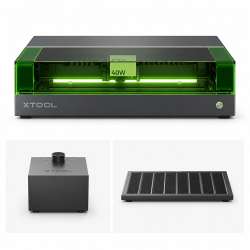
xTool S1 40W Laser Cutter

xTool S1 40W

$2,199.00at Northern ToolChecked Nov 24
See all prices and details
Visit Northern Tool
Pros
  • Large 498 x 319 mm bed fits sheet goods
  • 40W diode cuts thicker wood and acrylic
  • Fully enclosed with safety certifications
  • Auto-focus and pin-point positioning suit beginners
  • Conveyor feeder extends work to 118 in
Cons
  • Cannot mark bare metal without spray or add-on
  • Diode spot is coarser than fiber for tiny detail
  • Enclosure takes up more bench space
  • Conveyor feeder and air assist are add-ons

What separates them

xTool F1 Ultra Dual Laser EngraverxTool S1 40W Laser Cutter
Laser source20W fiber plus 20W diode in one unit40W diode only
Bare metal markingFiber laser marks stainless, aluminum, and brass directlyNeeds marking spray or a separate fiber module
Work area8.6 x 8.6 in (220 x 220 mm)19.6 x 12.6 in (498 x 319 mm)
Enclosure and safetyOpen frame, needs external shieldingFully enclosed with safety certifications
Cutting power on wood20W diode, thin stock only40W diode, cuts thicker ply and hardwoods
Spot size and detailFiber spot 0.03 mm for fine metal detail0.08 x 0.10 mm diode spot
Throughput optionsRotary for cylinders up to 145 mmAuto Conveyor Feeder for pieces up to 118 in long
Skill levelIntermediate; fiber settings take tuningBeginner-friendly with auto-focus and pin-point positioning

Price history

$2,499.00$1,448.00
Nov 9Nov 24
  • xTool F1 Ultra Dual Laser Engraver: lowest $2,299.00 on Nov 9 at Best Buy; $2,299.00 on Nov 24.
  • xTool S1 40W Laser Cutter: lowest $1,448.00 on Nov 17 at xTool; $1,499.00 on Nov 24.

Prices at every store

xTool F1 Ultra Dual Laser Engraver

  • Best BuyNew

    In stock

    $2,299.00Free shippingChecked Nov 24
    Visit Best Buy

Store links may earn us a commission. Price via Klarna.

Prices and history →

xTool S1 40W Laser Cutter

  • Northern ToolNew

    In stock

    $2,199.00+ $63.00 shippingChecked Nov 24
    Visit Northern Tool

Also available at

  • Acme ToolsCheck price at Acme Tools
  • Micro CenterCheck price at Micro Center
  • Stellar Pyxidis 3DCheck price at Stellar Pyxidis 3D
Prices and history →

Specs compared

SpecxTool F1 Ultra Dual Laser EngraverxTool S1 40W Laser Cutter
Laser Type20W Diode Laser + 20W Fiber Laser—
Working Area8.6" × 8.6" (220 mm × 220 mm)—
Max Working Speed10000 mm/s—
Max Processing Height145 mm—
Max Rotary Diameter145 mm—
Diode Spot Size0.08 mm × 0.1 mm—
Fiber Spot Size0.03 mm × 0.03 mm—
Motion Accuracy0.00482 mm—
Product Weight32.4 lb(14.7kg)—
Max Input Power250 W - 275 W—
Connection MethodUSB/Wi-Fi/IP/Hotspot—
Compatible Materials—Tumblers
Show all 21 specsShow fewer specs
SpecxTool F1 Ultra Dual Laser EngraverxTool S1 40W Laser Cutter
Cutting Length—118''
Alignment—Pin-point Positioning technology, Auto-focus
Design Type—Laser Engraver, Laser Cutter and Engraver Machi…
Guard Type—Protective cover, Enclosed design
Safety Guards—Protective cover
Speed—600mm/s
Body Material—Aerospace-grade aluminum frame
Special Features—Auto Conveyor Feeder
Skill Level—Beginner

Questions and answers

Which is better for engraving metal?
The F1 Ultra. Its 20W fiber laser marks stainless steel, aluminum, and brass directly with a 0.03 mm spot. The S1 40W is a diode laser and needs marking spray or a fiber module for bare metal.
Which cuts wood better?
The S1 40W. Its 40W diode and larger bed cut thicker plywood and hardwoods and handle bigger sheets. The F1 Ultra's 20W diode is limited to thin stock.
Which is safer for a home or classroom?
The S1 40W. It is fully enclosed and carries international safety certifications. The F1 Ultra is an open-frame machine and needs eye protection and good ventilation.
Is the F1 Ultra worth stepping up to over the S1?
Only if metal marking matters to you. The fiber laser is the reason to pay more. If you work mostly in wood and acrylic, the S1 gives you more bed and more cutting power.
Can either handle curved objects like tumblers?
Both can with a rotary attachment. The F1 Ultra supports rotary work up to 145 mm diameter. The S1 lists tumbler compatibility and curved surface engraving among its features.
Which is easier for a beginner?
The S1 40W. Auto-focus, pin-point positioning, and the enclosed design make setup simpler. The F1 Ultra's fiber settings take more tuning to get right.

Ask our shopping agent

It checks today's price at every store, compares the alternatives and answers in about a minute.

Enter to send, Shift+Enter for a new line

More comparisons

  • xTool S1 40W vs xTool M2 Color Craft Laser Cutter & Engraver
  • Creality Falcon2 Pro 40W Enclosed Laser Engraver & Cutter vs xTool F1 Ultra Dual Laser Engraver 20 W Fiber Diode
  • Creality Falcon2 Pro 40W Enclosed Laser Engraver & Cutter vs xTool S1 40W
  • Creality Falcon2 22W vs xTool S1 40W
  • xTool S1 40W vs xTool P2S
  • xTool F2 5W IR and 15W Diode Dual Laser vs xTool F1 Ultra Dual Laser Engraver 20 W Fiber Diode
  • xTool F2 5W IR and 15W Diode Dual Laser vs xTool S1 40W

Buying guides that pick them

  • Best desktop diode laser engravers for hobby and small business use
  • Best laser engravers and cutters