Shop
  • Deals
  • Deal checker
  • Black Friday
  • Buying guides
  • Brands
  • Stores
Travel
  • Flight deals
  • Hotel deals
Company
  • Research
  • Press
  • deal.ai apps
Black Friday 2026
  • Walmart
  • Best Buy
  • Target
  • TVs
  • Laptops
  • Headphones
  • Apple
  • Gaming
  • Vacuums
  • Kitchen
  • Toys
  • Smartwatches
  • Tablets
  • Furniture
  • Mattresses
© Deal.ai Inc.
TermsPrivacy
Deal.ai › Compare

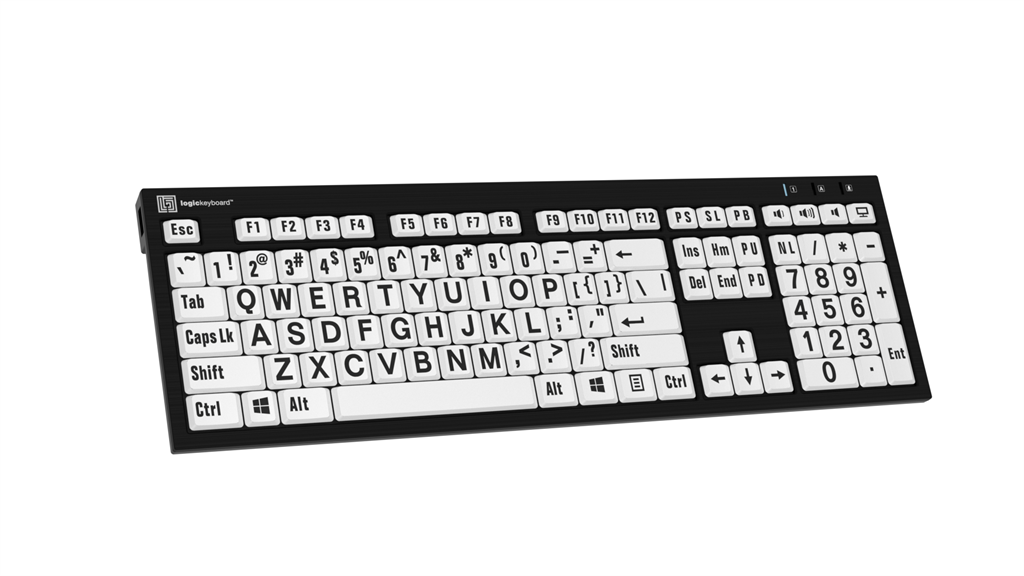
ZoomText Large-Print Keyboard vs Logickeyboard Nero Braille and Large-Print Keyboard (Windows, White, English)

The ZoomText Large-Print Keyboard is the better pick for anyone who actually uses ZoomText screen magnification, because its 18 dedicated keys trigger magnification, AppReader and DocReader commands without memorizing hotkeys. The Logickeyboard Nero is the better pick for a general low-vision typist who wants braille dots on the keys, a white-on-black or black-on-white high-contrast look, and a bundled lamp. Build is comparable on both: full-size layouts, USB wired, plastic chassis. Owners of large-print keyboards consistently rate the ZoomText keys as the reason they keep it, while Logickeyboard buyers praise the braille dots and the LogicLight lamp.

  • Choose the ZoomText Large-Print Keyboard if you use ZoomText software and want one-touch magnification, AppReader and DocReader commands built into the keyboard.
  • Choose the Logickeyboard Nero if you read braille, want a lamp included, or need a keyboard that works with any Windows screen reader or magnifier.

Prices

  • ZoomText Large-Print Keyboard: $143.00 at My Digital Apex (checked today)
  • Logickeyboard Nero Braille and Large-Print Keyboard (Windows, White, English): $119.90 at eBay (last seen Nov 8)
  • Difference: the Logickeyboard Nero Braille and Large-Print Keyboard (Windows, White, English) is $23.10 cheaper than the ZoomText Large-Print Keyboard at the latest prices (Nov 8 and Nov 10)
ZoomText
ZoomText Large-Print Keyboard

ZoomText Large-Print Keyboard

$143.00at My Digital ApexChecked 6 h ago
See all prices and details
Visit My Digital Apex
Pros
  • 36-point labels are the largest in this class
  • 18 dedicated ZoomText keys cut hotkey memorization
  • Keys reassignable to apps, documents or web pages
  • High-contrast black-on-yellow or white-on-black schemes
Cons
  • Feature keys are only useful if you run ZoomText
  • No braille markings
  • No bundled lamp
  • Standard membrane keys, not scissor switches
Logickeyboard
Logickeyboard Nero Braille and Large-Print Keyboard (Windows, White, English)

Logickeyboard Nero Braille and Large-Print Keyboard (Windows, White, English)

$119.90at eBayChecked Nov 8
See all prices and details
Visit eBay

Store links may earn us a commission.

Pros
  • Braille dots plus large print on every key
  • LogicLight lamp included with 5 brightness levels
  • Two built-in USB 2.0 ports

What separates them

ZoomText Large-Print KeyboardLogickeyboard Nero Braille and Large-Print Keyboard (Windows, White, English)
Key labels36-point text, black on yellow or white on black10 mm wide by 13 mm tall characters, black on white
BrailleNo braille markings6-dot English braille on the ANSI 104-key layout
Dedicated software keys18 ZoomText keys; F1-F12 double as commands and can be reassignedNone; standard function keys
Software tie-inBuilt for ZoomText (v4.1 generation); commands only work with ZoomText installedWorks with any Windows app or screen reader; no proprietary software
Included lightingNoneLogicLight USB lamp with 10 LEDs and 5 brightness levels
USB portsUSB ports on boardTwo USB 2.0 high-speed hubs
Key mechanismStandard membrane keysSoft-touch scissor switches, rated 10 million keystrokes
Layout optionsUS layout, two color schemesFull-size with numeric keypad; ANSI and ISO versions, multiple languages

Price history

$143.00$129.90
Nov 8Nov 10
  • ZoomText Large-Print Keyboard: lowest $143.00 on Nov 10 at My Digital Apex.
  • Logickeyboard Nero Braille and Large-Print Keyboard (Windows, White, English): lowest $129.90 on Nov 8 at Jestik; $129.90 on Nov 10.

Prices at every store

ZoomText Large-Print Keyboard

  • My Digital ApexNew

    In stock

    $143.00Checked 6 h ago
    Visit My Digital Apex
  • Access IngenuityNew

    In stock

    $178.20Checked 6 h ago
    Visit Access Ingenuity
  • Boundless Assistive TechnologyNew

    Availability unknown

    $175.00Checked 6 h ago
    Visit Boundless Assistive Technology
  • Emerald Coast Vision AidsNew

    Availability unknown

    $178.20Checked 6 h ago
    Visit Emerald Coast Vision Aids
All 7 stores and price history →

Logickeyboard Nero Braille and Large-Print Keyboard (Windows, White, English)

  • JestikNew

    In stock

    $129.90Free shippingChecked Nov 8
    Visit Jestik
  • Grooves-Inc.comNew

    In stockMade for another market

    $136.30+ $9.36 shippingChecked Nov 8
    Visit Grooves-Inc.com
  • eBayNew

    Availability unknownSold by sweetwatersound (99.8% positive, 492,600 ratings)Returns: Set by the eBay seller; the eBay Money Back Guarantee covers an item that doesn't arrive or isn't as described.

    $119.90Free shippingChecked Nov 8
    Visit eBay
  • AmazonNew

    Availability unknown

    As an Amazon Associate, Deal.ai earns from qualifying purchases.

    $129.90+ $13.95 shippingChecked 6 h ago
    Visit Amazon

Also available at

  • eBayCheck price at eBay

Store links may earn us a commission.

All 6 stores and price history →

Specs compared

SpecZoomText Large-Print KeyboardLogickeyboard Nero Braille and Large-Print Keyboard (Windows, White, English)
ConnectionUSB connectionUSB wired connection
Key label text size36-point text—
Color schemesBlack on Yellow or White on Black—
Dedicated feature keys18 dedicated ZoomText keys—
Generation4th generation—
Software versionv4.1—
USB portsUSB Ports—
Wired—USB-A Cable (Non-Removable)
Connectivity Type—Wired
Connectivity Interface—USB
Wired Connectivity—Yes
Model Name—XL Print
Show all 28 specsShow fewer specs
SpecZoomText Large-Print KeyboardLogickeyboard Nero Braille and Large-Print Keyboard (Windows, White, English)
Language—German
Layout—QWERTZ
Keyboard Type—Keyboard
Accessory Type—Keyboard
Included Accessories—LED lamp
Built-in USB hubs—Two built-in USB 2.0 High-speed hubs
Number of keys—108 (ANSI version) 109 (ISO version)
Typing angle—8.5° with leg lift and 4.5° without leg lift
Dimensions—17.6" x 5.6" x 0.9" (446mm x 141mm x 23mm)

What reviewers say

ZoomText Large-Print Keyboard

Owners are low-vision users and their families, and the response centers on legibility and the ZoomText shortcut keys. Most say the large high-contrast labels make typing far less tiring, while complaints focus on the wired connection and the keyboard being tied to ZoomText.

What people mention
  • LegibilityPraisedOwners say the 36-point labels are readable at a glance, even in dim rooms.
  • ContrastPraisedThe black-on-yellow option is the favorite for glare and low light.
  • ZoomText keysPraisedUsers like triggering magnification and readers with one held function key.
  • Software tie-inCriticisedBuyers who do not run ZoomText find the dedicated keys useless.

Questions and answers

Which is better for someone who uses ZoomText every day?
The ZoomText Large-Print Keyboard. Its 18 dedicated keys start ZoomText, change magnification and launch AppReader and DocReader without hotkeys. The Logickeyboard has no ZoomText keys.
Which is better if I read braille?
The Logickeyboard Nero. It has 6-dot English braille on the keys alongside the large print. The ZoomText keyboard has no braille markings.
Does the Logickeyboard work with screen readers other than ZoomText?
Yes. It is a standard Windows keyboard, so it works with NVDA, JAWS, Windows Magnifier or no assistive software at all. The ZoomText keyboard's special keys only do something when ZoomText is installed.
Which lasts longer?
The Logickeyboard publishes a 10 million keystroke rating and uses scissor switches. ZoomText does not publish a keystroke rating for its membrane keys. Neither is a mechanical keyboard, so heavy typists should expect years, not decades.
Is the Logickeyboard worth stepping up to over a plain keyboard?
If you have low vision and type a lot, yes. The braille dots, oversized characters and included lamp address the same problem a plain keyboard leaves you with. If you already own a magnifier and just need bigger letters, the ZoomText keyboard's labels are larger.
Do I need to install software for either one?
Both are plug-and-play over USB on Windows. The ZoomText keyboard needs ZoomText itself installed for its command keys to work; the Logickeyboard needs no drivers.

Ask our shopping agent

It checks today's price at every store, compares the alternatives and answers in about a minute.

Enter to send, Shift+Enter for a new line

More comparisons

  • ZoomText Large-Print Keyboard vs LogicKeyboard Large Print Bluetooth Keyboard
  • LogicKeyboard Large Print Bluetooth Keyboard vs Logickeyboard Nero Braille and Large-Print Keyboard (Windows, White, English)
  • ZoomText Large-Print Keyboard vs Ergoguys CD-1038 Black USB Wired Ergonomic Ezsee Low Vision Keyboard Large Print Yellow Keys
  • Ergoguys CD-1038 Black USB Wired Ergonomic Ezsee Low Vision Keyboard Large Print Yellow Keys vs Logickeyboard Nero Braille and Large-Print Keyboard (Windows, White, English)

Buying guides that pick them

  • Best large print ergonomic keyboards
Soft-touch scissor switches rated 10 million keystrokes
Cons
  • No dedicated magnification or screen-reader keys
  • Braille is 6-dot English only
  • Non-removable cable
  • Lamp adds a second USB connection
Net weight
—
29.6 oz (840 grams)
LED indicators—3 LED indicators for: Caps Lock, fn Lock and Po…
Chassis color—Black
OS support—Plug-and-play with Windows 10/11
Braille layout—6-dot English braille ANSI 104-key layout
Cable length—5' / 1.5 m
Key lifespan—10 million keystroke lifespan