StoreDeal.ai store
Shop
  • Deals
  • Deal checker
  • Black Friday
  • Buying guides
  • Brands
  • Stores
Travel
  • Flight deals
  • Hotel deals
Company
  • Research
  • Press
  • Use in AI assistants
  • Contact
  • deal.ai apps
Black Friday 2026
  • Walmart
  • Best Buy
  • Target
  • TVs
  • Laptops
  • Headphones
  • Apple
  • Gaming
  • Vacuums
  • Kitchen
  • Toys
  • Smartwatches
  • Tablets
  • Furniture
  • Mattresses
© Deal.ai Inc.·2222 Ponce de Leon Blvd, Miami, FL 33134·support@deal.ai
TermsPrivacy
Deal.ai
B
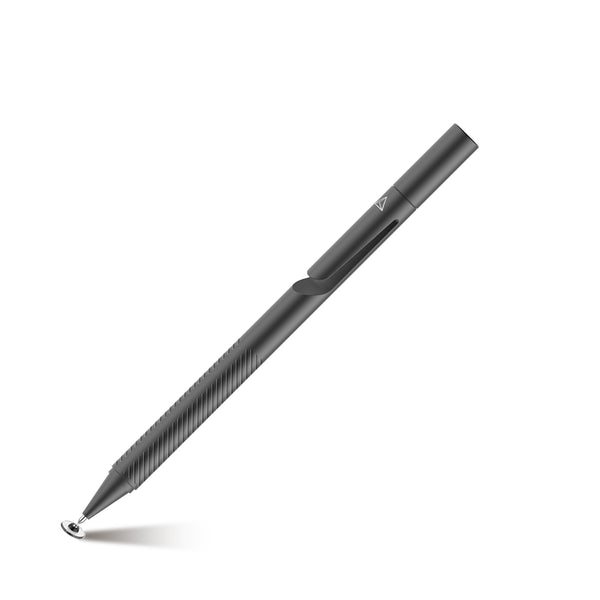
BOOX InkSense Plus Stylus with a Side Button

BOOX InkSense Plus Stylus with a Side Button

3.3(3 ratings)

Best price now

$45.99at The Official BOOX StoreChecked 5 h ago

Prices are checked against each store and labelled with when.

Visit The Official BOOX Store

Ask our agent about this product

It checks today's price at every store, compares the alternatives and answers in about a minute.

Enter to send, Shift+Enter for a new line

Price facts

  • Last seen at $45.99 at The Official BOOX Store on Nov 15.

Our take on the BOOX InkSense Plus Stylus with a Side Button

The BOOX InkSense Plus is an active stylus for BOOX e-ink tablets, with 4,096 pressure levels and tilt sensitivity for natural line variation in notes and sketches. It adds a shortcut side button, a G-sensor that wakes it when picked up, and Type-C charging from an 80mAh battery. A tap shows battery level on the tablet screen, and the tip is replaceable. It suits BOOX owners who write or draw daily and want pressure control plus a button shortcut; it is not a universal pen and will not work with most other brands' tablets.

Best forBOOX tablet owners who take handwritten notesSketchers and annotators who want pressure and tilt controlFrequent writers who want a side-button shortcutBuyers who prefer USB-C charging over AAAA batteries
Pros
  • 4,096 pressure levels give fine control over line weight
  • Tilt sensitivity varies stroke width like a pencil
  • Side button can trigger a shortcut while writing
  • Auto-wake on pickup saves pressing a button
  • Rechargeable over USB-C with on-screen battery level
  • Replaceable tip extends the pen's life
Cons
  • Works only with compatible BOOX devices, not other brands
  • No eraser end, unlike some rival styli
  • Slim battery means regular charging for heavy users
  • Side button shortcut depends on app support

BOOX InkSense Plus Stylus with a Side Button prices at every store

  • The Official BOOX StoreNew

    In stockShips from Hong Kong SAR China · duties may applyReturn policy

    $45.99Checked 5 h ago
    Visit The Official BOOX Store

About the BOOX InkSense Plus Stylus with a Side Button

The BOOX InkSense Plus is a stylus with a shortcut side button. It senses 4,096 levels of pressure and also responds to tilt.

It has a replaceable stylus tip and a built-in 80mAh Li-polymer battery that charges over Type-C. A charging status indicator shows when it is charging. Tapping the stylus displays its battery level on the screen.

A G-sensor wakes the stylus automatically.

Pressure levels
4,096, with tilt sensitivity
Side button
Shortcut button
Stylus tip
Replaceable
Auto-wake
G-sensor powered
Charging
Type-C, with charging status indicator
Battery
Built-in 80mAh Li-polymer
Pen diameter
9 mm
Pen length
157.5 mm (with a nib)
Nib diameter
0.6 mm
Weight
Approx. 15.3 g
Compatibility
Go 10.3 (Gen II) Series, Palma 3, Palma 2 Pro, Go 7, Go Color 7 (Gen II), Go 6 (Gen II)

Questions and answers

Which devices does the InkSense Plus work with?
It is made for BOOX e-ink tablets that support active stylus input. It is not a universal pen and generally will not work on iPads, Android tablets or other e-readers.
Does it need charging?
Yes. It has a built-in 80mAh battery charged over USB-C. The G-sensor wakes it when you pick it up, and tapping the screen shows the battery level.
Is there an eraser on the pen?
No. The InkSense Plus has a single writing tip and one side button. Erasing is done through the tablet's software or toolbar.
Can I replace the tip?
Yes, the stylus tip is replaceable. Worn tips can be swapped rather than replacing the whole pen.
How does it compare with the standard BOOX stylus?
It adds a shortcut side button, tilt sensitivity and USB-C charging with an on-screen battery readout. The standard pen is simpler and relies on different power and button options.
What is in the box?
The stylus and its tip. A USB-C cable for charging is typically needed but not always included, so check the pack contents before buying.
Where is the BOOX InkSense Plus Stylus with a Side Button cheapest?
At The Official BOOX Store, for $45.99, as of our latest check.
What do buyers say about the BOOX InkSense Plus Stylus with a Side Button?
Rated 3.3 out of 5 from 3 ratings.

More styluses

  • S
    Stylus Touch Screen Pen Fiber Tip Aluminum Lightweight White - ONZ74
    Stylus Touch Screen Pen Fiber Tip Aluminum Lightweight White - ONZ74
  • T
    Thor Self-adhesive Stylus
    Thor Self-adhesive Stylus
  • A
    ACTS Stylus Pens
    ACTS Stylus Pens
  • A
    Adonit Pro 3
    Adonit Pro 3
  • B
    Blue Stylus Pen Touch Compact Lightweight
    Blue Stylus Pen Touch Compact Lightweight
  • X
    Xpress Noah Stylus
    Xpress Noah Stylus
  • X
    Xpress Soft Touch Stylus
Xpress Soft Touch Stylus
  • M
    METRO Universal Stylus Pens for Touch Screens
    METRO Universal Stylus Pens for Touch Screens