StoreDeal.ai store
Shop
  • Deals
  • Deal checker
  • Black Friday
  • Buying guides
  • Brands
  • Stores
Travel
  • Flight deals
  • Hotel deals
Company
  • Research
  • Press
  • Use in AI assistants
  • Contact
  • deal.ai apps
Black Friday 2026
  • Walmart
  • Best Buy
  • Target
  • TVs
  • Laptops
  • Headphones
  • Apple
  • Gaming
  • Vacuums
  • Kitchen
  • Toys
  • Smartwatches
  • Tablets
  • Furniture
  • Mattresses
© Deal.ai Inc.·2222 Ponce de Leon Blvd, Miami, FL 33134·support@deal.ai
TermsPrivacy
Deal.ai
HumanCentric
HumanCentric Light Bars for Zoom / Video Conference

HumanCentric Light Bars for Zoom / Video Conference

Lowest price, any size

$54.99at MarketScaleChecked Nov 7

Prices differ by screen size, and this one may be for a smaller size: check the size at the store.

Prices are checked against each store and labelled with when.

Visit MarketScale

Ask our agent about this product

It checks today's price at every store, compares the alternatives and answers in about a minute.

Enter to send, Shift+Enter for a new line

Our take on the HumanCentric Light Bars for Zoom / Video Conference

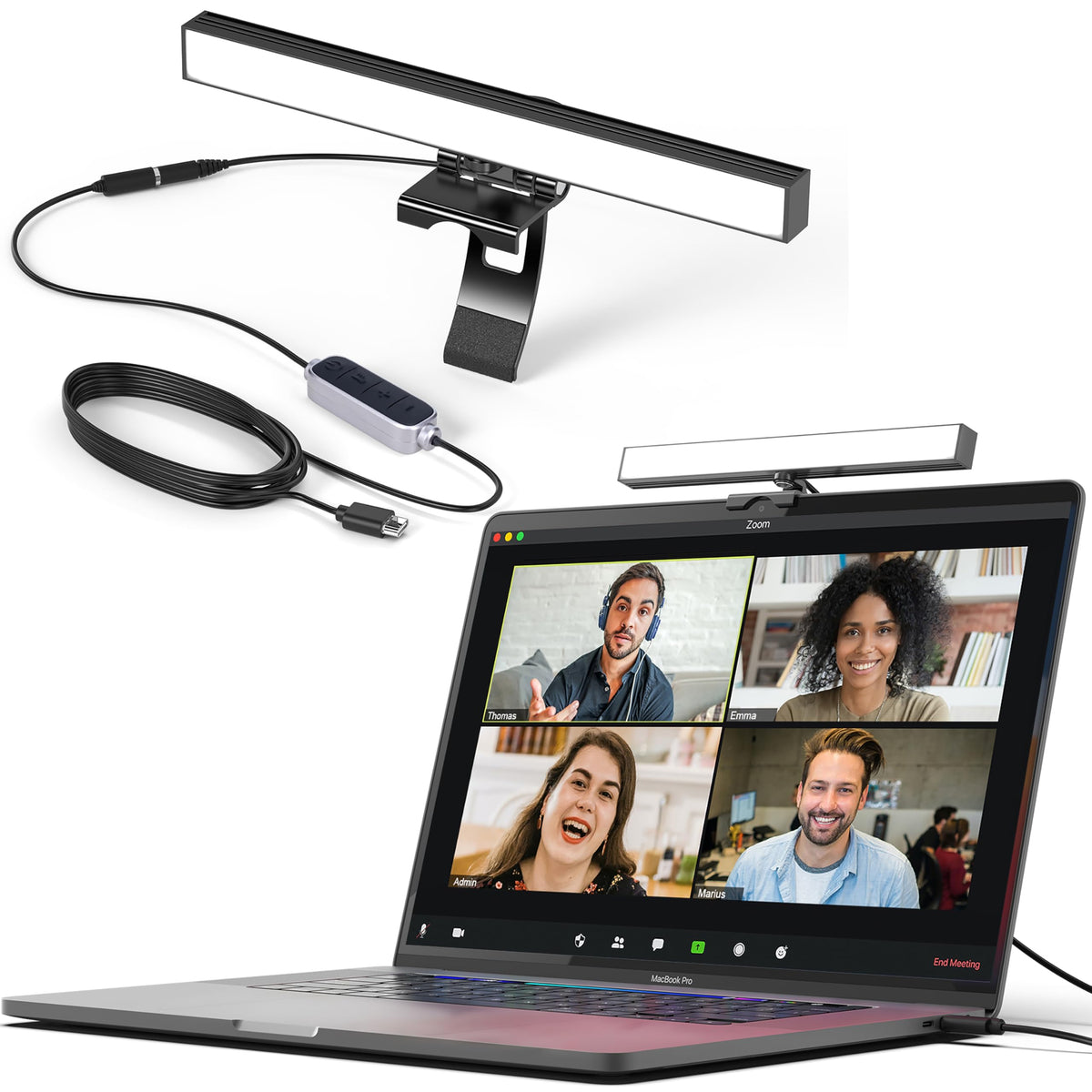
The HumanCentric Light Bars are a two-bar USB video-conference lighting kit. The slim bars sit on top of a monitor or laptop and connect through one power cable, so the desk stays clear. Preinstalled diffusers soften the light, and brightness and color temperature are adjustable. It suits people who spend hours on video calls and want even, front-facing light without a ring light or a tangle of cables. Against single-bar and ring-light rivals, the two-bar layout spreads light across the face more evenly and can daisy-chain up to four bars, though it is wired and needs a free USB port.

Best forRemote workers on daily video callsPeople with backlit or window-facing desksSmall home-office setupsStreamers who want soft, adjustable light
Pros
  • Two bars light both sides of the face evenly
  • Single cable keeps the desk tidy
  • Diffusers soften the light and cut glare
  • Adjustable brightness and color temperature
  • Mounts on the monitor or laptop without adhesives
  • Daisy-chains up to four bars
Cons
  • Wired USB connection, no battery
  • Clips suit flat-topped monitors and laptops only
  • Two bars take up more top-of-screen space than one

HumanCentric Light Bars for Zoom / Video Conference prices at every store

  • MarketScaleNew

    In stock

    $54.99Checked Nov 7
    Visit MarketScale

From MarketScale

  • Two slim light bars connected by a single power cable for even facial lighting
  • Balanced, front-facing light eliminates harsh shadows and backlighting
  • Preinstalled diffusers give a soft, diffused glow without glare
  • Adjustable brightness and color temperature
  • Mounts securely on top of a monitor or laptop with no suction cups or adhesives
  • Daisy-chain capable: expand from two lights up to four total
Sizes
Add-On Only Kit, Double Kit, Single Kit
Returns
Flexible returns
Shipping
Reliable shipping; available via Amazon checkout
Packs
Single Kit, Double Kit and Add-On Only Kit; add-on lights only work when connected to an existing single or double kit
In the box
Two light bars, Single power cable, Cable management clips and Velcro straps, USB-A & USB-C adapter

About the HumanCentric Light Bars for Zoom / Video Conference

This kit puts two slim light bars on either side of your screen to light your face evenly on video calls. The front-facing light is balanced to reduce harsh shadows and backlighting. Preinstalled diffusers soften the glow and cut glare.

The two light bars connect with a single power cable. Brightness and color temperature are adjustable. The bars mount on top of a monitor or laptop without suction cups or adhesives. You can daisy-chain additional lights to expand from two to four in total.

Connectivity
USB
Light bars
2, joined by a single power cable
Diffusers
Preinstalled
Adjustments
Brightness and color temperature
Mounting
Sits on top of a monitor or laptop; no suction cups or adhesives
Expandable
Daisy-chain up to 4 lights in total
In the box
2 light bars, single power cable, cable management clips and Velcro straps, USB-A and USB-C adapter

Specifications

Wired Connectivity Type
USB

Questions and answers

How do the light bars attach to a monitor?
They rest on top of the monitor or laptop and are held in place by their mounts. No suction cups or adhesives are used.
Can I add more lights later?
Yes. The kit is daisy-chain capable and expands from two bars up to four total.
Does it need a power outlet?
It runs from USB power through a single cable. USB-A and USB-C adapters are included.
Can I change the brightness and color temperature?
Yes, both are adjustable, so you can match warm indoor light or cooler daylight.
What comes in the box?
Two light bars, one power cable, cable management clips and Velcro straps, and USB-A and USB-C adapters.
Will it work with a laptop screen?
Yes, it mounts on a laptop as well as a monitor, as long as the top edge can hold the mount.
Where is the HumanCentric Light Bars for Zoom / Video Conference cheapest?
At MarketScale, for $54.99, as of our latest check.

More monitor light bars

  • A
    Andoer Computer Laptop Monitor Bar Video Conference Screen Lamp
    Andoer Computer Laptop Monitor Bar Video Conference Screen Lamp