StoreDeal.ai store
Shop
  • Deals
  • Deal checker
  • Black Friday
  • Buying guides
  • Brands
  • Stores
Travel
  • Flight deals
  • Hotel deals
Company
  • Research
  • Press
  • Use in AI assistants
  • Contact
  • deal.ai apps
Black Friday 2026
  • Walmart
  • Best Buy
  • Target
  • TVs
  • Laptops
  • Headphones
  • Apple
  • Gaming
  • Vacuums
  • Kitchen
  • Toys
  • Smartwatches
  • Tablets
  • Furniture
  • Mattresses
© Deal.ai Inc.·2222 Ponce de Leon Blvd, Miami, FL 33134·support@deal.ai
TermsPrivacy
Deal.ai
U
USB Switch A & C Input for Computers

USB Switch A & C Input for Computers

Best price now

$59.99at linkmejor.com - More for LessChecked Nov 26

Prices are checked against each store and labelled with when.

Visit linkmejor.com - More for Less

Price facts

  • Last seen at $59.99 at linkmejor.com - More for Less on Nov 26.

Our take on the USB Switch A & C Input for Computers

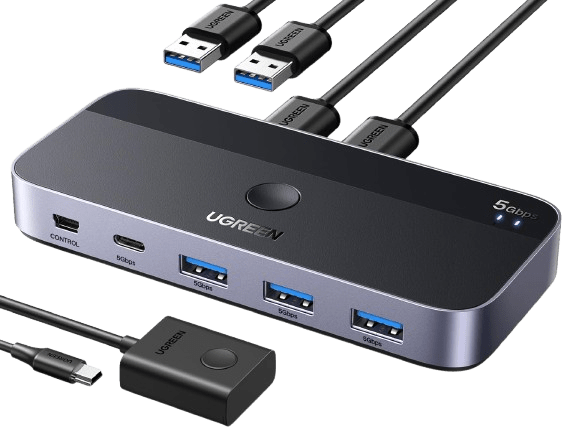
This is a two-computer USB switcher: two USB-C host inputs share four downstream USB 3.0 ports, one USB-C and three USB-A. It moves a keyboard, mouse, headset or drive between a work computer and a personal laptop with a button or a remote, at up to 5 Gbps. It is not a KVM switch, so it carries no video and no monitor signal. It suits people with two machines on one desk who want to share peripherals without replugging. Against KVM docks it is cheaper and simpler but adds no display switching; a powered USB-C port helps when high-draw devices are attached.

Best forTwo-computer desks sharing one keyboard and mouseLaptop plus desktop setupsSharing a headset or external drive between machinesUsers who want remote or button switching
Pros
  • Two USB-C host inputs, four downstream ports
  • One USB-C and three USB-A device ports
  • Up to 5 Gbps, backward compatible with USB 2.0
  • Button and remote switching
  • Optional USB-C power input for high-draw devices
  • Plug and play on Windows, macOS, Chrome OS and Linux
Cons
  • No video or monitor switching; not a KVM
  • USB-C host inputs, so older USB-A-only computers need adapters
  • Ports are for data, not charging
  • High-power devices may drop without the power supply connected

USB Switch A & C Input for Computers prices at every store

  • linkmejor.com - More for LessNew

    In stockShips from Hong Kong SAR China · duties may applyReturn policy

    $59.99Checked Nov 26
    Visit linkmejor.com - More for Less

About the USB Switch A & C Input for Computers

A USB switch that lets two USB-C computers share four USB devices: one USB-C port and three USB-A ports for a keyboard, mouse and headphones. You switch between a work computer and a personal laptop without moving cables. It is not a KVM switch and does not support a monitor or video transmission.

The USB 3.0 ports transfer data at up to 5 Gbps and are backward compatible with USB 2.0. The switch is plug and play with Windows, macOS, Chrome OS and Linux computers. The ports are primarily for data transfer and are not recommended for charging devices.

You can switch with the remote control or the button on the unit, so the switch can be tucked away to keep the desktop tidy. A USB-C power port takes an optional power supply for high-power devices such as hard disk drives and headsets; power is recommended when several devices are used at once, to avoid disconnection from insufficient power.

Ports
1 x USB-C, 3 x USB-A
Inputs
2 x USB-C computers
Data speed
Up to 5 Gbps
USB standard
USB 3.0, backward compatible with USB 2.0
Power
USB-C power port for an optional power supply
Switching
Remote control and button
Compatibility
Windows, macOS, Chrome OS, Linux
Setup
Plug and play

Ask our agent about this product

It checks today's price at every store, compares the alternatives and answers in about a minute.

Enter to send, Shift+Enter for a new line

Questions and answers

Can it switch a monitor between the two computers?
No. It switches USB data only and does not pass video. You need a separate KVM or display switch for monitors.
Do both computers need USB-C ports?
Yes. Both host inputs are USB-C, so a computer with only USB-A needs a USB-C adapter or cable.
How do I switch between the two computers?
Use the button on the unit or the included remote. The remote lets you keep the switch out of sight.
Should I connect the power supply?
Connect it when you attach high-draw devices such as external hard drives or headsets. Without it, those devices may disconnect.
Can I charge devices through it?
The ports are meant for data transfer, not charging. Charge phones and laptops from their own chargers.
Does it work with Mac and Linux?
Yes. It is plug and play on Windows, macOS, Chrome OS and Linux, with no drivers needed.
Where is the USB Switch A & C Input for Computers cheapest?
At linkmejor.com - More for Less, for $59.99, as of our latest check.

More usb sharing switches

  • 4
    4 In 4 Out KVM USB3.0 Switch Shared Controller Hub Adapter
    4 In 4 Out KVM USB3.0 Switch Shared Controller Hub Adapter
  • U
    UK204V Drive-free USB 3.0 Switch Selector
    UK204V Drive-free USB 3.0 Switch Selector
  • U
    USB 3.0 Bidirectional Switch Hub
    USB 3.0 Bidirectional Switch Hub
  • U
    UGREEN USB 3.0 Switch 2 Computers Sharing USB C & A Devices, 4 Port USB Switcher
    UGREEN USB 3.0 Switch 2 Computers Sharing USB C & A Devices, 4 Port USB Switcher
  • L
    Lindy 43141 2 Port USB 3.0 Switch
    Lindy 43141 2 Port USB 3.0 Switch
  • U
    USB 3.0 Switch Selector 2 Computers Share 4 USB Ports USB Switcher
    USB 3.0 Switch Selector 2 Computers Share 4 USB Ports USB Switcher
  • U
    UGREEN USB 3.0 Switch 2 Computers Sharing USB C & A Devices
    UGREEN USB 3.0 Switch 2 Computers Sharing USB C & A Devices
  • U
    Ugreen USB 3.0 Switch for 2 Computers Sharing USB C & A Devices
    Ugreen USB 3.0 Switch for 2 Computers Sharing USB C & A Devices