StoreDeal.ai store
Shop
  • Deals
  • Deal checker
  • Black Friday
  • Buying guides
  • Brands
  • Stores
Travel
  • Flight deals
  • Hotel deals
Company
  • Research
  • Press
  • Use in AI assistants
  • Contact
  • deal.ai apps
Black Friday 2026
  • Walmart
  • Best Buy
  • Target
  • TVs
  • Laptops
  • Headphones
  • Apple
  • Gaming
  • Vacuums
  • Kitchen
  • Toys
  • Smartwatches
  • Tablets
  • Furniture
  • Mattresses
© Deal.ai Inc.·2222 Ponce de Leon Blvd, Miami, FL 33134·support@deal.ai
TermsPrivacy
Deal.ai › Compare

Bambu Lab P2S 3D Printer with AMS 2 Pro vs Flashforge Creator 5 Pro

Buy the Bambu Lab P2S with AMS 2 Pro if you want the most polished, hands-off multi-color printing. Its sealed ecosystem, AI failure detection, auto flow calibration and quick-swap hotend make it the easier machine to live with, and owners consistently call it reliable. Buy the Flashforge Creator 5 Pro if you print multi-material jobs where waste matters: four independent toolheads mean no purge tower and much faster color changes, plus a 65°C heated chamber and 320°C hotends for engineering filaments. The P2S wins on software, finish and support; the Creator 5 Pro wins on material flexibility and waste.

  • Choose the Bambu Lab P2S if you want a proven, largely automatic multi-color printer with strong software, AI failure detection and a large user community.
  • Choose the Flashforge Creator 5 Pro if you need true multi-material printing with four toolheads, near-zero purge waste and a heated chamber for high-temp filaments.

Prices

  • Flashforge Creator 5 Pro: $729.00 at Wellbots (last seen Nov 17)
Bambu Lab
Bambu Lab P2S 3D Printer Bundle with Filament, Tool Kit, AMS 2 PRO System

Bambu Lab P2S 3D Printer with AMS 2 Pro

Bambu Lab P2S 3D Printer Bundle with Filament, Tool Kit, AMS 2 PRO System

4.8(6 ratings)
See all prices and details
Pros
  • AMS 2 Pro gives multi-color out of the box, expandable to 20 colors
  • AI failure detection with camera and NPU catches failed prints early
  • Auto flow dynamics calibration and quick-swap hotend cut setup time
  • Mature software and a large, active community
  • Bundle includes tool kit, filament buffer and textured PEI plate
Cons
  • Color changes waste filament through purging
  • No actively heated chamber, so high-temp engineering materials are harder
  • Single hotend limits true multi-material printing
Flashforge
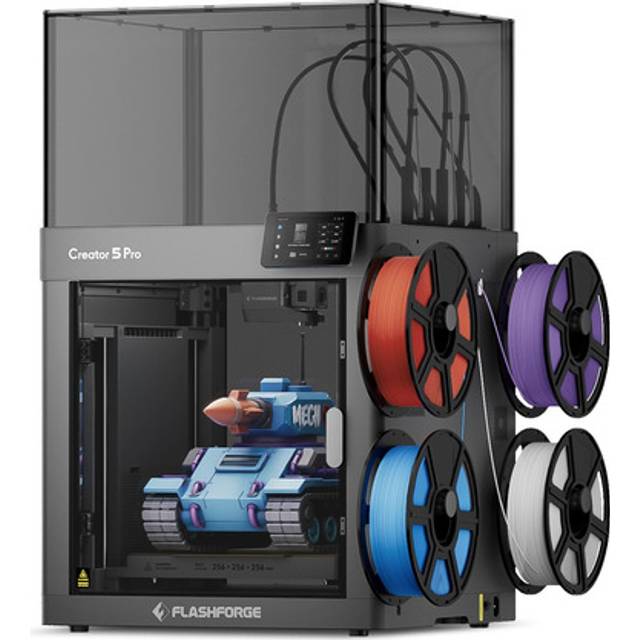
Flashforge Creator 5 Pro 4-Toolheads Enclosed Multi-Color 3D Printer

Flashforge Creator 5 Pro

Flashforge Creator 5 Pro 4-Toolheads Enclosed Multi-Color 3D Printer

4.6(10 ratings)
$729.00at WellbotsChecked Nov 17
See all prices and details
Visit Wellbots
Pros
  • Four independent toolheads mean zero purge waste
  • Actively heated chamber to 65°C suits ABS, ASA and other warp-prone filaments
  • 320°C hotends and 120°C bed handle engineering materials
  • HEPA and carbon filtration plus quieter enclosed operation
  • Fast multi-color jobs, up to 500% quicker than single-nozzle switching
Cons
  • No camera-based AI failure detection listed
  • Smaller software ecosystem and community than Bambu
  • Four toolheads mean more calibration and maintenance points

What separates them

Bambu Lab P2S 3D Printer with AMS 2 ProFlashforge Creator 5 Pro
Multi-color methodAMS 2 Pro feeds one hotend and purges between colors; up to 20 colors with extra AMS unitsFour independent toolheads switch colors with no purge
Material wastePurge waste on every color changeZero purge waste during material switching
Chamber and temperaturesEnclosed, no active chamber heater; standard hotend tempsActively heated chamber to 65°C, hotends to 320°C, bed to 120°C
SpeedHigh-speed CoreXY-class motion with auto flow calibration300 mm/s print, 600 mm/s travel, 30,000 mm/s² acceleration
Failure detection and automationAI computer vision with 2 TOPS NPU catches spaghetti and blobbing; auto calibrationFully automatic calibration and leveling; no camera-based failure detection listed
Hotend serviceabilityOne-clip quick-swap hotend, about 30 secondsFlashSwap interchangeable nozzles
Software and ecosystemMature Bambu Studio and app ecosystem, large community, widely praised as seamlessFlashforge slicer and workflow, smaller community
Build volume256 x 256 x 256 mm256 x 256 x 256 mm

Price history

$799.00$588.99
Nov 4Nov 25
  • Bambu Lab P2S 3D Printer with AMS 2 Pro: lowest $649.00 on Nov 4 at B&H Photo-Video-Audio; $779.00 on Nov 8.
  • Flashforge Creator 5 Pro: lowest $588.99 on Nov 10 at Alibaba.com; $749.00 on Nov 25.

Prices at every store

Bambu Lab P2S 3D Printer with AMS 2 Pro

  • B&H Photo-Video-AudioNew

    Availability unknown

    $649.00Checked Nov 4
    Visit B&H Photo-Video-Audio
  • Best BuyNew

    Availability unknown

    $649.99Checked Nov 4
    Visit Best Buy
  • Swing DesignNew

    Availability unknown

    $749.00Checked Nov 4
    Visit Swing Design
  • Additive PlusNew

    Availability unknown

    $749.00Checked Nov 4
    Visit Additive Plus

Also available at

  • Swing DesignCheck price at Swing Design
Prices and history →

Flashforge Creator 5 Pro

  • WellbotsNew

    In stock

    $729.00Checked Nov 17
    Visit Wellbots
  • WalmartNew

    In stock

    $749.00Checked 47 min ago
    Visit Walmart
  • Alibaba.comNew

    In stockShips from abroad · duties may apply

    $675.00+ $86.00 shippingChecked 15 h ago
    Visit Alibaba.com
  • eBayNew

    Availability unknownSold by flashforge_3d_happylife (99.9% positive, 3,000 ratings)Returns: Set by the eBay seller; the eBay Money Back Guarantee covers an item that doesn't arrive or isn't as described.

    $749.00Free shippingChecked 47 min ago
    Visit eBay

Also available at

  • FlashforgeCheck price at Flashforge
  • eBayCheck price at eBay
  • WalmartCheck price at Walmart

Store links may earn us a commission.

All 24 stores and price history →

Specs compared

SpecBambu Lab P2S 3D Printer with AMS 2 ProFlashforge Creator 5 Pro
color patternMystic Gray—
connection typePower cord, Wi-Fi, Ethernet—
enclosure typeDIY enclosure, Fully enclosed—
print technology3D printing, FDM—
Build volume—256 × 256 × 256 mm
Toolheads—4 Independent Toolheads
Max extruder temp—320°C
Max bed temp—120°C
Active chamber temp—Up to 65°C
Print speed—Up to 300 mm/s
Travel speed—Up to 600 mm/s
Acceleration—Up to 30,000 mm/s²
Show all 40 specsShow fewer specs
SpecBambu Lab P2S 3D Printer with AMS 2 ProFlashforge Creator 5 Pro
Layer thickness—0.1–0.4 mm
Standard nozzle—0.4 mm
Display—4-inch, 800 × 480 Full-Color Touchscreen
Connectivity—USB / Wi-Fi
Number Of Extruders—4 extruders
Width (")—256.0
Four independent toolheads—zero-purge color at a mid-range price
3d printing technology—Fused Deposition Modeling
Maximum build capacity—10 x 10 x 10

What reviewers say

Flashforge Creator 5 Pro

  • 4.6 / 510 ratings

Feedback is limited to 10 ratings averaging 4.6 out of 5, so it is early. Buyers mainly praise the multi-color output without purge waste and the enclosed, quieter operation, and call setup easy.

What people mention
  • Multi-colorPraisedOwners highlight four toolheads printing several colors in one job without purging.
  • WastePraisedMaterial switching is said to leave near-zero purge waste.
  • EnclosurePraisedThe enclosed frame is credited with quieter running and controlled fumes.
  • ReliabilityMixedWith only 10 ratings, buyers say it is too early to judge long-term durability.

Questions and answers

Which is better for printing lots of multi-color models?
The Creator 5 Pro, if waste and speed matter, because four toolheads switch colors with no purge. The P2S is simpler to run and its AMS handles up to 20 colors, but every change purges filament.
Which handles engineering filaments like ABS or ASA better?
The Creator 5 Pro. Its active chamber reaches 65°C and hotends reach 320°C, which reduces warping. The P2S is enclosed but has no active chamber heater.
Which is easier for a beginner?
The P2S. Auto calibration, AI failure detection, a guided touchscreen and a large community make it more forgiving. The Creator 5 Pro rewards users who understand multi-toolhead calibration.
Is the Creator 5 Pro worth stepping up to over the P2S?
Only if you print multi-material parts regularly or need high-temp filaments. For most hobbyists the P2S covers more with less fuss.
Which needs more maintenance?
The Creator 5 Pro, with four toolheads to calibrate and keep aligned. The P2S has one hotend and a quick-swap nozzle that takes about 30 seconds.
Do both have the same build volume?
Yes. Both print within 256 x 256 x 256 mm, so size is not the deciding factor.

Ask our shopping agent

It checks today's price at every store, compares the alternatives and answers in about a minute.

Enter to send, Shift+Enter for a new line

More comparisons

  • Creator 5 vs Flashforge Creator 5 Pro 4-Toolheads Enclosed Multi-Color 3D Printer
  • Flashforge Creator 5 Pro 4-Toolheads Enclosed Multi-Color 3D Printer vs QIDI Plus5 Combo Enclosed CoreXY FDM 3D Printer
  • Flashforge Creator 5 Pro 4-Toolheads Enclosed Multi-Color 3D Printer vs Creality K2 Plus Combo 3D printer
  • Snapmaker U1 vs Flashforge Creator 5 Pro 4-Toolheads Enclosed Multi-Color 3D Printer
  • Bambu Lab P2S 3D Printer Bundle with Filament, Tool Kit, AMS 2 PRO System vs Creality K2 Pro Combo 3D Printer
  • Flashforge Creator 5 Pro 4-Toolheads Enclosed Multi-Color 3D Printer vs Bambu Lab H3C 9 Toolhead 3D Printer
  • Bambu Lab P2S 3D Printer Bundle with Filament, Tool Kit, AMS 2 PRO System vs Bambu Lab A1 Combo 3D Printer with AMS Multi-Color Printing
  • Flashforge Creator 5 Pro 4-Toolheads Enclosed Multi-Color 3D Printer vs Creality K2 Pro 3D Printer

Buying guides that pick them

  • Best multi-color 3D printers
  • Best multi-toolhead 3D printers
  • Best budget enclosed 3D printers for common materials
  • Best enclosed CoreXY 3D printers with multi-color systems
3d printer minimum layer thickness
—
256 mm
Heated build plate—N
Build plate leveling style—Auto-Bed Leveling
Brand—Flashforge
Nozzle size—0.4 mm
Filament diameter—1.75 mm
Nozzle temperature range—608 ºF
Extrusion temperature range—572-608
Enclosed print chamber—Y
Build plate material—PEI
Build plate temperature range—248°F
Build rate—600 mm/s
Dimensions—28.00 x 17.50 x 17.50 in
Build plate dimensions—10 x 10 x 10
Color—Gray
Filament feeder system—Direct Drive
Display screen width—1.9 in
Display screen length—3.5 in
Build plate heat up time—1 min