Shop
  • Deals
  • Deal checker
  • Black Friday
  • Buying guides
  • Brands
  • Stores
Travel
  • Flight deals
  • Hotel deals
Company
  • Research
  • Press
  • deal.ai apps
Black Friday 2026
  • Walmart
  • Best Buy
  • Target
  • TVs
  • Laptops
  • Headphones
  • Apple
  • Gaming
  • Vacuums
  • Kitchen
  • Toys
  • Smartwatches
  • Tablets
  • Furniture
  • Mattresses
© Deal.ai Inc.
TermsPrivacy
Deal.ai › Compare

Brother ADS-4700W vs Canon ImageFORMULA RS40 Scanner

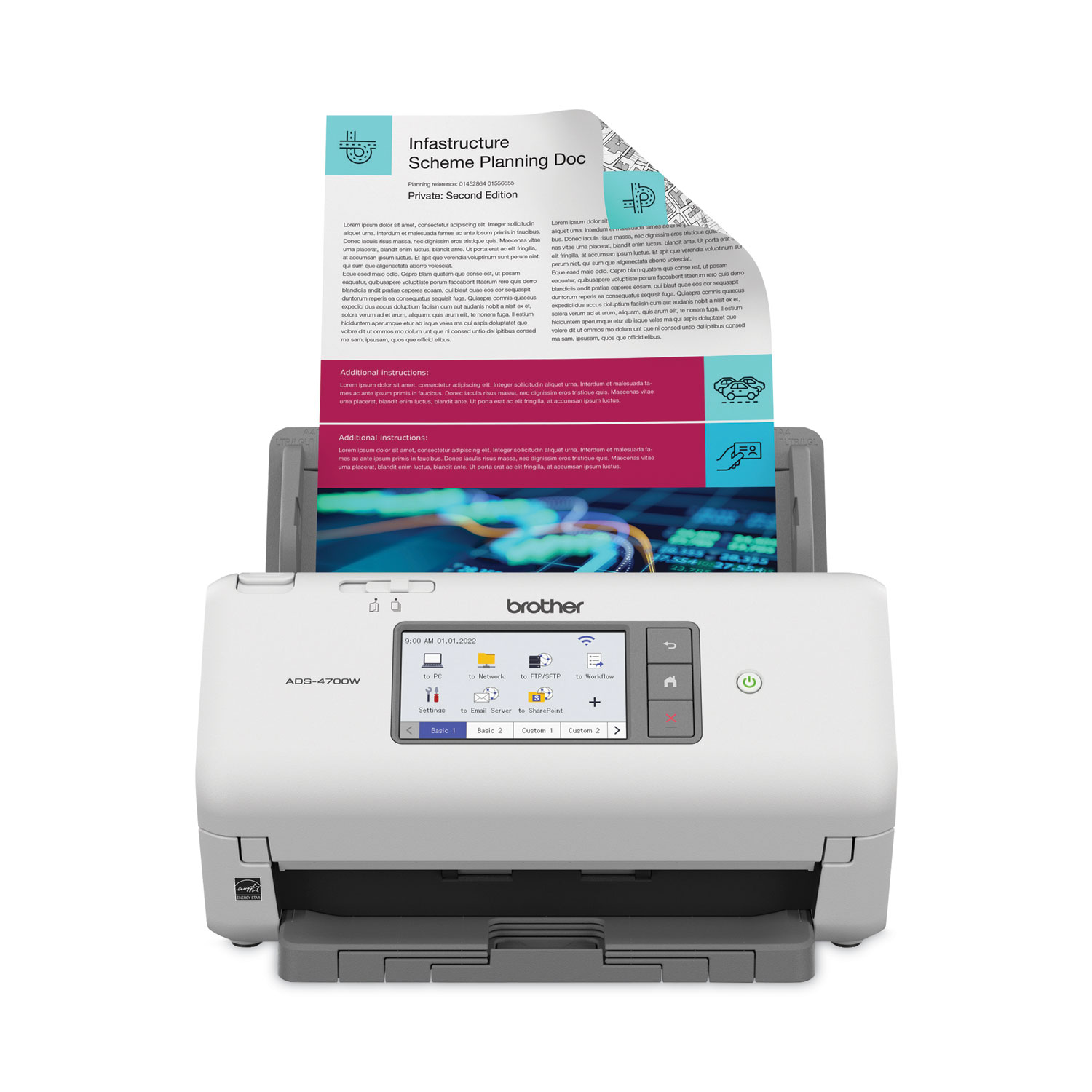
Buy the Brother ADS-4700W for an office workgroup that scans paper documents all day. It adds Wi-Fi, a 4.3-inch touchscreen with 56 shortcuts, an 80-sheet feeder, and TWAIN/WIA/ISIS/SANE drivers, which the Canon lacks. Buy the Canon ImageFORMULA RS40 if photos are part of the job. Its feeder handles up to 40 photos at once and its software includes red-eye correction and face smoothing. Both scan duplex at up to 40 ppm for documents, but the Brother is the stronger document machine and the Canon is the only one of the two built for photo batches.

  • Choose the Brother ADS-4700W if you scan stacks of office documents, need Wi-Fi and network scanning, or want one-touch shortcuts and wide driver support for a document management system.
  • Choose the Canon ImageFORMULA RS40 if you need to digitize boxes of printed photos alongside receipts, cards and tax documents, and a USB connection is enough.

Prices

  • Brother ADS-4700W: $495.00 at Amazon (checked today)
  • Canon ImageFORMULA RS40 Scanner: $339.00 at Arlington Camera (checked today)
  • Difference: the Canon ImageFORMULA RS40 Scanner is $156.00 cheaper than the Brother ADS-4700W today
Brother
Brother ADS-4700W Professional Desktop Scanner

Brother ADS-4700W

Brother ADS-4700W Professional Desktop Scanner

4.1(28 ratings)
$495.00at AmazonChecked 1 h ago
See all prices and details
Visit Amazon

As an Amazon Associate, Deal.ai earns from qualifying purchases.

Pros
  • Wi-Fi plus USB, so a workgroup can scan without a PC tethered to it
  • 80-sheet feeder takes bigger stacks between refills
  • Touchscreen shortcuts send scans straight to cloud, email or SharePoint
  • Wide driver support fits existing document management software
  • Triple Layer Security controls who reaches documents and the device
Cons
  • No photo feeder or photo cleanup tools
  • Only 28 ratings, averaging 4.1 out of 5
  • Touchscreen menus take time to set up
Canon
Canon ImageFORMULA RS40 Photo & Document Scanner with Auto Feeder

Canon ImageFORMULA RS40 Scanner

Canon ImageFORMULA RS40 Photo & Document Scanner with Auto Feeder

$339.00at Arlington CameraChecked 1 h ago
See all prices and details
Visit Arlington Camera
Pros
  • Handles photos, Polaroids, receipts, cards and licenses in one feeder
  • Bundled software fixes red-eye and smooths faces
  • Long document mode up to 118.1 inches
  • Light at 6.6 lbs with low standby power draw
  • One-year limited warranty with US-based support
Cons
  • USB only, with no Wi-Fi or network scanning
  • 60-sheet feeder is smaller than the Brother's
  • TWAIN is the only driver, which limits some document systems
  • Photo scans run slower at up to 30 ppm

What separates them

Brother ADS-4700WCanon ImageFORMULA RS40 Scanner
Photo scanningDocument-focused; no photo feeder or photo enhancement toolsFeeds up to 40 photos at once; software adds red-eye correction and face smoothing
ConnectivityWi-Fi and USB, with scan-to cloud, email, SharePoint and SFTPUSB 2.0 only
Feeder capacity80 sheets60 sheets, or 40 photos
Controls4.3-inch color touchscreen with up to 56 customizable shortcutsOne-button operation; no touchscreen
Driver supportTWAIN, WIA, ISIS and SANETWAIN only
Document speedUp to 40 ppm duplexUp to 40 ppm documents, up to 30 ppm photos
SecurityTriple Layer Security to limit document and device accessNo security feature set listed
Long documentsStandard A4/Letter document handlingLong document mode up to 118.1 inches

Price history

  • Brother ADS-4700W: lowest $495.00 on Nov 10 at Amazon.
  • Canon ImageFORMULA RS40 Scanner: lowest $322.22 on Nov 10 at A Matter of Fax.

Prices at every store

Brother ADS-4700W

  • NeweggNew

    In stock

    $530.00Free shippingChecked 1 h ago
    Visit Newegg
  • StaplesNew

    In stock

    $549.99Free shippingChecked 1 h ago
    Visit Staples
  • Techinn.comNew

    In stockMade for another market

    $521.99+ $70.49 shippingChecked 1 h ago
    Visit Techinn.com
  • AmazonNew

    Availability unknown

    As an Amazon Associate, Deal.ai earns from qualifying purchases.

    $495.00Free shippingChecked 1 h ago
    Visit Amazon

Store links may earn us a commission. Some prices via Klarna.

All 12 stores and price history →

Canon ImageFORMULA RS40 Scanner

  • Arlington CameraNew

    In stock

    $339.00Free shippingChecked 1 h ago
    Visit Arlington Camera
  • B&H Photo-Video-AudioNew

    In stock

    $350.00Free shippingChecked 1 h ago
    Visit B&H Photo-Video-Audio
  • DellNew

    In stock

    $350.00Free shippingChecked 1 h ago
    Visit Dell
  • CanonNew

    In stock

    $350.00+ $15.99 shippingChecked 1 h ago
    Visit Canon
All 14 stores and price history →

Specs compared

SpecBrother ADS-4700WCanon ImageFORMULA RS40 Scanner
InterfaceWi-Fi, USBUSB 2.0
DuplexYes—
Color Depth48-bit Color—
ColorWhite—
Resolution600 dpi—
sizeA4 - 8.27" x 11.69"—
TypeDocument Scanner—
FormatA4—
Operating SystemWindows, macOS—
Optical resolution—Up to 600 dpi
Output resolution—150/200/300/400/600/1200 (interpolated)
Photo scan speed—Up to 30 ppm
Show all 20 specsShow fewer specs
SpecBrother ADS-4700WCanon ImageFORMULA RS40 Scanner
Document scan speed—Up to 40 ppm
Feeder capacity—Up to 60 sheets
Photo feeder capacity—Up to 40 photos
Dimensions—9.6” X 11.4” X 9.9” (trays closed)
Weight—6.6 lbs
Power consumption—22W or less (Energy Saving Mode: 1.7W)
Document width—2.0”-8.5”
Long document mode—up to 118.1”

What reviewers say

Brother ADS-4700W

  • 4.1 / 528 ratings

Reviewers generally praise the ADS-4700W for its fast scanning speed, large feeder, and intuitive touchscreen. Some users have experienced paper jams and find the software setup complex. Overall, it is well-regarded for office use.

What people mention
  • Scan speedPraisedUsers appreciate the fast 40 ppm duplex scanning, which speeds up document processing.
  • Paper handlingMixedThe 80-page feeder is convenient, but some users report occasional paper jams with certain paper types.
  • TouchscreenPraisedThe 4.3-inch color touchscreen is intuitive and the customizable shortcuts are helpful.
  • Software setupCriticisedSome users find the bundled software and driver installation complicated.

Canon ImageFORMULA RS40 Scanner

Owner feedback is limited, but the pattern is that people like the batch photo feeding and one-pass duplex scanning for home archiving. Complaints center on the USB-only connection and the feeder's limits with delicate or oversized originals.

What people mention
  • FeederPraisedOwners like loading a stack of photos or documents and letting it run.
  • DuplexPraisedTwo-sided scanning in one pass is called a real time saver.
  • ConnectivityCriticisedThe USB-only link is seen as limiting for shared or wireless setups.
  • Photo handlingMixedBatch photo scanning works well, but curled or fragile prints can misfeed.

Questions and answers

Which is better for scanning a box of old family photos?
The Canon RS40. Its feeder takes up to 40 photos at a time and its software includes red-eye correction and face smoothing. The Brother is built for paper documents, not photo batches.
Which is better for a small office?
The Brother ADS-4700W. Wi-Fi, the 80-sheet feeder, the touchscreen shortcuts and ISIS/SANE support fit shared office workflows. The Canon needs a USB-connected computer.
Do both scan both sides at once?
Yes. Both are duplex scanners rated at up to 40 pages per minute for documents. The Canon drops to about 30 per minute when scanning photos.
Is the Brother worth stepping up to over the Canon?
If you scan documents daily and want network scanning and one-touch destinations, yes. If photos are the main job, the Canon's photo feeder and cleanup software matter more than the Brother's extras.
Which handles longer documents?
The Canon, which has a long document mode up to 118.1 inches. The Brother is specified for standard A4 and Letter pages.
Which is easier to set up?
The Canon, since it is USB only with a TWAIN driver. The Brother needs Wi-Fi or USB setup plus shortcut configuration on its touchscreen.

Ask our shopping agent

It checks today's price at every store, compares the alternatives and answers in about a minute.

Enter to send, Shift+Enter for a new line

More comparisons

  • Canon ImageFORMULA RS40 Photo & Document Scanner with Auto Feeder vs Epson FastFoto FF-680W Wireless High-Speed Photo and Document Scanning System
  • Brother ADS-4700W Professional Desktop Scanner vs Epson FastFoto FF-680W Wireless High-Speed Photo and Document Scanning System
  • Brother ADS-4700W Professional Desktop Scanner vs Epson WorkForce ES-580W Wireless Color Duplex Desktop Document Scanner
  • Brother ADS-4700W Professional Desktop Scanner vs Fujitsu fi-8170
  • Epson WorkForce ES-C320W Wireless Compact Desktop Document Scanner vs Canon ImageFORMULA RS40 Photo & Document Scanner with Auto Feeder