StoreDeal.ai store
Shop
  • Deals
  • Deal checker
  • Black Friday
  • Buying guides
  • Brands
  • Stores
Travel
  • Flight deals
  • Hotel deals
Company
  • Research
  • Press
  • Use in AI assistants
  • Contact
  • deal.ai apps
Black Friday 2026
  • Walmart
  • Best Buy
  • Target
  • TVs
  • Laptops
  • Headphones
  • Apple
  • Gaming
  • Vacuums
  • Kitchen
  • Toys
  • Smartwatches
  • Tablets
  • Furniture
  • Mattresses
© Deal.ai Inc.·2222 Ponce de Leon Blvd, Miami, FL 33134·support@deal.ai
TermsPrivacy
Deal.ai › Compare

Dell OptiPlex 7060 Tower Desktop vs Dell OptiPlex 9020 SFF Desktop

Buy the OptiPlex 7060 for a machine you will keep for years. Its 8th-gen six-core i7-8700, DDR4 memory and Windows 11 Pro support give it a much longer useful life than the 9020's 4th-gen quad-core i7-4770 and DDR3. The 9020 is a compact small-form-factor box that can drive three monitors and is fine for browsing, email and documents, but it is older hardware on Windows 10. Owners of both lines praise the OptiPlex build and easy service access; the 7060 is simply the newer, faster platform.

  • Choose the OptiPlex 7060 if you want the newer platform, Windows 11 Pro and six cores for years of everyday work.
  • Choose the OptiPlex 9020 if you need a small, low-profile desktop for basic tasks and three-monitor output.

Prices

  • Dell OptiPlex 7060 Tower Desktop: $329.96 at Walmart (checked today)
  • Dell OptiPlex 9020 SFF Desktop: $379.00 at Walmart (checked today)
  • Difference: the Dell OptiPlex 7060 Tower Desktop is $49.04 cheaper than the Dell OptiPlex 9020 SFF Desktop today
Dell
Dell OptiPlex 7060 Tower Desktop Computer, Intel Core i7-8700, 32GB DDR4 RAM, 1TB SSD, Windows 11 Pro

Dell OptiPlex 7060 Tower Desktop

Dell OptiPlex 7060 Tower Desktop Computer, Intel Core i7-8700, 32GB DDR4 RAM, 1TB SSD, Windows 11 Pro

$329.96at WalmartChecked 1 h ago
See all prices and details
Visit Walmart
Pros
  • Six-core i7-8700 with 12 threads handles heavier multitasking
  • DDR4 memory and Windows 11 Pro keep it current
  • 1TB SSD and 32GB RAM suit large files and many tabs
  • Tower chassis leaves room for expansion
Cons
  • Bulky tower takes more desk or floor space
  • No built-in Wi-Fi stated
  • Integrated graphics only, no dedicated GPU
Dell
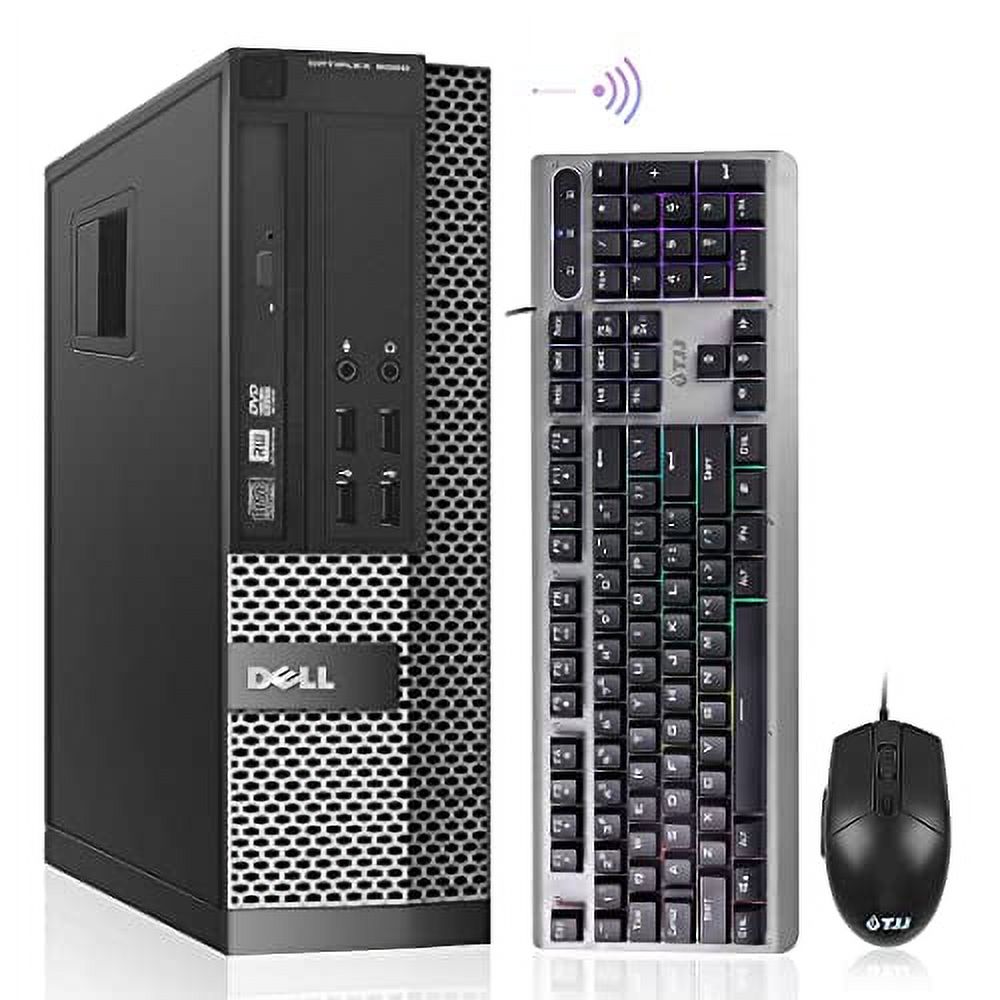
Dell OptiPlex 9020 Desktop Computer

Dell OptiPlex 9020 SFF Desktop

Dell OptiPlex 9020 Desktop Computer

5(1 rating)
$379.00at WalmartChecked 1 h ago
See all prices and details
Visit Walmart
Pros
  • Compact small form factor fits tight spaces
  • Three monitor outputs out of the box
  • Built-in dual-band Wi-Fi
  • Wired keyboard and mouse included
Cons
  • 4th-gen quad-core CPU is well behind current chips
  • DDR3 memory is a dead-end upgrade path
  • Ships on Windows 10 Pro, which is out of support
  • Older integrated graphics

What separates them

Dell OptiPlex 7060 Tower DesktopDell OptiPlex 9020 SFF Desktop
ProcessorCore i7-8700, 6 cores/12 threads, up to 4.6GHzCore i7-4770, 4 cores/8 threads, up to 3.9GHz
Memory type32GB DDR432GB DDR3
Operating systemWindows 11 ProWindows 10 Pro
Form factorTowerSmall form factor, about 11.4 x 3.6 x 12.3 in
GraphicsIntel UHD Graphics 630Intel HD Graphics 4600
Monitor outputsStandard tower ports; check the card and boardTwo DisplayPort plus one VGA, three monitors at once
WirelessNot stated; wired Ethernet typicalBuilt-in dual-band Wi-Fi (AC7260)
Upgrade ceilingDDR4, current socket, longer parts supportMaxed at 32GB DDR3, older platform

Price history

  • Dell OptiPlex 7060 Tower Desktop: lowest $329.96 on Nov 23 at Walmart; $329.96 on Nov 26.

Prices at every store

Dell OptiPlex 7060 Tower Desktop

  • WalmartNew

    In stock

    $329.96Checked 1 h ago
    Visit Walmart
  • AmazonRefurbished

    Availability unknown

    As an Amazon Associate, Deal.ai earns from qualifying purchases.

    $392.99Free shippingChecked 1 h ago
    Visit Amazon

Store links may earn us a commission.

All 2 stores and price history →

Dell OptiPlex 9020 SFF Desktop

  • WalmartNew

    In stockSold by BargainRusReturns: Sold by a Walmart Marketplace seller; returns go to the seller under the seller's returns policy.

    $379.00Free shippingChecked 1 h ago
    Visit Walmart
  • WalmartRefurbished

    In stockSold by Refurbchoice

    $316.00Free shippingChecked Nov 10
    Visit Walmart
Prices and history →

Specs compared

SpecDell OptiPlex 7060 Tower DesktopDell OptiPlex 9020 SFF Desktop
ProcessorIntel Core i7-8700 (6 Cores/12MB/12T/up to 4.6G…Intel Core i7
Integrated graphicsIntel UHD Graphics 630—
OSWindows 11 Pro—
BrandDell—
ColorBlack—
Proc. Brand—Intel
Graphic Card—Intel HD
Ram Memory—32 GB, DDR3
HD Type—Solid State
HD Capacity—1 TB
Core Count—4
Proc. Speed—3.6 GHz
Show all 17 specsShow fewer specs
SpecDell OptiPlex 7060 Tower DesktopDell OptiPlex 9020 SFF Desktop
Display—No Display
Max RAM—32 GB
Wireless Technology—Wi-Fi 5 GHz 2.4 GHz
Has Touchscreen—N
Data Storage—1 TB

What reviewers say

Dell OptiPlex 9020 SFF Desktop

Owners of the OptiPlex 9020 generally describe it as a reliable, quiet office machine that is easy to set up and handles everyday work without complaint. Complaints center on its age: the older platform, weak integrated graphics and the end of Windows 10 support.

What people mention
  • PerformancePraisedOwners say the quad-core i7 keeps up with browsing, office apps and multitasking.
  • NoisePraisedReviewers describe it as quiet during normal office work.
  • SetupPraisedBuyers report it is easy to set up and get running.
  • GraphicsCriticisedThe integrated Intel HD 4600 is called out as too weak for gaming or serious editing.

Questions and answers

Which is better for office work and multitasking?
The 7060. Its i7-8700 has six cores and twelve threads against four and eight on the 9020, and DDR4 memory is faster than DDR3. Heavy spreadsheets, many browser tabs and light photo work run noticeably smoother.
Which lasts longer?
The 7060. Newer silicon, DDR4 and Windows 11 Pro support mean it stays usable and secure longer. The 9020 is capped at 32GB DDR3 and runs Windows 10, which no longer gets security updates.
Is the 9020 good for a home office?
Yes for basic use. Browsing, email, documents and video playback are fine, and its small case fits tight desks. Skip it if you need current software support or heavy multitasking.
Can the 9020 run three monitors?
Yes. It has two DisplayPort outputs and one VGA port, so three displays work without a add-in card. The 7060 tower's outputs depend on its configuration, so check the ports before buying.
Is the 7060 worth stepping up to?
For most buyers, yes. You get a much faster CPU, DDR4, Windows 11 Pro and a case that is easier to upgrade. The 9020 only wins on size, built-in Wi-Fi and triple-monitor ports.
Do either come with Wi-Fi?
The 9020 lists built-in dual-band Wi-Fi. The 7060 tower does not state wireless, so plan on Ethernet or add a Wi-Fi card or USB adapter.

Ask our shopping agent

It checks today's price at every store, compares the alternatives and answers in about a minute.

Enter to send, Shift+Enter for a new line

More comparisons

  • Dell OptiPlex 7060 Tower Desktop Computer, Intel Core i7-8700, 32GB DDR4 RAM, 1TB SSD, Windows 11 Pro vs ASUS V500 Business Tower Desktop
  • Dell OptiPlex 7060 Tower Desktop Computer, Intel Core i7-8700, 32GB DDR4 RAM, 1TB SSD, Windows 11 Pro vs STGAubron Gaming PC Desktop, Intel Core i7 up to 3.9G, 32G RAM, 1T SSD, RTX 3060Ti 8G, WiFi, BT 5.0, RGB Fan x6, W11H64
  • Dell OptiPlex 9020 Desktop Computer vs Prebuilt Desktop PC, Intel Xeon E5 12-Core, Radeon R5 340 Graphics, 32GB RAM, 256GB SSD + 1TB HDD, WiFi 6, Bluetooth 5.4, Liquid Cooling, 9 RGB Fans, Windows 11, RGB Keyboard & Mouse
  • Dell OptiPlex 9020 Desktop Computer vs ASUS V500 Business Tower Desktop
  • Evounic Prebuilt Gaming PC Desktop vs Dell OptiPlex 9020 Desktop Computer
  • Dell RGB Desktop Computer vs Dell OptiPlex 9020 Desktop Computer
  • STGAubron Gaming PC Desktop, Intel Core i7 up to 3.9G, 32G RAM, 1T SSD, RTX 3060Ti 8G, WiFi, BT 5.0, RGB Fan x6, W11H64 vs Dell OptiPlex 9020 Desktop Computer

Buying guides that pick them

  • Best desktop computers under $800 with 32GB RAM