StoreDeal.ai store
Shop
  • Deals
  • Deal checker
  • Black Friday
  • Buying guides
  • Brands
  • Stores
Travel
  • Flight deals
  • Hotel deals
Company
  • Research
  • Press
  • Use in AI assistants
  • Contact
  • deal.ai apps
Black Friday 2026
  • Walmart
  • Best Buy
  • Target
  • TVs
  • Laptops
  • Headphones
  • Apple
  • Gaming
  • Vacuums
  • Kitchen
  • Toys
  • Smartwatches
  • Tablets
  • Furniture
  • Mattresses
© Deal.ai Inc.·2222 Ponce de Leon Blvd, Miami, FL 33134·support@deal.ai
TermsPrivacy
Deal.ai › Compare

Gigabyte MZ31-AR0 vs Dell 384-BBSR PowerEdge SP3 System Board

Buy the Gigabyte MZ31-AR0 if you are building a server from parts and need a board that takes a single EPYC in a standard E-ATX case. Buy the Dell 384-BBSR only if you are repairing or upgrading an existing PowerEdge and need the exact replacement board. The Gigabyte gives you 10GbE SFP+ ports, SlimSAS for 16 SATA drives, an M.2 slot and seven PCIe slots out of the box. The Dell is a proprietary PowerEdge part: it fits its chassis, its firmware and its management stack, and little else. Owners of the Gigabyte report it runs flawlessly but also report failures and poor documentation, so test it early.

  • Choose the Gigabyte MZ31-AR0 if you are assembling a single-socket EPYC server and want built-in 10GbE, many drive connections and standard E-ATX mounting.
  • Choose the Dell 384-BBSR if you are replacing a failed board in a PowerEdge server and need the exact Dell part for that chassis.

Prices

  • Gigabyte MZ31-AR0: $463.60 at eBay (last seen Nov 7)
  • Dell 384-BBSR PowerEdge SP3 System Board: $681.20 at Orange Hardwares (last seen Nov 10)
  • Difference: the Gigabyte MZ31-AR0 is $217.60 cheaper than the Dell 384-BBSR PowerEdge SP3 System Board at the latest prices (Nov 7 and Nov 10)
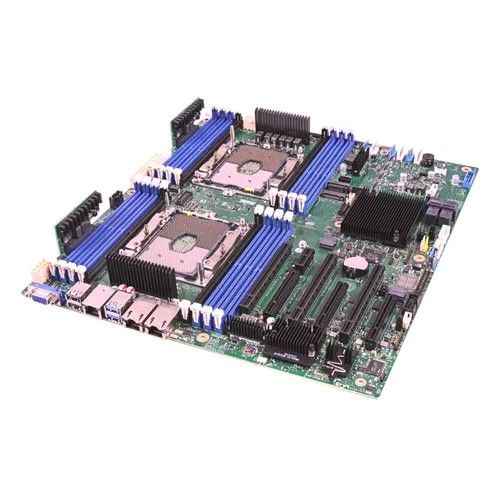
Gigabyte
Gigabyte MZ31-AR0

Gigabyte MZ31-AR0

$463.60at eBayChecked Nov 7
See all prices and details
Visit eBay

Store links may earn us a commission.

Pros
  • Two 10GbE SFP+ ports built in
  • Four SlimSAS connectors for up to 16 SATA drives
  • M.2 PCIe Gen3 x4 slot for a boot drive
  • Seven PCIe Gen3 slots for expansion cards
  • Single-socket EPYC in a standard E-ATX form factor
Cons
  • Documentation is widely criticized
  • At least one owner reports the board failed
  • PCIe is Gen3 only, not Gen4
  • Memory speed ratings vary across listings; confirm what your CPU supports
Dell
384-BBSR Dell Socket SP3 AMD EPYC System Board (Motherboard) for EMC Poweredge Supports 16x DIMM

Dell 384-BBSR PowerEdge SP3 System Board

384-BBSR Dell Socket SP3 AMD EPYC System Board (Motherboard) for EMC Poweredge Supports 16x DIMM

$681.20at Orange HardwaresChecked Nov 10
See all prices and details
Visit Orange Hardwares
Pros
  • Exact replacement for a PowerEdge chassis
  • Dell firmware and iDRAC management integration
  • 16 DIMM slots for large memory configurations
  • Backed by Dell's enterprise support chain
Cons
  • Fits only the matching PowerEdge model
  • No published port, slot or storage specs of its own
  • One buyer received a dead-on-arrival board
  • Often ships without retail packaging

What separates them

Gigabyte MZ31-AR0Dell 384-BBSR PowerEdge SP3 System Board
Intended useStandalone E-ATX board for custom buildsReplacement part for Dell EMC PowerEdge servers
Network ports2 x SFP+ 10Gb/s plus a dedicated management portNot specified; depends on the PowerEdge chassis
Storage connectors4 x SlimSAS 4i for up to 16 SATA drives, plus M.2 PCIe Gen3 x4Not specified; supplied through the PowerEdge backplane
Expansion slots7 PCIe Gen3 slots (up to 4 x16 and 3 x8)Not specified; fixed by the PowerEdge riser layout
Memory16 DIMMs, 8-channel DDR4, up to 2 TB at 1DPC16 DIMMs, EPYC Socket SP3
Remote managementAspeed AST2500 controller on boardDell iDRAC through the PowerEdge platform
Firmware and supportGigabyte support; owners call the documentation poorDell firmware updates and enterprise support tied to the server
Fit and installationStandard E-ATX; mounts in common server and workstation casesProprietary; only fits the matching PowerEdge model

Price history

$1,160.36$463.60
Nov 3Nov 11
  • Gigabyte MZ31-AR0: lowest $463.60 on Nov 7 at eBay; $677.97 on Nov 11.

Prices at every store

Gigabyte MZ31-AR0

  • eBayNew

    In stockSold by plc-fortune-usa

    $463.60Checked Nov 7
    Visit eBay
  • TecisoftNew

    In stock

    $797.25Checked Nov 11
    Visit Tecisoft
  • Orange HardwaresNew

    In stock

    $1,160.36Free shippingChecked Nov 7
    Visit Orange Hardwares
  • eBayPre-owned

    Availability unknownSold by longhorn786 (100% positive, 1,200 ratings)Ships from Canada · duties may applyReturns: Set by the eBay seller; the eBay Money Back Guarantee covers an item that doesn't arrive or isn't as described.

    $353.20+ $43.79 shippingChecked Nov 8
    Visit eBay

Also available at

  • TeciSoftCheck price at TeciSoft
  • AeonflyCheck price at Aeonfly
  • Orange HardwaresCheck price at Orange Hardwares

Store links may earn us a commission.

All 4 stores and price history →

Dell 384-BBSR PowerEdge SP3 System Board

  • ServerSupply.comRefurbished

    In stock

    $570.00Free shippingChecked Nov 9
    Visit ServerSupply.com
  • Orange HardwaresNew

    In stockReturn policy

    $681.20Checked Nov 10
    Visit Orange Hardwares
  • E Tech DevicesNew

    In stockReturn policy

    $717.05Checked Nov 9
    Visit E Tech Devices
All 3 stores and price history →

Specs compared

SpecGigabyte MZ31-AR0Dell 384-BBSR PowerEdge SP3 System Board
Socket TypeSocket SP3Socket SP3
CPU supportSingle AMD EPYC™ 7003 Series processors—
Memory slots16 x DIMMs—
Memory channels8-Channel DDR4 RDIMM/LRDIMM per CPU—
LAN ports2 x SFP+ 10 Gb/s LAN ports via Broadcom® BCM578…—
SlimSAS connectors4 x SlimSAS 4i connectors supporting SATA—
M.2 slot1 x M.2 slot with PCIe Gen3 x4—
PCIe slots7 x PCIe Gen3 x16 and x8 slots—
Form factorE-ATX UP—
Max memory capacityUp to 2 TB Memory Capacity (1DPC)—
Max memory speed8 Channels of DDR4-3200—
Max coresUp to 64 Cores—
Show all 39 specsShow fewer specs
SpecGigabyte MZ31-AR0Dell 384-BBSR PowerEdge SP3 System Board
PCIe lanes128 lanes PCIe 4.0—
Motherboard Socket TypeSocket SP3—
Motherboard ChipsetSystem on Chip—
Motherboard Form FactorEATX—
Motherboard ModelMZ31-AR0—
ManufacturerGigabyte—
Clock Speed2.0-3.0GHz—
Number Of CoresUp to 32-core—
Number Of Threads64 threads—

What reviewers say

Gigabyte MZ31-AR0

Owner feedback is split. One reviewer says the board runs flawlessly and that remote management works after a firmware update; another reports the board failed and calls the documentation really bad.

What people mention
  • ReliabilityMixedOne owner reports flawless operation, another says the board failed.
  • DocumentationCriticisedCalled really bad by a reviewer, which makes setup harder.
  • Remote managementPraisedWorks once the firmware is updated.
  • Single-socket designPraisedValued as a rare single-CPU EPYC board.

Dell 384-BBSR PowerEdge SP3 System Board

What people mention
  • DOA unitsCriticisedOne buyer received a board that was dead on arrival, though it was replaced.
  • PackagingCriticisedSome hardware shipped without the manufacturer's packaging.
  • ConditionPraisedBuyers say boards arrived in good condition.
  • FunctionPraisedBuyers report the boards worked as expected after installation.

Questions and answers

Which is better for a home lab or custom build?
The Gigabyte. It uses standard E-ATX mounting and gives you 10GbE, SlimSAS and an M.2 slot without extra cards. The Dell board only fits its PowerEdge chassis.
Which has better expansion?
The Gigabyte, on paper. It lists seven PCIe Gen3 slots, four SlimSAS connectors and an M.2 slot. Dell does not publish slot or port details for this board because they depend on the server it goes in.
Is the Dell board a drop-in upgrade for any EPYC system?
No. It is a proprietary PowerEdge part. It works in the matching Dell server, not in a generic case or another brand's chassis.
Which is more reliable?
Dell's enterprise support and firmware process are stronger. Gigabyte owners report both flawless running and board failures, so test the Gigabyte during its return window.
Do both support the same CPUs and memory?
Both use Socket SP3 for AMD EPYC and have 16 DIMM slots. Confirm the exact EPYC generation and DIMM type your board revision supports before buying.
Is the Gigabyte worth stepping up to over the Dell?
Only if you are building rather than repairing. For a new build it offers far more built-in I/O. For a PowerEdge repair, the Dell board is the only one that fits.

Ask our shopping agent

It checks today's price at every store, compares the alternatives and answers in about a minute.

Enter to send, Shift+Enter for a new line

More comparisons

  • Gigabyte MZ31-AR0 vs Supermicro H12SSL-CT ATX Server Motherboard
  • Gigabyte MZ32-AR0 vs Gigabyte MZ31-AR0
  • ASRock Rack EPYCD8-2T vs Gigabyte MZ31-AR0
  • Gigabyte MZ31-AR0 vs Asus KRPA-U16 Server Motherboard
  • 384-BBSR Dell Socket SP3 AMD EPYC System Board (Motherboard) for EMC Poweredge Supports 16x DIMM vs Supermicro H12SSL-CT ATX Server Motherboard
  • MZ32-AR0 Gigabyte Socket SP3 System on Chip Chipset EATX System Board (Motherboard) vs Gigabyte MZ31-AR0

Buying guides that pick them

  • Best single-socket AMD EPYC SP3 server motherboards
Thermal Design Power (TDP)
up to 200W (CPU TDP)
—
RAM TypeDDR4—
RAM Maximum Capacity64GB (RDIMM modules)—
RAM Speed2400 MHz—
RAM Number Of Slots16—
CPU CompatibilityAMD EPYC—
Motherboard CompatibilityExtended ATX—
Memory TypeDDR4—
Memory Speed2400 MHz—
Memory Channel Support8-Channel—
Discrete GraphicsNo—
Integrated GraphicsYes—
RAM Genre—DIMM
Chipset Vendor—AMD
Supported Processor—EPYC
Built-In Processor Vendor—AMD
Built-In Processor Type—EPYC
Quantity Of Memory Slots—16