Shop
  • Deals
  • Deal checker
  • Black Friday
  • Buying guides
  • Brands
  • Stores
Travel
  • Flight deals
  • Hotel deals
Company
  • Research
  • Press
  • deal.ai apps
Black Friday 2026
  • Walmart
  • Best Buy
  • Target
  • TVs
  • Laptops
  • Headphones
  • Apple
  • Gaming
  • Vacuums
  • Kitchen
  • Toys
  • Smartwatches
  • Tablets
  • Furniture
  • Mattresses
© Deal.ai Inc.
TermsPrivacy
Deal.ai › Compare

Gigabyte MZ32-AR0 vs Supermicro H13SSL-N

Buy the Supermicro H13SSL-N if you are building a current EPYC 9004 server and need DDR5, 128 cores and up to 3TB of memory. Buy the Gigabyte MZ32-AR0 only if you already own EPYC 7002 CPUs and DDR4 RDIMMs and want to reuse them. The Gigabyte is the cheaper board at $667.00 at CoreRex as of November 7, 2026, but it is a previous-generation platform. The Supermicro is the newer, longer-lived platform and the better buy for a new build.

Ask our shopping agent

It checks today's price at every store, compares the alternatives and answers in about a minute.
Enter to send, Shift+Enter for a new line

Gigabyte
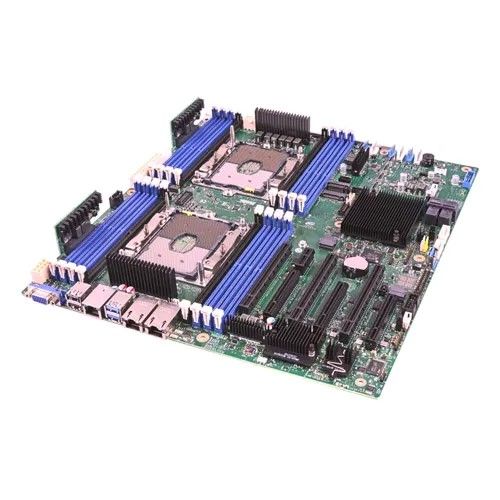
Gigabyte MZ32-AR0

Gigabyte MZ32-AR0

$667.00at CoreRexObserved Nov 7, 2026, 2:51 PM
See all prices and details
Visit CoreRex

Choose the Gigabyte MZ32-AR0 if you have EPYC 7002-series CPUs and DDR4 RDIMMs on hand and want a low-cost SP3 server board.

Pros
  • Cheapest path into an EPYC server board at $667.00 at CoreRex as of November 7, 2026.
  • 16 DIMM slots give plenty of channels for DDR4 RDIMMs and LRDIMMs.
  • Aspeed AST2500 BMC gives out-of-band server management.
  • Reuses EPYC 7002 CPUs and DDR4 memory you may already own.
Cons
  • DDR4 only, and the listed 128 GB maximum is very low for a 16-slot board.
  • Older SP3 platform with no path to EPYC 9004.
  • Extended ATX needs a larger case than standard ATX.
  • 64-core ceiling limits density per node.
Supermicro
Supermicro H13SSL-N Server Motherboard

Supermicro H13SSL-N

Supermicro H13SSL-N Server Motherboard

See all prices and details

Choose the Supermicro H13SSL-N if you are buying new EPYC 9004 silicon and want DDR5, PCIe 5.0 and a platform with years of upgrade room.

Pros
  • SP5 socket supports EPYC 9004 up to 128 cores and 400W.
  • DDR5 at 4800 MHz and up to 3 TB across 12 slots.
  • Standard ATX fits more chassis than EATX.
  • Integrated graphics onboard, no discrete GPU needed.
Cons
  • Newer platform costs more than the Gigabyte board.
  • DDR5 RDIMMs cost more per GB than DDR4.
  • Only 12 DIMM slots versus 16 on the Gigabyte.
  • 400W CPUs need strong cooling and power delivery.

What separates them

Gigabyte MZ32-AR0Supermicro H13SSL-N
CPU socketSocket SP3, AMD EPYC 7002 seriesSocket SP5, AMD EPYC 9004 series
Memory typeDDR4 RDIMM/LRDIMM at 3200 MHzDDR5 at 4800 MHz
Max memory128 GB across 16 DIMM slotsUp to 3 TB across 12 DIMM slots
Core supportUp to 64 cores / 128 threadsUp to 128 cores / 256 threads
CPU power ceilingUp to 280W cTDPUp to 400W SKUs
Form factorExtended ATXATX
Onboard videoAspeed AST2500Integrated graphics
Price$667.00 at CoreRex as of November 7, 2026Not given

Price history

$764.05$603.48
Nov 3Nov 7
  • Gigabyte MZ32-AR0: lowest $667.00 on Nov 7 at CoreRex.
  • Supermicro H13SSL-N: lowest $603.48 on Nov 3.

Prices at every store

Gigabyte MZ32-AR0

  • CoreRexNew

    In stock

    $667.00Observed Nov 7, 2026, 2:51 PM
    Visit CoreRex
  • eBayPre-owned

    Availability unknown

    $499.00+ $33.00 shippingObserved Nov 7, 2026, 2:50 PM
    Visit eBay

Also available at

  • AmazonCheck price at Amazon
  • anafrashop.comCheck price at anafrashop.com
  • AeonflyCheck price at Aeonfly

Store links may earn us a commission.

All 2 stores and price history →

Supermicro H13SSL-N

  • AmazonCheck price at Amazon
  • eBayCheck price at eBay
  • ViperatechCheck price at Viperatech

Store links may earn us a commission.

Prices and history →

Specs compared

SpecGigabyte MZ32-AR0Supermicro H13SSL-N
Motherboard Socket TypeSocket SP3SP5
Motherboard ChipsetSystem on ChipSystem on Chip
Motherboard Form FactorExtended ATXATX
Motherboard ModelMZ32-AR0H13SSL-N, MBD-H13SSL-N-B
Form FactorExtended ATXATX
ManufacturerGIGABYTESupermicro
Socket TypeSocket SP3SP5
CPU CompatibilityAMDAMD EPYC 9004 series Processors
Motherboard CompatibilityExtended ATXATX
Number Of CoresUp to 64 coresUp to 128 cores
Number Of Threads128 threads256 threads
Thermal Design Power (TDP)Up to 280W (CPU cTDP)up to 400 Watt SKUs
Show all 40 specsShow fewer specs
SpecGigabyte MZ32-AR0Supermicro H13SSL-N
RAM TypeRDIMM, DDR4, DDR4 SDRAM, LRDIMMDDR
RAM Maximum Capacity128 GBUp to 3TB
RAM Speed3200 MHz4800 MHz
RAM Number Of Slots1612
RAM ECC SupportYes (RDIMM/LRDIMM)Yes
GPU ManufacturerAspeed—
GPU ModelAST2500—
GPU ChipsetAspeed AST2500—
Storage Capacity3.84 GB (ssd)—
Storage Type

What reviewers say

Supermicro H13SSL-N

Owners praise the H13SSL-N for its solid build and compatibility with high-core-count EPYC CPUs, making it a popular choice for home labs and small servers. However, some criticize the limited expansion slots and the need for expensive registered DDR5 memory.

What people mention
  • Build qualityPraisedOwners report the board feels sturdy and well-made.
  • Memory supportPraisedReviewers appreciate the 12 DIMM slots and high capacity.
  • Expansion slotsCriticisedUsers complain about the limited number of PCIe slots.
  • NetworkingCriticisedThe absence of 10GbE LAN is a common complaint.

Questions and answers

Which is better for a new EPYC server build?
The Supermicro H13SSL-N. It takes EPYC 9004 CPUs, DDR5 and up to 3 TB of memory, while the Gigabyte is limited to EPYC 7002 and DDR4.
Can I use the same CPU in both boards?
No. The Gigabyte uses Socket SP3 for EPYC 7002 series. The Supermicro uses Socket SP5 for EPYC 9004 series. The sockets and CPUs are not interchangeable.
Is the Gigabyte worth it at $667.00?
Only if you already have EPYC 7002 CPUs and DDR4 RDIMMs. At $667.00 at CoreRex as of November 7, 2026 it is cheap for an SP3 board, but the platform is a generation behind.
Which supports more memory?
The Supermicro, by a wide margin. It supports up to 3 TB of DDR5 across 12 slots. The Gigabyte lists a 128 GB maximum across 16 DDR4 slots.
Which has better onboard management?
Both are server boards with BMC management. The Gigabyte uses an Aspeed AST2500 with dual Intel I350-AM2 gigabit LAN. The Supermicro has integrated graphics and its own BMC.
Which form factor is easier to fit?
The Supermicro. It is standard ATX. The Gigabyte is Extended ATX and needs a larger chassis.

More comparisons

  • Gigabyte MZ32-AR0 vs Gigabyte MZ31-AR0
  • Gigabyte MZ32-AR0 vs Supermicro H12SSL-NT Motherboard
  • Gigabyte MZ32-AR0 vs ASRock Rack EPYCD8-2T
  • Gigabyte MZ32-AR0 vs Asus KRPA-U16 Server Motherboard
  • Gigabyte MZ32-AR0 vs MBD-H11DSI-NT Supermicro Socket SP3 System on Chip Chipset EATX System Board (Motherboard)
  • Gigabyte MZ32-AR0 vs MBD-H11DSI Supermicro Socket SP3 System on Chip Chipset EATX System Board (Motherboard)
  • Gigabyte MZ32-AR0 vs ASRock Rack GENOAD8QM3-2T/BCM CEB Server Motherboard
NVMe, SATA
—
SSD Capacity3.84 GB—
Storage InterfaceSATA 6Gb/s, NVMe—
BrandGigabyte—
Limited warranty3 Year—
AMD ChipsetProvides reliable and efficient performance for…—
Socket SP3Compatible with EPYC processors, ensuring power…—
Extended ATX Form FactorOffers a larger size for enhanced expansion opt…—
AST2500 Graphics ControllerDelivers high-quality visuals and smooth graphi…—
Multiple Expansion SlotsProvides ample room for adding additional compo…—
Gigabit EthernetEnables fast and reliable network connectivity …—
Multiple USB PortsOffers convenient connectivity options for peri…—
China RoHS CertificationEnvironmentally friendly design that meets inte…—
Processor manufacturerAMD—
Processor socketSocket SP3—
Compatible processor seriesAMD EPYC—
Lithography7 nm—
Processor number of cores supported64—
Supported memory typesDDR4-SDRAM—