StoreDeal.ai store
Shop
  • Deals
  • Deal checker
  • Black Friday
  • Buying guides
  • Brands
  • Stores
Travel
  • Flight deals
  • Hotel deals
Company
  • Research
  • Press
  • Use in AI assistants
  • Contact
  • deal.ai apps
Black Friday 2026
  • Walmart
  • Best Buy
  • Target
  • TVs
  • Laptops
  • Headphones
  • Apple
  • Gaming
  • Vacuums
  • Kitchen
  • Toys
  • Smartwatches
  • Tablets
  • Furniture
  • Mattresses
© Deal.ai Inc.·2222 Ponce de Leon Blvd, Miami, FL 33134·support@deal.ai
TermsPrivacy
Deal.ai › Compare

JIMU Robot FireBot Kit vs Makeblock mBot Ultimate 10-in-1 Robot Kit

Pick the FireBot for a younger child (8+) who wants one expressive robot with a color sensor and RGB light, and a build that finishes in an afternoon. Pick the mBot Ultimate for a teen or adult who wants to keep going: 10 builds, an Arduino-compatible board, and real text coding in Arduino IDE or Python. The FireBot's 606 pieces and 3 servo motors give smoother, more lifelike motion; the mBot's aluminum frame and exposed electronics make it sturdier and far more expandable. Owners of both praise the build quality and app guidance, but the mBot draws complaints about frustration when builds get complex.

  • Choose the FireBot if your child is 8 to 11, wants a single character robot to build and code with block-style apps, and you want batteries in the box.
  • Choose the mBot Ultimate if the builder is 12 or older, already curious about Arduino or Python, and wants a platform to rebuild and expand for years.

Prices

  • JIMU Robot FireBot Kit: $60.00 at eBay (checked today)
  • Makeblock mBot Ultimate 10-in-1 Robot Kit: $200.00 at eBay (checked today)
  • Difference: the JIMU Robot FireBot Kit is $140.00 cheaper than the Makeblock mBot Ultimate 10-in-1 Robot Kit today
JIMU ROBOT
JIMU ROBOT Mythical Series: FireBot Kit/App-Enabled Building & Coding STEM Robot Kit (606 Pcs)

JIMU Robot FireBot Kit

JIMU ROBOT Mythical Series: FireBot Kit/App-Enabled Building & Coding STEM Robot Kit (606 Pcs)

$60.00at eBayChecked 2 h ago
See all prices and details
Visit eBay

Store links may earn us a commission.

Pros
  • Battery included, so it runs right after the build
  • 3 servo motors give smooth, expressive movement
  • Color sensor and RGB light make the robot react to its surroundings
  • Age 8+ and a single build keep the first session manageable
Cons
  • Plastic frame feels less durable than metal
  • Only one robot design per kit
  • Coding stays in the app; no Arduino or Python path
  • 606 pieces is a long build for impatient kids
Makeblock
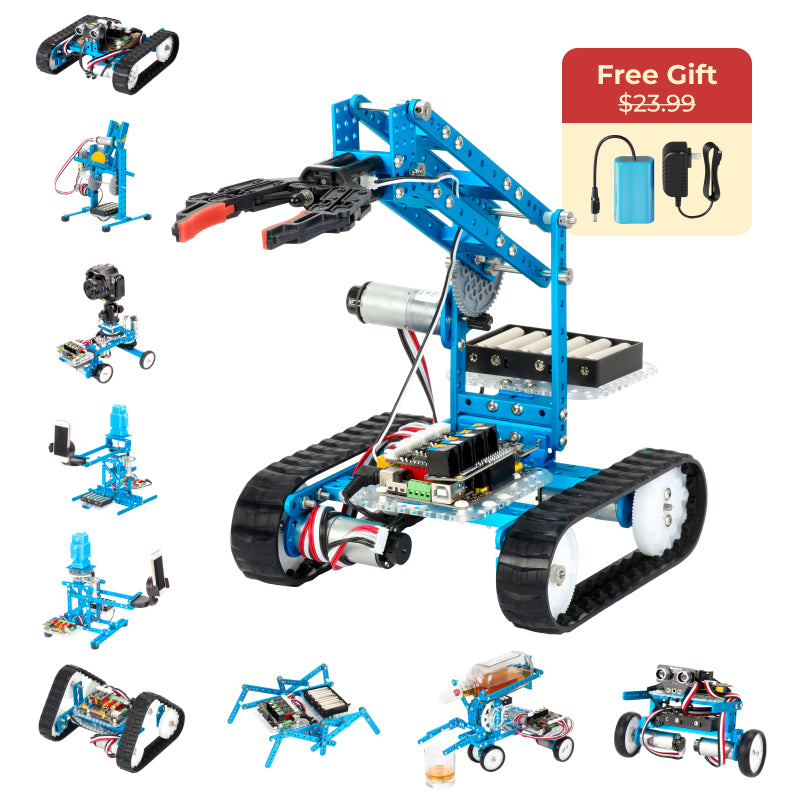
Makeblock mBot Ultimate 10 in 1 Robot Building Toys, Robotics Kit App Remote Control Robot Toys Compatible with Arduino C & Raspberry Pi, STEM Educational DIY Robotics

Makeblock mBot Ultimate 10-in-1 Robot Kit

Makeblock mBot Ultimate 10 in 1 Robot Building Toys, Robotics Kit App Remote Control Robot Toys Compatible with Arduino C & Raspberry Pi, STEM Educational DIY Robotics

$200.00at eBayChecked 2 h ago
See all prices and details
Visit eBay

Store links may earn us a commission.

Pros
  • 10 builds from one kit, so it stays interesting
  • Arduino-compatible board with Arduino IDE and Python support
  • Aluminum frame holds up to repeated rebuilds
  • Many sensor and motor ports for add-ons
Cons
  • No batteries included; 6 AA needed
  • Age 12+ and wiring make it a harder first kit
  • Roughly 1 to 2 hours of play per set of batteries
  • Complex builds can frustrate younger kids

What separates them

JIMU Robot FireBot KitMakeblock mBot Ultimate 10-in-1 Robot Kit
Recommended age8 and up12 and up
Build optionsOne robot per kit10 different robots from one kit
Coding pathsApp-based block codingBlock-based mBlock, Arduino IDE, and Python with a Raspberry Pi
Motion hardware3 servo motors plus 1 DC motor for smooth joint movement185 RPM motors with 11 motor and servo ports for expansion
Sensors1 color sensor and 1 RGB lightUltrasonic, line follower, gyroscope, and shutter module
Build materialPlastic frameAnodized 6061 aluminum parts
Power in the boxLithium battery included6 AA batteries required, not included; LiPo optional
Assembly complexity606 pieces, one guided build160+ parts, 10 builds, more wiring and electronics

Price history

  • JIMU Robot FireBot Kit: lowest $60.00 on Nov 27 at eBay.
  • Makeblock mBot Ultimate 10-in-1 Robot Kit: lowest $319.99 on Nov 27 at Amazon.

Prices at every store

JIMU Robot FireBot Kit

  • eBayNew

    In stock

    $60.00+ $4.00 shippingChecked 2 h ago
    Visit eBay
  • eBayNew

    Availability unknownSold by colsonscollectibles (99.8% positive, 7,100 ratings)Returns: Set by the eBay seller; the eBay Money Back Guarantee covers an item that doesn't arrive or isn't as described.

    $44.99+ $19.70 shippingChecked 3 h ago
    Visit eBay

Store links may earn us a commission.

Prices and history →

Makeblock mBot Ultimate 10-in-1 Robot Kit

  • MakeblockNew

    In stockReturn policy

    $399.99Checked 2 h ago
    Visit Makeblock
  • eBayOpen box

    Availability unknownReturns: Set by the eBay seller; the eBay Money Back Guarantee covers an item that doesn't arrive or isn't as described.

    $169.99+ $14.77 shippingChecked 2 h ago
    Visit eBay
  • eBayNew

    Availability unknownReturns: Set by the eBay seller; the eBay Money Back Guarantee covers an item that doesn't arrive or isn't as described.

    $200.00+ $9.54 shippingChecked 2 h ago
    Visit eBay
  • AmazonNew

    Availability unknown

    As an Amazon Associate, Deal.ai earns from qualifying purchases.

    $319.99Free shippingChecked 2 h ago
    Visit Amazon

Store links may earn us a commission.

All 3 stores and price history →

Specs compared

SpecJIMU Robot FireBot KitMakeblock mBot Ultimate 10-in-1 Robot Kit
Piece count606—
Product dimensions30.48 x 30.48 x 30.48 cm—
Manufacturer recommended age8 years and up—
Battery typeLithium—
Batteries includedYes—
MaterialPlastic—
ColourRed—
Assembly requiredYes—
DC motors1 DC motor—
Servo motors3 smooth motion robotic servo motors—
Sensors1 color sensor—
Lighting1 RGB light—
Show all 34 specsShow fewer specs
SpecJIMU Robot FireBot KitMakeblock mBot Ultimate 10-in-1 Robot Kit
Model ThemeRobot—
Recommended age—12+
Building methods—10-in-1
Max playing time—2 hrs
Ready-to-learn projects—15+
Code-to-play ways—30+
Part count—160+ parts
Connectivity—Bluetooth and USB onboard
Coding options—Block-based mBlock, Arduino IDE, Python via Ras…
Materials

What reviewers say

JIMU Robot FireBot Kit

Owners of JIMU kits generally enjoy the build and the app-driven movement, and treat them as a solid first coding robot. Common complaints center on assembly time and the limited number of builds.

What people mention
  • BuildPraisedOwners enjoy the lengthy, hands-on assembly of the 606 pieces.
  • Assembly timeCriticisedSome say putting it together takes longer than expected.
  • MovementPraisedThe servo motors give it smooth, lifelike motion.
  • Coding appPraisedBeginners find the block-based coding approachable.

Makeblock mBot Ultimate 10-in-1 Robot Kit

Buyers describe a well-made kit that is fun to assemble with kids and a solid entry into STEM. The tutorials and app get consistent praise. Some note that assembly and coding can frustrate a child.

What people mention
  • Build qualityPraisedOwners call the aluminum parts sturdy and well finished.
  • AssemblyMixedBuilding together is fun, but one reviewer's son got very frustrated.
  • Learning curveMixedGood for starting STEM, though advanced coding takes effort.
  • TutorialsPraisedThe manual and guided projects help builders a lot.

Questions and answers

Which is better for a 9-year-old?
The FireBot. It is rated 8+, ships with a battery, and has one guided build with app-based coding. The mBot Ultimate is rated 12+ and involves more wiring.
Which one teaches more programming?
The mBot Ultimate. It supports block-based mBlock, Arduino IDE, and Python through a Raspberry Pi. The FireBot stays in its companion app.
Which is sturdier?
The mBot Ultimate, with anodized 6061 aluminum parts. The FireBot uses a plastic frame, which is fine for display and light play but less durable.
Can I build more than one robot with either kit?
Only the mBot Ultimate. It builds 10 different robots. The FireBot builds one design.
Do I need to buy batteries?
The FireBot includes a lithium battery. The mBot Ultimate needs 6 AA batteries, which are not included, or an optional rechargeable LiPo pack.
Is the mBot Ultimate worth stepping up to?
Yes for a teen or adult who wants Arduino and Python and will rebuild it. For a younger child who wants one robot to play with, the FireBot is the better fit.

Ask our shopping agent

It checks today's price at every store, compares the alternatives and answers in about a minute.

Enter to send, Shift+Enter for a new line

More comparisons

  • JIMU ROBOT Mythical Series: FireBot Kit/App-Enabled Building & Coding STEM Robot Kit (606 Pcs) vs Makeblock mBot Ranger 3-in-1 Educational Robot Kit
  • Makeblock mBot Ranger 3-in-1 Educational Robot Kit vs Makeblock mBot Ultimate 10 in 1 Robot Building Toys, Robotics Kit App Remote Control Robot Toys Compatible with Arduino C & Raspberry Pi, STEM Educational DIY Robotics
  • Betabot Robot Building Kit for Kids Ages 8–14 vs JIMU ROBOT Mythical Series: FireBot Kit/App-Enabled Building & Coding STEM Robot Kit (606 Pcs)
  • Betabot Robot Building Kit for Kids Ages 8–14 vs Makeblock mBot Ultimate 10 in 1 Robot Building Toys, Robotics Kit App Remote Control Robot Toys Compatible with Arduino C & Raspberry Pi, STEM Educational DIY Robotics

Buying guides that pick them

  • Best build-your-own robot kits for kids
—
Anodised 6061 aluminium mechanical parts
Power—6 x AA batteries required, not included
Processor core—ATMEGA2560-16AU
Process clock speed—16 MHz
Sensor—Ultrasonic sensor, line follower sensor, gyrosc…
Coding language—Block-based, Arduino, Python (Extra Raspberry P…
Battery (Not included)—6 AA batteries or rechargeable LiPo battery
Battery capacity—2600 mAh
Playtime—≈ 1-2 hours
Charging time—1.5 hours
Rotational speed—185 RPM
Maximum external electronic modules—11 motor & servo ports 5 sensor ports
Communication mode—USB, Bluetooth, 2.4G