Shop
  • Deals
  • Deal checker
  • Black Friday
  • Buying guides
  • Brands
  • Stores
Travel
  • Flight deals
  • Hotel deals
Company
  • Research
  • Press
  • deal.ai apps
Black Friday 2026
  • Walmart
  • Best Buy
  • Target
  • TVs
  • Laptops
  • Headphones
  • Apple
  • Gaming
  • Vacuums
  • Kitchen
  • Toys
  • Smartwatches
  • Tablets
  • Furniture
  • Mattresses
© Deal.ai Inc.
TermsPrivacy
Deal.ai › Compare

Venrk 14" Portable Laptop Screen Extender vs Triple Boost Pro (Gen 2)

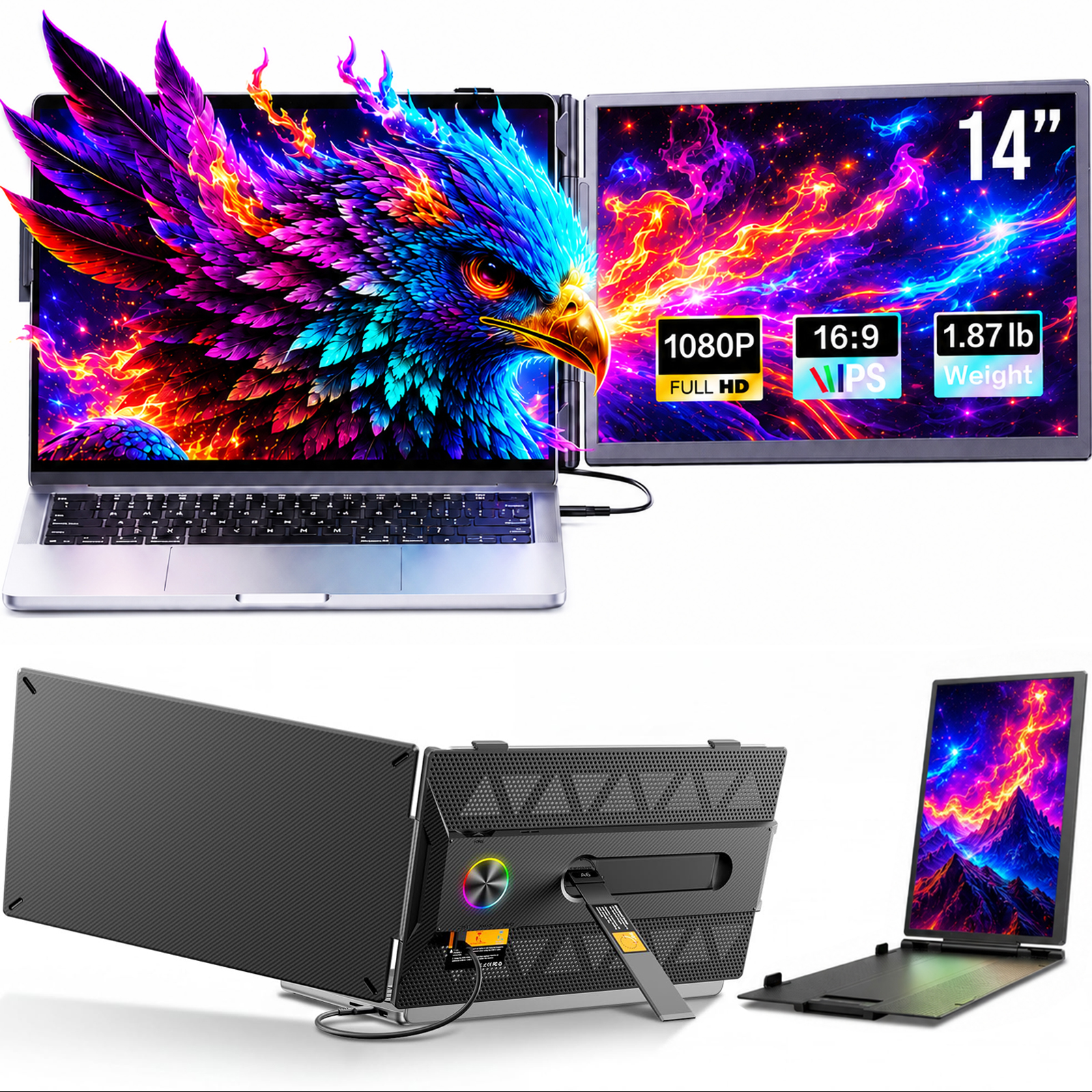
The Triple Boost Pro (Gen 2) is the stronger pick for anyone who wants a genuinely premium triple-screen setup: aluminum build, three 15.6-inch anti-glare IPS panels, a single USB-C cable and a bundled 30W adapter. The Venrk is a lighter, simpler two-screen extender that plugs in with no drivers and costs far less, but its panels are smaller at 14 inches and the open-frame plastic design feels less durable. Owners of the Triple Boost praise the screen quality and sturdiness but warn that driver installation is required and can be blocked on locked-down work laptops; Venrk buyers rate it highly for easy setup and portability.

  • Choose the Venrk if you want a no-driver, two-screen extender that folds flat, works over USB-C or HDMI plus USB-A, and you mainly need one extra panel for email, docs and browsing.
  • Choose the Triple Boost Pro if you want three larger anti-glare screens, an aluminum body and a single-cable setup, and you can install its software on your laptop.

Prices

  • Venrk 14" Portable Laptop Screen Extender: $75.99 at Amazon (last seen Nov 9)
  • Triple Boost Pro (Gen 2): $499.00 at Aura Displays (checked today)
  • Difference: the Venrk 14" Portable Laptop Screen Extender is $423.01 cheaper than the Triple Boost Pro (Gen 2) at the latest prices (Nov 9 and Nov 10)
Venrk
Laptop Screen Extender, 14" FHD 1080P IPS Portable Dual Monitor for Laptop

Venrk 14" Portable Laptop Screen Extender

Laptop Screen Extender, 14" FHD 1080P IPS Portable Dual Monitor for Laptop

4.7(194 ratings)
$75.99at AmazonChecked Nov 9
See all prices and details
Visit Amazon

As an Amazon Associate, Deal.ai earns from qualifying purchases.

Pros
  • No drivers or software to install
  • Works over USB-C or HDMI plus USB-A
  • Light and easy to carry
  • Adjustable kickstand and expandable clamps
  • Strong owner rating for ease of use
Cons
  • Only one extra screen, not two
  • Smaller 14-inch panels
  • Plastic open-frame build feels less premium
  • No stated brightness or anti-glare coating
T
Triple Boost Pro (Gen 2)

Triple Boost Pro (Gen 2)

4.5(264 ratings)
$499.00at Aura DisplaysChecked 9 h ago
See all prices and details
Visit Aura Displays
Pros
  • Three large 15.6-inch anti-glare IPS screens
  • Aluminum body with sturdy hinges
  • Single USB-C cable and included 30W adapter
  • Multiple modes including presentation and collaboration
  • Folds compactly for travel
Cons
  • Driver installation required and can be a pain
  • Heavy and fiddly to set up at first
  • Not compatible with iPad Pro
  • Locked-down corporate laptops may block the driver

What separates them

Venrk 14" Portable Laptop Screen ExtenderTriple Boost Pro (Gen 2)
Screen countTwo 14-inch panels (laptop screen plus one extra)Three 15.6-inch panels (laptop screen plus two extras)
Build materialOpen-frame plastic with adjustable kickstand and clampsPremium aluminum with pro-grade hinges and anti-slip stand
SetupPlug and play, no driversSoftware driver install required before use
ConnectionUSB-C single cable, or HDMI plus USB-A dual cableSingle USB-C cable, 30W power adapter included
Panel treatmentIPS, FHD 1080P, no anti-glare claimAnti-glare IPS HDR, 320 nits, 16:9
Laptop fitExpandable clamps for typical laptop sizesStated 12 to 17.3 inch laptop match
PortabilityUltra-lightweight, folds into a bagFolds compactly but heavy and awkward at first
Display modesExtend, mirror and portraitLandscape, collaboration, presentation, portrait, single and dual

Price history

$529.00$75.99
Nov 5Nov 10
  • Venrk 14" Portable Laptop Screen Extender: lowest $75.99 on Nov 9 at Amazon; $299.99 on Nov 10.
  • Triple Boost Pro (Gen 2): lowest $529.00 on Nov 9 at Amazon; $529.00 on Nov 10.

Prices at every store

Venrk 14" Portable Laptop Screen Extender

  • vipoutlet.comOpen box

    In stock

    $10.00Free shippingChecked Nov 9
    Visit vipoutlet.com
  • AmazonNew

    Availability unknown

    As an Amazon Associate, Deal.ai earns from qualifying purchases.

    $75.99Free shippingChecked Nov 9
    Visit Amazon

Also available at

  • NeweggCheck price at Newegg
  • WalmartCheck price at Walmart
All 2 stores and price history →

Triple Boost Pro (Gen 2)

  • Aura DisplaysNew

    Availability unknownReturn policy

    $499.00Checked 9 h ago
    Visit Aura Displays
  • AmazonNew

    Availability unknown

    As an Amazon Associate, Deal.ai earns from qualifying purchases.

    $529.00Free shippingChecked 9 h ago
    Visit Amazon
All 2 stores and price history →

Specs compared

SpecVenrk 14" Portable Laptop Screen ExtenderTriple Boost Pro (Gen 2)
editionDual Screen—
colorBlack—
Screen Size—15.6"
Resolution—Full HD
Brightness—320 nits
Aspect Ratio—16:9
Power Adapter—30W power adapter (included)
Display Type—Triple Full HD IPS HDR Displays
Connection—single, powerful USB-C connection
Build Material—premium aluminum
Compatibility—macOS, Window and more

What reviewers say

Venrk 14" Portable Laptop Screen Extender

  • 4.7 / 5194 ratings

Owners rate it highly, with 4.7 out of 5 across 194 ratings. They like the quick plug-and-play setup and the extra screen space on the road. Complaints center on power draw and clamp fit on some laptops.

What people mention
  • SetupPraisedOwners say it works as soon as it is plugged in, with no driver install.
  • PortabilityPraisedBuyers like that it folds flat and fits in a laptop bag.
  • Picture qualityPraisedThe 1080p IPS panel is described as sharp with wide viewing angles.
  • PowerMixedSome users need the 5V/2A external power adapter, which adds a cable.

Triple Boost Pro (Gen 2)

  • 4.5 / 5264 ratings

Owners rate it 4.5 out of 5 and mostly praise the bright, clear screens, the solid aluminum build and the single-cable setup. The recurring complaint is driver installation, which is mandatory and can fail on managed work laptops.

What people mention
  • Display qualityPraisedOwners describe the screens as crystal-clear and bright with good anti-glare behavior.
  • BuildPraisedThe aluminum chassis and hinges feel robust and professional to reviewers.
  • SetupCriticisedDrivers must be installed before the screens work, and buyers call the process a pain.

Questions and answers

Which is better for a three-screen workflow?
The Triple Boost Pro. It adds two extra panels to your laptop screen, while the Venrk adds only one.
Which is easier to set up?
The Venrk. It is plug and play with no drivers. The Triple Boost Pro needs its software installed before the screens work.
Which has the better build quality?
The Triple Boost Pro. Its aluminum chassis and pro-grade hinges feel more solid than the Venrk's open plastic frame.
Will the Triple Boost Pro work on a work laptop?
Only if you can install software. Owners report that locked-down corporate machines may block the driver, so check with IT first.
Which travels better?
The Venrk is lighter and simpler to pack. The Triple Boost Pro folds compactly but is heavy and takes practice to set up.
Is the Triple Boost Pro worth stepping up to?
Yes if you need three larger anti-glare screens and a premium body and can install drivers. If you just want one extra screen with zero setup, the Venrk is enough.

Ask our shopping agent

It checks today's price at every store, compares the alternatives and answers in about a minute.

Enter to send, Shift+Enter for a new line

More comparisons

  • Laptop Screen Extender, 14" FHD 1080P IPS Portable Dual Monitor for Laptop vs Xebec Tri-Screen 3
  • Xebec Tri-Screen 3 vs Triple Boost Pro (Gen 2)
  • Laptop Screen Extender, 14" FHD 1080P IPS Portable Dual Monitor for Laptop vs Mobile Pixels DUEX Plus
  • Laptop Screen Extender, 14" FHD 1080P IPS Portable Dual Monitor for Laptop vs Mobile Pixels DUEX Max

Buying guides that pick them

  • Best laptop screen extenders
Portability
Mixed
It folds compactly and travels well, but owners find it heavy and awkward to position at first.