StoreDeal.ai store
Shop
  • Deals
  • Deal checker
  • Black Friday
  • Buying guides
  • Brands
  • Stores
Travel
  • Flight deals
  • Hotel deals
Company
  • Research
  • Press
  • Use in AI assistants
  • Contact
  • deal.ai apps
Black Friday 2026
  • Walmart
  • Best Buy
  • Target
  • TVs
  • Laptops
  • Headphones
  • Apple
  • Gaming
  • Vacuums
  • Kitchen
  • Toys
  • Smartwatches
  • Tablets
  • Furniture
  • Mattresses
© Deal.ai Inc.·2222 Ponce de Leon Blvd, Miami, FL 33134·support@deal.ai
TermsPrivacy
Deal.ai › Compare

Venrk 14" Portable Laptop Screen Extender vs Xebec Tri-Screen 3

Buy the Venrk if you want two extra screens without spending much. The Xebec is the sturdier, better-integrated kit, with an embedded cable, 60W pass-through charging, a 270° rotation and a travel case, but it asks far more for that. Most shoppers deciding on value alone should take the Venrk; buy the Xebec if you travel constantly and need the screens to survive it.

  • Choose the Venrk if you want a dual-screen setup at a low outlay and can live with a clamp-on frame and a separate power cable when your laptop's USB-C port is weak.
  • Choose the Xebec Tri-Screen 3 if you need a rugged, single-cable kit with pass-through charging and a fitted case, and its higher outlay fits your budget.

Prices

  • Venrk 14" Portable Laptop Screen Extender: $81.99 at Amazon (last seen Nov 14)
  • Xebec Tri-Screen 3: $699.00 at Xebec (last seen Nov 20)
  • Difference: the Venrk 14" Portable Laptop Screen Extender is $617.01 cheaper than the Xebec Tri-Screen 3 at the latest prices (Nov 14 and Nov 20)
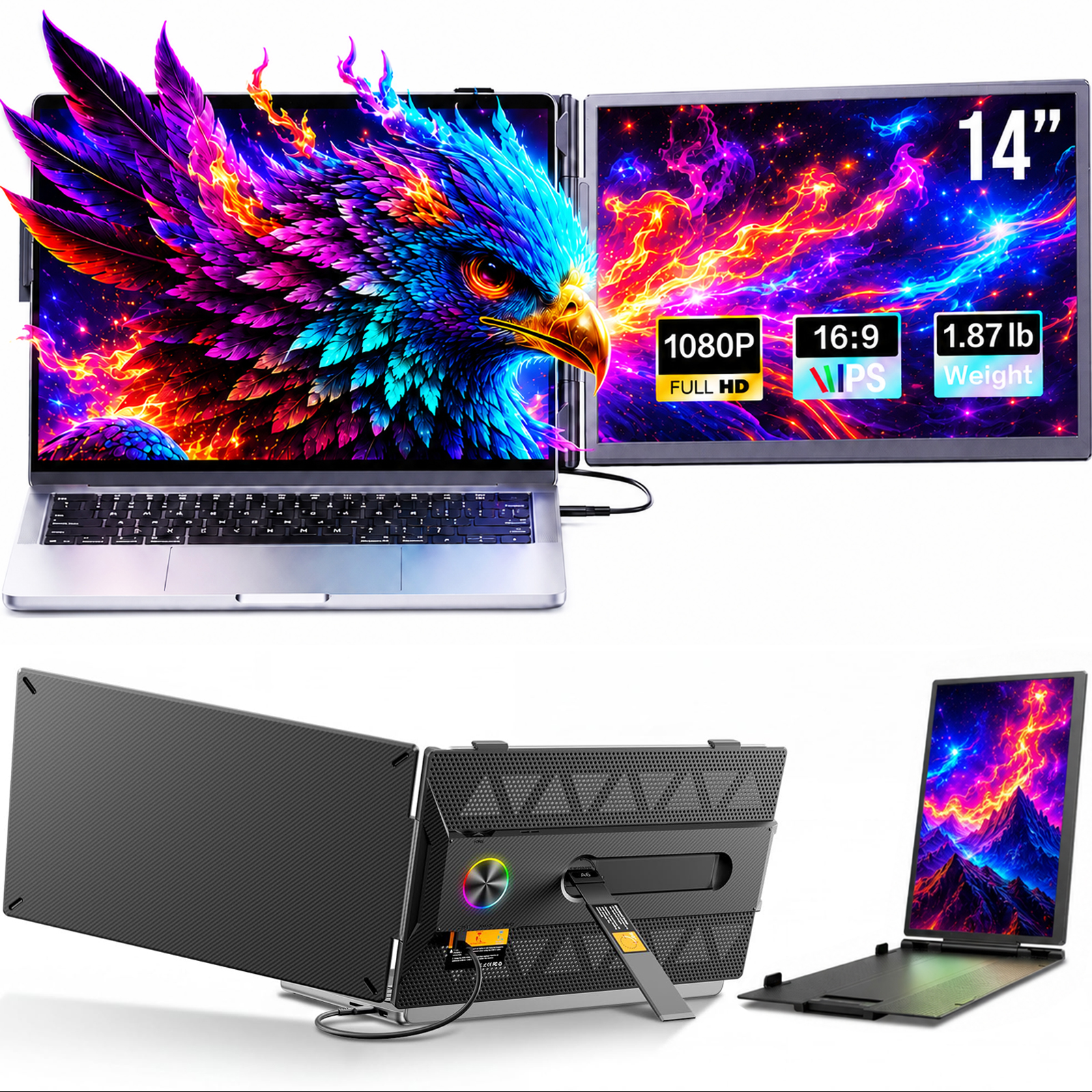
Venrk
Laptop Screen Extender, 14" FHD 1080P IPS Portable Dual Monitor for Laptop

Venrk 14" Portable Laptop Screen Extender

Laptop Screen Extender, 14" FHD 1080P IPS Portable Dual Monitor for Laptop

4.7(194 ratings)
$81.99at AmazonChecked Nov 14
See all prices and details
Visit Amazon

Store links may earn us a commission. As an Amazon Associate, Deal.ai earns from qualifying purchases.

Pros
  • Two 14 in 1080p IPS panels, slightly larger than the Xebec's 13.3 in
  • Works over USB-C or HDMI plus USB-A, so older laptops are covered
  • Portrait mode suits coding and long documents
  • Open-frame design helps cooling and keeps weight down
  • Lowest cost by a wide margin
  • Built-in speakers and ambient light modes
Cons
  • No published brightness figure, so outdoor use is a gamble
  • Needs 5V/2A external power on laptops that cannot supply enough over USB-C
  • Clamp-and-kickstand mounting is less secure than a fitted attachment
  • No pass-through charging and no travel case in the listing
  • Fewer ratings than the Xebec (194 versus 134, both high)
Xebec
Xebec Tri-Screen 3

Xebec Tri-Screen 3

4.8(134 ratings)
$699.00at XebecChecked Nov 20
See all prices and details
Visit Xebec
Pros
  • Single embedded USB-C cable with 60W pass-through charging
  • Patented attachment fits laptops 13 to 18 in wide without magnets or adhesives
  • Screens rotate up to 270° for presentation mode
  • Aluminum kickstand with multiple contact points holds position
  • Custom EVA-padded travel case included
Cons
  • Mac use needs an adapter sold separately
  • Heavier at 3.6 lbs and no height adjustment
  • Smaller 13.3 in panels than the Venrk's 14 in
  • Roughly eight times the Venrk's outlay

What separates them

Venrk 14" Portable Laptop Screen ExtenderXebec Tri-Screen 3
Screen size14 in per panel13.3 in per panel
Panel type and resolutionIPS, 1920x1080IPS LCD, 1920x1080 at 60Hz
Brightness300 cd/m²Adjustable up to 300 nits
ConnectionUSB-C single cable, or HDMI plus USB-AEmbedded USB-C cable with 60W pass-through charging
MountingExpandable clamps and adjustable kickstandPatented universal attachment for laptops 13 to 18 in wide, no magnets or adhesives
Rotation and modesExtend, mirror and portrait modesRotation up to 270°, landscape and presentation modes
Weight and portabilityDescribed as ultra-lightweight; weight not published3.6 lbs, 12.7 x 7.6 x 1.7 in closed, EVA travel case included
ValueLow outlay for two 1080p IPS panelsPremium outlay for a fitted, single-cable kit
Operating system supportNot statedWindows, Mac (adapter required, sold separately), Linux and ChromeOS
Speakers and extrasBuilt-in speakers, ambient light modes, external 5V/2A power supportNo speakers listed; brightness control only

Price history

$699.00$75.99
Nov 5Nov 26
  • Venrk 14" Portable Laptop Screen Extender: lowest $75.99 on Nov 9 at Amazon; $299.99 on Nov 26.
  • Xebec Tri-Screen 3: lowest $699.00 on Nov 5 at Xebec; $699.00 on Nov 20.

Prices at every store

Venrk 14" Portable Laptop Screen Extender

  • AmazonNew

    Availability unknown

    As an Amazon Associate, Deal.ai earns from qualifying purchases.

    $81.99Free shippingChecked Nov 14
    Visit Amazon
  • vipoutlet.comOpen box

    In stock

    $10.00Free shippingChecked Nov 9
    Visit vipoutlet.com
  • vipoutlet.comNew

    In stock

    $189.00Free shippingChecked Nov 11
    Visit vipoutlet.com

Also available at

  • NeweggCheck price at Newegg
  • WalmartCheck price at Walmart

Store links may earn us a commission.

Prices and history →

Xebec Tri-Screen 3

  • XebecNew

    In stock

    $699.00Free shippingChecked Nov 20
    Visit Xebec
  • InsightNew

    In stock

    $784.99+ $19.25 shippingChecked Nov 20
    Visit Insight
  • AmazonNew

    Availability unknown

    As an Amazon Associate, Deal.ai earns from qualifying purchases.

    $699.00Free shippingChecked Nov 20
    Visit Amazon
  • eBayPre-owned

    Availability unknownSold by purpletechnado

    $449.94Free shippingChecked Nov 9
    Visit eBay

Also available at

  • XebecCheck price at Xebec

Store links may earn us a commission.

All 3 stores and price history →

Specs compared

SpecVenrk 14" Portable Laptop Screen ExtenderXebec Tri-Screen 3
Display TypeLEDLCD
Resolution1920 x 12001920 x 1080
Connector TypeUSB-C, Mini HDMIUSB-C
HD Format1080pFull HD
Panel TypeIPSLCD IPS
Maximum Refresh Rate60 Hz60Hz
editionDual Screen—
colorBlack—
With SpeakersYes—
Size14 in—
Brightness300 cd/m²—
Horizontal Resolution—1920
Show all 28 specsShow fewer specs
SpecVenrk 14" Portable Laptop Screen ExtenderXebec Tri-Screen 3
Vertical Resolution—1080
Aspect Ratio—16:9
Display Modes—Presentation mode, Landscape mode
Max Brightness—Adjustable up to 300 nits
Controls And Adjustments—Brightness
Depth—1.7 in (closed)
Height—7.6 in (closed)
Weight—3.6 lbs
Width—12.7 in (closed)
Height Adjustment

What reviewers say

Venrk 14" Portable Laptop Screen Extender

  • 4.7 / 5194 ratings

Owners rate it highly, with 4.7 out of 5 across 194 ratings. They like the quick plug-and-play setup and the extra screen space on the road. Complaints center on power draw and clamp fit on some laptops.

What people mention
  • SetupPraisedOwners say it works as soon as it is plugged in, with no driver install.
  • PortabilityPraisedBuyers like that it folds flat and fits in a laptop bag.
  • Picture qualityPraisedThe 1080p IPS panel is described as sharp with wide viewing angles.
  • PowerMixedSome users need the 5V/2A external power adapter, which adds a cable.

Xebec Tri-Screen 3

  • 4.8 / 5134 ratings

Rated 4.8 out of 5 from 134 ratings, buyers mostly praise the easy single-cable setup and the productivity gain of two extra screens on the road. Complaints center on the Mac adapter requirement and the weight it adds to a bag.

What people mention
  • SetupPraisedOwners say the single embedded USB-C cable and clamp get both screens running in minutes.
  • PortabilityMixedIt folds flat and travels in the included case, but the 3.6 lbs is felt in a bag.
  • BrightnessCriticisedAt up to 300 nits, the panels wash out in bright rooms or near windows.

Questions and answers

Which works better with a MacBook?
The Xebec states Mac support but needs an adapter sold separately. The Venrk lists USB-C and HDMI plus USB-A connections with no driver install, which covers most Macs with the right cable or adapter.
Which is more stable on a laptop lid?
The Xebec. Its patented attachment fits laptops 13 to 18 in wide and its aluminum kickstand has multiple contact points. The Venrk relies on expandable clamps and a kickstand, which is lighter but easier to knock out of place.
Do either need extra power?
The Xebec draws up to 5V/2A but passes up to 60W of charging through to the laptop over its embedded cable. The Venrk may need a 5V/2A external power source when the laptop's USB-C port cannot deliver enough.
Which has the bigger screens?
The Venrk, at 14 in per panel versus 13.3 in on the Xebec. Both are 1920x1080 IPS at 60Hz, so sharpness is the same.
Which lasts longer?
The Xebec is built for travel, with an aluminum kickstand and a padded case, and its 4.8 rating from 134 ratings is slightly above the Venrk's 4.7 from 194. The Venrk's open frame is lighter but has no case and no published durability claims.
Is the Xebec Tri-Screen 3 worth the extra over the Venrk?
Only if you travel often and value the single-cable setup, 60W pass-through charging, secure attachment and included case. For a desk or occasional trip, the Venrk does the same two-screen job for far less.
Which systems does each support?
Xebec lists Windows, Mac (adapter required, sold separately), Linux and ChromeOS. Venrk does not state supported operating systems, only its USB-C and HDMI plus USB-A connection options.
How bright are the two screens?
Both top out at 300 nits, so neither is suited to direct sunlight. The Xebec lists its brightness as adjustable; the Venrk states 300 cd/m², which is the same figure.

Ask our shopping agent

It checks today's price at every store, compares the alternatives and answers in about a minute.

Enter to send, Shift+Enter for a new line

More comparisons

  • Laptop Screen Extender, 14" FHD 1080P IPS Portable Dual Monitor for Laptop vs Cevaton T2 Pro Triple Laptop Screen Extender
  • Laptop Screen Extender, 14" FHD 1080P IPS Portable Dual Monitor for Laptop vs KYY Portable Laptop Screen Extender 15.6" 1080P
  • Laptop Screen Extender, 14" FHD 1080P IPS Portable Dual Monitor for Laptop vs Mobile Pixels DUEX Plus
  • Laptop Screen Extender, 14" FHD 1080P IPS Portable Dual Monitor for Laptop vs Mobile Pixels DUEX Max
  • Laptop Screen Extender, 14" FHD 1080P IPS Portable Dual Monitor for Laptop vs Triple Boost Pro (Gen 2)
  • Laptop Screen Extender, 14" FHD 1080P IPS Portable Dual Monitor for Laptop vs Blackview Laptop Screen Extender
  • Xebec Tri-Screen 3 vs Triple Boost Pro (Gen 2)

Buying guides that pick them

  • Best laptop screen extenders
—
No
Display Position Adjustments—Rotation
Rotation Angle—Up to 270°
Operational Power Consumption—5V 2A (Max)
Design Highlights—Slim profile, Compact, Dual Monitor Set
Stand Design—Redesigned aluminum kickstand with multiple con…
Cables Included—Embedded USB-C cable
Compatibility
Mixed
Windows and ChromeOS work directly, while Macs need an adapter sold separately.