StoreDeal.ai store
Shop
  • Deals
  • Deal checker
  • Black Friday
  • Buying guides
  • Brands
  • Stores
Travel
  • Flight deals
  • Hotel deals
Company
  • Research
  • Press
  • Use in AI assistants
  • Contact
  • deal.ai apps
Black Friday 2026
  • Walmart
  • Best Buy
  • Target
  • TVs
  • Laptops
  • Headphones
  • Apple
  • Gaming
  • Vacuums
  • Kitchen
  • Toys
  • Smartwatches
  • Tablets
  • Furniture
  • Mattresses
© Deal.ai Inc.·2222 Ponce de Leon Blvd, Miami, FL 33134·support@deal.ai
TermsPrivacy
Deal.ai › Compare

LG UltraFine 27UP850N-W 4K Monitor vs Lenovo ThinkVision M14

These are not substitutes. The LG UltraFine 27UP850N-W is a 27-inch 4K desktop monitor for photo, video and office work; the Lenovo ThinkVision M14 is a 14-inch 1920x1200 portable second screen for laptops. Buy the LG if you need a main display with accurate color and USB-C power delivery; buy the M14 if you need a light travel screen. The LG wins on resolution, brightness, ports and speakers; the M14 wins on portability and value. The M14 holds 4.4 out of 5 from 15 ratings, and owners treat it as a travel accessory rather than a primary display.

  • Choose the LG UltraFine 27UP850N-W if you want a 27-inch 4K IPS desktop monitor with USB-C, DisplayPort, HDMI and built-in speakers for editing or everyday work.
  • Choose the Lenovo ThinkVision M14 if you want a 4 lb, 14-inch portable USB-C monitor to extend a laptop screen on the road.

Prices

  • Lenovo ThinkVision M14: $259.99 at Walmart (checked today)
LG
LG UltraFine 27 4K UHD IPS Monitor with USB-C (27UP850N-W)

LG UltraFine 27UP850N-W 4K Monitor

LG UltraFine 27 4K UHD IPS Monitor with USB-C (27UP850N-W)

See all prices and details
Pros
  • True 4K resolution at 27 inches gives sharp text and detailed images.
  • IPS panel with 400 cd/m² brightness handles bright rooms and color work.
  • USB-C plus HDMI and DisplayPort covers laptops, desktops and consoles.
  • Built-in speakers remove the need for separate desktop speakers.
Cons
  • 60 Hz and 5 ms suit office work, not fast gaming.
  • It is a fixed desktop monitor with no battery or travel case.
  • No VESA mount pattern is listed for arm or wall mounting.
Lenovo
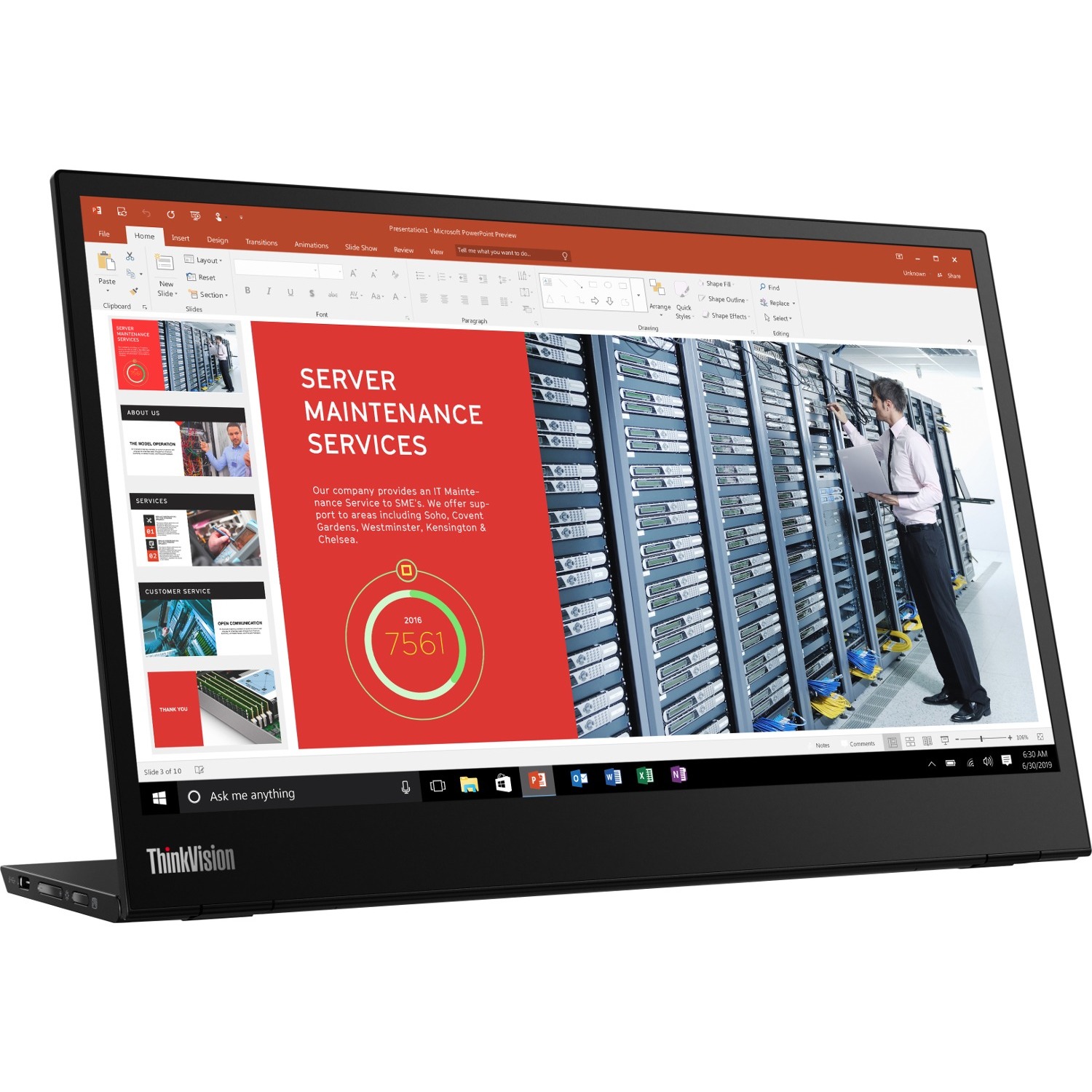
Lenovo ThinkVision M14

Lenovo ThinkVision M14

4.4(15 ratings)
$259.99at WalmartChecked 1 h ago
See all prices and details
Visit Walmart
Pros
  • 4 lb and 2.5 in tall, so it fits in a laptop bag.
  • Single USB-C cable carries video and power from a laptop.
  • Energy Star and EPEAT certified.
  • 178° viewing angles and a 100 x 100 mm VESA pattern.
  • Rated 4.4 out of 5 from 15 ratings.
Cons
  • 1920x1200 on 14 inches is far less sharp than 4K at 27 inches.
  • USB-C only, with no HDMI or DisplayPort.
  • 300 nits is dimmer and the panel is LCD, not IPS.
  • No speakers and no stand beyond its small kickstand.

What separates them

LG UltraFine 27UP850N-W 4K MonitorLenovo ThinkVision M14
Screen size27 in14 in
Resolution3840 x 2160 (4K)1920 x 1200 (WUXGA)
Panel and brightnessIPS, 400 cd/m²LCD, 300 nits
PortsHDMI, DisplayPort, USB-CUSB-C only, no HDMI
SpeakersBuilt inNone listed
WeightDesktop unit, not portable4 lb, 2.5 in tall
Refresh rate and response60 Hz, 5 ms60 Hz, 6 ms
Viewing anglesIPS panel, wide angles typical178° horizontal and vertical
MountingStandard desktop stand100 x 100 mm VESA pattern
CertificationsNot listedEnergy Star and EPEAT certified

Price history

$552.31$90.00
Nov 5Nov 26
  • LG UltraFine 27UP850N-W 4K Monitor: lowest $349.00 on Nov 11; $398.00 on Nov 12.
  • Lenovo ThinkVision M14: lowest $90.00 on Nov 9; $259.99 on Nov 26.

Prices at every store

LG UltraFine 27UP850N-W 4K Monitor

No priced offers right now.

Prices and history →

Lenovo ThinkVision M14

  • WalmartNew

    In stock

    $259.99Checked 1 h ago
    Visit Walmart
Prices and history →

Specs compared

SpecLG UltraFine 27UP850N-W 4K MonitorLenovo ThinkVision M14
Display TypeLEDLED
Resolution3840 x 2160WUXGA (1920 x 1200)
Connector TypeHDMI, DisplayPort, USB-CUSB-C, USB Type-C
HD Format4KFHD, 1080p
Panel TypeIPSIPS
Maximum Refresh Rate60 Hz60 Hz
Response Time5 milliseconds6 ms
Brightness400 cd/m²300 Nits
Refresh Rate (Hz)6060
USBYesYes
USB TypeUSB-CUSB-C
ColorBlackBlack
Show all 40 specsShow fewer specs
SpecLG UltraFine 27UP850N-W 4K MonitorLenovo ThinkVision M14
Screen Size (")27.014 in
SpeakersYesNo
With SpeakersYes—
Size27 in—
Refresh rate—60 Hz
Display—LCD
Aspect—16:9
Features—Portable
Contrast ratio—3000000:1
Inputs/Outputs—Unknown

What reviewers say

LG UltraFine 27UP850N-W 4K Monitor

Owners of the UltraFine line generally praise the sharp 4K panel and the convenience of USB-C docking. Complaints tend to focus on the 60 Hz limit and on USB-C power that is not enough for bigger laptops.

What people mention
  • Picture qualityPraisedOwners describe sharp 4K detail and even IPS color for editing and everyday work.
  • USB-C setupPraisedA single USB-C cable for video, data and charging is the feature buyers mention most.
  • Refresh rateCriticisedThe 60 Hz panel is called limiting for gaming and fast motion.
  • Charging powerMixedUSB-C power delivery works for thin laptops but some owners find it short for larger ones.

Lenovo ThinkVision M14

  • 4.4 / 515 ratings

Owners rate it 4.4 out of 5 across 15 ratings. They like the light build and the one-cable USB-C setup. Complaints center on brightness and the plastic stand.

What people mention
  • PortabilityPraisedOwners say it slips into a laptop bag and adds little weight.
  • USB-C setupPraisedA single cable carries both power and video on compatible laptops.
  • BrightnessCriticised300 nits is fine indoors but washes out near windows or outside.

Questions and answers

Which is better for photo or video editing?
The LG. Its 27-inch 4K IPS panel at 400 cd/m² gives more resolution, brightness and color consistency than the M14's 14-inch 1920x1200 LCD at 300 nits.
Which is better as a second screen for a laptop?
The Lenovo M14. It weighs 4 lb, runs off one USB-C cable and fits in a bag, while the LG is a fixed desktop monitor.
Does the Lenovo M14 work with a desktop PC?
Only if the PC's USB-C port supports DisplayPort video output. It has no HDMI or DisplayPort input, so older desktops will need an adapter.
Which lasts longer?
Neither maker publishes a lifespan figure. The LG is a stationary monitor with a standard desktop stand; the M14's hinge and thin panel see more handling, which is the likelier wear point.
Can I use both together?
Yes. The M14 can be the travel screen and the LG the desk screen, and both connect over USB-C.
Is the LG worth stepping up to?
If you need a main 4K display, yes. The LG buys four times the pixels, a larger panel, more ports and speakers, while the M14 stays a travel accessory.
Can the Lenovo M14 be mounted on an arm?
Yes. It has a 100 x 100 mm VESA pattern, though its 4 lb weight and small size suit a light arm or a stand more than a fixed desk setup.

Ask our shopping agent

It checks today's price at every store, compares the alternatives and answers in about a minute.

Enter to send, Shift+Enter for a new line

More comparisons

  • LG UltraFine 27 4K UHD IPS Monitor with USB-C (27UP850N-W) vs HP E27u G5 QHD USB-C Monitor
  • LG UltraFine 27 4K UHD IPS Monitor with USB-C (27UP850N-W) vs BenQ GW2791 27" FHD IPS Monitor
  • HP E27u G5 QHD USB-C Monitor vs Lenovo ThinkVision M14
  • BenQ GW2791 27" FHD IPS Monitor vs Lenovo ThinkVision M14
Mount pattern
—
100 x 100
Brand—Lenovo
Power type—Corded Electric
Model—61DDUAR6US
Electronics certifications—Energy Star-Certified, EPEAT
Horizontal viewing angle—178 º
Vertical viewing angle—178 º
Input/output quantity—1
Input/output direction—Input
Assembled product height—2.5 in
Assembled product weight—4 lb
Height (with stand)—8.66 in
Depth (with stand)—3.8 in
Number Of HDMI Ports—0
Number Of USB Ports—2 (USB Type-C)
Horizontal Resolution—1920
Vertical Resolution—1080
GTG Response Time—6ms (overdrive)
StandMixed
The kickstand works but feels plastic and limited in tilt.