StoreDeal.ai store
Shop
  • Deals
  • Deal checker
  • Black Friday
  • Buying guides
  • Brands
  • Stores
Travel
  • Flight deals
  • Hotel deals
Company
  • Research
  • Press
  • Use in AI assistants
  • Contact
  • deal.ai apps
Black Friday 2026
  • Walmart
  • Best Buy
  • Target
  • TVs
  • Laptops
  • Headphones
  • Apple
  • Gaming
  • Vacuums
  • Kitchen
  • Toys
  • Smartwatches
  • Tablets
  • Furniture
  • Mattresses
© Deal.ai Inc.·2222 Ponce de Leon Blvd, Miami, FL 33134·support@deal.ai
TermsPrivacy
Deal.ai › Compare

Logitech MX Vertical vs 3Dconnexion CadMouse Pro Wireless

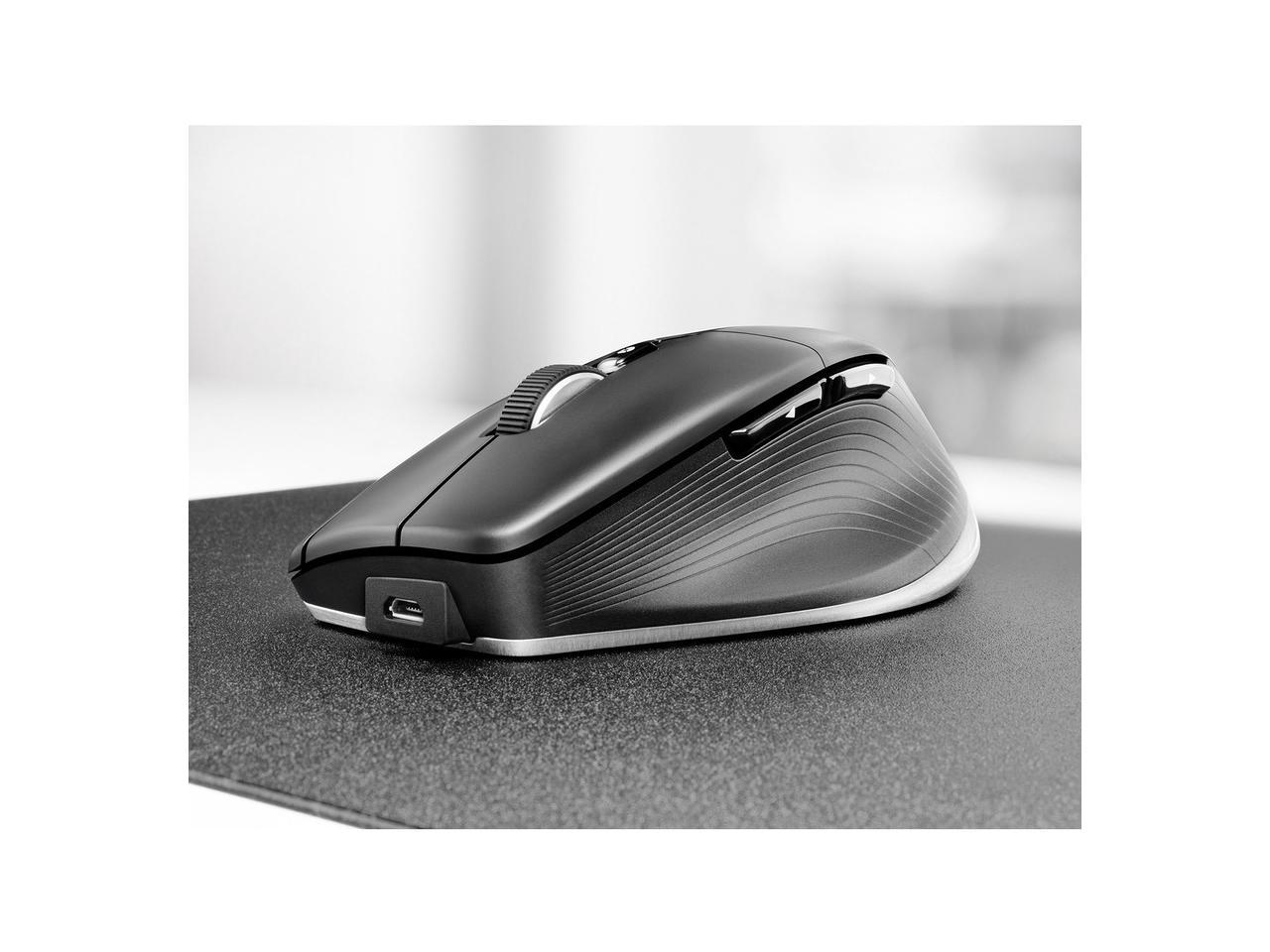
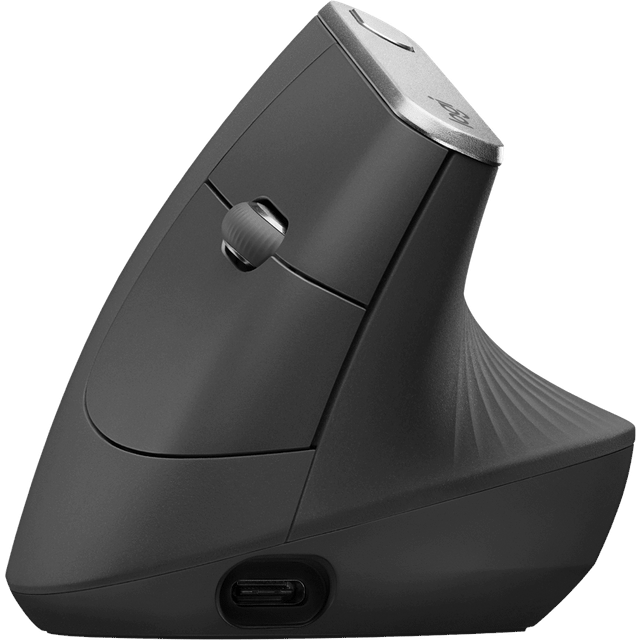
Buy the MX Vertical if wrist and forearm comfort is the priority; buy the CadMouse Pro Wireless if you work in CAD and want a dedicated middle button, radial menus and QuickZoom. The MX Vertical's 57° handshake angle is the more radical ergonomic change, and its 4,000 DPI sensor needs less hand travel than a standard mouse. The CadMouse Pro is heavier, has seven buttons and a smart scroll wheel, and owners rate its build and CAD tooling highly, but it is a conventional flat shape that does less for wrist strain.

  • Choose the Logitech MX Vertical if you want a vertical, handshake-style grip to ease wrist pressure during long office or general computing sessions.
  • Choose the 3Dconnexion CadMouse Pro Wireless if you spend your day in CAD software and want a dedicated middle button, radial menus and QuickZoom.

Prices

  • Logitech MX Vertical: $66.99 at Newegg (checked today)
  • 3Dconnexion CadMouse Pro Wireless: $113.00 at Amazon (last seen Nov 19)
  • Difference: the Logitech MX Vertical is $46.01 cheaper than the 3Dconnexion CadMouse Pro Wireless at the latest prices (Nov 19 and Nov 26)
Logitech
Logitech MX Vertical Advanced wireless

Logitech MX Vertical

Logitech MX Vertical Advanced wireless

4.3(1,198 ratings)
$66.99at NeweggChecked 1 h ago
See all prices and details
Visit Newegg

Store links may earn us a commission. Price via Klarna.

Pros
  • Vertical angle reduces wrist pressure and forearm strain
  • Light at about 4.8 oz for a full-size mouse
  • Up to four months per charge with fast top-up charging
  • Connects over USB, RF or Bluetooth
Cons
  • Right-hand only, no left-handed version
  • No PTFE feet and no backlight
  • Fewer buttons than the CadMouse Pro
  • Vertical grip takes days to get used to
3Dconnexion
3Dconnexion CadMouse Pro Wireless

3Dconnexion CadMouse Pro Wireless

3.5(1 rating)
$113.00at AmazonChecked Nov 19
See all prices and details
Visit Amazon

Store links may earn us a commission. As an Amazon Associate, Deal.ai earns from qualifying purchases.

Pros
  • Dedicated middle button and radial menu built for CAD
  • QuickZoom and gesture support speed up navigation
  • Seven programmable buttons
  • Solid, heavy build that stays planted
Cons
  • Heavy at about 14.4 oz, tiring for general use
  • Flat shape does little for wrist strain
  • No published battery runtime
  • Glossy finish shows fingerprints

What separates them

Logitech MX Vertical3Dconnexion CadMouse Pro Wireless
Grip angle57° vertical handshake positionConventional flat, right-handed shape
Sensor resolution4,000 DPI opticalOptical sensor, resolution not published
Buttons6 buttons including a DPI switch7 buttons, all programmable
CAD toolingNoneRadial menu, QuickZoom, dedicated middle button
Scroll wheelStandard wheelSmart Mouse Wheel 2 with gesture support
WeightAbout 4.8 ozAbout 14.4 oz
ConnectivityUSB, RF receiver and BluetoothUSB-C and Bluetooth
Battery lifeUp to four months per charge, three hours from a one-minute chargeRechargeable, runtime not published

Price history

$125.45$59.90
Nov 9Nov 27
  • Logitech MX Vertical: lowest $59.90 on Nov 24 at Newegg; $66.99 on Nov 27.
  • 3Dconnexion CadMouse Pro Wireless: lowest $110.00 on Nov 19 at Wantjoin International Investment; $125.45 on Nov 27.

Prices at every store

Logitech MX Vertical

  • NeweggNew

    In stock

    $66.99Free shippingChecked 1 h ago
    Visit Newegg
  • WalmartNew

    In stockSold by valence corpReturns: Sold by a Walmart Marketplace seller; returns go to the seller under the seller's returns policy.

    $74.99Free shippingChecked 1 h ago
    Visit Walmart
  • AntonlineNew

    In stock

    $104.92Free shippingChecked 1 h ago
    Visit Antonline
  • AmazonNew

    Availability unknown

    As an Amazon Associate, Deal.ai earns from qualifying purchases.

    $71.24Free shippingChecked Nov 19
    Visit Amazon

Also available at

  • WalmartCheck price at Walmart

Store links may earn us a commission. Some prices via Klarna.

All 7 stores and price history →

3Dconnexion CadMouse Pro Wireless

  • Wantjoin International InvestmentNew

    In stockShips from Hong Kong SAR China · duties may apply

    $110.00Checked Nov 19
    Visit Wantjoin International Investment
  • NeweggNew

    In stock

    $125.45Free shippingChecked 47 min ago
    Visit Newegg
  • Dell Home & Home OfficeNew

    In stock

    $135.99Free shippingChecked 47 min ago
    Visit Dell Home & Home Office
  • AmazonNew

    Availability unknown

    As an Amazon Associate, Deal.ai earns from qualifying purchases.

    $113.00Free shippingChecked Nov 19
    Visit Amazon

Also available at

  • WalmartCheck price at Walmart

Store links may earn us a commission. Some prices via Klarna.

All 8 stores and price history →

Specs compared

SpecLogitech MX Vertical3Dconnexion CadMouse Pro Wireless
WirelessYesBluetooth
ColorGrayBlack
ConnectionUSB, Radio (RF), BluetoothUSB Type C
Height (")3.0914 in
BrandLogitech3Dconnexion
Mouse typeErgonomic MiceOptical Mice
Motion detectOpticalOptical
Buttons47
DexterityAmbidextrousRight-Handed
Battery consumption typeIntegrated Rechargeable BatteryIntegrated Rechargeable Battery
FeaturesErgonomic DesignErgonomic Design, Rechargeable
Power typeBatteryBattery
Show all 40 specsShow fewer specs
SpecLogitech MX Vertical3Dconnexion CadMouse Pro Wireless
Model nameMX VerticalCadMouse Pro
Weight0.29 lb0.9 lb
Has written warrantyNoNo
Multipack quantity11
ErgonomicYesYes
BluetoothYesYes
TypeMouseMouse
Sensitivity4,000 DPI7,200 DPI
ProgrammableYesYes
Number Of Buttons4 Button

What reviewers say

Logitech MX Vertical

  • 4.3 / 51,198 ratings

Owners rate it highly for relieving wrist and forearm discomfort during long desk days, and most adapt within a week. Complaints center on its size and weight for smaller hands and on the scroll wheel and smooth finish.

What people mention
  • Wrist comfortPraisedOwners say the angled grip eases wrist and forearm pain over long workdays.
  • Size and weightCriticisedPeople with smaller hands find it bulky and heavy to move around.
  • Learning curveMixedMost adapt within days, but some take longer to aim accurately.
  • Scroll wheelCriticisedReviewers call the wheel stiff and miss a free-spinning mode.

3Dconnexion CadMouse Pro Wireless

Owners and reviewers treat it as a serious CAD tool: the separate middle button and radial menu win consistent praise, and the build feels premium. Complaints center on weight, size and the software setup needed to unlock the extra buttons.

What people mention
  • Middle buttonPraisedOwners say the dedicated middle click makes pan and rotate in CAD far easier than pressing a wheel.
  • WeightCriticisedReviewers call it heavy, which suits deliberate CAD work but tires the wrist in general use.
  • Size and fitMixedThe large, right-handed shape is comfortable for big hands but too bulky for smaller ones.
  • SoftwareMixedThe radial menu and programmable buttons work well once 3DxWare is set up, but setup is required.

Questions and answers

Which is better for wrist pain?
The MX Vertical. Its 57° handshake angle keeps the wrist in a neutral position, which is the whole point of the design. The CadMouse Pro is a flat mouse and does not change wrist posture.
Which is better for CAD work?
The CadMouse Pro Wireless. The dedicated middle button, radial menu and QuickZoom are made for CAD navigation, and seven programmable buttons cover more commands. The MX Vertical has no CAD-specific tools.
Which is built better?
Both are well made. The CadMouse Pro feels denser and heavier, which suits a stationary desk setup. The MX Vertical is lighter and more portable, and its rubberized surface holds up well over time.
Is the CadMouse Pro worth stepping up to from a standard mouse?
Only if you use CAD software daily. For general office work its weight and flat shape make it a harder sell than the MX Vertical.
Can left-handed users use either?
No. Both are right-handed designs. Left-handed shoppers need a different mouse.
Which works across more devices?
The MX Vertical. It pairs over Bluetooth or the RF receiver and also works wired over USB. The CadMouse Pro Wireless connects over Bluetooth or USB-C.

Ask our shopping agent

It checks today's price at every store, compares the alternatives and answers in about a minute.

Enter to send, Shift+Enter for a new line

More comparisons

  • 3Dconnexion CadMouse Pro Wireless vs Logitech MX Ergo S
  • Logitech MX Vertical Advanced wireless vs Logitech MX Ergo S
  • Logitech MX Master 3S Wireless Mouse vs Logitech MX Vertical Advanced wireless
  • Logitech MX Anywhere 3S Wireless Mouse vs Logitech MX Vertical Advanced wireless

Buying guides that pick them

  • Best wireless mice for creative work
7
VerticalYes—
DPI (dpi)4000—
Side ButtonsYes—
Width (")3.11—
Weight (oz)4.762—
BacklightNo—
No. of Buttons (pcs)6—
PTFE Mouse FeetNo—
DPI ButtonYes—
Suitable for Left-HandersNo—
Left or Right HandRight Hand—
Length (")4.724—
SensorOptical—
Dimensions4.72 x 3.11 x 3.09 in—
OrientationVertical—
Retail packagingSingle Piece—
Quantity1-Pack—
size5 x 4 x 4—