StoreDeal.ai store
Shop
  • Deals
  • Deal checker
  • Black Friday
  • Buying guides
  • Brands
  • Stores
Travel
  • Flight deals
  • Hotel deals
Company
  • Research
  • Press
  • Use in AI assistants
  • Contact
  • deal.ai apps
Black Friday 2026
  • Walmart
  • Best Buy
  • Target
  • TVs
  • Laptops
  • Headphones
  • Apple
  • Gaming
  • Vacuums
  • Kitchen
  • Toys
  • Smartwatches
  • Tablets
  • Furniture
  • Mattresses
© Deal.ai Inc.·2222 Ponce de Leon Blvd, Miami, FL 33134·support@deal.ai
TermsPrivacy
Deal.ai › Compare

Logitech Pebble 2 Combo for Mac vs Logitech MK470 Slim Wireless Combo

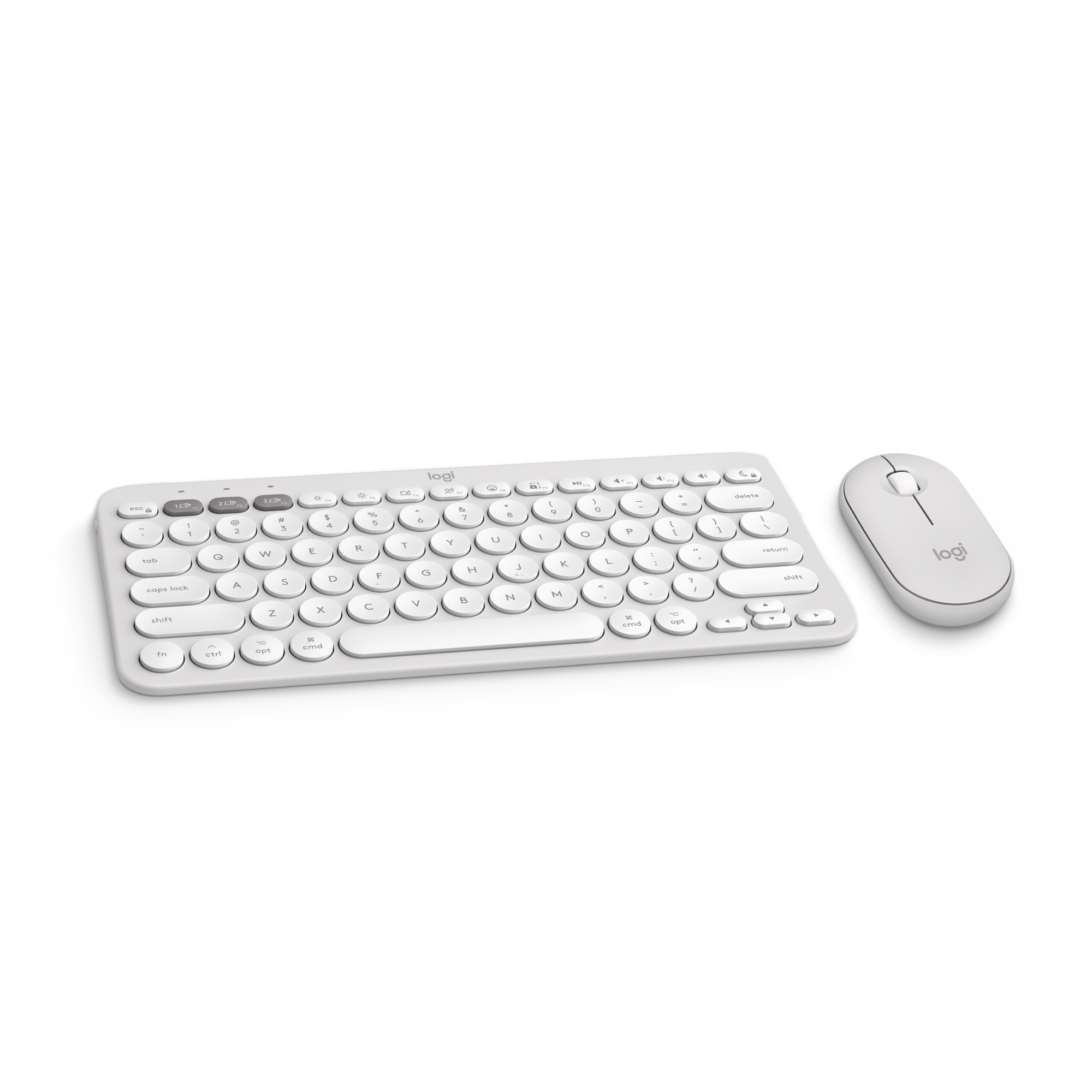
The Pebble 2 Combo for Mac is the better pick for Mac owners who want a small, quiet set that travels and pairs with several devices. The MK470 is the better pick if you want a full-size keyboard with a number pad for a desk. The Pebble 2 is more compact and more flexible on connections, and its SilentTouch keys and mouse are notably quiet. The MK470 gives you a numpad and a larger layout, but it is bulkier and less suited to a bag. Owners of both sets praise the quiet typing and reliable wireless; the common complaint about the Pebble 2 is the small, flat keys, and about the MK470 the lack of backlighting and Mac-specific keys.

  • Choose the Logitech Pebble 2 Combo for Mac if you use a Mac, want a slim set that fits in a bag, and need to switch between up to three devices.
  • Choose the Logitech MK470 Slim if you work at a desk and want a full-size keyboard with a number pad.

Prices

  • Logitech Pebble 2 Combo for Mac: $49.99 at Amazon (checked today)
  • Logitech MK470 Slim Wireless Combo: $39.99 at Best Buy (checked today)
  • Difference: the Logitech MK470 Slim Wireless Combo is $10.00 cheaper than the Logitech Pebble 2 Combo for Mac today
Logitech
Logitech Pebble 2 Combo for Mac

Logitech Pebble 2 Combo for Mac

5(3 ratings)
$49.99at AmazonChecked 2 h ago
See all prices and details
Visit Amazon

Store links may earn us a commission. As an Amazon Associate, Deal.ai earns from qualifying purchases.

Pros
  • Compact and light enough for a bag
  • Pairs with three devices and switches fast
  • Very quiet keys and clicks
  • Mac key layout and customizable keys
  • Works over Bluetooth or the included receiver
Cons
  • No number pad
  • Flat, small keys take getting used to
  • No backlight
  • Right-handed mouse only
Logitech
Logitech MK470 Slim Wireless Keyboard and Mouse Combo

Logitech MK470 Slim Wireless Combo

Logitech MK470 Slim Wireless Keyboard and Mouse Combo

$39.99at Best BuyChecked 2 h ago
See all prices and details
Visit Best Buy

Store links may earn us a commission. Price via Klarna.

Pros
  • Full-size layout with number pad
  • Comfortable for long desk sessions
  • Quiet for a standard keyboard
  • Simple plug-and-play receiver
Cons
  • Bulky for travel
  • No Mac-specific keys
  • Pairs with one device at a time
  • No backlight

What separates them

Logitech Pebble 2 Combo for MacLogitech MK470 Slim Wireless Combo
LayoutCompact, travel-sized, no number padFull size with number pad
Mac fitMade for Mac, with Mac key layoutGeneral layout, not Mac-specific
Multi-devicePairs with up to three devices and switches between themSingle-device pairing
QuietnessSilentTouch keys and mouseStandard keys, quieter than average but not silent
ConnectionBluetooth LE or the included Logi Bolt receiverLogitech wireless receiver
PortabilitySlim and light, easy to carryLarger and heavier, best left on a desk
PowerRuns on AAA keyboard and AA mouse batteriesRuns on AA batteries
BacklightNoneNone

Price history

  • Logitech Pebble 2 Combo for Mac: lowest $49.99 on Nov 16 at Amazon.
  • Logitech MK470 Slim Wireless Combo: lowest $39.99 on Nov 16 at Best Buy.

Prices at every store

Logitech Pebble 2 Combo for Mac

  • QuillNew

    In stock

    $59.99Free shippingChecked 2 h ago
    Visit Quill
  • StaplesNew

    In stock

    $60.35Free shippingChecked 2 h ago
    Visit Staples
  • NeweggNew

    In stock

    $63.99Free shippingChecked 2 h ago
    Visit Newegg
  • AmazonNew

    Availability unknown

    As an Amazon Associate, Deal.ai earns from qualifying purchases.

    $49.99Free shippingChecked 2 h ago
    Visit Amazon

Also available at

  • WalmartCheck price at Walmart

Store links may earn us a commission. Some prices via Klarna.

All 7 stores and price history →

Logitech MK470 Slim Wireless Combo

  • Best BuyNew

    In stock

    $39.99Free shippingChecked 2 h ago
    Visit Best Buy
  • StaplesNew

    In stock

    $49.99Free shippingChecked 2 h ago
    Visit Staples
  • AdoramaNew

    In stock

    $49.99Free shippingChecked 2 h ago
    Visit Adorama
  • Office DepotNew

    In stock

    $49.99Free shippingChecked 2 h ago
    Visit Office Depot

Store links may earn us a commission. Some prices via Klarna.

All 7 stores and price history →

Specs compared

SpecLogitech Pebble 2 Combo for MacLogitech MK470 Slim Wireless Combo
WirelessBluetoothYes
TypeStandard KeyboardsStandard Keyboards
Rollable/FoldableNoNo
BacklightNoNo
ColorWhiteBlack, Gray
BrandLogitech—
Power typeBattery—
Keyboard techOptical—
FeaturesCustomizable Keys—
ConnectionBluetooth—
Number of keys10—
Keyboard layoutQwerty—
Show all 38 specsShow fewer specs
SpecLogitech Pebble 2 Combo for MacLogitech MK470 Slim Wireless Combo
Battery consumption typeChangeable Disposable Battery—
Motion detectOptical—
Model920-012201—
Pieces2—
Has written warrantyNo—
Height1.5 in—
Assembled product weight1.4 lb—
Battery sizeAA—
Number of batteries2—
Theme

What reviewers say

Logitech MK470 Slim Wireless Combo

Owners describe the MK470 as a quiet, tidy combo that works well for everyday typing and spreadsheets. Most praise the low noise and long battery life; some find the flat mouse and mushy key feel less comfortable for long sessions.

What people mention
  • Key noisePraisedOwners say the low-profile keys are much quieter than standard keyboards, which helps in shared rooms.
  • Battery lifePraisedUsers report going many months, often over a year, before changing batteries.
  • Mouse comfortCriticisedSome find the slim mouse too flat and small for long use, especially with larger hands.
  • Key feelMixedTyping is described as soft and shallow; some like it, others miss crisper feedback.

Questions and answers

Which is better for typing all day at a desk?
The MK470, because its full-size layout and number pad suit spreadsheets and long sessions. The Pebble 2 is fine for shorter bursts but its flat, compact keys tire some typists.
Which works better with a Mac?
The Pebble 2 Combo for Mac. It has a Mac key layout and is built for Mac pairing, while the MK470 uses a general layout with Windows-oriented keys.
Which is quieter?
The Pebble 2. Its SilentTouch keys and mouse are designed to be quiet, and owners consistently call it near-silent. The MK470 is quiet for a standard keyboard but not silent.
Can I use either with a tablet or phone?
The Pebble 2 can pair with up to three devices over Bluetooth, including tablets and phones. The MK470 is aimed at a single computer through its receiver.
Is the Pebble 2 worth stepping up to over the MK470?
If you want portability, multi-device switching and Mac keys, yes. If you mostly want a number pad and a bigger keyboard at a desk, the MK470 covers that need.
Which lasts longer on a set of batteries?
Both run on standard alkaline batteries and last months with normal use. The MK470 uses AA cells and the Pebble 2 uses AAA in the keyboard and AA in the mouse.

Ask our shopping agent

It checks today's price at every store, compares the alternatives and answers in about a minute.

Enter to send, Shift+Enter for a new line

More comparisons

  • Logitech Pebble 2 Combo for Mac vs Logitech MX KEYS S wireless keyboard and mouse combo
  • Logitech Pebble 2 Combo for Mac vs Logitech Wave Keys MK670 Combo
  • Logitech MX KEYS S wireless keyboard and mouse combo vs Logitech MK470 Slim Wireless Keyboard and Mouse Combo
  • Logitech Wave Keys MK670 Combo vs Logitech MK470 Slim Wireless Keyboard and Mouse Combo

Buying guides that pick them

  • Best wireless keyboard and mouse combos
Bluetooth LE
—
Retail packagingSet—
Mouse StyleTraditional—
Wireless or WiredWireless—
Weight (Ounces)2.68—
Battery Requirements2 x AAA, 1 x AA—
Mouse Tracking MethodOptical—
Mouse OperationButton(s) with scroll wheel—
Color FamilyWhite—
Batteries IncludedYes—
Keyboard Design or StyleSlim—
Designed for GamingNo—
Material of ItemPlastic—
OS CompatibilitymacOS—
Numpad—Yes
Form Factor—Full Size
Mouse Included—Yes