StoreDeal.ai store
Shop
  • Deals
  • Deal checker
  • Black Friday
  • Buying guides
  • Brands
  • Stores
Travel
  • Flight deals
  • Hotel deals
Company
  • Research
  • Press
  • Use in AI assistants
  • Contact
  • deal.ai apps
Black Friday 2026
  • Walmart
  • Best Buy
  • Target
  • TVs
  • Laptops
  • Headphones
  • Apple
  • Gaming
  • Vacuums
  • Kitchen
  • Toys
  • Smartwatches
  • Tablets
  • Furniture
  • Mattresses
© Deal.ai Inc.·2222 Ponce de Leon Blvd, Miami, FL 33134·support@deal.ai
TermsPrivacy
Deal.ai › Compare

Logitech Pebble 2 Combo for Mac vs Logitech Wave Keys MK670 Combo

Buy the Wave Keys MK670 if comfort over long sessions is the priority: the wavy keyframe, cushioned palm rest and full number pad suit desk work, and the M550 L mouse fits medium to large hands. Buy the Pebble 2 Combo for Mac if you want a small, quiet set to carry between a Mac, iPad and phone. The Pebble is compact and silent but has a cramped layout and a small travel mouse; the Wave Keys is bigger, heavier and built for a fixed desk. Owners rate the Wave Keys well overall, and the wavy shape divides people who prefer a flat keyboard.

  • Choose the Pebble 2 Combo for Mac if you want a slim, quiet keyboard and mouse that slip into a bag and pair with three devices at once.
  • Choose the Wave Keys MK670 if you type at a desk all day and want wrist support, a number pad and a larger mouse.

Prices

  • Logitech Pebble 2 Combo for Mac: $49.99 at Amazon (checked today)
  • Logitech Wave Keys MK670 Combo: $59.99 at eBay (checked today)
  • Difference: the Logitech Pebble 2 Combo for Mac is $10.00 cheaper than the Logitech Wave Keys MK670 Combo today
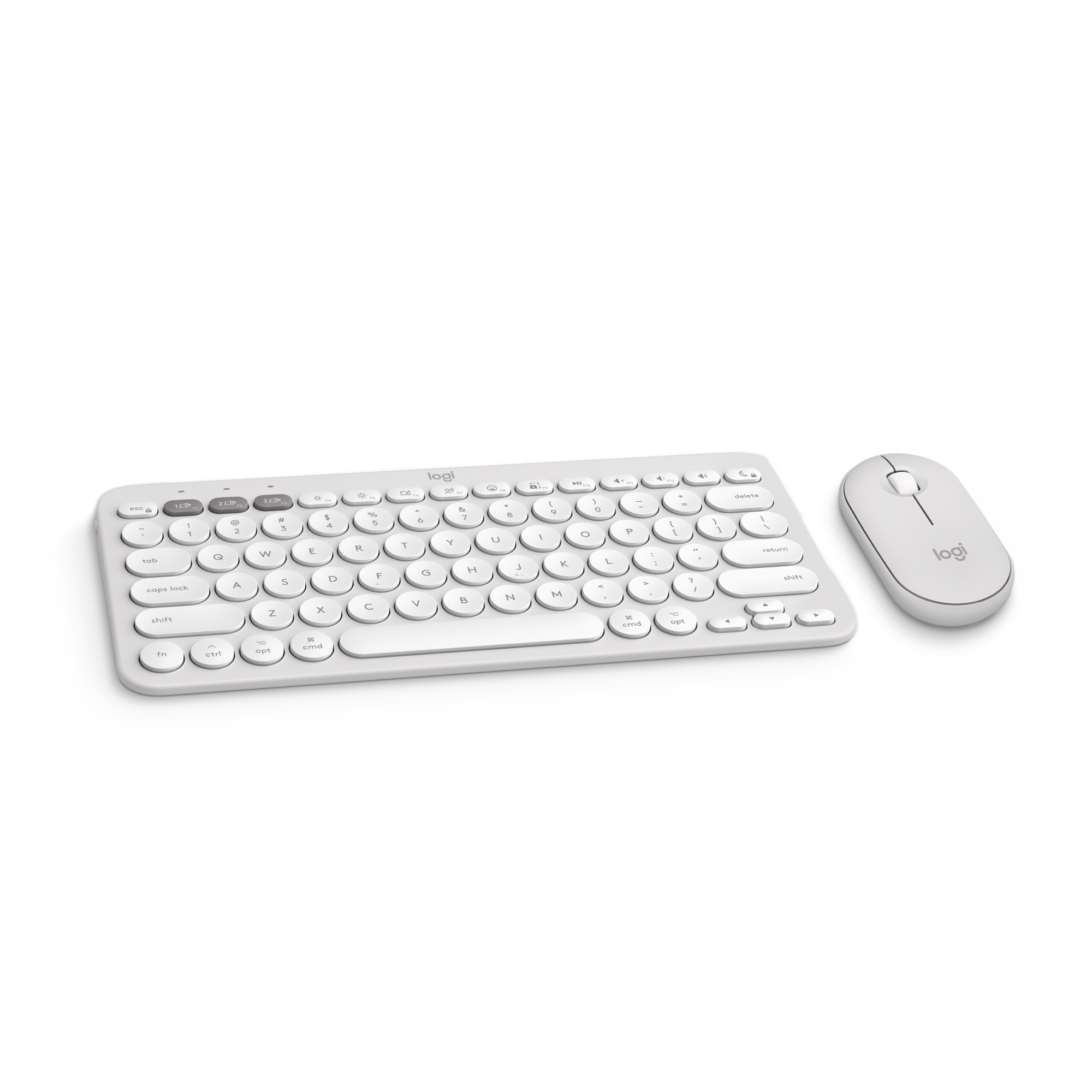
Logitech
Logitech Pebble 2 Combo for Mac

Logitech Pebble 2 Combo for Mac

5(3 ratings)
$49.99at AmazonChecked 2 h ago
See all prices and details
Visit Amazon

Store links may earn us a commission. As an Amazon Associate, Deal.ai earns from qualifying purchases.

Pros
  • Very slim and light, easy to carry
  • Quiet keys and clicks
  • Pairs with three devices and switches fast
  • Mac-friendly key layout
Cons
  • No number pad
  • No palm rest or wrist support
  • Small mouse suits smaller hands
  • No backlight
Logitech
Logitech Wave Keys MK670 Combo

Logitech Wave Keys MK670 Combo

4.3(230 ratings)
$59.99at eBayChecked 2 h ago
See all prices and details
Visit eBay

Store links may earn us a commission.

Pros
  • Cushioned palm rest and wavy frame ease wrist strain
  • Full number pad and adjustable tilt
  • Keyboard battery lasts up to three years
  • Larger mouse with rubber grip and 400–4,000 DPI
Cons
  • Big and heavy for travel
  • Louder typing than the Pebble
  • No backlight
  • Wavy shape is not for everyone

What separates them

Logitech Pebble 2 Combo for MacLogitech Wave Keys MK670 Combo
Size and portabilityCompact travel-sized set, 1.4 lb togetherFull-size keyboard, 14.8 in wide, 1.65 lb keyboard alone
Wrist supportFlat, low-profile keys with no palm restWavy keyframe with cushioned palm rest
Number padCompact layout without a number pad99 keys including a numeric keypad
Typing noiseSilentTouch keeps keys and clicks quietStandard keys, noticeably louder
Battery lifeRuns on AAA and AA cells, replaced as neededUp to 3 years on the keyboard, 2 years on the mouse
Mouse fitSmall right-handed mouse for travelContoured M550 L with rubber grip for medium to large hands
Multi-device pairingPairs with up to three devices and switches between themBluetooth 5.1 or Logi Bolt, one host at a time
Mac fitMac layout and keys tuned for macOSUS layout aimed at Windows and general desktop use

Price history

  • Logitech Pebble 2 Combo for Mac: lowest $49.99 on Nov 16 at Amazon.
  • Logitech Wave Keys MK670 Combo: lowest $59.99 on Nov 16 at eBay.

Prices at every store

Logitech Pebble 2 Combo for Mac

  • QuillNew

    In stock

    $59.99Free shippingChecked 2 h ago
    Visit Quill
  • StaplesNew

    In stock

    $60.35Free shippingChecked 2 h ago
    Visit Staples
  • NeweggNew

    In stock

    $63.99Free shippingChecked 2 h ago
    Visit Newegg
  • AmazonNew

    Availability unknown

    As an Amazon Associate, Deal.ai earns from qualifying purchases.

    $49.99Free shippingChecked 2 h ago
    Visit Amazon

Also available at

  • WalmartCheck price at Walmart

Store links may earn us a commission. Some prices via Klarna.

All 7 stores and price history →

Logitech Wave Keys MK670 Combo

  • eBayNew

    In stock

    $59.99+ $10.00 shippingChecked 2 h ago
    Visit eBay
  • WalmartNew

    In stockSold by VoczaleReturns: Sold by a Walmart Marketplace seller; returns go to the seller under the seller's returns policy.

    $87.99Checked 1 h ago
    Visit Walmart
  • Best BuyNew

    In stock

    $89.99Free shippingChecked 2 h ago
    Visit Best Buy
  • AmazonNew

    Availability unknown

    As an Amazon Associate, Deal.ai earns from qualifying purchases.

    $87.99Free shippingChecked 2 h ago
    Visit Amazon

Also available at

  • WalmartCheck price at Walmart

Store links may earn us a commission.

All 16 stores and price history →

Specs compared

SpecLogitech Pebble 2 Combo for MacLogitech Wave Keys MK670 Combo
Number of keys1099 (US layout)
ColorWhiteBlack
BrandLogitech—
WirelessBluetooth—
Power typeBattery—
Keyboard techOptical—
FeaturesCustomizable Keys—
ConnectionBluetooth—
Keyboard layoutQwerty—
Battery consumption typeChangeable Disposable Battery—
Motion detectOptical—
Model920-012201—
Show all 40 specsShow fewer specs
SpecLogitech Pebble 2 Combo for MacLogitech Wave Keys MK670 Combo
Pieces2—
Has written warrantyNo—
Height1.5 in—
Assembled product weight1.4 lb—
Battery sizeAA—
Number of batteries2—
ThemeBluetooth LE—
Retail packagingSet—
TypeStandard Keyboards—
Rollable/FoldableNo

What reviewers say

Logitech Wave Keys MK670 Combo

  • 4.3 / 5230 ratings

Owners rate the combo highly for comfort and value. Many say the wavy keyboard eases wrist strain over a full workday, and the mouse fits larger hands well. A few find the fixed angle limiting and the mouse too big for smaller hands.

What people mention
  • ComfortPraisedOwners say the wavy keyframe and palm rest reduce wrist strain during long typing sessions.
  • Typing feelPraisedReviewers describe the keys as quiet and easy to adjust to from a standard keyboard.
  • BatteryPraisedUsers report going months, and in some cases years, without changing batteries.
  • ConnectivityPraisedPairing over Bluetooth or the Logi Bolt receiver is described as quick and reliable.

Questions and answers

Which is better for all-day typing at a desk?
The Wave Keys MK670. Its palm rest and wavy keyframe support the wrists, and the number pad speeds up data entry. The Pebble 2 is built for short sessions on the move.
Which is better for travel?
The Pebble 2 Combo. It is slim, light and quiet, and it switches between three paired devices. The Wave Keys is too wide and heavy to carry daily.
Which lasts longer on batteries?
The Wave Keys. Logitech rates its keyboard at up to three years and its mouse at up to two on the included cells. The Pebble 2 runs on replaceable AAA and AA batteries with no long rating.
Is the Wave Keys worth stepping up to?
If you type for hours at a fixed desk, yes. You gain wrist support, a number pad and a bigger mouse. If portability matters more, stay with the Pebble 2.
Does the Pebble 2 work with Windows PCs?
It connects over Bluetooth and includes a Logi Bolt receiver, so it works with PCs. The key labels are set up for Mac, so some keys differ on Windows.
Which mouse is better for large hands?
The M550 L in the Wave Keys combo. It is contoured with a rubber side grip for medium to large hands. The Pebble mouse is small and right-handed.

Ask our shopping agent

It checks today's price at every store, compares the alternatives and answers in about a minute.

Enter to send, Shift+Enter for a new line

More comparisons

  • Logitech Pebble 2 Combo for Mac vs Logitech MX KEYS S wireless keyboard and mouse combo
  • Logitech Wave Keys MK670 Combo vs Logitech MX KEYS S wireless keyboard and mouse combo
  • Logitech Pebble 2 Combo for Mac vs Logitech MK470 Slim Wireless Keyboard and Mouse Combo
  • Logitech Wave Keys MK670 Combo vs Logitech MK470 Slim Wireless Keyboard and Mouse Combo

Buying guides that pick them

  • Best wireless keyboard and mouse combos
—
BacklightNo—
Mouse StyleTraditional—
Wireless or WiredWireless—
Weight (Ounces)2.68—
Battery Requirements2 x AAA, 1 x AA—
Mouse Tracking MethodOptical—
Mouse OperationButton(s) with scroll wheel—
Color FamilyWhite—
Batteries IncludedYes—
Keyboard Design or StyleSlim—
Designed for GamingNo—
Material of ItemPlastic—
OS CompatibilitymacOS—
Compatibility—Desktop Set
Keyboard height—218.9 mm / 8.6 inches
Keyboard width—375.9 mm / 14.8 inches
Keyboard depth—30.5 mm / 1.2 inches
Keyboard weight—750g / 26.6 ounces with batteries