StoreDeal.ai store
Shop
  • Deals
  • Deal checker
  • Black Friday
  • Buying guides
  • Brands
  • Stores
Travel
  • Flight deals
  • Hotel deals
Company
  • Research
  • Press
  • Use in AI assistants
  • Contact
  • deal.ai apps
Black Friday 2026
  • Walmart
  • Best Buy
  • Target
  • TVs
  • Laptops
  • Headphones
  • Apple
  • Gaming
  • Vacuums
  • Kitchen
  • Toys
  • Smartwatches
  • Tablets
  • Furniture
  • Mattresses
© Deal.ai Inc.·2222 Ponce de Leon Blvd, Miami, FL 33134·support@deal.ai
TermsPrivacy
Deal.ai › Compare

MakerBot Sketch 3D Printer vs Bambu Lab X1 Carbon

Buy the Bambu Lab X1 Carbon for faster, more versatile printing on PLA, PETG, ABS and TPU, with a larger 256 mm cube build volume and 500 mm/s tool-head speed. Buy the MakerBot Sketch only if you want a simple PLA-only classroom machine with Ethernet and a tuned 200-micron profile. The Sketch is the lighter-duty of the two on paper: PLA only, about 150 mm/s, and a 200-micron tuned profile, while the X1 Carbon adds CoreXY motion, lidar bed leveling and a hardened steel nozzle. The Sketch ships as a printer-only kit with no filament or training, but it includes MakerBot Cloud file management and 600+ certified lesson plans for educators. The X1 Carbon also adds AI first-layer inspection, spaghetti failure detection, power-loss recovery and up to 16-color printing with the AMS.

  • Choose the MakerBot Sketch if you need a locked-down PLA-only printer for a classroom or office, with Ethernet, WiFi and USB and a tuned 200-micron profile.
  • Choose the Bambu Lab X1 Carbon if you want speed, a 256 mm cube build volume and multi-material printing in PLA, PETG, ABS and TPU.

Prices

  • MakerBot Sketch 3D Printer: $599.00 at 3dprintersdepot.com (last seen Nov 20)
  • Bambu Lab X1 Carbon: $540.97 at Colabmod (last seen Nov 24)
  • Difference: the Bambu Lab X1 Carbon is $58.03 cheaper than the MakerBot Sketch 3D Printer at the latest prices (Nov 20 and Nov 24)
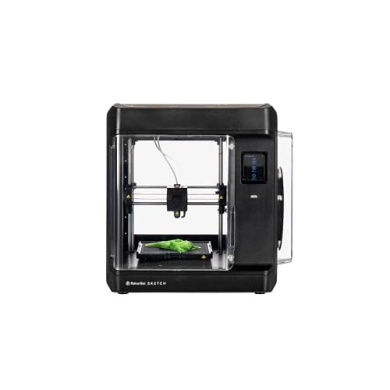
MakerBot
MakerBot Sketch 3D Printer

MakerBot Sketch 3D Printer

$599.00at 3dprintersdepot.comChecked Nov 20
See all prices and details
Visit 3dprintersdepot.com
Pros
  • PLA-only design keeps settings simple for beginners and classrooms
  • Ethernet, WiFi and USB give three ways to send jobs
  • Enclosed chamber and built-in camera
  • Tuned 200-micron layer profile reduces tuning work
  • LCD touchscreen and memory card slot
  • MakerBot Cloud file management and 600+ certified lesson plans for educators
Cons
  • PLA only, so no ABS, PETG or TPU
  • About 150 mm/s top speed is slow next to the X1 Carbon
  • Heavier at 51.15 lbs and larger footprint
  • No multi-color printing beyond swapping spools
  • Layer resolution listed only as 200 microns
  • Printer-only package: no filament or training included
Bambu Lab
Bambu Lab X1 Carbon 3D Printer

Bambu Lab X1 Carbon

Bambu Lab X1 Carbon 3D Printer

$540.97at ColabmodChecked Nov 24
See all prices and details
Visit Colabmod
Pros
  • 500 mm/s tool-head speed cuts print times sharply
  • 256 x 256 x 256 mm build volume
  • Prints PLA, PETG, ABS and TPU
  • Dual auto bed leveling with lidar
  • Hardened steel nozzle and all-metal hotend handle abrasive and high-temp filaments
  • AI first-layer inspection, spaghetti detection and power loss fail safe
Cons
  • Wi-Fi only, no Ethernet or USB port listed
  • Works with Bambu Studio and 3MF files, a narrower software path
  • No full-size SD slot, only microSD
  • Heavier 14.13 kg unit needs a sturdy bench
  • Enclosed CoreXY design costs more than a PLA-only machine

What separates them

MakerBot Sketch 3D PrinterBambu Lab X1 Carbon
Build volume250 x 220 x 200 mm256 x 256 x 256 mm
Printing technologyFused deposition modeling (bed-slinger style)CoreXY
Max speed5.91 in/sec (about 150 mm/s)500 mm/s tool-head speed
MaterialsPLA onlyPLA, PETG, ABS, TPU
EnclosureEnclosed chamberEnclosed chamber
ConnectivityWiFi, Ethernet, USBWi-Fi
CameraBuilt-in cameraBuilt-in camera
SoftwareTinkerCAD, Fusion 360Bambu Studio (3MF files)
Bed levelingNot listed as automaticDual auto bed leveling with lidar
Hotend and nozzleMetal body, single extruderAll-metal hotend, hardened steel nozzle

Price history

$1,029.00$399.00
Oct 30Nov 24
  • MakerBot Sketch 3D Printer: lowest $399.00 on Nov 3 at Dynamism.com; $599.00 on Nov 20.
  • Bambu Lab X1 Carbon: lowest $540.97 on Nov 24 at Colabmod.

Prices at every store

MakerBot Sketch 3D Printer

  • 3dprintersdepot.comNew

    In stock

    $599.00Checked Nov 20
    Visit 3dprintersdepot.com
  • GoEngineerNew

    In stock

    $599.00Checked Nov 20
    Visit GoEngineer
  • eBayNew

    Availability unknownSold by dawki_43 (0% positive, 2 ratings)Returns: Set by the eBay seller; the eBay Money Back Guarantee covers an item that doesn't arrive or isn't as described.

    $500.00+ $127.95 shippingChecked Nov 15
    Visit eBay
  • GovConnectionNew

    Availability unknown

    $699.88Checked Nov 20
    Visit GovConnection

Also available at

  • eBayCheck price at eBay

Store links may earn us a commission.

All 16 stores and price history →

Bambu Lab X1 Carbon

  • ColabmodNew

    In stock

    $540.97Free shippingChecked Nov 24
    Visit Colabmod
  • PoolnookNew

    In stock

    $908.99Free shippingChecked Nov 17
    Visit Poolnook
  • FuturologyTechNew

    In stock

    $999.00+ $112.00 shippingChecked Nov 15
    Visit FuturologyTech
  • OKwishingNew

    In stock

    $2,289.99Free shippingChecked Nov 24
    Visit OKwishing

Also available at

  • eBayCheck price at eBay

Store links may earn us a commission.

All 14 stores and price history →

Specs compared

SpecMakerBot Sketch 3D PrinterBambu Lab X1 Carbon
Number Of Extruders1 extruderDirect Drive Extruder
Printing Material TypePolylactide (PLA)PETG, ABS
Build Volume250 x 220 x 200 mm256 x 256 x 256 mm
Printing TechnologyFused Deposition ModellingCoreXY
Layer Resolution200 microns (tuned)7 μm (lidar resolution)
Filament Diameter1.75 mm (0.069 inches)1.75 mm
Filament TypePLAABS, PETG, PLA, TPU
Filament ColorWhite, Black, Gray, OrangeMulti Color
ConnectivityWiFi, Ethernet, USBWi-Fi
Type3D Printer3D Printer
MaterialMetalAll-Metal (hotend), Hardened Steel (nozzle)
Design HighlightsEnclosed chamberEnclosed chamber
Show all 40 specsShow fewer specs
SpecMakerBot Sketch 3D PrinterBambu Lab X1 Carbon
Depth470 mm (18.5 in)389 mm
Height547 mm (21.54 in)457 mm
Weight51.15 lbs14.13 kg
Width535 mm (21.07 in)389 mm
Printing Speed5.91 in/sec500 mm/s (Max Speed of Tool Head)
Software CompatibilityTinkerCad, Fusion 360Bambu Studio
Display Screen TypeLCD touch screenTouchscreen
Memory Card SlotYesNo (microSD card slot)
Built-In CameraYesYes

What reviewers say

MakerBot Sketch 3D Printer

Owner feedback on the Sketch line centers on its classroom-friendly enclosure and camera, but users note the PLA-only material limit and modest print quality for the price.

What people mention
  • EnclosurePraisedOwners like the closed chamber for safety and consistent prints.
  • Material limitsCriticisedUsers complain it only prints PLA, ruling out stronger filaments.
  • Print qualityMixed200-micron layers are fine for classroom models but not detailed work.
  • CameraPraisedThe built-in camera is seen as useful for checking prints remotely.

Bambu Lab X1 Carbon

Owners generally rate the X1 Carbon highly for its speed and reliability out of the box, with auto leveling and the camera cited as the biggest quality-of-life features. Complaints tend to focus on price, the locked-in software ecosystem, and noise at high speeds.

What people mention
  • Print speedPraisedOwners say it prints much faster than older bed-slinger printers without losing quality.
  • Auto levelingPraisedLidar and dual auto bed leveling are described as reliable, removing most manual calibration.
  • EnclosurePraisedThe enclosed chamber is credited with making ABS and similar filaments practical.
  • PriceCriticisedBuyers call it expensive compared with open-frame printers of similar size.

Questions and answers

Which is better for a school or classroom?
The MakerBot Sketch. It prints PLA only, has a tuned 200-micron profile, and offers Ethernet, WiFi and USB, which suits shared school networks. The X1 Carbon is faster but exposes students to more materials and settings.
Which prints faster?
The Bambu Lab X1 Carbon. Its tool head reaches 500 mm/s, while the Sketch tops out at 5.91 in/sec, about 150 mm/s.
Can the MakerBot Sketch print ABS or PETG?
No. It is listed for PLA only. The X1 Carbon prints PLA, PETG, ABS and TPU.
Which has the bigger build volume?
The X1 Carbon at 256 x 256 x 256 mm, versus 250 x 220 x 200 mm on the Sketch. The difference matters most in height.
Do both have a camera and enclosure?
Yes. Both list a built-in camera and an enclosed chamber, so remote monitoring and draft-free printing are covered on either.
Is the X1 Carbon worth stepping up to?
For anyone printing functional parts in ABS or PETG, or who needs speed, yes. For PLA-only classroom work, the Sketch is the simpler path, and it adds MakerBot Cloud and 600+ certified lesson plans.
Which one levels its bed automatically?
The X1 Carbon, which lists dual auto bed leveling with lidar. The Sketch does not list automatic bed leveling, so plan on manual checks.
Does the Sketch come with filament or training?
No. It ships as a printer-only package with no filament and no training. The lesson plans are included, but you supply spools yourself.
Which handles abrasive and high-temperature filaments?
The X1 Carbon. Its all-metal hotend and hardened steel nozzle are built for filaments like PETG-CF, PAHT-CF and PA6-CF. The Sketch is PLA only.
What does each printer include in the box?
The Sketch includes a spatula and snips, plus three spools of filament in white, black, gray or orange. The X1 Carbon includes a 0.4 mm hardened steel nozzle.

Ask our shopping agent

It checks today's price at every store, compares the alternatives and answers in about a minute.

Enter to send, Shift+Enter for a new line

More comparisons

  • Bambu Lab X1 Carbon 3D Printer vs Bambu Lab X2D AMS Combo
  • Creality Ender 3 vs Bambu Lab X1 Carbon 3D Printer
Included Accessories
Spatula, Snip
0.4 mm Hardened Steel Nozzle
KitYes—
ColorBlack—
Filament Multipack Quantity3—
ConfigurationCore—
Operating SystemWindows—
Connectivity (Printer)USB—
Print TechnologyFDM—
Supported File Formats—3MF
Safety Features—Power loss fail safe
Storage Type—microSD
Skill Level—Beginners
Typical Users—Professionals, Hobbyists
Compatible Filament Material—PLA, ABS, Wood
Maximum Tool Head Speed—500 mm/s
Acceleration—20000 mm/s²
Included Component—Nozzle
Compatible Slicer—Bambu Studio, Superslicer, Prusaslicer, Cura
Hot Bed—Flexible Steel Plate