StoreDeal.ai store
Shop
  • Deals
  • Deal checker
  • Black Friday
  • Buying guides
  • Brands
  • Stores
Travel
  • Flight deals
  • Hotel deals
Company
  • Research
  • Press
  • Use in AI assistants
  • Contact
  • deal.ai apps
Black Friday 2026
  • Walmart
  • Best Buy
  • Target
  • TVs
  • Laptops
  • Headphones
  • Apple
  • Gaming
  • Vacuums
  • Kitchen
  • Toys
  • Smartwatches
  • Tablets
  • Furniture
  • Mattresses
© Deal.ai Inc.·2222 Ponce de Leon Blvd, Miami, FL 33134·support@deal.ai
TermsPrivacy
Deal.ai › Compare

Raspberry Pi 400 Kit vs PicoBricks Raspberry Pi Pico Starter Kit

These are not competing products. The Raspberry Pi 400 Kit is a finished desktop computer built into a keyboard: plug in a monitor and mouse and you have a working PC. PicoBricks is a microcontroller learning kit built around a Raspberry Pi Pico, with 12 sensors and a 234-page tutorial, and it needs a separate computer to program it. Buy the Pi 400 for general computing and learning Linux; buy PicoBricks to learn electronics and coding hands-on. Owners of the Pi 400 praise the tidy one-piece design and the full Pi 4 performance; PicoBricks buyers like the no-solder setup and the guided projects.

  • Choose the Raspberry Pi 400 Kit if you want a complete, ready-to-use desktop for browsing, documents, media and learning to program.
  • Choose the PicoBricks if you want to learn electronics and coding with sensors, guided projects and no soldering.

Prices

  • Raspberry Pi 400 Kit: $129.90 at Amazon (last seen Nov 20)
  • PicoBricks Raspberry Pi Pico Starter Kit: $79.99 at Amazon (last seen Nov 20)
  • Difference: the PicoBricks Raspberry Pi Pico Starter Kit is $49.91 cheaper than the Raspberry Pi 400 Kit at the latest prices (Nov 20)
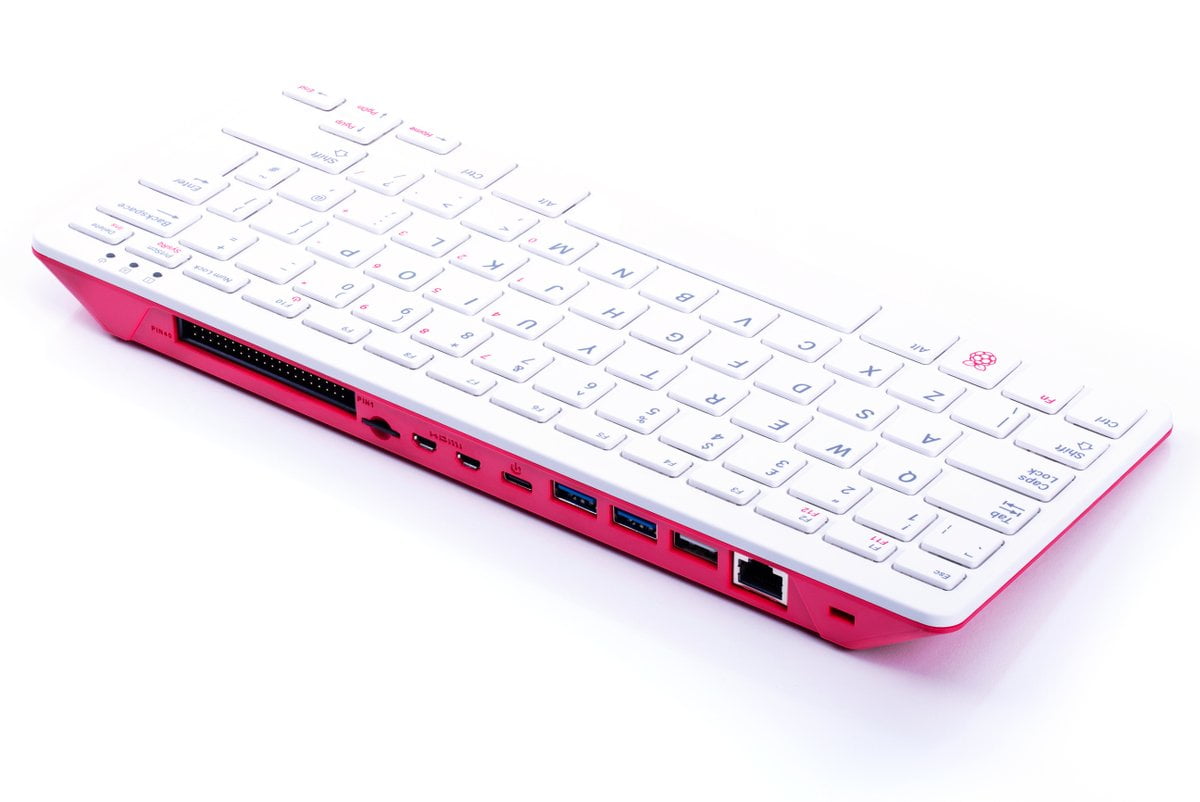
Raspberry Pi
Raspberry Pi 400 Kit

Raspberry Pi 400 Kit

$129.90at AmazonChecked Nov 20
See all prices and details
Visit Amazon

Store links may earn us a commission. As an Amazon Associate, Deal.ai earns from qualifying purchases.

Pros
  • Full desktop computer in one compact keyboard
  • Quad-core 1.8 GHz CPU and 4 GB RAM handle browsing, documents and video
  • Dual micro HDMI output up to 4K
  • Gigabit Ethernet, Wi-Fi, Bluetooth and three USB ports
  • Kit includes power supply, cable and pre-loaded microSD card
Cons
  • No built-in sensors or electronics learning projects
  • Needs a monitor and mouse to use
  • 4 GB RAM limits heavy multitasking
  • US keyboard layout only in this version
PicoBricks
PicoBricks - Raspberry Pi Pico Starter Kit with 12 Sensors and Extensive Learning Guide, Raspberry Pi Zero To Hero

PicoBricks Raspberry Pi Pico Starter Kit

PicoBricks - Raspberry Pi Pico Starter Kit with 12 Sensors and Extensive Learning Guide, Raspberry Pi Zero To Hero

4.9(2 ratings)
$79.99at AmazonChecked Nov 20
See all prices and details
Visit Amazon

Store links may earn us a commission. As an Amazon Associate, Deal.ai earns from qualifying purchases.

Pros
  • 12 sensors and 10 pre-assembled modules out of the box
  • No soldering or complex wiring
  • 234-page tutorial guides beginners through projects
  • Works with MicroPython, Arduino and Blockly
  • Good fit for classrooms and STEM learning
Cons
  • Not a computer; needs a host PC to program it
  • RP2040 has little memory for large programs
  • Limited to microcontroller-scale projects
  • No display or keyboard of its own

What separates them

Raspberry Pi 400 KitPicoBricks Raspberry Pi Pico Starter Kit
What it isA complete personal computer inside a keyboardA sensor and coding kit built on a Raspberry Pi Pico
ProcessorBroadcom BCM2711 quad-core Cortex-A72 at 1.8 GHzRP2040 microcontroller on the Pico board
Memory4 GB RAM264 KB SRAM on the RP2040
Operating systemRuns Raspberry Pi OS desktop from a 16 GB microSD cardRuns MicroPython, Arduino or Blockly programs on the Pico
SetupPlug in power, mouse and HDMI displayNo soldering or complex wiring; modules are pre-assembled
Inputs and sensorsKeyboard, USB ports, GPIO header, no built-in sensors12 sensors and 10 pre-assembled modules
Display outputTwo micro HDMI ports, up to 4K at 60 HzNone; needs a host computer to write and load code
Learning materialGetting Started Guide plus the Pi OS desktop234-page tutorial covering electronics and Pico projects

Price history

$129.90$75.75
Nov 9Nov 20
  • Raspberry Pi 400 Kit: lowest $80.00 on Nov 9 at DigiKey; $129.90 on Nov 20.
  • PicoBricks Raspberry Pi Pico Starter Kit: lowest $75.75 on Nov 10 at blikai; $79.99 on Nov 20.

Prices at every store

Raspberry Pi 400 Kit

  • WalmartNew

    In stockSold by Joes Tech ShopReturns: Sold by a Walmart Marketplace seller; returns go to the seller under the seller's returns policy.

    $139.95+ $17.00 shippingChecked 1 h ago
    Visit Walmart
  • AmazonNew

    Availability unknown

    As an Amazon Associate, Deal.ai earns from qualifying purchases.

    $129.90Free shippingChecked Nov 20
    Visit Amazon
  • DigiKeyNew

    In stock

    $80.00+ $4.99 shippingChecked Nov 10
    Visit DigiKey
  • VilrosNew

    In stock

    $100.00Free shippingChecked Nov 10
    Visit Vilros

Store links may earn us a commission.

All 2 stores and price history →

PicoBricks Raspberry Pi Pico Starter Kit

  • RobotShop USANew

    In stockReturn policy

    $130.00Checked 1 h ago
    Visit RobotShop USA
  • AmazonNew

    Availability unknown

    As an Amazon Associate, Deal.ai earns from qualifying purchases.

    $79.99Free shippingChecked Nov 20
    Visit Amazon
  • blikaiNew

    In stock

    $75.75Checked Nov 10
    Visit blikai
  • Micro CenterNew

    In stock

    $99.99Checked Nov 10
    Visit Micro Center

Also available at

  • RobotShop.comCheck price at RobotShop.com

Store links may earn us a commission.

All 2 stores and price history →

Specs compared

SpecRaspberry Pi 400 KitPicoBricks Raspberry Pi Pico Starter Kit
colorWhite—
size11.4" x 5.5" x 1.8"—
ProcessorBroadcom BCM2711 quad-core Cortex-A72(ARM v8) 6…—
RAM4GB—
Wireless LANDual-band IEEE 802.11b/g/n/ac—
BluetoothBLE—
EthernetGigabit Ethernet—
USB ports2 x USB 3.0 & 1 x USB 2.0 ports—
GPIO headerHorizontal 40-pin GPIO header—
HDMI ports2 x micro HDMI ports (supports up to 4Kp60)—
Power input5V DC via USB connector—
Dimensions286mm x 122mm x 23mm (maximum)—
Show all 25 specsShow fewer specs
SpecRaspberry Pi 400 KitPicoBricks Raspberry Pi Pico Starter Kit
Keyboard layoutUS keyboard layout—
Included storage16GB microSD card, pre-programmed with Raspberr…—
Sensors included—12 sensors
Guide length—234-page tutorial
Pre-assembled modules—10 powerful, pre-assembled modules
Soldering required—no soldering or complex wiring
Package—Box
Main Purpose—Steam Kit
Kit Type—Coding

What reviewers say

Raspberry Pi 400 Kit

Owners and reviewers treat the Pi 400 as the easiest way into Raspberry Pi: a real desktop in a keyboard for basic tasks and learning. They praise the tidy all-in-one design and the included accessories, and note the limits of 4GB RAM and the micro-HDMI ports.

What people mention
  • SetupPraisedOwners say the preloaded card and included power supply make first boot quick and simple.
  • PerformanceMixedReviewers find it fine for browsing and documents but limited by 4GB RAM under heavier loads.
  • PortsCriticisedThe micro-HDMI outputs are seen as awkward, needing adapters for standard monitors.
  • KeyboardPraisedTypists report the integrated keyboard is comfortable enough for everyday use.

PicoBricks Raspberry Pi Pico Starter Kit

Owners and educators describe PicoBricks as an easy on-ramp to the Pico, praising the solderless setup and the structured tutorial. Some experienced makers find the fixed sensor layout limiting once the basics are done.

What people mention
  • SetupPraisedOwners say it works within minutes because nothing needs soldering or wiring.
  • Learning guidePraisedThe 234-page tutorial is called clear and well structured for beginners.
  • FlexibilityCriticisedMakers note the onboard sensors are fixed, so custom circuits are harder than with loose parts.
  • DifficultyMixedBeginners find the pace comfortable, while some say later projects get basic for experienced users.

Questions and answers

Which is better for learning to code?
Both teach coding, but differently. The Pi 400 runs a full desktop where you write Python and other languages in a normal environment. PicoBricks teaches code that controls sensors and hardware, with a guided tutorial. Pick based on whether you want software or electronics.
Can the PicoBricks replace a computer?
No. The PicoBricks runs on a Raspberry Pi Pico microcontroller and needs a separate computer to write and upload code. The Pi 400 is the computer.
Which is better for kids?
PicoBricks suits kids who like building and experimenting with sensors, and the no-solder design keeps it safe and simple. The Pi 400 suits kids who need a first real computer for schoolwork and typing.
Do I need extra parts for the Pi 400 Kit?
You need a monitor with HDMI and a USB mouse. The kit includes the power supply, a micro HDMI to HDMI cable and a pre-loaded microSD card.
Which lasts longer as a purchase?
The Pi 400 stays useful as a general desktop for years. PicoBricks is a learning kit; once the projects are done, its use depends on how much you keep building. Many owners keep both for different jobs.
Is one worth stepping up to?
They serve different purposes, so it is not a step up. If you want a computer, get the Pi 400. If you want a sensor kit for electronics projects, get PicoBricks.

Ask our shopping agent

It checks today's price at every store, compares the alternatives and answers in about a minute.

Enter to send, Shift+Enter for a new line

More comparisons

  • Raspberry Pi 400 Kit vs Vilros Raspberry Pi 4 Complete Starter Kit
  • Raspberry Pi 400 Kit vs SunFounder Raspberry Pi Pico W Ultimate Starter Kit with Online Tutorials, RoHS Compliant - Kepler Kit
  • PicoBricks - Raspberry Pi Pico Starter Kit with 12 Sensors and Extensive Learning Guide, Raspberry Pi Zero To Hero vs SunFounder Raspberry Pi Pico W Ultimate Starter Kit with Online Tutorials, RoHS Compliant - Kepler Kit
  • Vilros Raspberry Pi 5 Basic Starter Kit vs Raspberry Pi 400 Kit
  • Raspberry Pi 5 Beginners Kit vs Raspberry Pi 400 Kit
  • Vilros Raspberry Pi 4 Complete Starter Kit vs PicoBricks - Raspberry Pi Pico Starter Kit with 12 Sensors and Extensive Learning Guide, Raspberry Pi Zero To Hero

Buying guides that pick them

  • Best Raspberry Pi starter kits for kids
Interconnect System
—
Raspberry Pi Zero WH (40 pin)
Suggested Programming Environment—Arduino, Blocky (UIFlow), Micropython
Included MCU/MPU Board(s)—Raspberry Pi Pico
Utilized IC / Part—RP2040