StoreDeal.ai store
Shop
  • Deals
  • Deal checker
  • Black Friday
  • Buying guides
  • Brands
  • Stores
Travel
  • Flight deals
  • Hotel deals
Company
  • Research
  • Press
  • Use in AI assistants
  • Contact
  • deal.ai apps
Black Friday 2026
  • Walmart
  • Best Buy
  • Target
  • TVs
  • Laptops
  • Headphones
  • Apple
  • Gaming
  • Vacuums
  • Kitchen
  • Toys
  • Smartwatches
  • Tablets
  • Furniture
  • Mattresses
© Deal.ai Inc.·2222 Ponce de Leon Blvd, Miami, FL 33134·support@deal.ai
TermsPrivacy
Deal.ai › Compare

Raspberry Pi 400 Kit vs SunFounder Pico W Ultimate Starter Kit

These are not substitutes. The Raspberry Pi 400 Kit is a finished desktop computer built into a keyboard: plug in a monitor and mouse and you have a working PC for browsing, documents and learning Linux. The SunFounder Kepler Kit is a parts box built around the Pico W microcontroller, aimed at wiring circuits and writing small programs. Buy the 400 Kit if you want a computer; buy the Kepler Kit if you want to learn electronics and embedded coding. Owners of the 400 praise the tidy one-piece design and quiet, fanless running; Kepler buyers praise the breadth of parts and the Paul McWhorter video lessons.

  • Choose the Raspberry Pi 400 Kit if you want a complete, ready-to-run desktop for web, office work, media or teaching someone Linux and Python.
  • Choose the SunFounder Kepler Kit if your goal is hands-on electronics and IoT projects, with sensors, breadboards and guided lessons rather than a general-purpose computer.

Prices

  • Raspberry Pi 400 Kit: $129.90 at Amazon (last seen Nov 20)
  • SunFounder Pico W Ultimate Starter Kit: $69.99 at SunFounder (checked today)
  • Difference: the SunFounder Pico W Ultimate Starter Kit is $59.91 cheaper than the Raspberry Pi 400 Kit at the latest prices (Nov 20 and Nov 27)
Raspberry Pi
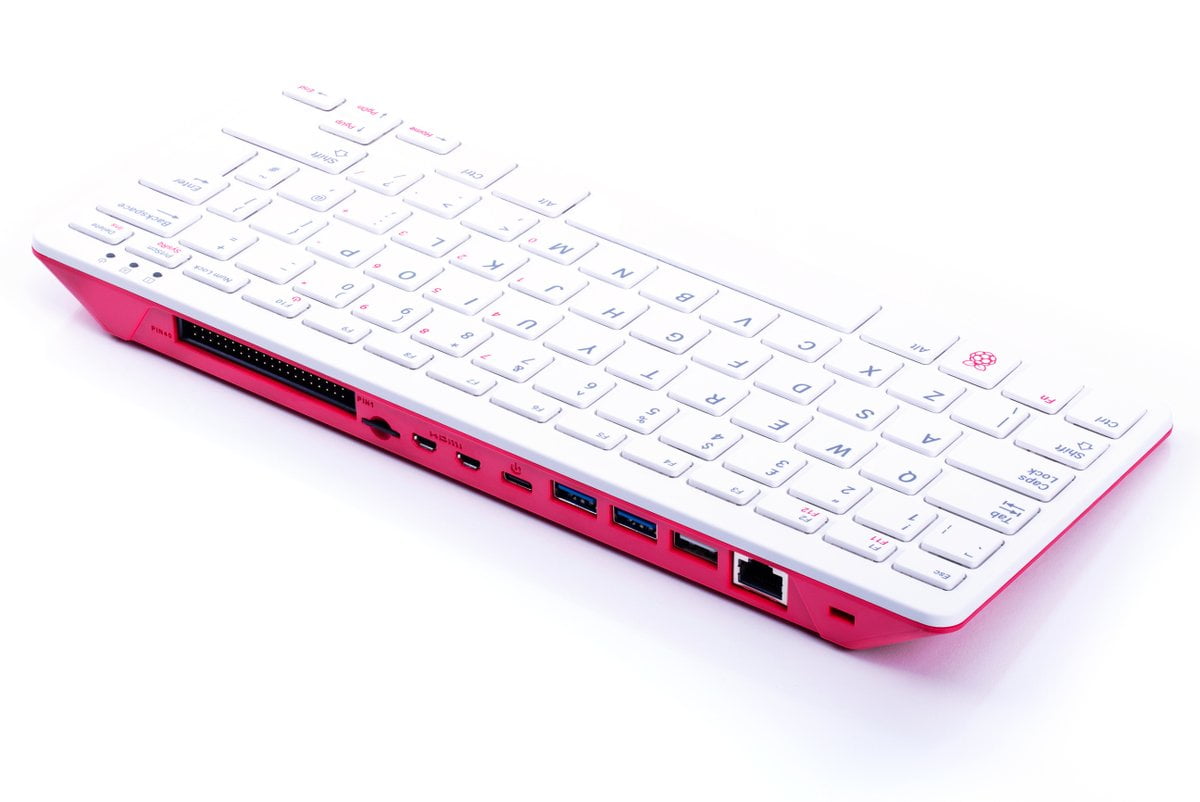
Raspberry Pi 400 Kit

Raspberry Pi 400 Kit

$129.90at AmazonChecked Nov 20
See all prices and details
Visit Amazon

Store links may earn us a commission. As an Amazon Associate, Deal.ai earns from qualifying purchases.

Pros
  • Ready to use out of the box with power supply, cable and preloaded card
  • Full desktop OS with browser, office tools and Python
  • Quiet and fanless, with a compact all-in-one keyboard design
  • Dual 4K HDMI output, Gigabit Ethernet and USB 3.0
  • Large community and long-standing software support
Cons
  • 4GB RAM limits heavy multitasking and browser tabs
  • No built-in display, mouse or speakers; you supply them
  • ARM Linux will not run mainstream Windows or macOS software
  • Not suited to analog electronics or sensor work without extra parts
SunFounder
SunFounder Raspberry Pi Pico W Ultimate Starter Kit with Online Tutorials, RoHS Compliant - Kepler Kit

SunFounder Pico W Ultimate Starter Kit

SunFounder Raspberry Pi Pico W Ultimate Starter Kit with Online Tutorials, RoHS Compliant - Kepler Kit

4.8(112 ratings)
$69.99at SunFounderChecked 1 h ago
See all prices and details
Visit SunFounder
Pros
  • 450+ components and 117 guided projects in one box
  • Clear video lessons from an experienced educator
  • Supports MicroPython, C/C++ and Piper Make
  • Includes breadboard, battery, charger module and sensors
  • Strong ratings from buyers and an active support forum
Cons
  • Not a computer; no desktop, display output or general apps
  • Pico W has tiny memory and a 2.4GHz-only radio
  • Requires patience with wiring and debugging
  • Many small parts are easy to lose and not for young children unsupervised

What separates them

Raspberry Pi 400 KitSunFounder Pico W Ultimate Starter Kit
What it isA complete computer integrated into a keyboardA component and project kit built around a Pico W board
ProcessorBroadcom BCM2711 quad-core Cortex-A72 at 1.8GHz, 64-bitRP2040 dual-core microcontroller, far less powerful but real-time friendly
Memory and storage4GB RAM plus a 16GB microSD card preloaded with Raspberry Pi OS264KB SRAM on the Pico W, no operating system or desktop
Display outputTwo micro HDMI ports, up to 4K at 60HzNone; output is LEDs, LCDs and serial over USB
NetworkingDual-band Wi-Fi, Bluetooth LE and Gigabit EthernetSingle-band 2.4GHz Wi-Fi only, no Bluetooth or Ethernet
Connectivity and expansionUSB 3.0 and USB 2.0 ports plus a 40-pin GPIO headerMicro USB plus a breadboard and 450+ loose components
Learning materialGetting Started guide and the standard Raspberry Pi OS desktop117 projects, 27 video lessons by Paul McWhorter, tutorials in six languages
Best fitGeneral computing, coding on a desktop, educationElectronics, sensors, IoT and microcontroller programming

Price history

$129.90$80.00
Nov 9Nov 20
  • Raspberry Pi 400 Kit: lowest $80.00 on Nov 9 at DigiKey; $129.90 on Nov 20.

Prices at every store

Raspberry Pi 400 Kit

  • WalmartNew

    In stockSold by Joes Tech ShopReturns: Sold by a Walmart Marketplace seller; returns go to the seller under the seller's returns policy.

    $139.95+ $17.00 shippingChecked 1 h ago
    Visit Walmart
  • AmazonNew

    Availability unknown

    As an Amazon Associate, Deal.ai earns from qualifying purchases.

    $129.90Free shippingChecked Nov 20
    Visit Amazon
  • DigiKeyNew

    In stock

    $80.00+ $4.99 shippingChecked Nov 10
    Visit DigiKey
  • VilrosNew

    In stock

    $100.00Free shippingChecked Nov 10
    Visit Vilros

Store links may earn us a commission.

All 2 stores and price history →

SunFounder Pico W Ultimate Starter Kit

  • SunFounderNew

    In stockShips from Hong Kong SAR China · duties may applyReturn policy

    $69.99Checked 1 h ago
    Visit SunFounder
Prices and history →

Specs compared

SpecRaspberry Pi 400 KitSunFounder Pico W Ultimate Starter Kit
colorWhite—
size11.4" x 5.5" x 1.8"—
ProcessorBroadcom BCM2711 quad-core Cortex-A72(ARM v8) 6…—
RAM4GB—
Wireless LANDual-band IEEE 802.11b/g/n/ac—
BluetoothBLE—
EthernetGigabit Ethernet—
USB ports2 x USB 3.0 & 1 x USB 2.0 ports—
GPIO headerHorizontal 40-pin GPIO header—
HDMI ports2 x micro HDMI ports (supports up to 4Kp60)—
Power input5V DC via USB connector—
Dimensions286mm x 122mm x 23mm (maximum)—
Show all 26 specsShow fewer specs
SpecRaspberry Pi 400 KitSunFounder Pico W Ultimate Starter Kit
Keyboard layoutUS keyboard layout—
Included storage16GB microSD card, pre-programmed with Raspberr…—
Wireless interface—single-band 2.4GHz wireless interfaces (802.11n)
Wireless chip—Infineon CYW4343
Microcontroller—RP2040
Programming languages—MicroPython, C/C++ (Arduino) and Piper Make
Kit items—450+
Included microcontroller—Raspberry Pi Pico W
Included cable—Micro USB Cable

What reviewers say

Raspberry Pi 400 Kit

Owners and reviewers treat the Pi 400 as the easiest way into Raspberry Pi: a real desktop in a keyboard for basic tasks and learning. They praise the tidy all-in-one design and the included accessories, and note the limits of 4GB RAM and the micro-HDMI ports.

What people mention
  • SetupPraisedOwners say the preloaded card and included power supply make first boot quick and simple.
  • PerformanceMixedReviewers find it fine for browsing and documents but limited by 4GB RAM under heavier loads.
  • PortsCriticisedThe micro-HDMI outputs are seen as awkward, needing adapters for standard monitors.
  • KeyboardPraisedTypists report the integrated keyboard is comfortable enough for everyday use.

SunFounder Pico W Ultimate Starter Kit

  • 4.8 / 5112 ratings

Questions and answers

Which is better for learning to code?
For general programming on a real desktop, the 400 Kit is better: it runs Python, Scratch and a full browser. The Kepler Kit is better for embedded coding, where your program drives lights, sensors and motors on a microcontroller.
Can the Kepler Kit replace a computer?
No. The Pico W has no display output, no operating system and only 264KB of RAM. You still need a computer to write and upload code to it.
Which is better for kids?
The 400 Kit suits a child who wants a first computer for schoolwork and simple coding. The Kepler Kit suits a child aged 8+ who likes building circuits, with adult help for the small parts.
Which lasts longer?
The 400 Kit stays useful as a small desktop for years and gets OS updates. The Kepler Kit's parts stay usable, but its value fades once the projects are finished unless you keep building new ones.
Is the Kepler Kit worth stepping up to over a bare Pico W?
Yes, if you are starting out. A bare board teaches little without parts; the kit supplies the sensors, displays and lessons that make the projects possible.
Do I need extra accessories for the 400 Kit?
You need a monitor with HDMI, a mouse and speakers or headphones. The kit includes the power supply, a micro HDMI to HDMI cable and a preloaded microSD card.

Ask our shopping agent

It checks today's price at every store, compares the alternatives and answers in about a minute.

Enter to send, Shift+Enter for a new line

More comparisons

  • Raspberry Pi 400 Kit vs Vilros Raspberry Pi 4 Complete Starter Kit
  • Vilros Raspberry Pi 4 Complete Starter Kit vs SunFounder Raspberry Pi Pico W Ultimate Starter Kit with Online Tutorials, RoHS Compliant - Kepler Kit
  • Raspberry Pi 400 Kit vs PicoBricks - Raspberry Pi Pico Starter Kit with 12 Sensors and Extensive Learning Guide, Raspberry Pi Zero To Hero
  • Vilros Raspberry Pi 5 Basic Starter Kit vs Raspberry Pi 400 Kit
  • Raspberry Pi 5 Beginners Kit vs Raspberry Pi 400 Kit
  • PicoBricks - Raspberry Pi Pico Starter Kit with 12 Sensors and Extensive Learning Guide, Raspberry Pi Zero To Hero vs SunFounder Raspberry Pi Pico W Ultimate Starter Kit with Online Tutorials, RoHS Compliant - Kepler Kit

Buying guides that pick them

  • Best Raspberry Pi starter kits for kids
Included breadboard—Breadboard
Included battery—18650 Battery
Included charger module—Li-po Charger Module
Included RGB LED—RGB LED
Included thermistor—Thermistor