StoreDeal.ai store
Shop
  • Deals
  • Deal checker
  • Black Friday
  • Buying guides
  • Brands
  • Stores
Travel
  • Flight deals
  • Hotel deals
Company
  • Research
  • Press
  • Use in AI assistants
  • Contact
  • deal.ai apps
Black Friday 2026
  • Walmart
  • Best Buy
  • Target
  • TVs
  • Laptops
  • Headphones
  • Apple
  • Gaming
  • Vacuums
  • Kitchen
  • Toys
  • Smartwatches
  • Tablets
  • Furniture
  • Mattresses
© Deal.ai Inc.·2222 Ponce de Leon Blvd, Miami, FL 33134·support@deal.ai
TermsPrivacy
Deal.ai › Compare

Samsung Odyssey G5 G55T 34" Ultrawide vs Alienware AW3425DW

The Alienware AW3425DW is the better monitor: a QD-OLED panel at 240Hz with 0.03ms response, G-Sync Compatible and FreeSync Premium Pro, near-full DCI-P3 coverage and a height-adjustable stand. The Odyssey G5 is a solid budget ultrawide with the same 3440x1440 resolution and 165Hz, but its VA panel shows black smearing, has only tilt adjustment and 250-nit brightness. Buy the Alienware if you want the best picture and speed and can accept OLED care habits; buy the Samsung if you want an ultrawide for less and mostly play casually or work in a bright room.

  • Choose the Samsung Odyssey G5 if you want a 34-inch 165Hz ultrawide at the lowest cost and do not need deep blacks, height adjustment or HDR that pops.
  • Choose the Alienware AW3425DW if you want the sharpest motion, true blacks and wide color, and you will take basic steps to avoid static content burn-in.
Samsung
Samsung Odyssey G5 – G55T – 34″ (86cm) – 165Hz – 21:9
Samsung Odyssey G5 G55T 34" Ultrawide

Samsung Odyssey G5 – G55T – 34″ (86cm) – 165Hz – 21:9

See all prices and details
Pros
  • 34-inch 3440x1440 ultrawide at 165Hz
  • 1000R curve wraps the view for immersion
  • FreeSync Premium reduces tearing
  • No burn-in risk, safe for static work apps
Cons
  • VA black smearing in dark, fast scenes
  • Only tilt adjustment; no height or swivel
  • 250 nits is dim for HDR and bright rooms
  • No USB hub or G-Sync certification
Dell
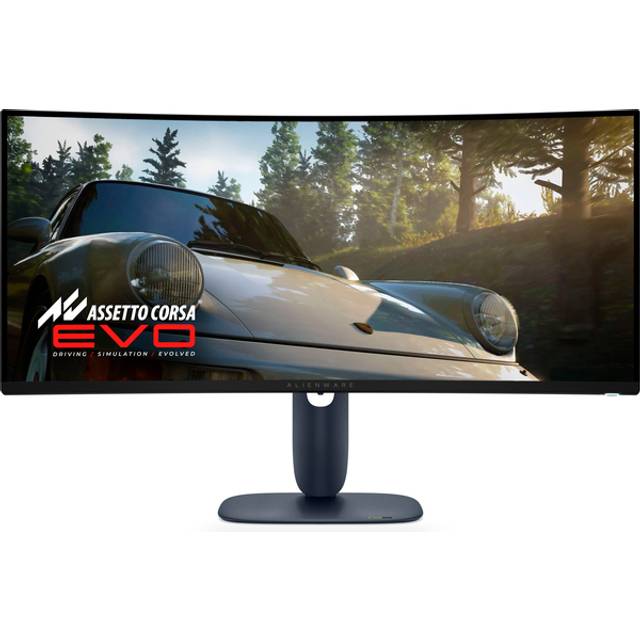
Dell Alienware AW3425DW

Alienware AW3425DW

Dell Alienware AW3425DW

4.4(2 ratings)
See all prices and details
Pros
  • QD-OLED gives true blacks and vivid color
  • 240Hz with 0.03ms response for fast shooters
  • G-Sync Compatible and FreeSync Premium Pro
  • Height-adjustable stand, VESA mount, USB hub, HDMI 2.1
Cons
  • OLED risk of burn-in from static HUDs and taskbars
  • Full-screen brightness lower than a good LCD
  • Costs far more than the Samsung
  • Text clarity slightly softer than an LCD at the same resolution

What separates them

Samsung Odyssey G5 G55T 34" UltrawideAlienware AW3425DW
Panel typeVA LCD with LED backlightQD-OLED
Refresh rate165Hz240Hz
Response time1ms MPRT (VA smearing in dark scenes)0.03ms gray-to-gray
Brightness and HDR250 nits, HDR10, 2,500:1 contrastOLED per-pixel contrast, DCI-P3 99.3%, Delta E<2
Adaptive syncFreeSync PremiumFreeSync Premium Pro and G-Sync Compatible
StandTilt only, no height adjustmentHeight adjustable and VESA mountable
Curve1000R aggressive curve1800R gentler curve
PortsHDMI and DisplayPort2x HDMI 2.1, DisplayPort 1.4, 3 USB ports

Price history

$799.99$304.02
Nov 11Nov 25
  • Samsung Odyssey G5 G55T 34" Ultrawide: lowest $304.02 on Nov 25.
  • Alienware AW3425DW: lowest $719.99 on Nov 14; $719.99 on Nov 25.

Specs compared

SpecSamsung Odyssey G5 G55T 34" UltrawideAlienware AW3425DW
Size34″ (86cm)34 in
Resolution3440 x 1440 pixels (UWQHD)3440x1440 (UltraWide), 2560x1440
Refresh rate165Hz240Hz
Connector TypeHDMI, DisplayPortHDMI, DisplayPort, USB-C
CurvedYesYes
Panel TypeVAOLED
Maximum Refresh Rate165 Hz240 Hz
Response Time1 millisecond1 ms, 0.03 ms
Weight With Stand (lb)—17.9
3.5 mm In (AUX)—No
HDMI Ports—2
No. of USB (total) (pcs)—3
Show all 40 specsShow fewer specs
SpecSamsung Odyssey G5 G55T 34" UltrawideAlienware AW3425DW
Depth Without Stand (")—4.4
HDMI Version—2.1
Tiltable—Yes
VGA Ports—No
Height With Stand (")—21.9
Curved Screen—Yes
Headphone Out—No
Weight With Stand (kg)—8.14
VESA-Mount—Yes
Color—

What reviewers say

Samsung Odyssey G5 G55T 34" Ultrawide

Owners rate the G55T highly for its immersive curve and smooth high-refresh gaming at an ultrawide size. Common complaints center on VA black smearing, limited brightness and the basic stand.

What people mention
  • CurvePraisedOwners say the 1000R curve pulls them into games and makes the wide screen feel natural.
  • MotionPraisedThe 165Hz refresh and FreeSync are reported to keep fast action smooth.
  • Black smearingCriticisedReviewers note dark, fast-moving scenes smear on the VA panel.
  • BrightnessCriticisedAt 250 nits, HDR looks flat and the screen struggles in bright rooms.

Alienware AW3425DW

Owners and reviewers rate the AW3425DW highly for its QD-OLED picture, contrast and gaming motion, at 4.8 out of 5 across 363 reviews. Common complaints center on burn-in worry, softer text and limited connectivity.

What people mention
  • Picture qualityPraisedOwners describe deep blacks, strong contrast and vivid color from the QD-OLED panel.
  • Gaming motionPraisedReviewers say the high refresh and fast pixel response make fast games feel smooth.
  • Burn-inCriticisedBuyers worry about static taskbars and icons leaving marks over long desktop sessions.
  • Text clarityMixedSome users find small text slightly softer than on IPS monitors because of the subpixel layout.

Questions and answers

Which is better for competitive shooters?
The Alienware. Its 240Hz refresh and 0.03ms response give clearer motion and less blur than the Samsung's 165Hz VA panel, which smears in dark scenes.
Which lasts longer?
The Samsung VA panel has no burn-in risk and should run for years. The Alienware's OLED can develop burn-in from static elements, so vary content and use screen-off timers.
Is the Alienware worth stepping up to?
Yes if picture quality and speed matter most. The QD-OLED's contrast, color and motion are a clear step above the VA Samsung. If you mostly work in bright rooms or want the lowest outlay, the Samsung is enough.
Which is better for office work and spreadsheets?
The Samsung is safer for static windows because it cannot burn in, and its 1000R curve is fine for a single user. The Alienware works too but needs care with fixed taskbars and long static sessions.
Do both support adaptive sync with Nvidia cards?
The Alienware is G-Sync Compatible and FreeSync Premium Pro certified. The Samsung lists FreeSync Premium only, so Nvidia variable refresh is not guaranteed.
Which has the better stand and mounting?
The Alienware has height adjustment and VESA mounting. The Samsung offers tilt only, so plan on a VESA arm if you need height or swivel.

Ask our shopping agent

It checks today's price at every store, compares the alternatives and answers in about a minute.

Enter to send, Shift+Enter for a new line

More comparisons

  • KOORUI 34'' UWQHD Curved Gaming Monitor vs Samsung Odyssey G5 – G55T – 34″ (86cm) – 165Hz – 21:9
  • KOORUI 34'' UWQHD Curved Gaming Monitor vs Dell Alienware AW3425DW
  • Samsung Odyssey G5 – G55T – 34″ (86cm) – 165Hz – 21:9 vs INNOCN 34" 180Hz WQHD IPS UltraWide Productivity & Gaming Monitor 34C1R
  • Dell Alienware AW3425DW vs INNOCN 34" 180Hz WQHD IPS UltraWide Productivity & Gaming Monitor 34C1R

Buying guides that pick them

  • Best 34-inch ultrawide gaming monitors
  • Best curved QHD monitors
Blue, Black
DisplayPort Version—1.4
VGA—No
Width (")—32.1
Adjustable Height—Yes
Contrast (:1)—1500000
TCO Certification—No
Ethernet—No
Surface Treatment—Matte
HDMI—Yes
EPEAT Rating—No
DVI Ports—No
OLED Type—QD-OLED
Pivot‎ 90°‎—No
Camera (built-in)—No
Color Depth—10 Bit
Height Without Stand (")—17.5
Memory Card Reader—No
Energy Consumption (In Use) (W)—36