Shop
  • Deals
  • Deal checker
  • Black Friday
  • Buying guides
  • Brands
  • Stores
Travel
  • Flight deals
  • Hotel deals
Company
  • Research
  • Press
  • deal.ai apps
Black Friday 2026
  • Walmart
  • Best Buy
  • Target
  • TVs
  • Laptops
  • Headphones
  • Apple
  • Gaming
  • Vacuums
  • Kitchen
  • Toys
  • Smartwatches
  • Tablets
  • Furniture
  • Mattresses
© Deal.ai Inc.
TermsPrivacy
Deal.ai › Compare

Stylus Touch Screen Pen Fiber Tip Aluminum vs Adonit Pro 3 Stylus

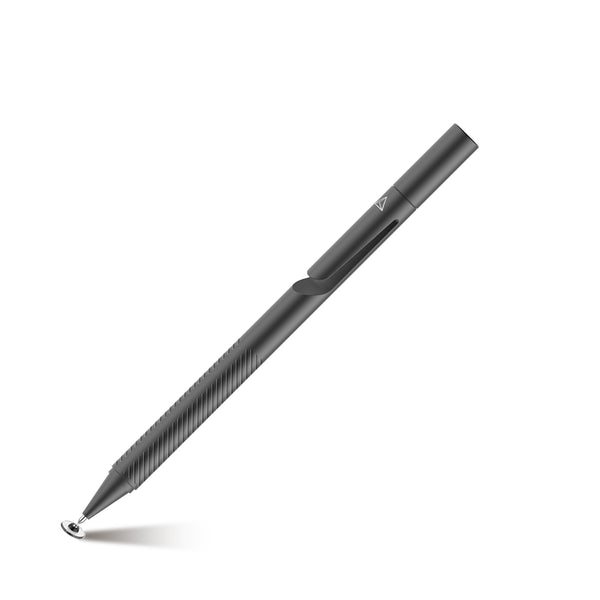
Both are passive disc-tip styli that work on any touchscreen without pairing or batteries. The Adonit Pro 3 is the better-built tool: one-piece precision disc, textured grip, pocket clip, replaceable tips and a magnetic cap that stays put. The ONZ74 adds a second fiber tip for tapping and scrolling and costs far less, but owners say it feels cheap and the magnetic tip comes off too easily. Buy the Adonit for daily note-taking and sketching; buy the ONZ74 as a cheap spare or if you want a fiber tip for scrolling.

  • Choose the ONZ74 if you want a low-cost two-tip stylus, with a fiber end for tapping and scrolling and a disc end for writing, and you don't mind a lighter, cheaper feel.
  • Choose the Adonit Pro 3 if you write or sketch daily and want a sturdier aluminum body, a textured grip, a pocket clip and replaceable disc tips.

Prices

  • Stylus Touch Screen Pen Fiber Tip Aluminum: $11.99 at OdeMobile (last seen Nov 9)
  • Adonit Pro 3 Stylus: $17.99 at Adonit (checked today)
  • Difference: the Stylus Touch Screen Pen Fiber Tip Aluminum is $6.00 cheaper than the Adonit Pro 3 Stylus at the latest prices (Nov 9 and Nov 10)
S
Stylus Touch Screen Pen Fiber Tip Aluminum Lightweight White - ONZ74

Stylus Touch Screen Pen Fiber Tip Aluminum

Stylus Touch Screen Pen Fiber Tip Aluminum Lightweight White - ONZ74

4.7(45 ratings)
$11.99at OdeMobileChecked 20 h ago
See all prices and details
Visit OdeMobile
Pros
  • Two tips in one pen: disc for writing, fiber for scrolling
  • No pairing, app or battery
  • Light and pen-like in the hand
  • Transparent disc lets you see the contact point
Cons
  • Owners say it feels cheap
  • Magnetic tip detaches too easily and can get lost
  • No clip
  • No pressure sensitivity
Adonit
Adonit Pro 3

Adonit Pro 3 Stylus

Adonit Pro 3

4(7 ratings)
$17.99at AdonitChecked 3 h ago
See all prices and details
Visit Adonit
Pros
  • Sturdy one-piece precision disc for accurate writing
  • Textured grip and pocket clip
  • Replaceable tips extend its life
  • Works on foldable phone screens
Cons
  • No fiber tip for scrolling
  • Some Chromebook users report missed taps
  • No pressure sensitivity
  • A few buyers report defects and poor support

What separates them

Stylus Touch Screen Pen Fiber Tip AluminumAdonit Pro 3 Stylus
Tip setupDisc tip on one end, fiber tip on the otherSingle precision disc tip, engineered as one piece
BuildStainless steel and aluminum, described by owners as feeling cheapSolid anodized aluminum with textured grip
CapTwo-way magnetic cap, but owners say the tip comes off easilyMagnetic cap with a click closure
CarryingNo clipBuilt-in pocket clip
Tip replacementNot statedReplaceable disc tips
Scrolling and tappingDedicated fiber tip for taps and scrollsDisc tip only
Batteries and pairingNone requiredNone required
Device supportTablets and phones, no app neededAll touchscreens, including foldables

Price history

$17.99$11.99
Oct 29Nov 10
  • Stylus Touch Screen Pen Fiber Tip Aluminum: lowest $11.99 on Nov 10 at OdeMobile.
  • Adonit Pro 3 Stylus: lowest $17.99 on Oct 29 at Adonit; $17.99 on Nov 10.

Prices at every store

Stylus Touch Screen Pen Fiber Tip Aluminum

  • OdeMobileNew

    In stockReturn policy

    $11.99Checked 20 h ago
    Visit OdeMobile
  • OdeMobileNew

    In stock

    $11.99+ $4.99 shippingChecked 20 h ago
    Visit OdeMobile
Prices and history →

Adonit Pro 3 Stylus

  • AdonitNew

    In stock

    $17.99Free shippingChecked 3 h ago
    Visit Adonit

Also available at

  • AdonitCheck price at Adonit
Prices and history →

Specs compared

SpecStylus Touch Screen Pen Fiber Tip AluminumAdonit Pro 3 Stylus
Tip typedisc tip and a fiber tipPrecision disc
Tip materialsoft, and scratch resistant rubberSee through disc
Cap attachmenttwo-way magnetic cap—
Materialstainless steel and aluminum—
Pairing requiredNo pairing or specific app required—
BodyLight-weight body with soft touch rubber tip—
Compatible Brands—Windows, Android, Apple (iPad, iPhone)
Compatible Devices—All touchscreen devices
Operating System Compatibility—Windows, Android
Tip Diameter—Fine point
Latency—Immediate Accuracy
Function Highlights—Precise contact point with the screen, Sketchin…
Show all 28 specsShow fewer specs
SpecStylus Touch Screen Pen Fiber Tip AluminumAdonit Pro 3 Stylus
Bluetooth Connectivity—No
Accuracy—Precise contact point with the screen, Simply A…
Diameter—9 mm
Length—126 mm
Weight—18 g
Body Material—Metal
Metal Material—Aluminum
Included Accessories—Cap
Battery Type—No batteries are required
Color

What reviewers say

Stylus Touch Screen Pen Fiber Tip Aluminum

  • 4.7 / 545 ratings

Owners rate it highly and call it a lightweight, versatile stylus that works well on iPads, including older models. The main complaints are a less premium feel than expected and a magnetic tip that detaches too easily.

What people mention
  • Build feelMixedOwners like the metal body and light weight but some say it feels cheap for what it is.
  • Tip attachmentCriticisedThe magnetic tip detaches too easily and can get lost.
  • AccuracyPraisedThe transparent disc tip is accurate and lag-free for writing and detail drawing.
  • CompatibilityPraisedWorks on iPads and other capacitive screens with no pairing or app.

Adonit Pro 3 Stylus

Buyers like the smooth writing feel, the slim metal build and the pocket clip, and many see it as a good cheaper alternative to the Apple Pencil. Some report missed touches on Chromebook touchscreens and defective units.

What people mention
  • CompatibilityPraisedBuyers say it works on foldable phones, including cover and inner screens.
  • Writing feelPraisedOwners describe a smooth writing feel for notes and sketches.
  • BuildPraisedThe slim aluminum body, textured grip and pocket clip are well liked.
  • ValuePraisedBuyers call it a good alternative to the Apple Pencil at a lower cost.

Questions and answers

Which is better for taking notes in class?
The Adonit Pro 3. Its one-piece disc is more stable, the textured grip holds steady, and the clip keeps it on a notebook. The ONZ74 writes fine but feels lighter and less precise.
Which lasts longer?
The Adonit Pro 3. Its aluminum body is sturdier and its disc tips are replaceable. The ONZ74's magnetic tip is the weak point, and owners report losing it.
Do either need charging or Bluetooth?
No. Both are passive styli with no battery and no pairing. They work on any capacitive touchscreen out of the box.
Is the Adonit worth stepping up to over the ONZ74?
Yes if you write or sketch regularly. You get a better build, a grip, a clip and replaceable tips. If you mainly tap and scroll, the ONZ74's fiber tip is handy.
Will either work on an iPad or a foldable phone?
Yes. Both work on iPad, iPhone, Android and Windows touchscreens. Adonit owners specifically report success on foldable inner and cover screens.
Do they support pressure sensitivity?
No. Neither has pressure sensitivity or palm rejection, so they suit basic notes and sketching, not pro drawing apps that need pressure.

Ask our shopping agent

It checks today's price at every store, compares the alternatives and answers in about a minute.

Enter to send, Shift+Enter for a new line

Buying guides that pick them

  • Best stylus pens under $20
—
Black, Midnight Blue, Rose Gold, Silver
Ergonomics—Textured grip
Shape—Slim
Finish—Anondized
Texture—Textured (grip)
Closure Type—Magnetic cap closure
Design Highlights—Clip, Magnetic Cap