StoreDeal.ai store
Shop
  • Deals
  • Deal checker
  • Black Friday
  • Buying guides
  • Brands
  • Stores
Travel
  • Flight deals
  • Hotel deals
Company
  • Research
  • Press
  • Use in AI assistants
  • Contact
  • deal.ai apps
Black Friday 2026
  • Walmart
  • Best Buy
  • Target
  • TVs
  • Laptops
  • Headphones
  • Apple
  • Gaming
  • Vacuums
  • Kitchen
  • Toys
  • Smartwatches
  • Tablets
  • Furniture
  • Mattresses
© Deal.ai Inc.·2222 Ponce de Leon Blvd, Miami, FL 33134·support@deal.ai
TermsPrivacy
Deal.ai › Compare

Stylus Touch Screen Pen Fiber Tip Aluminum vs NIUTA Universal Stylus Pen

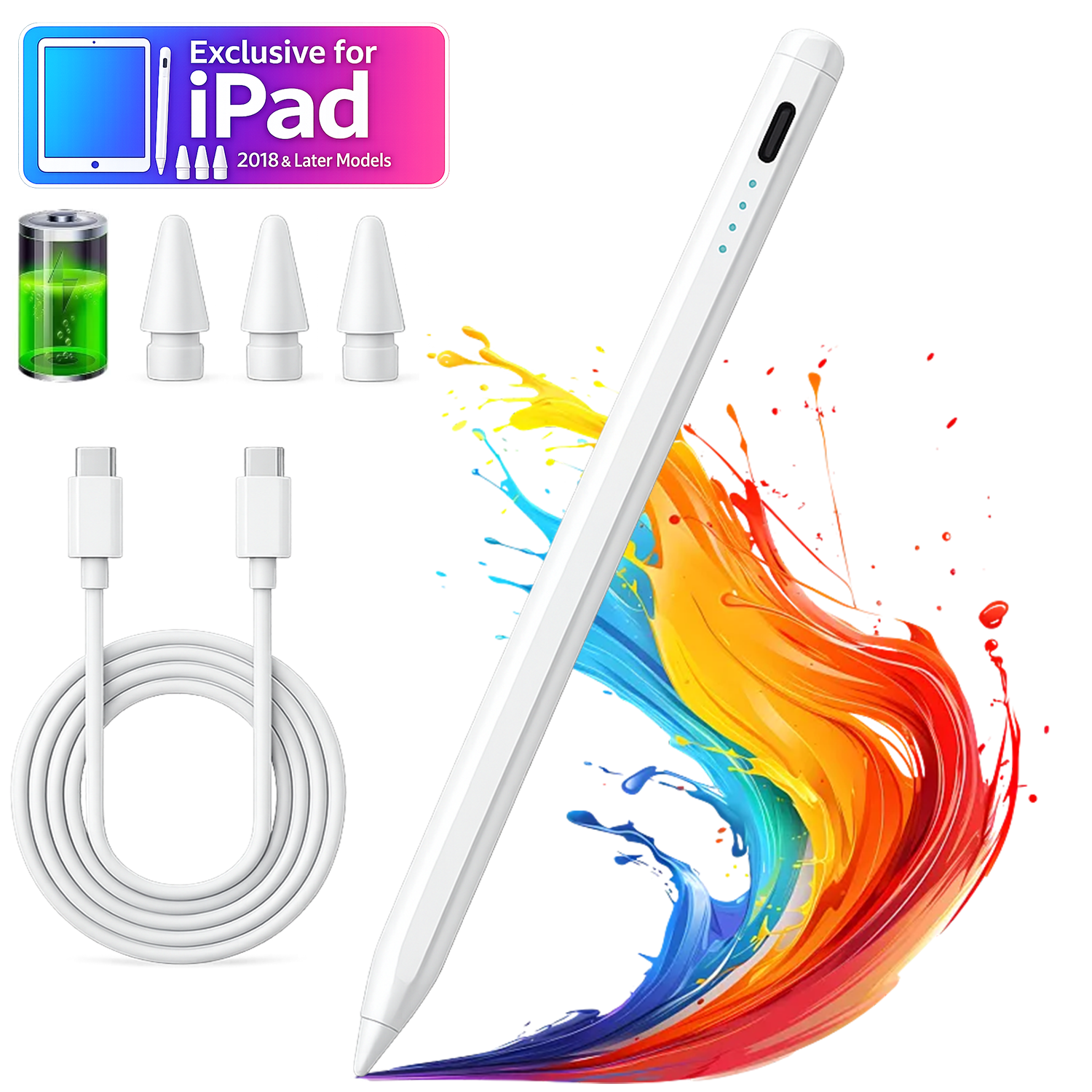
Buy the NIUTA if you want a rechargeable pen with a replaceable tip and a battery readout for everyday tapping, scrolling and light notes on a tablet or phone. Buy the ONZ74 if you write or sketch in fine detail and want a clear disc tip that shows exactly where you are pointing, with no charging to think about. The ONZ74 is a passive pen with a metal body and a magnetic cap; owners like how it writes but some say the tip comes off too easily. The NIUTA has the stronger owner rating and more ratings, a POM tip that glides, and three spare tips in the box, but it needs charging and its tip is not as precise for detail work.

  • Choose the ONZ74 if you do handwriting, sketching or detail drawing and want a see-through disc tip with no battery or pairing.
  • Choose the NIUTA if you want one rechargeable pen for tapping, scrolling and light note-taking across an iPad, phone or Android tablet.

Prices

  • Stylus Touch Screen Pen Fiber Tip Aluminum: $11.99 at OdeMobile (checked today)
  • NIUTA Universal Stylus Pen: $12.79 at Walmart (checked today)
  • Difference: the Stylus Touch Screen Pen Fiber Tip Aluminum is $0.80 cheaper than the NIUTA Universal Stylus Pen today
S
Stylus Touch Screen Pen Fiber Tip Aluminum Lightweight White - ONZ74

Stylus Touch Screen Pen Fiber Tip Aluminum

Stylus Touch Screen Pen Fiber Tip Aluminum Lightweight White - ONZ74

4.7(45 ratings)
$11.99at OdeMobileChecked 1 h ago
See all prices and details
Visit OdeMobile
Pros
  • Disc tip gives no-lag accuracy for handwriting and detail drawing
  • See-through tip shows where you are pointing
  • No battery, charging or pairing
  • Metal body with a magnetic cap that snaps on either end
Cons
  • Some owners say the magnetic tip and cap come off too easily
  • A few owners say it feels cheap
  • Disc tip can be awkward for plain tapping and scrolling
  • No spare tips in the box
NIUTA
NIUTA Stylus Pen for iPad, Rechargeable Universal Stylus Pen for Touch Screens

NIUTA Universal Stylus Pen

NIUTA Stylus Pen for iPad, Rechargeable Universal Stylus Pen for Touch Screens

4.9(160 ratings)
$12.79at WalmartChecked 42 min ago
See all prices and details
Visit Walmart
Pros
  • Rechargeable over Type-C with a battery display
  • Three replaceable POM tips included
  • Strong owner rating from a larger pool of ratings
  • Magnetic body helps it stay put on a desk or in a bag
Cons
  • Needs charging, so it can run out mid-task
  • POM tip is less precise for fine drawing than a disc tip
  • Double-tap power control takes getting used to
  • Magnet only holds on compatible surfaces

What separates them

Stylus Touch Screen Pen Fiber Tip AluminumNIUTA Universal Stylus Pen
PowerPassive, no battery or chargingType-C rechargeable with a battery display
Tip typeDisc tip for accuracy plus a fiber tip for tappingSingle POM tip, 3 replaceable tips included
Precision for writing and drawingTransparent disc shows the exact contact pointRounded POM tip, better for general use than fine detail
Cap and storageTwo-way magnetic cap, but owners say it and the tip can come looseMagnetic body attaches to compatible surfaces
BuildStainless steel and aluminum, described by some owners as feeling cheapAluminum body with a clean, durable feel
Owner rating4.7 out of 5 from 45 ratings4.9 out of 5 from 160 ratings
SetupNo pairing or app neededDouble-tap power control, no pairing needed
Running cost over timeTip wear means replacing the penSpare tips included, so the pen lasts longer

Price history

$16.49$11.99
Nov 8Nov 24
  • Stylus Touch Screen Pen Fiber Tip Aluminum: lowest $11.99 on Nov 10 at OdeMobile; $11.99 on Nov 24.
  • NIUTA Universal Stylus Pen: lowest $12.99 on Nov 8 at Walmart.

Prices at every store

Stylus Touch Screen Pen Fiber Tip Aluminum

  • OdeMobileNew

    In stock

    $11.99Checked 1 h ago
    Visit OdeMobile
  • AmazonNew

    Availability unknown

    As an Amazon Associate, Deal.ai earns from qualifying purchases.

    $17.59Free shippingChecked 1 h ago
    Visit Amazon
  • OdeMobileNew

    In stock

    $11.99+ $4.99 shippingChecked Nov 9
    Visit OdeMobile

Also available at

  • OdeMobileCheck price at OdeMobile

Store links may earn us a commission.

All 2 stores and price history →

NIUTA Universal Stylus Pen

  • WalmartNew

    In stockSold by ORANGE INC USReturns: Sold by a Walmart Marketplace seller; returns go to the seller under the seller's returns policy.

    $12.79Checked 42 min ago
    Visit Walmart

Also available at

  • WalmartCheck price at Walmart
Prices and history →

Specs compared

SpecStylus Touch Screen Pen Fiber Tip AluminumNIUTA Universal Stylus Pen
Tip materialsoft, and scratch resistant rubberPOM
Tip typedisc tip and a fiber tip—
Cap attachmenttwo-way magnetic cap—
Materialstainless steel and aluminum—
Pairing requiredNo pairing or specific app required—
BodyLight-weight body with soft touch rubber tip—
Charging—Type-C charging
Battery display—clear battery display
Tips included—3 replaceable POM tips
Body material—aluminum
Power control—double tap
Magnetic attachment—magnetic design
Show all 13 specsShow fewer specs
SpecStylus Touch Screen Pen Fiber Tip AluminumNIUTA Universal Stylus Pen
Compatible devices—iPad, iPhone, Android tablets, cell phones

What reviewers say

Stylus Touch Screen Pen Fiber Tip Aluminum

  • 4.7 / 545 ratings

Owners rate it highly and call it a lightweight, versatile stylus that works well on iPads, including older models. The main complaints are a less premium feel than expected and a magnetic tip that detaches too easily.

What people mention
  • Build feelMixedOwners like the metal body and light weight but some say it feels cheap for what it is.
  • Tip attachmentCriticisedThe magnetic tip detaches too easily and can get lost.
  • AccuracyPraisedThe transparent disc tip is accurate and lag-free for writing and detail drawing.
  • CompatibilityPraisedWorks on iPads and other capacitive screens with no pairing or app.

NIUTA Universal Stylus Pen

  • 4.9 / 5160 ratings

Owners rate it 4.9 out of 5 across 160 ratings and mostly praise its value, smooth glide and battery display. Complaints center on the lack of palm rejection and precision compared with first-party pens.

What people mention
  • ValuePraisedBuyers say it does everyday stylus jobs for far less than a first-party pen.
  • CompatibilityPraisedOwners like that one pen works on iPads, iPhones and Android tablets.
  • Battery displayPraisedThe on-pen power readout is called useful and easy to check.
  • Palm rejectionCriticised

Questions and answers

Which is better for drawing and handwriting?
The ONZ74. Its transparent disc tip shows the exact contact point and gives finer control for strokes and letters. The NIUTA's POM tip is rounder and better suited to tapping, scrolling and quick notes.
Which lasts longer?
The NIUTA is built to last longer in daily use because it ships with three replaceable POM tips and recharges instead of wearing out. The ONZ74 has no battery to age, but once its tip wears you replace the pen.
Do I need to charge either one?
Only the NIUTA. It charges over Type-C and has a battery display. The ONZ74 is passive and works with no charging or pairing at all.
Does either work on an iPad or an Android tablet?
Both work on standard capacitive touch screens, including iPad, iPhone and Android tablets and phones. Neither is an active pen, so neither gives pressure sensitivity or palm rejection.
Is the NIUTA worth stepping up to over the ONZ74?
Yes if you mostly tap, scroll and take light notes and want a rechargeable pen with spare tips. Stay with the ONZ74 if precision writing and drawing matter more than charging convenience.
Which is better for note-taking in class or meetings?
The NIUTA suits quick notes and highlighting across devices, and its battery display tells you when to recharge. The ONZ74 is the better pick if your notes include diagrams or small handwriting.

Ask our shopping agent

It checks today's price at every store, compares the alternatives and answers in about a minute.

Enter to send, Shift+Enter for a new line

More comparisons

  • Stylus Touch Screen Pen Fiber Tip Aluminum Lightweight White - ONZ74 vs Adonit Pro 3
  • Stylus Touch Screen Pen Fiber Tip Aluminum Lightweight White - ONZ74 vs Stylus Touch Screen Pen Fiber Tip Aluminum Lightweight Black - ONZ79
  • NIUTA Stylus Pen for iPad, Rechargeable Universal Stylus Pen for Touch Screens vs DEALLY 30 Pieces Stylus Pens for Touchscreen
  • NIUTA Stylus Pen for iPad, Rechargeable Universal Stylus Pen for Touch Screens vs atzeste Stylus Pen for iPad Pencil
  • NIUTA Stylus Pen for iPad, Rechargeable Universal Stylus Pen for Touch Screens vs MUNXSRI Stylus Pen for iPad 2018-2026
  • Camkey Digiroot 4-Pack Stylus Pens High Sensitivity & Precision Capacitive Stylus vs NIUTA Stylus Pen for iPad, Rechargeable Universal Stylus Pen for Touch Screens

Buying guides that pick them

  • Best stylus pens under $20
Reviewers note a resting palm registers, so writing needs care.