StoreDeal.ai store
Shop
  • Deals
  • Deal checker
  • Black Friday
  • Buying guides
  • Brands
  • Stores
Travel
  • Flight deals
  • Hotel deals
Company
  • Research
  • Press
  • Use in AI assistants
  • Contact
  • deal.ai apps
Black Friday 2026
  • Walmart
  • Best Buy
  • Target
  • TVs
  • Laptops
  • Headphones
  • Apple
  • Gaming
  • Vacuums
  • Kitchen
  • Toys
  • Smartwatches
  • Tablets
  • Furniture
  • Mattresses
© Deal.ai Inc.·2222 Ponce de Leon Blvd, Miami, FL 33134·support@deal.ai
TermsPrivacy
Deal.ai › Compare

Vontar Wireless Optical Gaming Mouse vs Wired Luminous USB Gaming Mouse

Both are basic four-button gaming-style mice with modest sensors, so the choice comes down to cable versus battery. The Vontar is the better pick for laptop and couch use because it is wireless and lighter at 80 g. The wired B mouse suits a fixed desktop setup where you never want to think about batteries, and its light strips are the main draw. Neither is a serious gaming mouse; owners of this class of budget mouse most often mention short lifespan and loose scroll wheels.

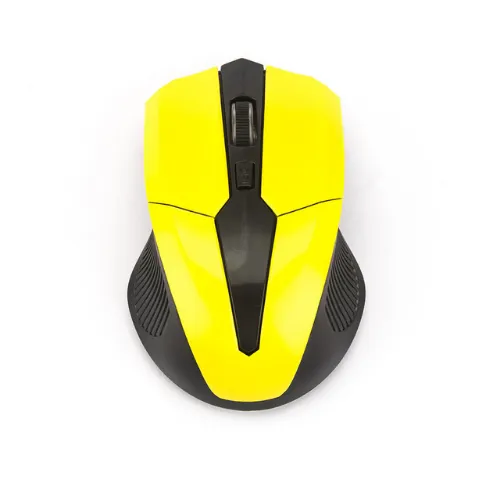
  • Choose the Vontar Wireless Optical Gaming Mouse if you want a cable-free mouse for a laptop, a TV PC or a shared desk, and you like the yellow, red or gray shell options.
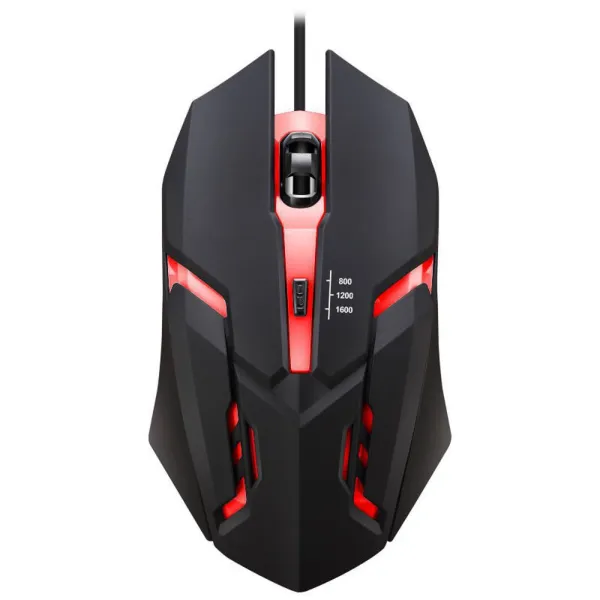
  • Choose the Wired Luminous USB Gaming Mouse if it will stay plugged into one desktop, you want zero battery or pairing hassle, and the glowing side strips appeal to you.

Prices

  • Vontar Wireless Optical Gaming Mouse: $8.99 at Deal.ai (last seen Nov 16)
  • Wired Luminous USB Gaming Mouse: $7.99 at Deal.ai (last seen Nov 16)
  • Difference: the Wired Luminous USB Gaming Mouse is $1.00 cheaper than the Vontar Wireless Optical Gaming Mouse at the latest prices (Nov 16)
V
Vontar Wireless Optical Gaming Mouse

Vontar Wireless Optical Gaming Mouse

$8.99at Deal.aiChecked Nov 16
See all prices and details
View at Deal.ai
Pros
  • Wireless, so no cable drag or desk clutter
  • Light at 80 g and easy to pack with a laptop
  • Adjustable DPI up to 1600
  • Three color choices: yellow, gray, red
  • Ridged side grips help control
Cons
  • Battery or charging needs are not specified
  • No lighting, plain shell
  • 1600 DPI is modest for fast or high-resolution play
  • 2.4G dongles can be lost and use a USB port
W
Wired Luminous USB Gaming Mouse

Wired Luminous USB Gaming Mouse

$7.99at Deal.aiChecked Nov 16
See all prices and details
View at Deal.ai
Pros
  • Never needs a battery or charging
  • Glowing side strips stand out on a dark desk
  • Plug-and-play USB with no pairing
  • Fixed cable means no interference or dropouts
Cons
  • 1.2 m cable limits placement and adds drag
  • Listing says laptop only, not desktop
  • No DPI figure or sensitivity control stated
  • Heavier feel with the cable attached

What separates them

Vontar Wireless Optical Gaming MouseWired Luminous USB Gaming Mouse
Connection2.4G USB wireless receiverWired USB, 1.2 m cable
Weight80 g, light for travelNot stated; wired body with cable drag
Sensor adjustmentDPI adjustable up to 1600Photoelectric sensor, no DPI figure given
PowerNeeds battery or charging; not specifiedDraws power from USB, never needs a battery
LightingPlain sprayed shell, no lightingGlowing red accent strips along the sides
Stated compatibilityPC, laptop and desktopLaptop only per the listing
Grip and shapeContoured top with ridged side gripsAngular black body with accent strips
Cable clutterNone on the desk1.2 m cable across the desk

Price history

$8.99$7.99
Nov 16Nov 29
  • Vontar Wireless Optical Gaming Mouse: lowest $8.99 on Nov 16 at Deal.ai; $8.99 on Nov 29.
  • Wired Luminous USB Gaming Mouse: lowest $7.99 on Nov 16 at Deal.ai; $7.99 on Nov 29.

Prices at every store

Vontar Wireless Optical Gaming Mouse

  • Deal.aiNew

    In stock

    $8.99Free shippingChecked Nov 16
    View at Deal.ai
Prices and history →

Wired Luminous USB Gaming Mouse

  • Deal.aiNew

    In stock

    $7.99Free shippingChecked Nov 16
    View at Deal.ai
Prices and history →

Questions and answers

Which is better for gaming?
Neither is a true gaming mouse. The Vontar's adjustable DPI up to 1600 gives slightly more control, but both use basic sensors and four buttons. If you play competitively, look at a mouse with a named optical sensor and a higher polling rate.
Which lasts longer?
The wired mouse avoids battery wear and wireless dropouts, so it usually outlasts a budget wireless model. The Vontar's weak points are its battery and dongle; the wired mouse's weak point is its cable and scroll wheel. Neither is built for years of heavy use.
Can I use the wired mouse with a desktop PC?
It is a standard USB mouse, so it will work on most desktops despite the listing saying laptop. The 1.2 m cable is short, so check it reaches from your tower or hub to where you sit.
Is the Vontar good for a laptop on the go?
Yes. It is wireless, weighs 80 g and works with PCs and laptops. Keep track of the small USB receiver, since losing it makes the mouse useless.
Is the step up to the Vontar worth it over the wired mouse?
Step up only if cable-free use matters to you. You gain wireless freedom and adjustable DPI but give up the guaranteed power supply and the lighting. On a fixed desk, the wired mouse is the simpler choice.
Do either have side buttons?
Both list four buttons: left, right, scroll-wheel click and one small button behind the wheel. Neither has thumb side buttons, so you lose the extra bindings many gamers expect.

Ask our shopping agent

It checks today's price at every store, compares the alternatives and answers in about a minute.

Enter to send, Shift+Enter for a new line

More comparisons

  • Wired Luminous USB Gaming Mouse vs Wireless Optical Gaming Mouse