StoreDeal.ai store
Shop
  • Deals
  • Deal checker
  • Black Friday
  • Buying guides
  • Brands
  • Stores
Travel
  • Flight deals
  • Hotel deals
Company
  • Research
  • Press
  • Use in AI assistants
  • Contact
  • deal.ai apps
Black Friday 2026
  • Walmart
  • Best Buy
  • Target
  • TVs
  • Laptops
  • Headphones
  • Apple
  • Gaming
  • Vacuums
  • Kitchen
  • Toys
  • Smartwatches
  • Tablets
  • Furniture
  • Mattresses
© Deal.ai Inc.·2222 Ponce de Leon Blvd, Miami, FL 33134·support@deal.ai
TermsPrivacy
Deal.ai › Compare

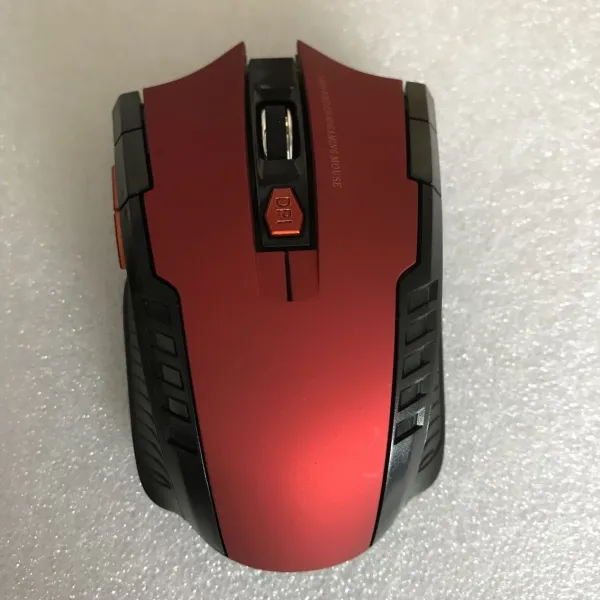
Wired Luminous USB Gaming Mouse vs Wireless Optical Gaming Mouse

Pick the Wireless Optical Gaming Mouse if you want a cord-free desk, side buttons and adjustable sensitivity; it is the more capable mouse of the two. The Wired Luminous USB Gaming Mouse is the simpler, sturdier option: a fixed 1.2 m cable means no batteries or pairing, and there is nothing to charge. Neither is a serious esports mouse, but the wireless model gives you more buttons and a lighter body, while the wired one trades features for plug-and-play reliability.

  • Choose the Wired Luminous USB Gaming Mouse if you want a no-fuss wired mouse that never needs charging or pairing and you only need basic buttons.
  • Choose the Wireless Optical Gaming Mouse if you want a lighter, contoured mouse with side buttons and adjustable DPI and you can live with 2.4 GHz wireless.

Prices

  • Wired Luminous USB Gaming Mouse: $7.99 at Deal.ai (last seen Nov 16)
  • Wireless Optical Gaming Mouse: $9.99 at Deal.ai (checked today)
  • Difference: the Wired Luminous USB Gaming Mouse is $2.00 cheaper than the Wireless Optical Gaming Mouse at the latest prices (Nov 16 and Nov 29)
W
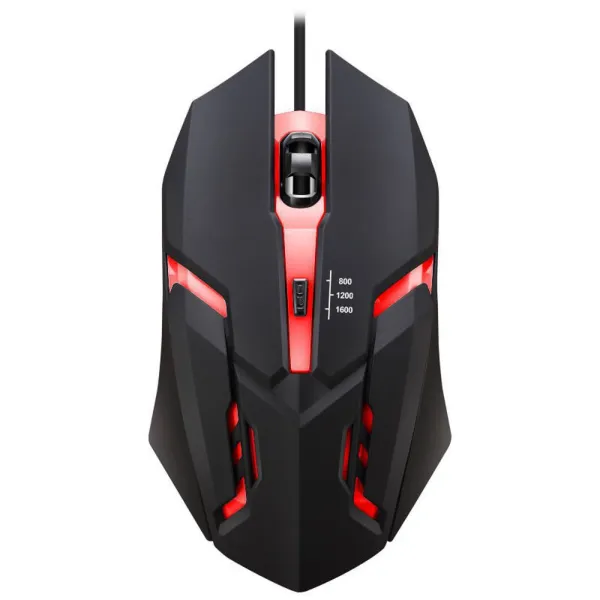
Wired Luminous USB Gaming Mouse

Wired Luminous USB Gaming Mouse

$7.99at Deal.aiChecked Nov 16
See all prices and details
View at Deal.ai
Pros
  • No charging or pairing, ever
  • Cable cannot lag or drop out
  • Simple four-button layout
  • Light strips make it easy to find in a dark room
Cons
  • Cable limits where you can place it
  • No side buttons
  • No stated DPI adjustment
  • Black is the only color
W
Wireless Optical Gaming Mouse

Wireless Optical Gaming Mouse

$9.99at Deal.aiChecked 2 h ago
See all prices and details
View at Deal.ai
Pros
  • Wireless range up to 10 m
  • Six buttons including side buttons
  • 1600 dpi with three sensitivity steps
  • Light at 0.06 kg with an ergonomic shape
  • Five color choices
Cons
  • Needs its own power source
  • 2.4 GHz dongles can be lost and add a USB port
  • 1600 dpi is modest for gaming
  • Touch wheel takes getting used to

What separates them

Wired Luminous USB Gaming MouseWireless Optical Gaming Mouse
ConnectionWired USB, 1.2 m cableWireless 2.4 GHz USB receiver, up to 10 m range
Buttons4 buttons6 buttons, including side buttons and a DPI button
SensitivityPhotoelectric sensor, no stated DPI adjustment1600 dpi, adjustable across three gears or fewer
Weight and shapeAngular body with light strips, weight not statedContoured body with textured side grips, 0.06 kg
Power and upkeepDraws power over the cable, nothing to chargeRuns on its own power source, so it needs managing
Scroll wheelStandard wheel with a button behind itTouch wheel
Color optionsBlack only, bare or boxedRed, gold, blue, black and grey
SetupPlug in and usePlug in the receiver and pair

Price history

$9.99$7.99
Nov 16Nov 29
  • Wired Luminous USB Gaming Mouse: lowest $7.99 on Nov 16 at Deal.ai; $7.99 on Nov 29.
  • Wireless Optical Gaming Mouse: lowest $9.99 on Nov 29 at Deal.ai.

Prices at every store

Wired Luminous USB Gaming Mouse

  • Deal.aiNew

    In stock

    $7.99Free shippingChecked Nov 16
    View at Deal.ai
Prices and history →

Wireless Optical Gaming Mouse

  • Deal.aiNew

    In stock

    $9.99Free shippingChecked 2 h ago
    View at Deal.ai
Prices and history →

Questions and answers

Which is better for gaming?
The Wireless Optical Gaming Mouse. It has six buttons, side buttons for binds and 1600 dpi you can switch between three steps. The wired mouse has four buttons and no stated sensitivity adjustment.
Which lasts longer?
The wired mouse has fewer failure points: no battery and no receiver to lose. The wireless mouse depends on its power source and dongle over time. Neither is built to premium standards.
Is the wireless one worth stepping up to?
Yes if you want side buttons, adjustable DPI and a cord-free desk. Stay with the wired one if you would rather never think about charging or pairing.
Will the wireless mouse work with my laptop?
Yes. It connects through a USB receiver at 2.4 GHz and is listed for laptops. It needs a free USB-A port for the dongle.
Does the wired mouse have adjustable sensitivity?
No adjustment is listed. It is a fixed photoelectric sensor with four buttons, so you set cursor speed in your operating system instead.
Which is better for travel?
The wireless one. It weighs 0.06 kg and has no cable to coil, though you must keep track of the receiver. The wired mouse packs a fixed 1.2 m cable.

Ask our shopping agent

It checks today's price at every store, compares the alternatives and answers in about a minute.

Enter to send, Shift+Enter for a new line

More comparisons

  • Vontar Wireless Optical Gaming Mouse vs Wired Luminous USB Gaming Mouse