StoreDeal.ai store
Shop
  • Deals
  • Deal checker
  • Black Friday
  • Buying guides
  • Brands
  • Stores
Travel
  • Flight deals
  • Hotel deals
Company
  • Research
  • Press
  • Use in AI assistants
  • Contact
  • deal.ai apps
Black Friday 2026
  • Walmart
  • Best Buy
  • Target
  • TVs
  • Laptops
  • Headphones
  • Apple
  • Gaming
  • Vacuums
  • Kitchen
  • Toys
  • Smartwatches
  • Tablets
  • Furniture
  • Mattresses
© Deal.ai Inc.·2222 Ponce de Leon Blvd, Miami, FL 33134·support@deal.ai
TermsPrivacy

Free shipping on everything·10% off your first order·No account needed · Buy 2, save 10% · 3+, save 15%
Deal.ai › Store › Tech & Gadgets › Computer & Office
1
1602 I2C LCD Display Module

1602 I2C LCD Display Module

Sold and shipped by Deal.ai

$8.99Free shipping

$8.09 with 10% off your first order

Buy 2, save 10% · 3+, save 15%

Encapsulation: 1602IIC
Batch number: Blue screen
How many?
1
  • 30-day money-back guarantee
  • Secure checkout

Arrives about Dec 4–14, from a warehouse in China

30-day full refund: if you're not happy with it for any reason, or it never arrives, tell us within 30 days and we refund you in full. Shipping and refunds

Ask our agent about this product

It checks today's price at every store, compares the alternatives and answers in about a minute.
Enter to send, Shift+Enter for a new line

Price facts

  • Last seen at $8.99 at Deal.ai on Nov 26.

Our take on the 1602 I2C LCD Display Module

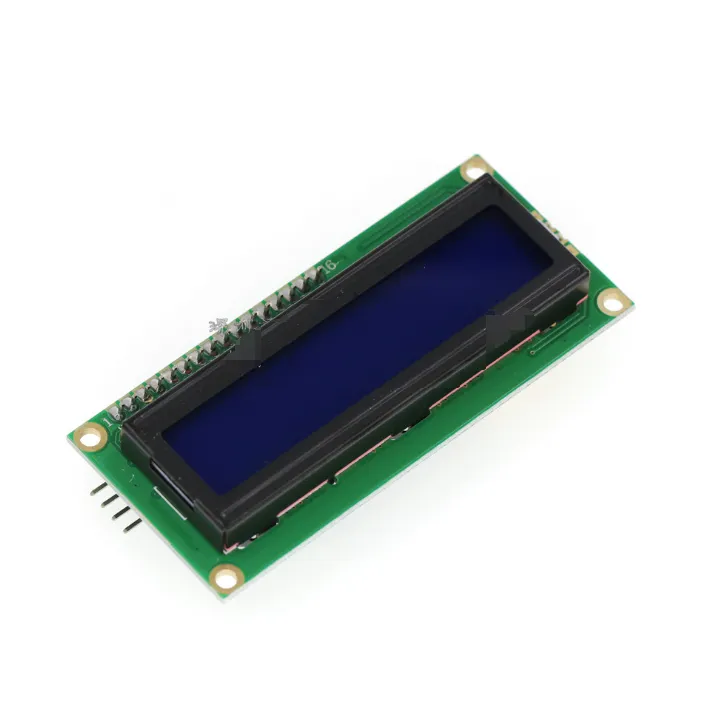
This is a 16x2 character LCD module on a green board with a blue backlit screen, mounted through four corner holes. The I2C adapter on the back cuts the wiring to four pins (VCC, GND, SDA, SCL), so it needs only two data lines from a microcontroller instead of the six or more a parallel 1602 uses. It suits Arduino, Raspberry Pi and ESP32 hobby projects that need a couple of lines of text, and it is the cheapest common way to add a display. Against parallel 1602 modules it saves pins and wiring; against OLED or TFT screens it is larger and easier to read at a distance but shows text only, with no graphics or color.

Best forArduino and ESP32 beginners adding a text readoutRaspberry Pi status or sensor displaysProjects short on GPIO pinsSimple menu and clock builds
Pros
  • Only four wires: VCC, GND, SDA and SCL
  • 16x2 characters are readable across a room
  • Blue backlight works in dim light
  • Mounting holes at all four corners
  • Widely supported by LiquidCrystal_I2C libraries
Cons
  • Text only, no graphics or color
  • I2C address often needs a scan or jumper change
  • Contrast pot on the adapter needs adjusting by hand
  • Backlight draws noticeably more current than the LCD alone
  • Pins arrive unsoldered on most units

What reviewers say

Owners treat it as a dependable, low-cost way to get text onto a project. Most praise the simple four-wire hookup and the readable blue screen; complaints center on I2C address conflicts and backlight contrast that needs tweaking.

What people mention
  • WiringPraisedOwners like that two data wires plus power are enough, unlike parallel 1602 modules.
  • I2C addressCriticisedBuyers report the fixed address conflicts with other I2C devices and needs a scan or solder jumper change.
  • ContrastMixedThe screen often shows blank or faint text until the contrast potentiometer is turned.
  • ReadabilityPraisedThe blue backlit characters are described as clear and legible in low light.
  • Backlight currentCriticisedSome users find the backlight pulls enough current to matter on battery-powered builds.

About the 1602 I2C LCD Display Module

This is a rectangular 1602 LCD display module on a green circuit board. A black frame surrounds the dark blue display area, and there is a mounting hole at each corner.

A row of 16 pins runs along one long edge, and a small adapter board with a four-pin header sits on the back. The module connects over I2C (IIC) and measures 41.5 x 19 x 15.3 mm (1.63 x 0.75 x 0.60 in).

Model
1602 LCD module
Interface
I2C (IIC)
Display
Blue screen
Dimensions
41.5 x 19 x 15.3 mm (1.63 x 0.75 x 0.60 in)
Weight
60 g (2.1 oz)
Pins
16-pin row along one long edge
Header
4-pin header on adapter board at the back
Mounting
Hole at each corner

Specifications

Model
1602 LCD module
Type
IIC (I2C) LCD module
Display
Blue screen
Shipping weight
60 g (2.1 oz)

Questions and answers

How do I connect it to an Arduino?
Wire VCC to 5V, GND to ground, SDA to A4 and SCL to A5 on an Uno, then use a LiquidCrystal_I2C library with the module's address. Scan the bus if the default address does not respond.
Does it work with a Raspberry Pi?
Yes. Enable I2C on the Pi, connect SDA and SCL to the GPIO I2C pins, and drive it with a Python LCD library. It runs on 5V, so power it from the 5V pin, not 3.3V.
What is the I2C address?
Most units ship at 0x27, some at 0x3F. Run an I2C scanner sketch to confirm, and change the address in code or with the adapter's address jumpers.
Why is the screen blank?
Usually the contrast setting. Turn the potentiometer on the back adapter until characters appear, and check the backlight jumper is in place.
Does it come with the header pins soldered?
Typically not. The 16 display pins and the four-pin adapter header usually arrive loose and need soldering before use.
Can it show graphics or custom characters?
It shows 16x2 characters and up to eight user-defined 5x8 glyphs. It cannot draw images, graphs or color.
Where is the 1602 I2C LCD Display Module cheapest?
At Deal.ai, for $8.99, as of our latest check.

More in Computer & Office

  • M
    Mini Metal 2-in-1 Lightning USB Flash Drive
    Mini Metal 2-in-1 Lightning USB Flash Drive
  • T
    Three-Blade Metal Gyro Keycap
    Three-Blade Metal Gyro Keycap
  • S
    Slim External USB 3.0 DVD Drive
    Slim External USB 3.0 DVD Drive
  • U
    USB Wireless Network Adapter
    USB Wireless Network Adapter
  • J
    Japanese-English PBT Keycap Set
    Japanese-English PBT Keycap Set
  • M
    Memory Module Heat Sink with RGB Strip
    Memory Module Heat Sink with RGB Strip
  • P
    PCIe x16 Quad M.2 SSD Adapter Card
    PCIe x16 Quad M.2 SSD Adapter Card
  • R
    Rabbit-Shaped Wired Optical Mouse
    Rabbit-Shaped Wired Optical Mouse
All 2820 in Computer & Office →