- Is the Mac mini M4 worth it over the M2 model?
- Yes for most buyers. The M4 is noticeably faster, has front USB-C ports and a smaller body. The M2 is still fine for basic web and office work if you find it.
- Do I need to buy a monitor and keyboard?
- Yes. The box has the Mac mini and a power cord only. You supply a monitor, keyboard and mouse, though most USB and Bluetooth peripherals work.
- Can I upgrade the RAM or storage later?
- No. Memory and SSD are soldered, so choose 24GB or 32GB and a larger SSD up front if you expect heavy use.
- How many ports does it have?
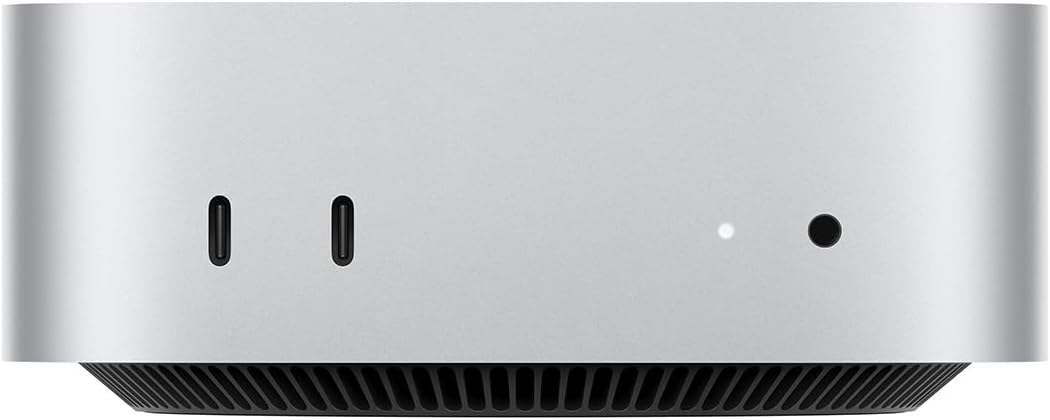
- Two USB-C ports and a headphone jack on the front, plus Thunderbolt, HDMI and Gigabit Ethernet on the back. The M4 Pro version adds more Thunderbolt ports.
- Is 256GB enough storage?
- For light use with cloud storage, yes. For photo libraries, video editing or many large apps, pick a larger SSD or plan on external drives.
- Does it run Windows apps?
- Not natively. macOS runs Microsoft Excel, Photoshop and Zoom, but Windows-only software needs a virtual machine or a Windows PC.
- Where is the Apple Mac mini M4 10-Core CPU 16GB RAM 256GB SSD cheapest?
- At Best Buy, for $649.00, 35% under what the other stores charge, as of our latest check.
- What do buyers say about the Apple Mac mini M4 10-Core CPU 16GB RAM 256GB SSD?
- Rated 4.9 out of 5 from 1,576 ratings.
- Where can I buy the Apple Mac mini M4 10-Core CPU 16GB RAM 256GB SSD?
- 11 stores we checked sell it, including Best Buy, Amazon, Ricky Cell, Usedmac, Techable.