StoreDeal.ai store
Shop
  • Deals
  • Deal checker
  • Black Friday
  • Buying guides
  • Brands
  • Stores
Travel
  • Flight deals
  • Hotel deals
Company
  • Research
  • Press
  • Use in AI assistants
  • Contact
  • deal.ai apps
Black Friday 2026
  • Walmart
  • Best Buy
  • Target
  • TVs
  • Laptops
  • Headphones
  • Apple
  • Gaming
  • Vacuums
  • Kitchen
  • Toys
  • Smartwatches
  • Tablets
  • Furniture
  • Mattresses
© Deal.ai Inc.·2222 Ponce de Leon Blvd, Miami, FL 33134·support@deal.ai
TermsPrivacy

Free shipping on everything·10% off your first order·No account needed · Buy 2, save 10% · 3+, save 15%
Deal.ai › Store › Tech & Gadgets › Computer & Office
D
Dual-Fan Graphics Card Backplane Heatsink

Dual-Fan Graphics Card Backplane Heatsink

Sold and shipped by Deal.ai

$36.99Free shipping

$33.29 with 10% off your first order

Buy 2, save 10% · 3+, save 15%

Style: 1 Style
How many?
1
  • 30-day money-back guarantee
  • Secure checkout

Arrives about Dec 5–15, from a warehouse in China

30-day full refund: if you're not happy with it for any reason, or it never arrives, tell us within 30 days and we refund you in full. Shipping and refunds

Ask our agent about this product

It checks today's price at every store, compares the alternatives and answers in about a minute.

Enter to send, Shift+Enter for a new line

Price facts

  • Lowest price today: $36.99 at Deal.ai (checked Nov 28, 2026).

Our take on the Dual-Fan Graphics Card Backplane Heatsink

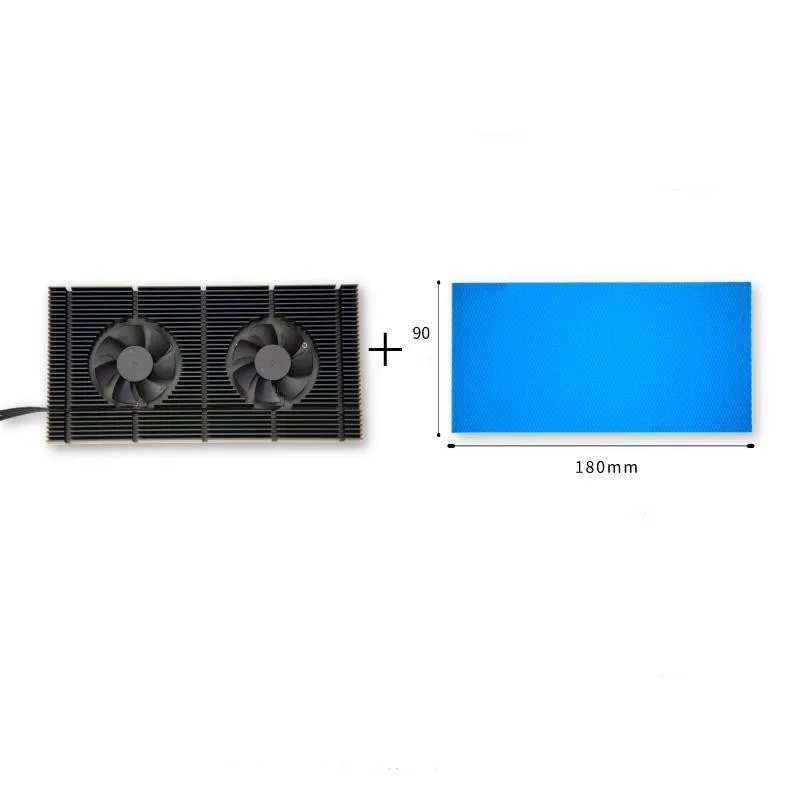
This is a bolt-on cooling block for the back of a graphics card: a black finned aluminum heatsink with two fans set into its top face and a four-pin fan cable. It is meant for cards whose backplate or rear memory runs hot, especially blower-style and water-cooled cards where the back of the PCB gets no airflow. It ships with mounting ties, rubber bands and gloves, plus a thermal pad in the bundle you choose. It is a DIY accessory, not a replacement cooler: it adds rear-side airflow and surface area rather than changing the card's own heatsink.

Best forCards with a hot backplate or rear memoryWater-blocked or blower-cooled buildsSmall cases with poor rear airflowTinkerers who don't mind DIY mounting
Pros
  • Two fans push air directly across the back of the card
  • Tall fins add real surface area over a flat backplate
  • Four-pin connector plugs into a motherboard fan header
  • Ships with ties, rubber bands and gloves for mounting
  • Thermal pad bundle covers the contact area in one go
Cons
  • Adds bulk and weight to the back of the card
  • Mounting relies on ties and bands, not screws
  • No fan speed control of its own; needs a header or splitter
  • Thick pads can hold the block off the surface if not sized right
  • Clearance with CPU coolers and case panels is tight in small builds

About the Dual-Fan Graphics Card Backplane Heatsink

This is a backplane heatsink for a graphics card: a rectangular finned block with two fans set into its top face. A cable with a four-pin connector runs out from one end.

The set includes the heat sink, ten nylon cable ties, ten high-temperature resistant rubber bands and a pair of gloves.

Type
Graphics card backplane heatsink
Fans
2, set into the top face
Connector
4-pin
Weight
600 g
In the box
Heat sink x1, nylon cable tie x10, high-temperature resistant rubber band x10, a pair of gloves x1

Specifications

Material
Other
Style 1
GK6 radiator + full coverage 1 thick Laird 500
Style 2
GK6 radiator + full coverage 0.5 thick Laird 600
Style 3
GK6 radiator + full coverage 1 thick Laird 600
Style 4
GK6 radiator + full coverage 0.5 thick Laird 700
Style 5
GK6 radiator + full coverage 1 thick Laird 700
Style 6
GK6 radiator + GK3 liquid thermal pad 36 grams
Shipping weight
600 g

Questions and answers

Will it fit my graphics card?
It sits on the back of the card, so measure the flat backplate area and check clearance above it for the fin height plus fan. Cards with tall rear components or a curved shroud leave less flat surface to mount on.
Which thermal pad thickness should I pick?
Match the pad to the gap between the block and the card's rear surface. A 0.5 mm pad suits tight, flat contact; 1 mm covers rougher or uneven surfaces. Thicker than the gap means poor contact.
How do the fans get power?
The four-pin cable runs to a motherboard fan header or a fan splitter. There is no separate controller, so speed follows whatever header you plug into.
Does it replace my card's cooler?
No. It cools the back of the PCB and backplate only. The card's own heatsink and fans still handle the GPU and front-side memory.
What is in the box?
One heatsink, ten nylon cable ties, ten high-temperature rubber bands and a pair of gloves, plus the thermal pad bundle you select.
Is it worth it over a plain backplate?
A plain backplate only spreads heat. This adds fans and fin area, so it moves more heat, but only if your card's rear side is actually a hot spot and you have the clearance.
Where is the Dual-Fan Graphics Card Backplane Heatsink cheapest?
At Deal.ai, for $36.99, as of our latest check.

More in Computer & Office

  • P
    Printed Tablet Case for iPad Air 3/4/5, Mini 4/5/6, Pro 9.7/10.5
    Printed Tablet Case for iPad Air 3/4/5, Mini 4/5/6, Pro 9.7/10.5
  • 3
    3D Printer Hot End Assembly for A1/A1 Mini
    3D Printer Hot End Assembly for A1/A1 Mini
  • O
    OLED Screen 3D Printing Pen
    OLED Screen 3D Printing Pen
  • F
    Flexible Silicone USB Keyboard
    Flexible Silicone USB Keyboard
  • C
    Channel-Stitched Swivel Office Chair with Casters
    Channel-Stitched Swivel Office Chair with Casters
  • H
    High-Back Channel-Stitched Office Chair
    High-Back Channel-Stitched Office Chair
  • A
    Aluminum Laptop Stand
    Aluminum Laptop Stand
  • T
    Two-Piece Hard Shell Laptop Case for MacBook Air & Pro
    Two-Piece Hard Shell Laptop Case for MacBook Air & Pro
All 3064 in Computer & Office →