- Is the V1 Max good for gaming?
- Yes. The 2.4 GHz dongle gives a low-latency connection, and the linear Gateron Jupiter Reds actuate smoothly without a tactile bump. Competitive players may still prefer a wired board for the absolute lowest latency.
- Can I change the switches?
- Yes. The board is hot-swappable and accepts most 3- and 5-pin MX-style switches, so you can move to tactile or clicky switches without soldering.
- How many devices can it connect to?
- Bluetooth pairs with up to three devices, and the 2.4 GHz dongle adds a fourth connection. You switch between them with key combos.
- Does it work with Mac and Windows?
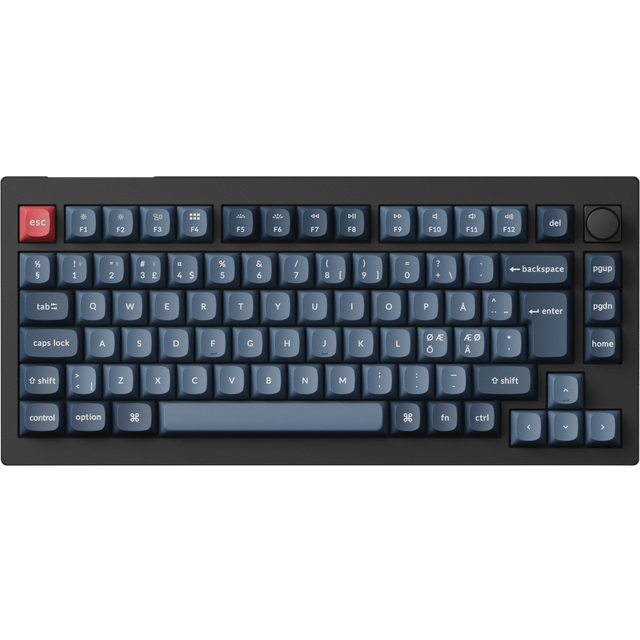
- Yes. It supports both, with Mac and Windows keycaps and a toggle for the modifier layout. QMK/VIA remapping works on either system.
- What is in the box?
- The keyboard, a USB-C cable, a 2.4 GHz receiver, a keycap and switch puller, and a quick-start guide. A wrist rest is not included.
- Is the Nordic layout hard to get used to?
- Only if you are used to a US layout. The extra Å, Ä and Ö keys and the shifted punctuation take a short adjustment, but the physical layout matches Nordic keyboards.
- Where is the Keychron V1 Max Gateron Jupiter Red Wireless (Nordic) cheapest?
- At PayMore Hilliard, for $64.99, 35% under what the other stores charge, as of our latest check.
- Where can I buy the Keychron V1 Max Gateron Jupiter Red Wireless (Nordic)?
- 9 stores we checked sell it, including Best Buy, PayMore Hilliard, Amazon, eBay, Central Computers.