StoreDeal.ai store
Shop
  • Deals
  • Deal checker
  • Black Friday
  • Buying guides
  • Brands
  • Stores
Travel
  • Flight deals
  • Hotel deals
Company
  • Research
  • Press
  • Use in AI assistants
  • Contact
  • deal.ai apps
Black Friday 2026
  • Walmart
  • Best Buy
  • Target
  • TVs
  • Laptops
  • Headphones
  • Apple
  • Gaming
  • Vacuums
  • Kitchen
  • Toys
  • Smartwatches
  • Tablets
  • Furniture
  • Mattresses
© Deal.ai Inc.·2222 Ponce de Leon Blvd, Miami, FL 33134·support@deal.ai
TermsPrivacy
Deal.ai › Store › Tech & Gadgets › Computer & Office
M
Multiport USB-C Hub for MacBook

Multiport USB-C Hub for MacBook

Sold and shipped by Deal.ai

$14.66+ $9.63 shipping

Shipping is combined: each extra item adds only a little.

Mode: 4in1 Black

Arrives about Nov 16–25, from a US warehouse

1

30-day full refund: if you're not happy with it for any reason, or it never arrives, tell us within 30 days and we refund you in full. Shipping and refunds

Ask our agent about this product

It checks today's price at every store, compares the alternatives and answers in about a minute.

Enter to send, Shift+Enter for a new line

Price facts

  • Last seen at $14.66 at Deal.ai on Nov 12.
Our take on the Multiport USB-C Hub for MacBook

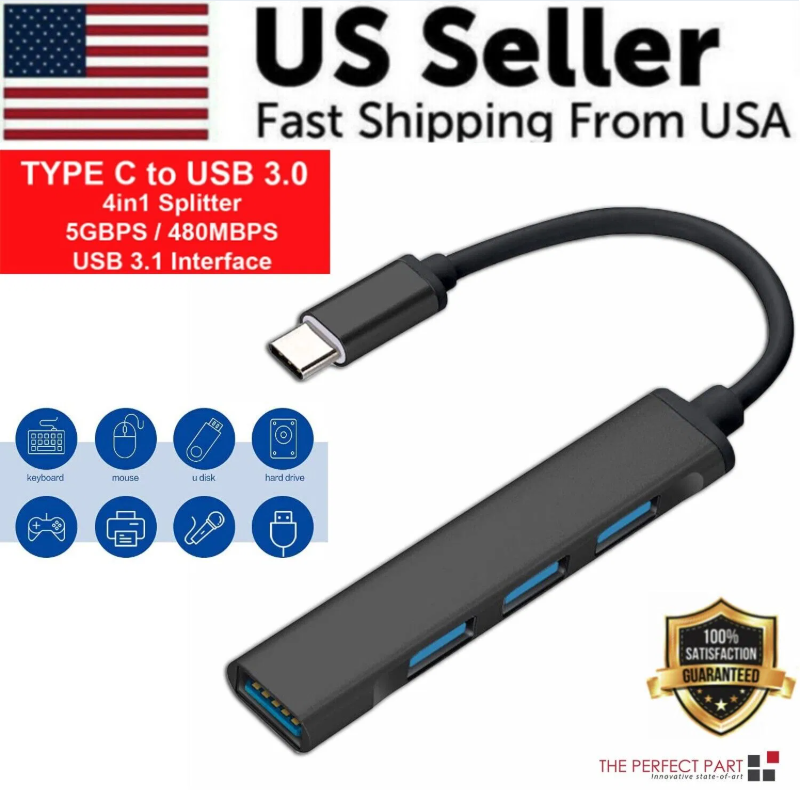
An aluminum USB-C hub that adds USB-A, HDMI, SD and microSD card slots and USB-C passthrough to a MacBook. The 5-in-1 version has a short integrated cable with one USB-C connector; the 7-in-1 is a block with two fixed USB-C plugs that must sit in two adjacent ports. HDMI output is capped at 4K at 30Hz, and the USB-C data port runs at 480Mbps, so it is a connectivity extender rather than a fast storage dock. It suits MacBook Air and Pro owners who need everyday ports back, not users pushing high-refresh displays or fast external drives.

Best forMacBook Air and Pro owners short on USB-A and HDMI portsAdding an external monitor and card readers at a deskTravelers who want one small hub instead of dongles
Pros
  • Aluminum body matches the MacBook finish
  • USB 3.0 ports move data at up to 5Gbps
  • Thunderbolt 3 passthrough carries up to 100W charging
  • SD and microSD slots read cards at up to 104MB/s
  • HDMI adds a 4K display output
Cons
  • HDMI is limited to 4K at 30Hz, not 60Hz
  • USB-C data port is slow at 480Mbps
  • 7-in-1 version needs two adjacent USB-C ports
  • No Ethernet or audio jack

Multiport USB-C Hub for MacBook prices at every store

  • Deal.aiNew

    In stock

    $14.66+ ~$9.63 shippingChecked 7 h ago
    View at Deal.ai

Multiport USB-C Hub for MacBook price history

$14.66$14.66
Nov 12Nov 13

Lowest price we've seen: $14.66 on Nov 12 at Deal.ai. Tracked across 1 store since Nov 12.

About the Multiport USB-C Hub for MacBook

This multiport USB-C hub adds extra ports to a MacBook. It has an aluminum body. It connects USB devices, USB-C devices, an HDMI display and memory cards.

You can extend your monitor and connect devices such as keyboards, printers and mice. HDMI output supports 4K (3840x2160) at 30Hz. Before buying, check that your MacBook has two USB-C ports near each other.

Material
Aluminum
Ports
USB 3.0/2.0/1.0, USB-C PD, USB-C, HDMI, SD card slot, Micro SD (TF) card slot
USB 3.0
Data transfer up to 5Gbps
Thunderbolt 3 port
Data transfer up to 40Gb/s, power up to 100W
USB-C data port
Data transfer up to 480Mbps
SD card slot
Speeds up to 104 MB/s
TF card slot
Speeds up to 104 MB/s
HDMI
4K x 2K (3840x2160) at 30Hz
Compatibility
MacBook Air 13 and 15 inch (2020, 2019, 2018); MacBook Pro 13 inch (2020, 2019, 2018, 2017, 2016); MacBook Pro 15 inch (2020, 2019, 2018, 2017, 2016); MacBook Pro 16 inch (2020, 2019)
Requirement
Two USB-C ports near each other on the MacBook

Questions and answers

What is the difference between the 5-in-1 and 7-in-1 versions?
The 5-in-1 uses a short integrated cable with a single USB-C connector. The 7-in-1 is a rectangular block with two fixed USB-C plugs that both go into the MacBook.
Will it work with my MacBook?
It is listed for MacBook Air 13 and 15 inch 2018-2020 and MacBook Pro 13, 15 and 16 inch 2016-2020. The 7-in-1 needs two USB-C ports close together, so check your model before choosing it.
Can I run a 4K monitor at 60Hz?
No. The HDMI port outputs 4K at 30Hz, so a 60Hz 4K display will run at 30Hz through this hub.
Does it charge the laptop while in use?
Yes. The Thunderbolt 3 port passes up to 100W of power through, so you can keep the MacBook charger connected while using the other ports.
How fast is the USB-C data port?
It transfers at up to 480Mbps, which is fine for a mouse or keyboard but slow for external drives. Use the USB 3.0 ports at 5Gbps for storage.
What comes in the box?
The hub itself in the 5-in-1 or 7-in-1 configuration you choose. No separate cable is needed because the connector is built in.
Where is the Multiport USB-C Hub for MacBook cheapest?
At Deal.ai, for $14.66, as of our latest check.

More in Computer & Office

  • P
    Portable Adjustable Folding Laptop Stand
    Portable Adjustable Folding Laptop Stand
  • 1
    10.1 Inch Android 12 Tablet PC
    10.1 Inch Android 12 Tablet PC
  • T
    Tropical Plant Print ID Card Holder
    Tropical Plant Print ID Card Holder
  • 3
    300Mbps Mini Wireless USB WiFi Adapter
    300Mbps Mini Wireless USB WiFi Adapter
  • P
    PU Leather Tablet Keyboard Case
    PU Leather Tablet Keyboard Case
  • 2
    2.4GHz Wireless Optical Gaming Mouse
    2.4GHz Wireless Optical Gaming Mouse
  • P
    Portable Bluetooth Mini Thermal Label Printer
    Portable Bluetooth Mini Thermal Label Printer
  • 8
    80-Key Wired Mini Keyboard with Stand
    80-Key Wired Mini Keyboard with Stand
All 67 in Computer & Office →