StoreDeal.ai store
Shop
  • Deals
  • Deal checker
  • Black Friday
  • Buying guides
  • Brands
  • Stores
Travel
  • Flight deals
  • Hotel deals
Company
  • Research
  • Press
  • Use in AI assistants
  • Contact
  • deal.ai apps
Black Friday 2026
  • Walmart
  • Best Buy
  • Target
  • TVs
  • Laptops
  • Headphones
  • Apple
  • Gaming
  • Vacuums
  • Kitchen
  • Toys
  • Smartwatches
  • Tablets
  • Furniture
  • Mattresses
© Deal.ai Inc.·2222 Ponce de Leon Blvd, Miami, FL 33134·support@deal.ai
TermsPrivacy
Deal.ai › Compare

Acer Aspire Lite 15 Celeron Laptop vs Acer Chromebook 315

The Chromebook 315 is the stronger machine: its Intel Core 3 N355 is a modern dual-core that runs circles around the Celeron N4500, and its battery lasts noticeably longer. The Aspire Lite 15 wins on memory and software flexibility, with 8GB RAM and full Windows 11 for desktop apps. Buy the Acer Aspire Lite 15 if you need Windows programs or heavy browser tabs; buy the Chromebook 315 if your work lives in a browser and you want a faster, longer-lasting laptop.

  • Choose the Acer Aspire Lite 15 if you need Windows desktop software, more RAM for multitasking, or a traditional laptop for school assignments that require installed apps.
  • Choose the Acer Chromebook 315 if you work mostly in a browser and Google apps, want a faster processor and longer battery life, and don't need Windows.

Prices

  • Acer Aspire Lite 15 Celeron Laptop: $299.99 at Curacao (checked today)
  • Acer Chromebook 315: $135.00 at vipoutlet.com (last seen Nov 9)
  • Difference: the Acer Chromebook 315 is $164.99 cheaper than the Acer Aspire Lite 15 Celeron Laptop at the latest prices (Nov 9 and Nov 14)
Acer
Acer AL15-35P-C3NH Aspire Lite 15 Laptop

Acer Aspire Lite 15 Celeron Laptop

Acer AL15-35P-C3NH Aspire Lite 15 Laptop

5(1 rating)
$299.99at CuracaoChecked 1 h ago
See all prices and details
Visit Curacao
Pros
  • 8GB RAM handles more tabs and apps at once
  • Full Windows 11 runs desktop software
  • 128GB SSD boots and loads files faster than eMMC
  • Full HD IPS screen with wide viewing angles
  • Wi-Fi 6 and Bluetooth 5.2
Cons
  • Celeron N4500 is slow for anything beyond basic tasks
  • 128GB fills quickly with Windows and programs
  • Heavier than the Chromebook
  • Shorter rated battery life
Acer
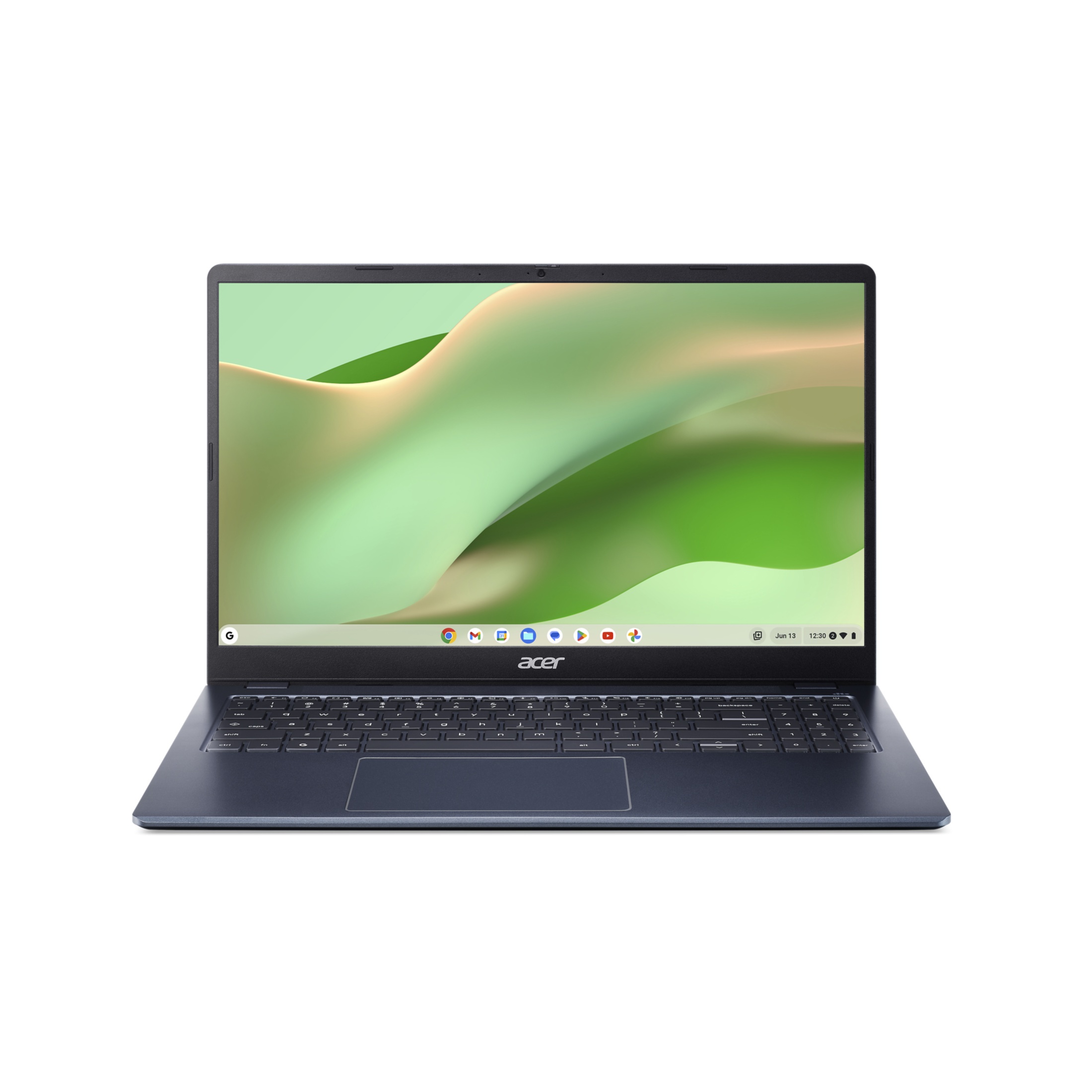
Acer Chromebook 315 15.6-inch FHD Laptop

Acer Chromebook 315

Acer Chromebook 315 15.6-inch FHD Laptop

4.3(635 ratings)
$135.00at vipoutlet.comChecked Nov 9
See all prices and details
Visit vipoutlet.com
Pros
  • Core 3 N355 is clearly faster than the Celeron
  • Up to 15-16 hours of battery life
  • Lighter at 3.5 lb
  • Anti-glare FHD screen
  • OceanGlass recycled touchpad and EPEAT registration
Cons
  • Only 4GB RAM, which limits heavy multitasking
  • Chrome OS can't run Windows desktop programs
  • eMMC storage is slower than an SSD
  • No touchscreen on this configuration

What separates them

Acer Aspire Lite 15 Celeron LaptopAcer Chromebook 315
ProcessorIntel Celeron N4500, a low-end dual-core built for basic tasksIntel Core 3 N355, a newer dual-core with much higher clock speeds
Memory8GB DDR4, enough for many browser tabs and office apps4GB LPDDR5, tighter for heavy multitasking
Operating systemWindows 11 Home, runs desktop programs and gamesChrome OS, runs web apps and Android apps from Google Play
Battery lifeRated up to 10 hoursRated up to 15-16 hours
Storage128GB SSD128GB eMMC, slower than an SSD
Display15.6-inch FHD IPS panel with ComfyView15.6-inch FHD anti-glare panel at 60Hz
Weight3.97 lb3.5 lb
Build and materialsSlim silver plastic chassisElemental Blue chassis with an OceanGlass recycled touchpad, EPEAT-registered

Price history

$339.99$135.00
Nov 10Nov 13
  • Acer Chromebook 315: lowest $135.00 on Nov 10 at vipoutlet.com; $339.99 on Nov 13.

Prices at every store

Acer Aspire Lite 15 Celeron Laptop

  • CuracaoNew

    In stockReturn policy

    $299.99Checked 1 h ago
    Visit Curacao
Prices and history →

Acer Chromebook 315

  • vipoutlet.comNew

    In stock

    $135.00Free shippingChecked Nov 9
    Visit vipoutlet.com
  • WalmartNew

    In stock

    $197.00Checked 1 h ago
    Visit Walmart
  • WalmartNew

    In stock

    $197.00Free shippingChecked Nov 9
    Visit Walmart
  • Wireless PlaceNew

    In stock

    $279.50Free shippingChecked Nov 9
    Visit Wireless Place
All 4 stores and price history →

Specs compared

SpecAcer Aspire Lite 15 Celeron LaptopAcer Chromebook 315
ProcessorIntel Celeron N4500 1.1GHzIntel Core 3 N355
Storage128GB Solid State Drive128 GB eMMC
Resolution1920x10801920 x 1080
Operating systemWindows 11 HomeChrome OS
Battery lifeUp to 10 Hours15 hours battery life
Weight3.97 lbs. (1.80 kg)3.5 lb
Memory8GB DDR4—
Display size15.6"—
Display typeAcer ComfyView FHD LED-backlit IPS Display—
GraphicsIntel UHD Graphics—
Wireless2x2 Wireless LAN Wifi 6 (802.11ax)—
BluetoothBluetooth 5.2—
Show all 38 specsShow fewer specs
SpecAcer Aspire Lite 15 Celeron LaptopAcer Chromebook 315
color—Blue
actual_color—Elemental Blue
RAM—4 GB
RAM Type—LPDDR5
Screen Size—39.62 cm (15.6 inch)
Screen Resolution—1920 x 1080 pixel
Battery Backup—Up to 16 hours
Power Supply—65 W
Battery Cell—3-cell Li-ion battery
Dimensions—

What reviewers say

Acer Chromebook 315

  • 4.3 / 5635 ratings

Rated 4.3 out of 5 across 635 ratings, owners mostly treat it as a dependable, low-cost big-screen Chromebook for browsing, schoolwork and streaming. Complaints cluster on memory and storage rather than the screen or battery.

What people mention
  • Battery lifePraisedOwners report it lasting a full day of browsing and video without charging.
  • DisplayPraisedThe 15.6-inch 1080p anti-glare panel is called bright and easy on the eyes.
  • MemoryCriticised4 GB of RAM is the most common gripe, with slowdowns once many tabs are open.
  • StorageCriticisedThe 128 GB eMMC is seen as small and slower than an SSD.

Questions and answers

Which is better for schoolwork?
For browser-based work like Google Docs, Classroom and research, the Chromebook 315 is faster and lasts longer. If your school requires installed Windows software, the Aspire Lite 15 is the safer pick.
Which one lasts longer?
The Chromebook 315 has the longer rated battery life, up to 15-16 hours versus about 10 on the Aspire Lite 15. Its newer processor also helps it stay responsive for more years.
Is the Chromebook 315 worth stepping up to?
Yes if you live in a browser. The Core 3 N355 is a big jump over the Celeron N4500. Skip it if you need Windows apps or lots of RAM.
Can the Chromebook 315 run Microsoft Office?
It runs the web versions of Word, Excel and PowerPoint through a browser, and Android Office apps from Google Play. It does not run the full desktop Office suite.
Which has more memory?
The Aspire Lite 15 has 8GB versus 4GB on the Chromebook 315. That matters if you keep many tabs or apps open at once.
Which is easier to carry?
The Chromebook 315 is lighter at 3.5 lb versus 3.97 lb, and both are 15.6-inch laptops, so neither is a small ultraportable.

Ask our shopping agent

It checks today's price at every store, compares the alternatives and answers in about a minute.

Enter to send, Shift+Enter for a new line

More comparisons

  • ASUS Chromebook CX15 Laptop vs Acer Chromebook 315 15.6-inch FHD Laptop
  • HP 15.6 inch HD Windows Laptop vs Acer Chromebook 315 15.6-inch FHD Laptop
  • Acer Chromebook 315 15.6-inch FHD Laptop vs HP 14-inch laptop
  • ASUS Chromebook CX15 Laptop vs Acer AL15-35P-C3NH Aspire Lite 15 Laptop
  • HP 15.6 inch HD Windows Laptop vs Acer AL15-35P-C3NH Aspire Lite 15 Laptop

Buying guides that pick them

  • Best everyday laptops for general home use
  • Best laptops under $300 for everyday use
  • Best laptops under $600
35.925 x 23.617 x 1.835/1.86 cm
HDMI Port—1 x HDMI 1.4 port with HDCP support
Wireless LAN—802.11 a/b/g/n/ac/ax wireless LAN
Drive Type—Solid State Drive
Number Of Cores—Dual Core
Language—English / North America
With No-Glare Screen—Yes
Refresh Rate—60Hz
Available Ports—USB-C, HDMI
EPEAT-Registered—Yes
Drive Capacity—128 GB drive
Installed Memory—4 GB RAM
Processor Speed—3.4 GHz CPU
Series—Acer Chromebook
SSD Size—64 GB
Processor Speed (GHz)—2.6
Screen Type—LCD