StoreDeal.ai store
Shop
  • Deals
  • Deal checker
  • Black Friday
  • Buying guides
  • Brands
  • Stores
Travel
  • Flight deals
  • Hotel deals
Company
  • Research
  • Press
  • Use in AI assistants
  • Contact
  • deal.ai apps
Black Friday 2026
  • Walmart
  • Best Buy
  • Target
  • TVs
  • Laptops
  • Headphones
  • Apple
  • Gaming
  • Vacuums
  • Kitchen
  • Toys
  • Smartwatches
  • Tablets
  • Furniture
  • Mattresses
© Deal.ai Inc.·2222 Ponce de Leon Blvd, Miami, FL 33134·support@deal.ai
TermsPrivacy
Deal.ai › Compare

Lenovo Chromebook Plus 14 vs Lenovo Chromebook Plus 15.3

The Lenovo Chromebook Plus 14 is the better machine for most people. Its OLED touchscreen, 12GB of fast memory, Wi-Fi 7, fingerprint reader and 5MP camera are a clear step above the 15.3-inch model's 8GB and plain Intel Core 3 N355. The 15.3-inch model wins only on screen size, and its larger panel is a basic display, not OLED. Owners rate the 14 highly for the screen and light 1.17 kg build; the 15.3-inch is the budget pick for desk use.

  • Choose the Lenovo Chromebook Plus 14 if you want a light, premium Chromebook with an OLED touchscreen, more memory and modern connectivity.
  • Choose the Lenovo Chromebook Plus 15.3-inch if you mainly want the biggest screen for desk work and simple browsing at the lowest outlay.

Prices

  • Lenovo Chromebook Plus 14: $405.30 at CTT Home & Culinary (last seen Nov 2)
  • Lenovo Chromebook Plus 15.3: $217.00 at Walmart (checked today)
  • Difference: the Lenovo Chromebook Plus 15.3 is $188.30 cheaper than the Lenovo Chromebook Plus 14 at the latest prices (Nov 2 and Nov 14)
Lenovo
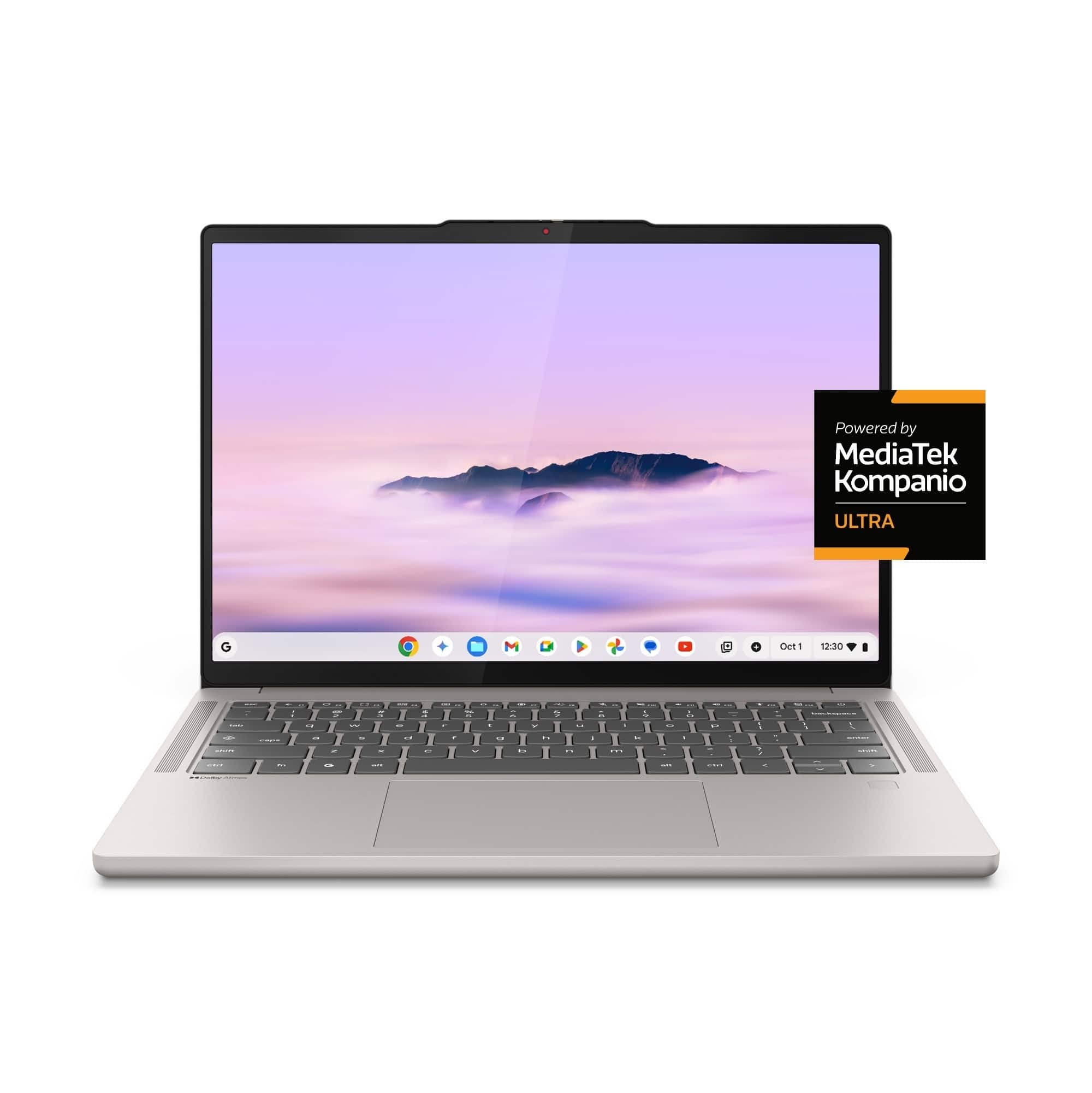
Lenovo Chromebook Plus 14

Lenovo Chromebook Plus 14

4.6(170 ratings)
$405.30at CTT Home & CulinaryChecked Nov 2
See all prices and details
Visit CTT Home & Culinary
Pros
  • OLED touchscreen with full DCI-P3 color
  • 12GB of fast LPDDR5X memory
  • Light at about 1.17 kg with a 60Wh battery
  • Wi-Fi 7, fingerprint login and a 5MP shutter camera
  • Rated 4.6 out of 5 from 170 ratings
Cons
  • 128GB storage fills quickly with local files
  • Glossy OLED screen reflects light
  • Soldered memory cannot be upgraded
Lenovo
Lenovo Chromebook Plus 15.3-inch Laptop

Lenovo Chromebook Plus 15.3

Lenovo Chromebook Plus 15.3-inch Laptop

$217.00at WalmartChecked 36 min ago
See all prices and details
Visit Walmart

Store links may earn us a commission. Price via Klarna.

Pros
  • Large 15.3-inch screen for desk work
  • Simple Intel Core 3 setup for browsing and docs
  • 128GB SSD
Cons
  • Only 8GB of memory, and that is the maximum
  • Entry-level N355 processor
  • No OLED, touch, fingerprint or Wi-Fi 7 listed

What separates them

Lenovo Chromebook Plus 14Lenovo Chromebook Plus 15.3
Display14-inch 1920x1200 OLED touchscreen, 400 nits, 100% DCI-P315.3-inch panel, no OLED or touch listed
Memory12GB LPDDR5X-8533 soldered8GB, 8GB max supported
ProcessorIntel octa-core up to 3.6 GHz with a 50 TOPS NPU for on-device AIIntel Core 3 N355, an entry-level chip
Weight and sizeAbout 1.17 kg, 15.8 mm thin15.3-inch chassis, heavier and bulkier
Battery60Wh, rated up to 17 hours, 65W USB-C chargingNot specified
Ports and wirelessUSB-C, HDMI, Wi-Fi 7 and Bluetooth 5.4Not specified
Security and cameraFingerprint reader and 5MP camera with privacy shutterNot specified
Screen size14 inches15.3 inches

Price history

$999.00$217.00
Oct 31Nov 14
  • Lenovo Chromebook Plus 14: lowest $289.00 on Nov 11 at Amazon; $655.35 on Nov 13.
  • Lenovo Chromebook Plus 15.3: lowest $217.00 on Nov 11 at Walmart; $217.00 on Nov 14.

Prices at every store

Lenovo Chromebook Plus 14

  • lenovo.comNew

    In stock

    $529.99Checked Nov 11
    Visit lenovo.com
  • Newegg.comNew

    In stockSold by Lenovo

    $529.99Free shippingChecked Nov 11
    Visit Newegg.com
  • CTT Home & CulinaryNew

    Availability unknown

    $405.30Checked Nov 2
    Visit CTT Home & Culinary
  • Newegg.comNew

    Availability unknown

    $514.49Checked Nov 2
    Visit Newegg.com
All 28 stores and price history →

Lenovo Chromebook Plus 15.3

  • WalmartNew

    In stock

    $217.00Free shippingChecked 36 min ago
    Visit Walmart

Store links may earn us a commission. Price via Klarna.

Prices and history →

Specs compared

SpecLenovo Chromebook Plus 14Lenovo Chromebook Plus 15.3
Screen Size14 inches15.3
Processor ModelMediaTek Kompanio Ultra SeriesN355
Memory12GB Soldered LPDDR5X-8533—
Storage128GB UFS 3.1—
Display14" WUXGA (1920x1200) OLED 400nits Glossy, 100%…—
Battery60Wh—
Power Adapter65W USB-C Slim (2-pin, Wall-mount)—
WeightAround 1.17 kg (2.58 lbs)—
Camera5.0MP with Privacy Shutter—
WLAN + BluetoothMediaTek Wi-Fi 7 MT7925, 802.11be 2x2 + BT5.4—
Operating SystemChromeOS—
Resolution1920 x 1200—
Show all 40 specsShow fewer specs
SpecLenovo Chromebook Plus 14Lenovo Chromebook Plus 15.3
Processor BrandIntel CPU—
TouchscreenYes—
Drive TypeSolid State Drive—
Number Of CoresOcta Core—
ColorGray, Blue—
LanguageEnglish / North America—
Available PortsUSB-C, HDMI—
Drive Capacity128 GB drive—
Installed Memory8 GB RAM—
Battery Life

What reviewers say

Lenovo Chromebook Plus 14

  • 4.6 / 5170 ratings

Reviewers rate the Lenovo Chromebook Plus 14 highly, at 4.6 out of 5 from 170 ratings. They praise its light build, OLED display, speed, keyboard and battery life. The main complaints are the ChromeOS learning curve and the usual limits of a Chromebook.

What people mention
  • DesignPraisedOwners call it ultraportable and easy to carry at about 1.17 kg.
  • DisplayPraisedThe OLED panel is described as gorgeous, with strong color coverage.
  • PerformancePraisedReviewers find it snappy for everyday ChromeOS work.
  • KeyboardPraisedThe backlit keyboard gets consistent praise.
Reviews
  • The best laptops of 2026: Expert tested and reviewed - ZDNET
  • The best laptops of 2026: Expert tested and reviewed - ZDNET - Who should look elsewhere: Anyone looking for an ultraportable, as this 16-in
  • Search | Product Finder - Product Finder
  • I test laptops all-year — these are the best you can buy in 2026 - The Dell XPS 13 (2026) is the rare budget Windows laptop that actually de

Questions and answers

Which is better for photo editing and streaming?
The Chromebook Plus 14. Its OLED panel covers 100% DCI-P3 and is brighter and more color-accurate, and its 12GB of memory handles more browser tabs and apps. The 15.3-inch model's basic panel and 8GB cap suit lighter tasks.
Is the bigger 15.3-inch screen worth choosing?
Only if screen size matters more than everything else. The 15.3-inch gives more room for spreadsheets and split windows, but you give up OLED, touch, memory and speed to get it.
Which lasts longer?
The 14 is rated up to 17 hours on a 60Wh battery with 65W USB-C charging. Lenovo does not publish a battery rating for the 15.3-inch model, so the 14 is the safer bet for all-day use.
Can I upgrade the memory later?
No on both. The 14 uses soldered LPDDR5X, and the 15.3-inch tops out at 8GB, so pick the memory you need up front. That favors the 14's 12GB.
Is the 14 worth stepping up to?
Yes for most shoppers. The OLED touchscreen, double the practical memory headroom, Wi-Fi 7 and fingerprint login make it the more capable machine for years of use.
Which is better for a student on the move?
The 14. At about 1.17 kg with a long battery rating, it travels better. The 15.3-inch is better left on a desk.

Ask our shopping agent

It checks today's price at every store, compares the alternatives and answers in about a minute.

Enter to send, Shift+Enter for a new line

More comparisons

  • Lenovo Chromebook Plus 14 vs Acer Chromebook Plus 516
  • Lenovo Chromebook Plus 14 vs Acer Chromebook Plus Spin 514
  • Lenovo Chromebook Plus 14 vs Lenovo Chromebook Duet 11 (Gen 9)
  • Lenovo Chromebook Plus 14 vs Acer Chromebook Plus 514
  • Dell XPS 14 vs Lenovo Chromebook Plus 14
  • Lenovo Chromebook Plus 14 vs Asus Chromebook Plus CX34 (2025)
  • Lenovo Chromebook Plus 14 vs HP OmniBook 5 16 inch Touch Windows 11 Laptop Intel Core Ultra 7 AI PC 16GB RAM 1TB SSD Silver
  • Lenovo Chromebook Plus 14 vs Lenovo Chromebook Plus 15.3 Laptop

Buying guides that pick them

  • Best laptops for everyday use
  • Best laptops
  • Best all-around laptops for everyday use
  • Best Chromebooks with 8GB RAM and 128GB storage
  • Best value Chromebooks with 8GB RAM
17 hours battery life
—
With Backlit KeyboardYes—
Refresh Rate60Hz—
Biometric SecurityFingerprint Scan—
Energy StarYes—
EPEAT-RegisteredYes—
Processor Speed3.6 GHz CPU—
Screen Resolution1920 x 1200 (WUXGA)—
Touch Screentrue—
Brightness400 nits—
Storage TypeUFS—
Total Storage Capacity256 gigabytes—
System Memory (RAM)16 gigabytes—
GraphicsARM Immortalis-G925'—
Display Connector(s)Display connection via USB port—
Battery Life (up to)17 hours—
Battery ChemistryLithium-polymer—
2-in-1 Designfalse—
Backlit Keyboardtrue—
  • Best Chromebooks for everyday use