StoreDeal.ai store
Shop
  • Deals
  • Deal checker
  • Black Friday
  • Buying guides
  • Brands
  • Stores
Travel
  • Flight deals
  • Hotel deals
Company
  • Research
  • Press
  • Use in AI assistants
  • Contact
  • deal.ai apps
Black Friday 2026
  • Walmart
  • Best Buy
  • Target
  • TVs
  • Laptops
  • Headphones
  • Apple
  • Gaming
  • Vacuums
  • Kitchen
  • Toys
  • Smartwatches
  • Tablets
  • Furniture
  • Mattresses
© Deal.ai Inc.·2222 Ponce de Leon Blvd, Miami, FL 33134·support@deal.ai
TermsPrivacy
Deal.ai › Compare

Lenovo Chromebook Plus 15.3 vs Acer Chromebook Plus 514

Buy the Lenovo if you want a bigger, sharper touchscreen and a smoother 120Hz display. Buy the Acer if you want a lighter, more portable 14-inch machine with slightly longer battery life. Both run Chrome OS on 8GB RAM and a 128GB SSD, so everyday browsing, video and Google Workspace feel similar. The Lenovo's touchscreen, backlit keyboard and 16:10 panel are the real upgrades; the Acer's 4.3-star rating from 32 owners is solid but not exceptional.

  • Choose the Lenovo Chromebook Plus if you want a 15.3-inch touchscreen with 120Hz refresh, a backlit keyboard and a taller 16:10 display for split-screen work.
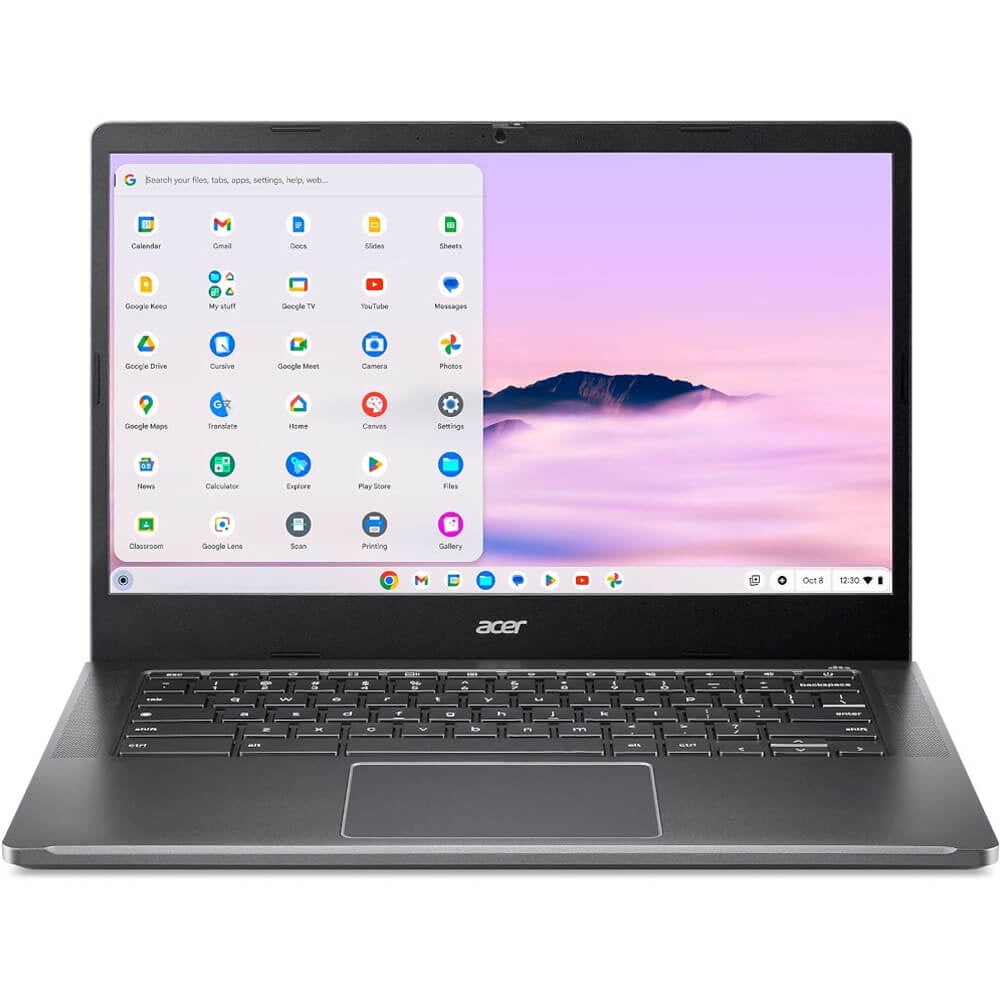
  • Choose the Acer Chromebook Plus 514 if you want a smaller, lighter 14-inch laptop that is easier to carry and gets slightly more battery life.

Prices

  • Lenovo Chromebook Plus 15.3: $241.00 at Walmart (checked today)
  • Acer Chromebook Plus 514: $114.99 at Shop (checked today)
  • Difference: the Acer Chromebook Plus 514 is $126.01 cheaper than the Lenovo Chromebook Plus 15.3 today
Lenovo
Lenovo Chromebook Plus 15.3-inch Laptop

Lenovo Chromebook Plus 15.3

Lenovo Chromebook Plus 15.3-inch Laptop

$241.00at WalmartChecked 2 h ago
See all prices and details
Visit Walmart

Store links may earn us a commission. Price via Klarna.

Pros
  • Large 15.3-inch 1920 x 1200 touchscreen
  • 120Hz refresh rate for smoother scrolling
  • Backlit keyboard and no-glare finish
  • Taller 16:10 aspect ratio suits split-screen work
Cons
  • Heavier and bulkier at 3.4 lb
  • Shorter rated battery life than the Acer
  • 8GB RAM is soldered and not upgradable
Acer
Acer 14" Chromebook Plus 514 Laptop

Acer Chromebook Plus 514

Acer 14" Chromebook Plus 514 Laptop

4.3(32 ratings)
$114.99at ShopChecked 3 h ago
See all prices and details
Visit Shop
Pros
  • Lighter 14-inch body is easier to carry
  • Rated up to 12 hours of battery life
  • Wi-Fi 6E-class 802.11ax wireless
  • Solid 4.3-star owner rating
Cons
  • No touchscreen
  • Standard 60Hz, 16:9 display
  • No backlit keyboard

What separates them

Lenovo Chromebook Plus 15.3Acer Chromebook Plus 514
Screen size and shape15.3-inch 16:10 panel, more vertical room for documents and tabs14-inch 16:9 panel, more compact but shorter vertically
TouchscreenTouch-enabledNo touchscreen
Refresh rate120Hz, smoother scrolling and motionStandard 60Hz
Resolution1920 x 12001920 x 1080
KeyboardBacklitNot backlit
Portability3.4 lb, larger footprint14-inch chassis, easier to pack
Battery lifeRated up to 11 hoursRated up to 12 hours
ProcessorIntel Core 3 N355, octa-core, 1.9 GHzIntel Core i3-N305, 8 cores, 2 GHz

Price history

$598.00$114.99
Nov 11Nov 19
  • Lenovo Chromebook Plus 15.3: lowest $217.00 on Nov 11 at Walmart; $241.00 on Nov 19.
  • Acer Chromebook Plus 514: lowest $114.99 on Nov 19 at Shop.

Prices at every store

Lenovo Chromebook Plus 15.3

  • WalmartNew

    In stock

    $241.00Free shippingChecked 2 h ago
    Visit Walmart
  • DoorDashNew

    In stockSold by Best Buy US

    $349.00+ $5.99 shippingChecked 3 h ago
    Visit DoorDash
  • WalmartNew

    In stockSold by BDR LLC

    $499.99Free shippingChecked 3 h ago
    Visit Walmart
  • Wireless PlaceNew

    Availability unknown

    $409.99Checked 3 h ago
    Visit Wireless Place

Store links may earn us a commission. Some prices via Klarna.

All 10 stores and price history →

Acer Chromebook Plus 514

  • WalmartNew

    In stockSold by Geeks and ExpressReturns: Sold by a Walmart Marketplace seller; returns go to the seller under the seller's returns policy.

    $598.00Free shippingChecked 3 h ago
    Visit Walmart
  • ShopNew

    Availability unknownSold by Shop app

    $114.99Free shippingChecked 3 h ago
    Visit Shop
  • Uber EatsNew

    Availability unknownSold by Uber Eats Costco Wholesale

    $162.97Checked 3 h ago
    Visit Uber Eats
  • AmazonNew

    Availability unknown

    As an Amazon Associate, Deal.ai earns from qualifying purchases.

    $549.99Free shippingChecked 3 h ago
    Visit Amazon

Store links may earn us a commission.

All 6 stores and price history →

Specs compared

SpecLenovo Chromebook Plus 15.3Acer Chromebook Plus 514
Screen Size (")15.314 in
Resolution1920 x 12001920 x 1080
TouchscreenYesN
ColorBlueBlack
SeriesLenovo Chromebook—
ProcessorIntel Core 3—
Max. RAM Supported8 GB—
SSD Size128 GB—
Hard Drive TypeSSD—
Processor ModelN355—
RAM8 GB—
Operating SystemChrome OS—
Show all 37 specsShow fewer specs
SpecLenovo Chromebook Plus 15.3Acer Chromebook Plus 514
Processor BrandIntel CPU—
Graphics ProcessorIntel GPU—
Number Of CoresOcta Core—
With Backlit KeyboardYes—
With No-Glare ScreenYes—
Refresh Rate120Hz—
Available PortsUSB-C, HDMI—
Energy StarYes—
Weight3.4 lb—
Drive Capacity

What reviewers say

Acer Chromebook Plus 514

  • 4.3 / 532 ratings

Owners rate it well overall, calling it a good value Chromebook with a bright, sharp screen and all-day battery. Complaints center on the modest processor and small storage for anything beyond browser work.

What people mention
  • DisplayPraisedOwners like the sharp 1080p IPS panel compared with older budget Chromebooks.
  • BatteryPraisedReviewers report it lasting a full day of classes or office work.
  • PerformanceMixedFine for browsing and documents, but it stutters with many tabs or heavier apps.
  • StorageCriticisedThe 128GB drive is seen as small once local files and apps add up.
Reviews
  • Chromebooks: 4GB, 6GB, 8GB & 16GB RAM Chromebooks | B&H - Chromebooks

Questions and answers

Which is better for schoolwork and split-screen tabs?
The Lenovo. Its 15.3-inch 16:10 screen gives more vertical space and the 120Hz panel scrolls more smoothly. The Acer is fine for single-window work but feels tighter.
Which lasts longer on a charge?
The Acer is rated up to 12 hours versus 11 for the Lenovo. Real-world results depend on brightness and workload, but the Acer has a slight edge.
Is the Lenovo worth stepping up to over the Acer?
If you value the touchscreen, backlit keyboard and larger 120Hz display, yes. If portability matters more, the Acer covers the same Chrome OS basics in a lighter body.
Do both have the same memory and storage?
Yes. Both ship with 8GB RAM and a 128GB SSD, and neither is easy to upgrade. Expect similar everyday performance.
Which is easier to carry around?
The Acer. Its 14-inch chassis is smaller and lighter than the Lenovo's 15.3-inch body, which weighs 3.4 lb.
Can I use these for video calls and streaming?
Yes. Both have webcams and integrated Intel graphics that handle video calls and streaming fine. The Lenovo's larger, sharper screen is nicer for watching.

Ask our shopping agent

It checks today's price at every store, compares the alternatives and answers in about a minute.

Enter to send, Shift+Enter for a new line

More comparisons

  • ASUS Chromebook Plus CX34 14 inch Touch Laptop vs Lenovo Chromebook Plus 15.3-inch Laptop
  • ASUS Chromebook Plus CX34 14 inch Touch Laptop vs Acer 14" Chromebook Plus 514 Laptop
  • Lenovo Chromebook Plus 14 vs Lenovo Chromebook Plus 15.3-inch Laptop
  • Lenovo Slim 3 Chromebook Laptop vs Lenovo Chromebook Plus 15.3-inch Laptop

Buying guides that pick them

  • Best Chromebooks
  • Best Chromebooks with 8GB RAM and 128GB storage
  • Best Chromebooks with 8GB RAM
128 GB drive
—
Installed Memory8 GB RAM—
Processor Speed1.9 GHz CPU—
Battery Life11 hours battery life—
edition—Intel Core i3-N305
Proc. speed—2 GHz
RAM memory—8 GB
Data storage—128 GB
Graphic card—Integrated Graphics
Brand—Acer
OS—ChromeOS
Core count—8
Features—Webcam
Proc. brand—Intel Core i3-N305
Wireless—Bluetooth, 802.11ax, Wi-Fi
Included software—Chrome OS