StoreDeal.ai store
Shop
  • Deals
  • Deal checker
  • Black Friday
  • Buying guides
  • Brands
  • Stores
Travel
  • Flight deals
  • Hotel deals
Company
  • Research
  • Press
  • Use in AI assistants
  • Contact
  • deal.ai apps
Black Friday 2026
  • Walmart
  • Best Buy
  • Target
  • TVs
  • Laptops
  • Headphones
  • Apple
  • Gaming
  • Vacuums
  • Kitchen
  • Toys
  • Smartwatches
  • Tablets
  • Furniture
  • Mattresses
© Deal.ai Inc.·2222 Ponce de Leon Blvd, Miami, FL 33134·support@deal.ai
TermsPrivacy
Deal.ai › Compare

ASUS Chromebook Plus CX34 vs Lenovo Chromebook 14″ (14-8)

Buy the ASUS CX34 if you want a touchscreen, a stronger Intel chip and more storage. Buy the Lenovo 14 if you want the lightest, simplest Chromebook for browsing, email and school documents. The ASUS has the better screen, hinge and processor on paper. The Lenovo wins on weight and a taller 16:10 display. Owners of both lines praise the sturdy plastic builds and long battery life.

  • Choose the ASUS Chromebook Plus CX34 if you want a touchscreen, 128 GB of storage and enough power for many browser tabs and light photo editing.
  • Choose the Lenovo Chromebook 14 if you want a light 14-inch machine for web apps, video and documents and do not need a touchscreen.

Prices

  • ASUS Chromebook Plus CX34: $475.00 at Reno Computer Co (last seen Nov 8)
  • Lenovo Chromebook 14″ (14-8): $265.00 at Amazon (checked today)
  • Difference: the Lenovo Chromebook 14″ (14-8) is $210.00 cheaper than the ASUS Chromebook Plus CX34 at the latest prices (Nov 8 and Nov 11)
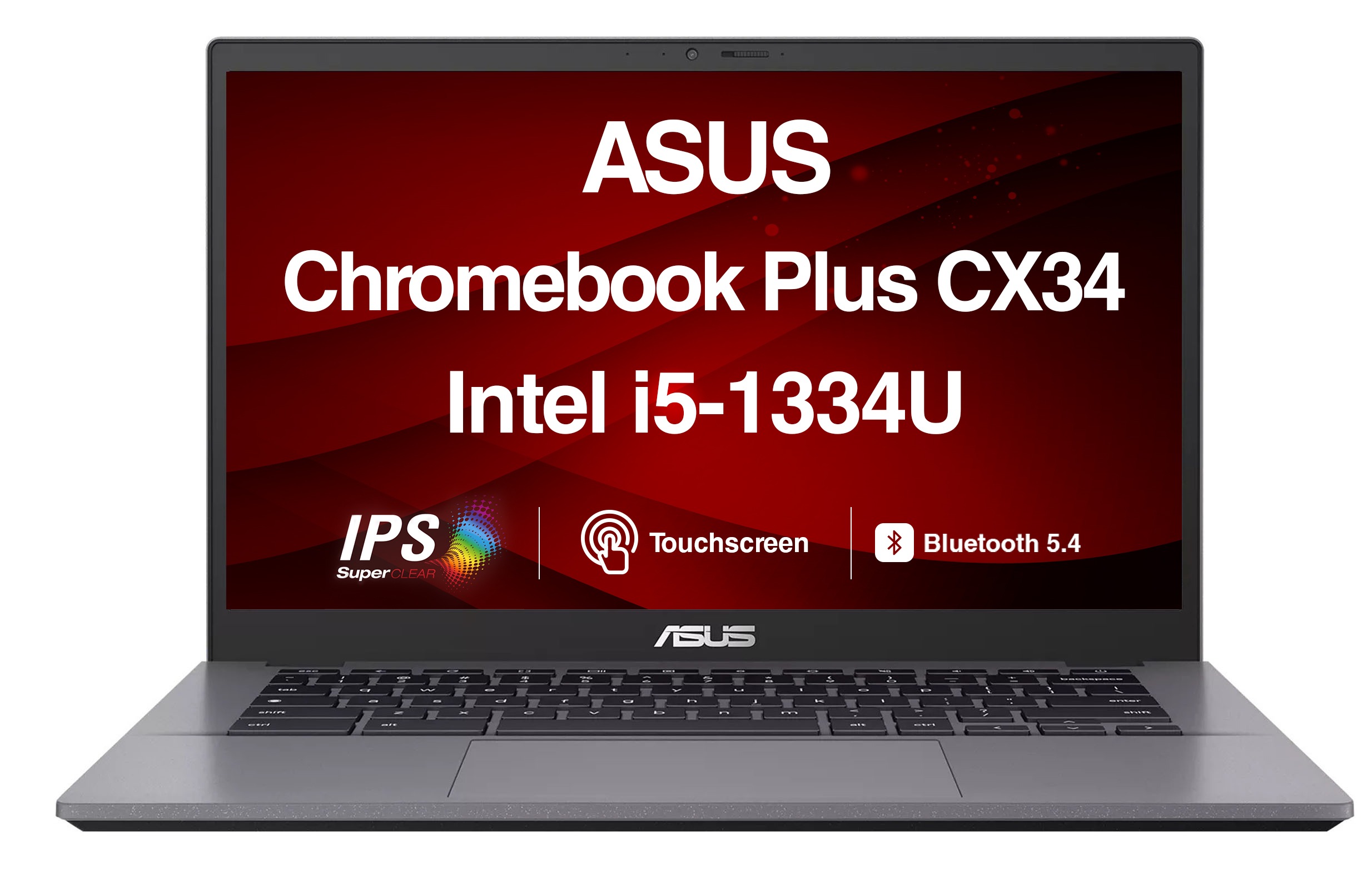
ASUS
ASUS Chromebook Plus CX34 Touchscreen Laptop

ASUS Chromebook Plus CX34

ASUS Chromebook Plus CX34 Touchscreen Laptop

4.7(6 ratings)
$475.00at Reno Computer CoChecked Nov 8
See all prices and details
Visit Reno Computer Co
Pros
  • Touchscreen with anti-glare coating
  • Faster Intel chip with 6 cores
  • 128 GB storage, double the Lenovo
  • Chromebook Plus AI features
  • Lay-flat hinge for sharing
Cons
  • Heavier at 3.2 lb
  • 16:9 screen is shorter than 16:10
  • Shorter rated battery life than some rivals
Lenovo
Lenovo Chromebook 14″ (14-8)

Lenovo Chromebook 14″ (14-8)

$265.00at AmazonChecked 48 min ago
See all prices and details
Visit Amazon

Store links may earn us a commission. As an Amazon Associate, Deal.ai earns from qualifying purchases.

Pros
  • Lighter at 2.99 lb
  • Taller 16:10 screen shows more of a page
  • Simple ARM chip runs cool and quiet
  • Slim 0.78-inch body
Cons
  • No touchscreen
  • Only 64 GB storage
  • MediaTek chip is slower for heavy multitasking

What separates them

ASUS Chromebook Plus CX34Lenovo Chromebook 14″ (14-8)
ProcessorIntel 12th Gen, 6 cores, up to 4.4 GHz turboMediaTek Kompanio 540 ARM chip
TouchscreenYes, anti-glare touch displayNo touch
Screen shape14-inch 16:9 at 1920 x 108014-inch 16:10 at 1920 x 1200
Storage128 GB64 GB
Weight3.2 lb2.99 lb
Hinge180-degree lay-flat hingeStandard clamshell hinge
ChromeOS tierChromebook Plus, with Google AI featuresStandard ChromeOS
PortsUSB-A, USB-C and HDMIHDMI plus USB ports

Price history

$549.99$229.99
Oct 31Nov 12
  • ASUS Chromebook Plus CX34: lowest $229.99 on Nov 11 at Iconic; $428.00 on Nov 12.
  • Lenovo Chromebook 14″ (14-8): lowest $265.00 on Nov 11 at Amazon.

Prices at every store

ASUS Chromebook Plus CX34

  • Best BuyNew

    In stock

    $479.00Free shippingChecked 48 min ago
    Visit Best Buy
  • Reno Computer CoNew

    Availability unknown

    $475.00Checked Nov 8
    Visit Reno Computer Co
  • AmazonNew

    Availability unknown

    As an Amazon Associate, Deal.ai earns from qualifying purchases.

    $489.99Free shippingChecked 11 min ago
    Visit Amazon
  • PoshmarkNew

    Availability unknown

    $499.00Checked Nov 8
    Visit Poshmark

Also available at

  • Big Apple BuddyCheck price at Big Apple Buddy
  • BstockCheck price at Bstock
  • WalmartCheck price at Walmart

Store links may earn us a commission.

All 21 stores and price history →

Lenovo Chromebook 14″ (14-8)

  • NeweggNew

    In stock

    $494.99Free shippingChecked 48 min ago
    Visit Newegg
  • AdoramaNew

    In stock

    $499.99Free shippingChecked 48 min ago
    Visit Adorama
  • AntonlineNew

    In stock

    $512.98Free shippingChecked 48 min ago
    Visit Antonline
  • AmazonNew

    Availability unknown

    As an Amazon Associate, Deal.ai earns from qualifying purchases.

    $265.00Free shippingChecked 48 min ago
    Visit Amazon

Store links may earn us a commission. Some prices via Klarna.

All 4 stores and price history →

Specs compared

SpecASUS Chromebook Plus CX34Lenovo Chromebook 14″ (14-8)
Resolution1920 x 10801920 x 1200
Operating SystemChrome OSChromeOS
TouchscreenYesNo
Weight3.2 lb2.99 lbs (1.36 kg)
Screen Size14 inches14.0"
Storage64 GB64 GB Flash Memory
Memory8GB LPDDR5 on board, Memory Max Up to:8GB8GB
ProcessorIntel Core i5MediaTek Kompanio 540 Chip
WebcamYesYes
Processor BrandIntel CPU—
ColorGray—
LanguageEnglish / North America—
Show all 40 specsShow fewer specs
SpecASUS Chromebook Plus CX34Lenovo Chromebook 14″ (14-8)
With No-Glare ScreenYes—
Refresh Rate60Hz—
Available PortsUSB-A, USB-C, HDMI—
Drive Capacity128 GB drive—
Installed Memory8 GB RAM—
Processor Speed4.6 GHz CPU—
Battery Life10 hours battery life—
OS VersionChromebook Plus—
Battery Capacity50WHrs—
Battery Run Time

What reviewers say

ASUS Chromebook Plus CX34

Owner feedback on the CX34 line is generally positive, with the screen, weight and ports drawing the most praise. Complaints center on the modest memory and storage and on Chrome OS limits for users who need desktop software.

What people mention
  • DisplayPraisedOwners like the sharp 1080p anti-glare touchscreen for work and streaming.
  • WeightPraisedBuyers say 3.2 lb is easy to carry to class or between meetings.
  • PortsPraisedReviewers appreciate having USB-A, USB-C and HDMI without adapters.
  • MemoryCriticisedUsers report slowdowns once many browser tabs are open on 8 GB of RAM.
Reviews
  • The Best Laptops Under $500 for 2026
  • The Best Cheap Laptops for 2026 - Boot Drive Capacity (as Tested)1Boot Drive TypeSSDClassConvertible 2-in-1Dimensions (HWD)0.74 by 12.4 by 8

Questions and answers

Which is better for schoolwork?
The ASUS CX34. Its Intel chip and 128 GB of storage handle more tabs and files, and the touchscreen helps with note apps. The Lenovo is fine for basic documents and web research.
Which lasts longer?
The ASUS rates about 10 hours on a 50Wh battery. The Lenovo does not publish a figure, but ARM Chromebooks in this class typically run a full school day. Real results depend on screen brightness and load.
Is the touchscreen worth stepping up to?
Yes if you use Android apps, draw diagrams or scroll long pages by hand. If you only type and watch video, the Lenovo's non-touch screen is enough.
Which is better for travel?
The Lenovo is about 0.2 lb lighter and slightly thinner, so it packs easier. The ASUS adds a touchscreen and more power for the extra weight.
Do both run the same apps?
Yes. Both run ChromeOS with the Play Store and Linux support. The ASUS adds Chromebook Plus features such as built-in Google AI writing and editing tools.
Which screen is better?
The Lenovo's 1920 x 1200 panel is taller, which suits reading and documents. The ASUS is 1920 x 1080 but adds touch and an anti-glare finish.

Ask our shopping agent

It checks today's price at every store, compares the alternatives and answers in about a minute.

Enter to send, Shift+Enter for a new line

More comparisons

  • HP OmniBook 3 16 vs ASUS Chromebook Plus CX34 Touchscreen Laptop
  • Lenovo IdeaPad Slim 3 Chromebook vs ASUS Chromebook Plus CX34 Touchscreen Laptop
  • ASUS Chromebook Plus CX34 Touchscreen Laptop vs Dell Inspiron 15 15.6" FHD Touchscreen Laptop
  • ASUS Chromebook Plus CX34 Touchscreen Laptop vs HP Chromebook Plus x360 14″
  • HP 15.6 inch HD Windows Laptop vs ASUS Chromebook Plus CX34 Touchscreen Laptop
  • HP Chromebook Plus x360 14″ vs Lenovo Chromebook 14″ (14-8)

Buying guides that pick them

  • Best everyday laptops
  • Best budget laptops for everyday use
  • Best laptops under $600
  • Best Chromebooks with 8GB RAM and 128GB storage
  • Best Chromebooks for everyday use
10 Hours
—
Battery Type3-cell—
Graphics MemoryShared—
Number Of Processor Cores6 cores—
Integrated GPUYes—
Processor Clock Speed1.2 GHz—
Graphics Memory TechLPDDR5—
Max Turbo Speed4.4 GHz—
Highlighted Performance FeaturesAI-powered—
Processor ChipsetIntel—
Processor Chipset Features12th Gen (processor generation)—
Cache10M Cache—
Display Size14-inch—
Display Resolution1080p—
Display Aspect Ratio16:9—
Display Brightness250nits—
Display HighlightsAnti-glare display, NanoEdge, Wide view—
LCD TechnologyIPS—
Display BacklightLED Backlit—